


Both are in Scalper on the SAHI app, and both are shown below on SAHI's own phone screens, labelled. We checked SAHI web's Scalper screen as well: it has neither the clock nor the Top Options tab.
Live Market Clock
1Where it is
WhereSAHI appScalperTop bar
In Scalper on the SAHI app, at the top left, beside the rotate button and before P&L, Positions and Orders.
2What it is
A clock synced to exchange time, not to your phone's clock, shown at the top of Scalper all session (02:37:22 PM in SAHI's screen below).
It sits on the same bar as your P&L and positions, so the time is in view while you watch the index chart above and the option chart below.
- CIndex chart
NIFTY50 spot, on 3-minute candles.
- DOption chart
The contract you trade, 24 Feb 25750 Call, on 5-minute candles.
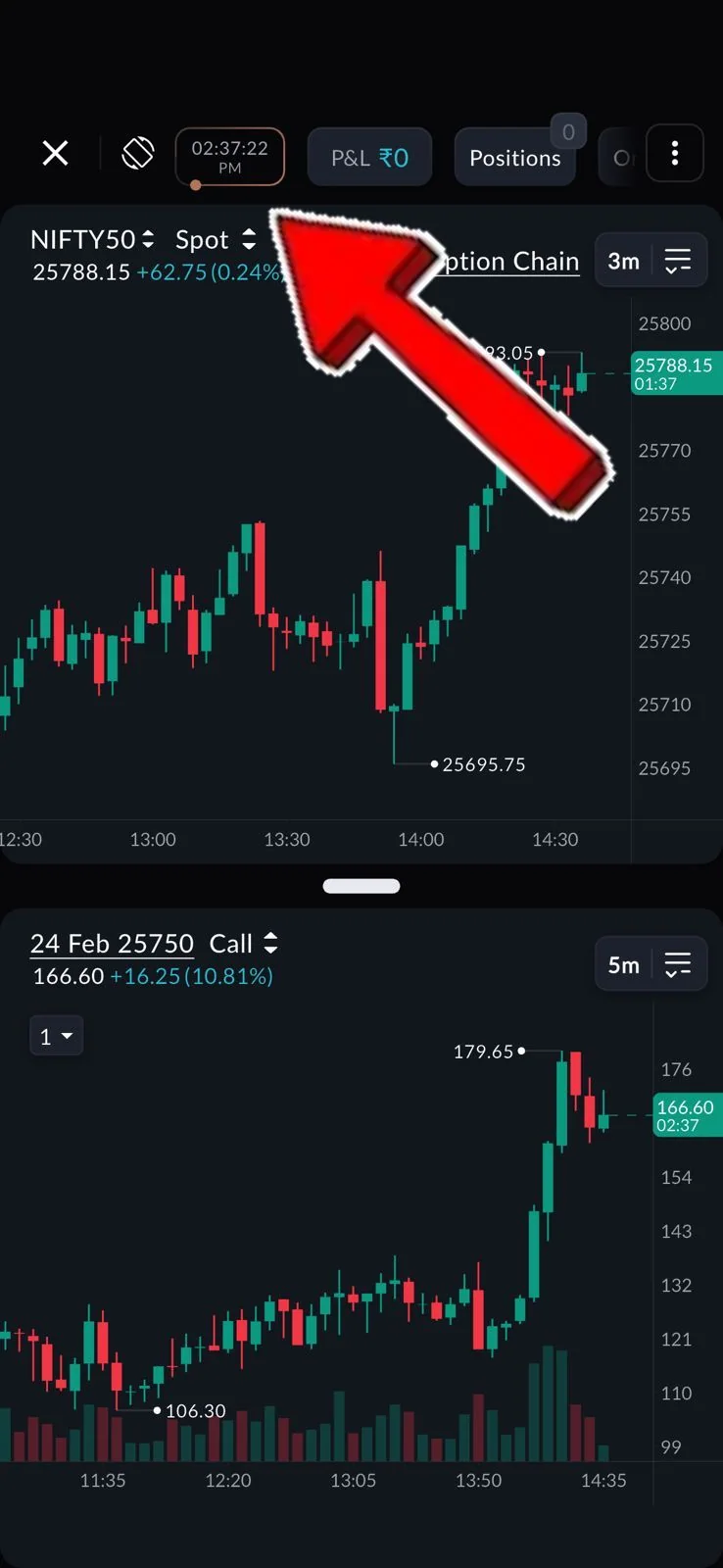
- ALive Market Clock
Exchange time, to the second: 02:37:22 PM here.
- BP&L and Positions
On the same bar, so time and P&L read together.
3How it helps
- Exchange time, not phone time. A phone clock can drift by seconds; the market's own clock is the one that counts for the open, the close and expiry.
- No glance away from the chart. The time sits on the trading screen, not in another app or tab.
- Time-aware trades. Option premiums lose time value faster late in the day, and volume often picks up near the close; knowing the exact time helps you plan entries and exits around both.
- The clock is in Scalper on the SAHI app; SAHI web's Scalper does not show it.
Top Options
1Where it is
WhereSAHI appScalperTop panelTop Options
In Scalper on the SAHI app, scroll the row of buttons along the top (Alerts, Live analysis) to the end and tap Top Options.
Open Top Options3 steps
- Open Scalper in the SAHI app.
- Swipe the top row of buttons left, past Alerts and Live analysis.
- Tap Top Options to see the most active contracts.
2What it is
A ready list of option contracts picked three ways: highest open interest, highest volume, and at-the-money strikes, the ones closest to the current price.
Instead of scrolling through 30 to 50 strikes across expiries, you start from the handful that are actually being traded.
- BLive analysis
Its neighbour on the same scrolling row.
- CAlerts
The row scrolls sideways; the clock sits at its start.
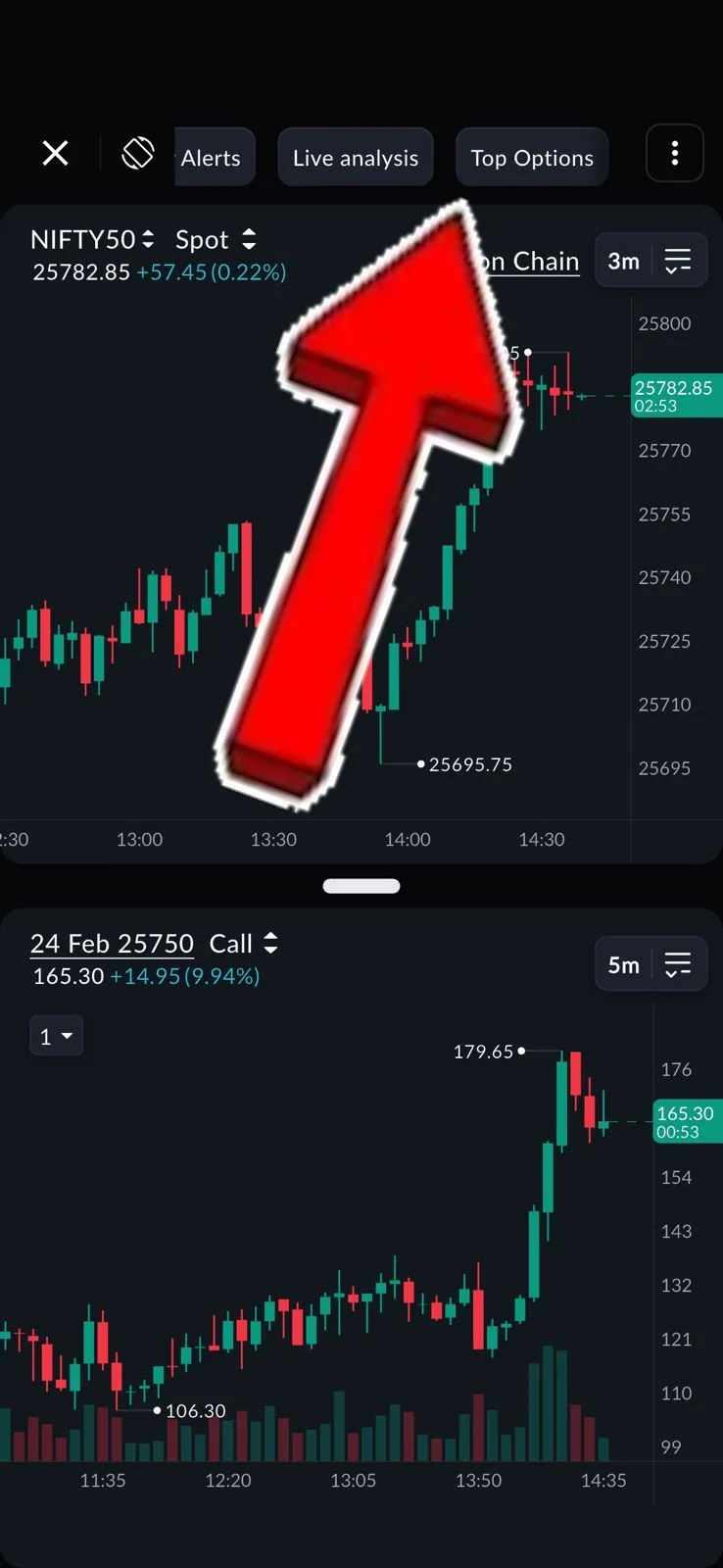
- ATop Options
Opens the list of the most active contracts.
3How it helps
- Liquid contracts first. High open interest and high volume usually mean tighter spreads and better fills.
- Less scrolling at the worst moment. When a move starts, the busy strikes are one tap away, not 40 rows down the chain.
- At-the-money at a glance. The strikes nearest the price, where most intraday option trading happens, are on the same list.
Busy is not the same as right. Check the strike and expiry against your own plan before you trade a contract just because it is at the top of the list.
- Top Options is in Scalper on the SAHI app; SAHI web's Scalper does not have the tab.
- SAHI's release does not show the list itself, so the screen here stops at the tab.
Questions
Where is the Live Market Clock?
At the top of Scalper on the SAHI app, beside P&L and Positions.
Why not just use my phone's clock?
A phone clock can be a few seconds off; the Live Market Clock follows exchange time.
How does Top Options pick contracts?
By highest open interest, highest volume and at-the-money strikes.
Are these on SAHI web?
Not on the web Scalper screen when we checked; both are on the SAHI app.
Open Scalper in the SAHI appCheck the clock at the top, then swipe the top row to Top Options.
Open SAHI