

Live now
Index readings from the same feed the Sahi terminal runs on. Open the live Options Scanner to see this guide applied to today’s numbers.
- NIFTY — —
- BANKNIFTY — —
- SENSEX — —
What you will learn
- ARead the Contracts list
- BCompare underlyings
- CBuild your own screen
- DAvoid lists that mislead
- ↻Run a routine
- 3
- views: Contracts, Underlyings, Custom
- 13
- contract scans
- 15
- columns in the Underlyings All scan
- 217
- underlyings in the catalogue
First 5 Minutes
The question What do I do first, if I read nothing else?
Do this first
- Open the Options Scanner. It opens on Contracts with Top gainers. Leave every setting as it is.
- Read the line of settings under the scan name. A capsule with a cross is something that differs from the defaults; the quiet words between them are the defaults. Together they are the whole question the list answers.
- Read lots before percentages, and the Spread column before you believe a price.
- Press one contract's name. The dialog shows its payoff and the exact numbers behind the row.
- Read Trap 1 and Trap 2. They explain most of the lists that mislead.
In a hurry on an expiry morning? Go straight to the time-of-day guide and the expiry-day routine. Nothing is showing? Use the checklist. On a phone? Read this.
Values in this guide are as of 19 October 2026, read from the source files listed in the Sources section. Anything this guide could not confirm is gathered once, in What we have not verified.
What the Options Scanner Is
The question What does a scanner do that an option chain does not?
The Screener Idea
A stock screener does not tell you what a stock will do. It lists every stock that did something you asked about: rose the most, traded the most, broke a range.
The Options Scanner does the same for options. Every F&O underlying has hundreds of contracts, and opening each option chain one at a time is slow. The scanner puts all of them on one list, sorted by the figure you asked about, and leaves the judgement to you.
This guide follows the page from the first click to a finished routine. A beginner can read each step in order, because every control is named, every column is explained and every number is worked out. A serious trader can jump to the part needed: the column quick reference, the exact floors and guards, the logic of All and Any, and the traps that make a list mislead. Every picture is a capture of the running scanner. Where a number cannot be backed from the product, the guide says so and links to What we have not verified.
| View | One row is | The question it answers |
|---|---|---|
| Contracts | One option contract, such as a NIFTY 25000 Call | Where is the action? Which contracts moved, where positions are being opened or closed, where money is trading. |
| Underlyings | One stock or index | How much movement do its options price, how does that compare with what it actually did, and where do positions sit? |
| Custom | A contract or an underlying, as you choose | Which ones meet the conditions I have set, all of them or any of them? |


The whole Contracts view, from the page bar down to the first rows, is pictured in Step 1.
What It Does Not Do
- It places no orders. A row is a reading, and the contract dialog is for looking, not for trading.
- It does not forecast. Build-ups, Chance worthless and Expected move describe positions and prices at one moment.
- It does not hide the thin end. It leaves out contracts under its floors and says how many, and a lower floor shows them.
- It does not compute charges, taxes, margin or the cost of getting in and out. See Risk notes.
- It no longer lists ready-made strategy baskets. Those are checked in the strategy finder inside the Strategy Builder, and an older scanner link that names strategies opens there with the same settings. See Which tool when.
Four Words to Know Before the First Scan
The question Which few words must I know before any list makes sense?
- Lot
- Options trade in fixed bundles. Open Interest and volume are shown in lots (contracts divided by the lot size), because a lot is the smallest quantity you can trade. The lot size of each underlying comes from the product's catalogue, for example 65 for NIFTY and 30 for BANKNIFTY at 19 October 2026; the exchange revises lot sizes from time to time (lot sizes not re-checked).
- Premium
- The price of one option, in rupees per unit. The cost of one lot is the premium times the lot size. A premium of ₹17.90 on a lot of 65 is ₹1163.50 per lot (illustrative).
- Open Interest
- The number of option contracts still open. Every open contract has a buyer and a writer, so the number alone never says who was pushing. It counts positions, not trades.
- Build-up
- The premium and Open Interest read together. Four patterns exist: Long build-up, Short build-up, Short covering and Long unwinding. Step 6 of Part A explains each. The names are conventions for how traders read the pattern, not a record of who traded.
Four more terms appear at once and are defined in the glossary: expiry, window (how far back a change is measured), floor (the smallest traded amount a contract needs to be listed) and spread (the gap between the buying and selling quote). Strike-position words ATM, ITM and OTM and the figures IV, PCR and delta are linked where they first appear.
Two habits help. First, always read the lots before the percentage, because a percentage hides the size of the base. Second, read the settings under the scan name before reading any row; the second capsule names the window being measured.
Where the Numbers Come From and How Fresh They Are
The question How fresh is this, and how much can I lean on the time stamp?
| What is read | How | How often |
|---|---|---|
| Every traded option of every underlying | One market file written on the server, holding each underlying's tracked expiries, with the minutes it keeps for the 5m, 15m, 30m and 1h windows | The file is written once a minute. While the market is open and the tab is visible, the page reads it again every 60 seconds. |
| The same, when that file is missing | The page waits up to 20 seconds for the file, and treats a request that stalls longer as missing. It then reads each underlying's option chain directly, about eight at a time, and shows the day's change only | Once, then again when you press Read again. In Contracts a banner says "5m to 1h movement is not available right now, so the day's change is shown." In Underlyings it says "The market file is not available right now, so each underlying's option chain was read on its own." Both name how many underlyings could not be read. |
| Daily candles (realised volatility in Underlyings) | Roughly 90 days of candles for each underlying, kept in your browser for the session | Once per session. A candle for a day still forming is left out. |
| Futures (futures scans, Future capsule) | The near-month and later futures months, read underlying by underlying, four at a time | About every two minutes while the market is open |
| Longer candles, IV history, company figures (Custom, only when a condition needs them) | Read once, only for the conditions that use them. The IV history is the year of 30-day IV behind IV rank and IV percentile (see below). Company figures (market cap, results dates and the Custom company filters) come from a source the product itself calls temporary. While that feed is not available, Custom says Company figures are not available right now in place of a Company scan's table, greys the Company group, and shows no figure rather than a zero (see Part C, Step 4). | Once per session or per day |
The product's catalogue lists 217 F&O underlyings, 208 stocks and 9 indices. Whether the scanner reads exactly that list at runtime is not yet confirmed; the status line's count of underlyings tells you how many it actually listed.
The status line says what you are looking at. During the session it reads, for example, 5 Oct, 14:20 IST, then the count. In Contracts the count is the list on screen against every contract read at that expiry, for example 1292 of 9395 contracts · 196 underlyings, so it matches the scan chip Top gainers 1292 (when the list holds every contract read it says just 9395 contracts). While the page is still reading it says, for example, Reading 12 of 19 underlyings. In Contracts, if the file has not changed for more than 3 minutes it adds older than 3 minutes; after the close every view adds market closed. Quote the status line, not your clock, when you note what a list showed.
Two files built from the exchange's daily closes
Two readings do not come from the minute file. Both are built once a day from NSE's daily F&O closing file (the bhavcopy), and both describe; neither forecasts.
- The year of 30-day IV (IV rank and IV percentile in Custom). For each session the file reads the underlying's three nearest expiries that fall after that session, so an expiry that settles on the day is never used and no expiry day is left empty. It blends them to a constant 30 days. The file now runs from 16 September 2025 to 19 October 2026, 270 sessions, and it includes the Sunday Budget session of 1 February 2026. IV rank and IV percentile use its last 252 sessions: a percentile needs at least 60, a rank a full 252. The Implied Volatility page ranks the same file (IV year read from the file, not rebuilt by us).
- ATM Open Interest in context (the Experimental card in Customise). The file now reads to the 19 October 2026 close: 307 sessions from 21 July 2025. Each underlying's reading is set against its last 12 settled expiries, as Part A, Step 9 explains. We read the file's header and did not rebuild it (not rebuilt by us).
Do Not Read It as a Live Tape
The scanner is a minute-by-minute reading. It is built to find where to look, not to time an entry to the second. For the cell-by-cell detail of one contract, use the Option Chain.
How late the market data is at its source is not yet confirmed. This guide does not describe the scanner as an exchange feed. Until that is checked, read every Open Interest change here as of the file's time, and not as the exchange's latest figure.
Time of Day: What to Expect Between 09:15 and 09:45
The question What can I use at 09:20, when the session is only minutes old?
A change over 5, 15, 30 or 60 minutes compares now with a stored minute that many minutes earlier. At the open there is no such minute yet, so the shorter windows wait. The session runs 09:15 to 15:40 IST. The times below are counted from the open and are approximate, because they follow the stored minutes and not the clock alone (first stored minute not confirmed).
| Time (IST) | Windows that can show a change | What shows for the others, and what to do |
|---|---|---|
| 09:15 to about 09:20 | Day only | The 5m, 15m, 30m and 1h choices are greyed, with the hint Day only right now, or a list says This window is not ready yet. Day compares with the previous close. Use Day, and expect few contracts, because the ₹10 lakh floor counts today's traded value and little has traded. |
| about 09:20 to 09:30 | Day and 5m | 5m needs a stored minute within 90 seconds of five minutes ago. 15m, 30m and 1h wait. Use 5m for the freshest change, and Day for the rest. |
| about 09:30 to 09:45 | Day, 5m and 15m | 15m needs a minute within 150 seconds of fifteen minutes ago. 30m and 1h still wait. |
| from about 09:45 | Day, 5m, 15m and 30m (tolerance 180 seconds) | 1h (tolerance 300 seconds) joins at about 10:15. |
| 11:00, 14:00, 15:00 | All windows | Stored minutes are kept for about the last 75 minutes, so the 1h window exists only while a minute about an hour earlier is still stored. |
If the window you want is not ready
- Choose the next shorter window, or Day. The page never prints a longer gap under a shorter name, so a figure you can see is a figure for the window it names. Check the status line: measured 09:20 → 09:25 IST names the two minutes compared.
- Volume vs pace jumps early. In a window, it divides by the minutes of session so far, so in the first minutes a few trades give a very large multiple. Read the lots beside it.
- If the market file is missing, the page reads chains directly and offers Day only, with a banner. Press Read again. See Why a contract or list is missing or empty.
- Gainers and losers on Day need a contract that traded yesterday (at least 10 lots) and a starting premium of at least ₹2. At the open this screens out many new expiries. That is the product's guard, not a gap in the data.
What exactly appears in the first minutes of a live session, and at which minute each window becomes ready, was not watched live for this guide (not yet confirmed). The wording above is from the product's source.
Reading It on a Phone
The question Can I run the scanner from a phone or a tablet, and what changes?
Yes. The same three views open on a phone, with a layout made for a narrow screen. The picture below is the Contracts view at 390 pixels wide.
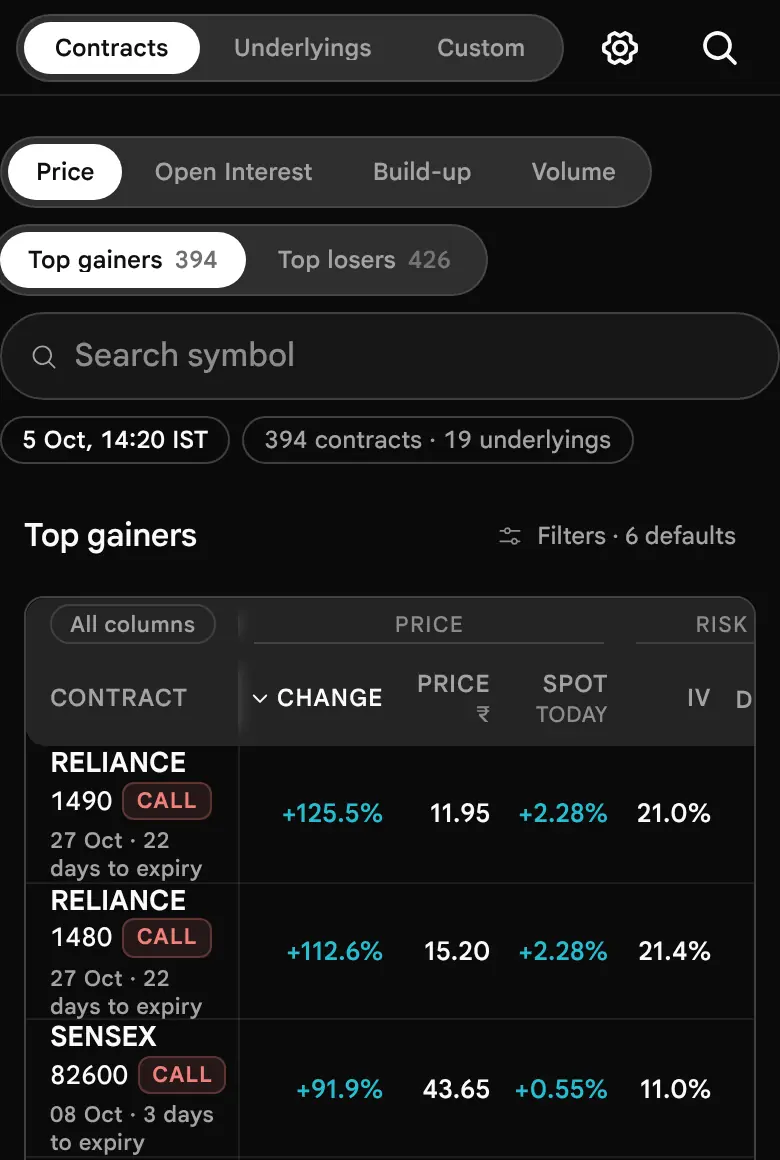
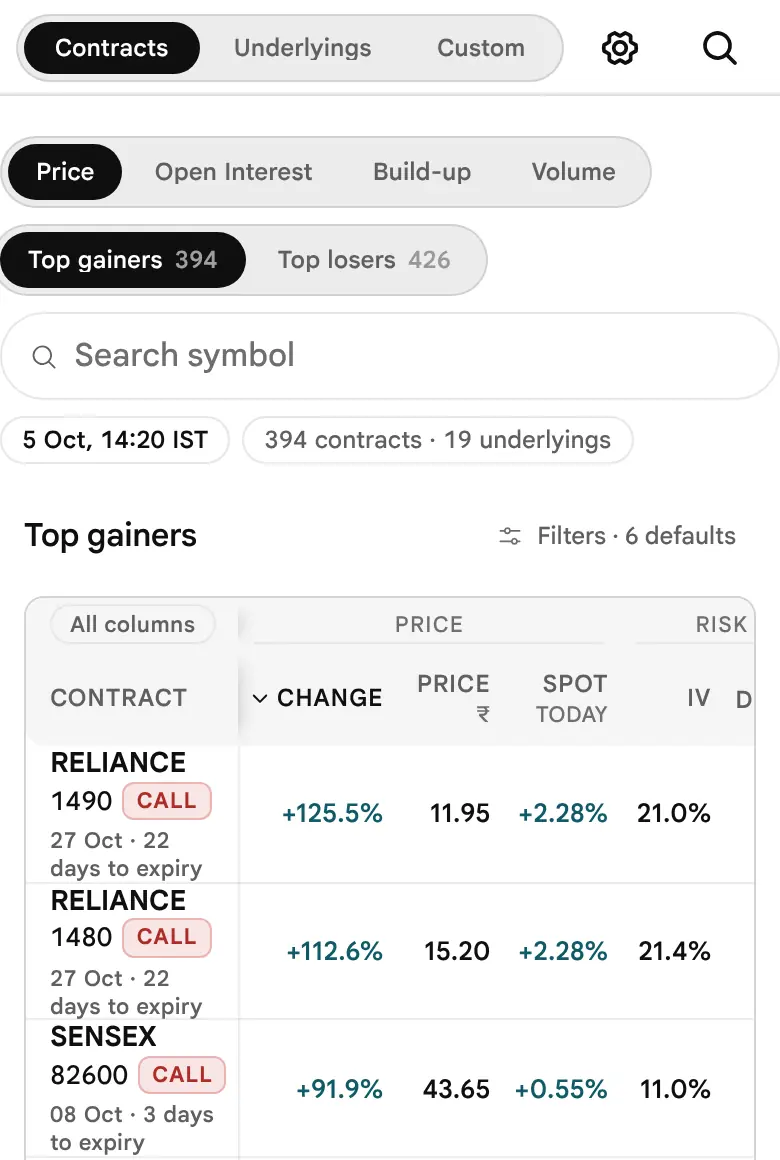
- One line per contract. On a phone and a tablet the symbol, the strike and the Call or Put chip sit on one line, for example BAJFINANCE 900 Put. Under it is one short line with the expiry and the days left, for example 27 Oct · 8 days. A phone drops the words "to expiry"; a wider screen prints 27 Oct · 8 days to expiry. On the day itself the line reads Expiry day.
- Shorter rows. Because the name no longer wraps onto three lines, a phone row is about 46 pixels tall, close to the desktop's. On a touch tablet rows are 52 pixels, which still leaves room for a finger. The name column is as wide as its longest name, and the figures scroll under it.
- Defaults fold to one line. At 768 pixels or less the settings in force that are at their defaults show as one label such as 6 defaults. Press it to open Customise.
- Customise is a sheet, opened by the gear in the top bar. Everything applies at once; press the cross to close.
- The table scrolls sideways, and the first columns show first. Press All columns for the rest. The name stays pinned.
- Scan chips and the Custom shelf swipe. Swipe along the row for more scans.
- The search pill shows its focus ring round the whole pill. An empty list after a search says No contracts match “X” with a Clear search button (Part A, Step 12).
- Touch targets are larger on touch screens (44 pixels, from the product's style rules). How they feel on a real device is not yet confirmed.
A short routine for a phone
- Open Contracts, Most active, search your index symbol. Read Traded, then Spread.
- Switch to Open Interest gainers, window 5m or 15m (see the time-of-day guide). Read lots, then the build-up name.
- Press the top name to see its numbers, then confirm in the option chain, where the quote and depth are shown.
In this guide, wide figures and tables scroll sideways inside their own frame, with a soft edge showing there is more. Press a figure to see it large; press Escape or the close button to leave. The phone and tablet layout was read from the page's style sheets, not tried on every device (not tested on every device).
The Contracts view
Where is the action? Which single options moved, where positions are opened or closed, and where money is trading.
Contracts, Step by Step
Contracts lists single options the way a stock screener lists stocks. It is the view most readers open first, and the one the page opens on unless you left it on another view last time.
Open the page and choose Contracts
Open the Options Scanner. In the page bar, the capsule shows Contracts, Underlyings and Custom. Contracts is the default. The page remembers the view you used last in your browser, and a link that names a view always opens that view.
On first opening, the page shows Top gainers, for the current expiry, over the day, for all underlyings, Call & Put, with ₹10 lakh or more traded today. Those are the defaults, and every one of them can be changed in the steps below.
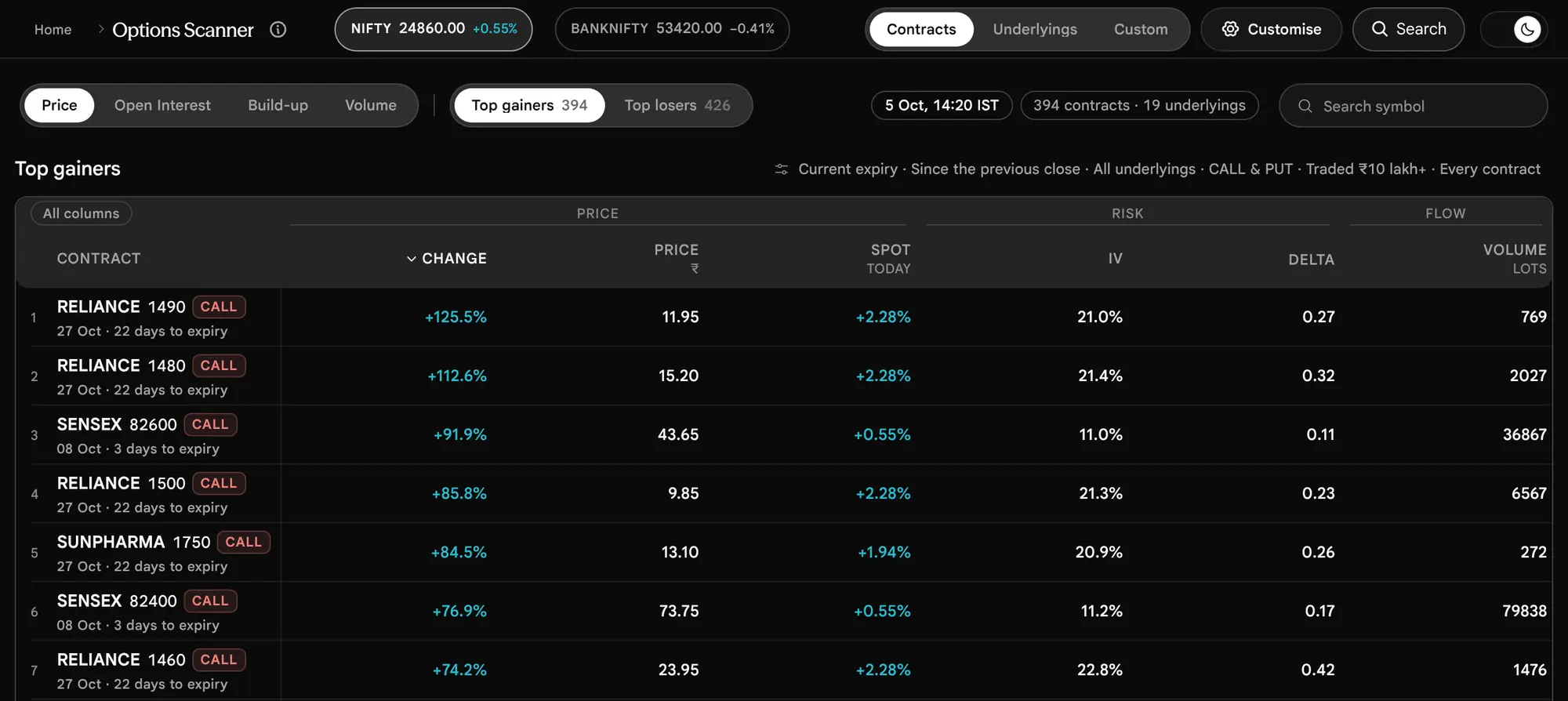
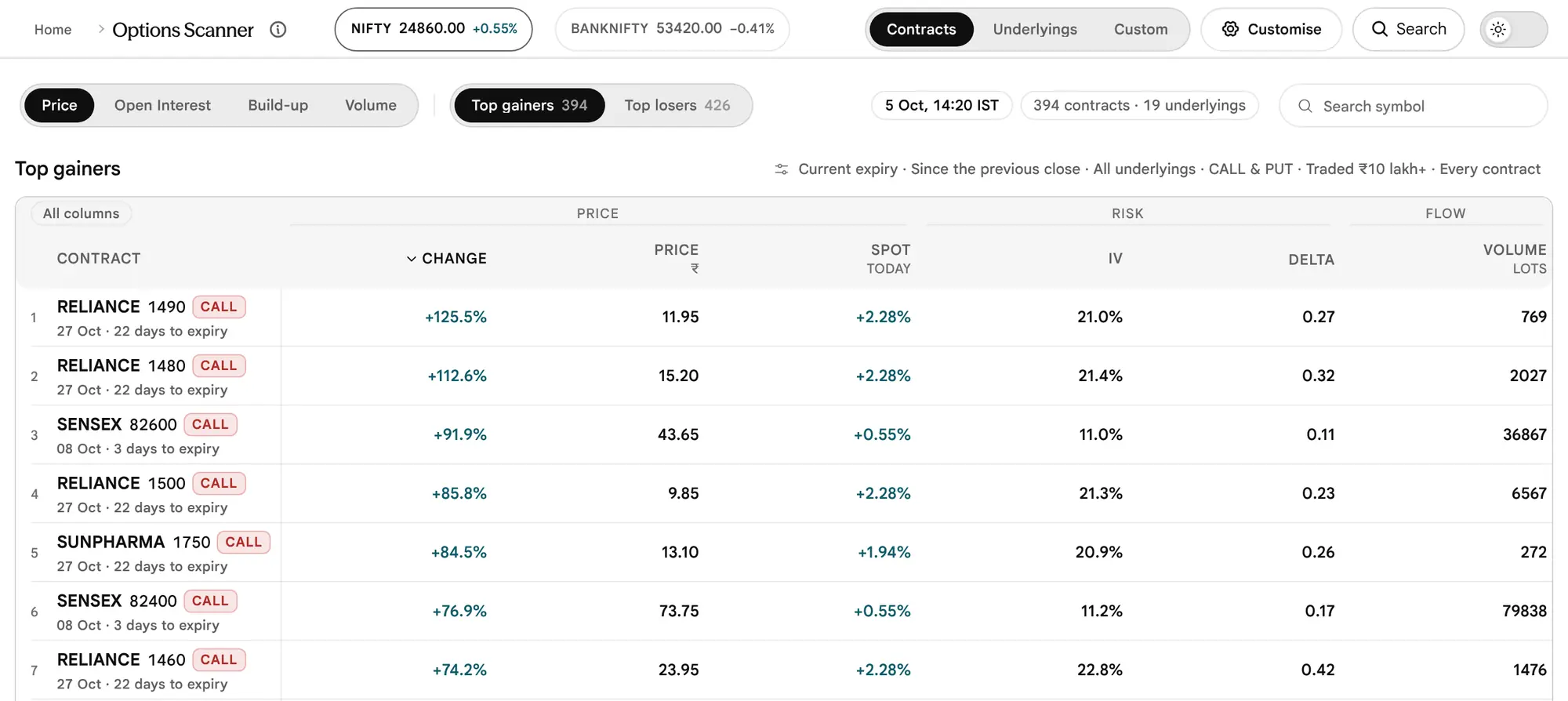
Choose a family, then a scan
The scan picker works in two steps. The first capsule picks a family: Price, Open Interest, Build-up or Volume. The second capsule shows the scans inside that family, and each scan carries a count: how many contracts it lists right now under the settings in force. A family remembers the scan you used last in it, so coming back lands where you left.








| Family | Scan | What it lists, and how it is sorted at first |
|---|---|---|
| Price | Top gainers | Contracts whose premium rose, largest percent first |
| Top losers | Contracts whose premium fell, largest fall first | |
| Open Interest | Open Interest gainers | Open Interest added, most lots first |
| Open Interest losers | Open Interest closed, most lots first | |
| Open Interest % gainers | Open Interest added as a percent of where it started, largest first. Needs a starting position (the Starting Open Interest floor). | |
| Open Interest % losers | Open Interest closed as a percent of where it started, largest first. Same floor. | |
| Build-up | Long build-up | Premium up and Open Interest up, most lots added first |
| Short build-up | Premium down and Open Interest up, most lots added first | |
| Short covering | Premium up and Open Interest down, most lots closed first | |
| Long unwinding | Premium down and Open Interest down, most lots closed first | |
| Volume | Most active | Where the most money traded (average traded price × contracts), largest first |
| Volume surge | Contracts trading above usual, largest multiple first: against yesterday's volume on Day, against today's own pace in a shorter window | |
| Volume above Open Interest | Contracts whose volume exceeded the Open Interest they started with, largest ratio first. Needs a starting position. |
That is thirteen scans in four families. Each scan answers one plain question, given in the table above. The results header names the scan, and the settings under it name the window it measures, so the list on screen always matches the question you chose.
Read the results header
Above the table, the header answers three things at a glance: which scan is open, under which settings, and how many rows it lists. Read it before reading any row.


- The scan name. The heading is the scan's name alone, such as Top gainers. What it asks is in the table of Step 2, and the window it measures is the second capsule: Since the previous close, Last 15 minutes, Last hour.
- The settings in force. Anything that differs from the defaults is a capsule with a cross; the defaults fold into one quiet line. Step 10 shows how to use them.
- The status line (beside the scan picker on a wide screen): when the market was read, for example 5 Oct, 14:20 IST, with older than 3 minutes if the file has not refreshed and market closed after the close, then how many contracts are listed out of every contract read at that expiry, and how many underlyings, for example 1292 of 9395 contracts · 196 underlyings. The first figure is the same as the count on the scan chip (Top gainers 1292), so the two always agree; when the list holds every contract read, the line says just 9395 contracts. On a shorter window it adds the two minutes compared, for example measured 14:05 → 14:20 IST. While the page is still reading it says, for example, Reading 12 of 19 underlyings.
- The footer under the table. It says how many more contracts matched the scan but traded under your money floor, holds a fold-out called How these are measured, and shows 50 rows at a time with a Show 50 more button (the last press shows what is left, for example Show 17 more); there is no hard cap on the rows.
Read the table, band by band
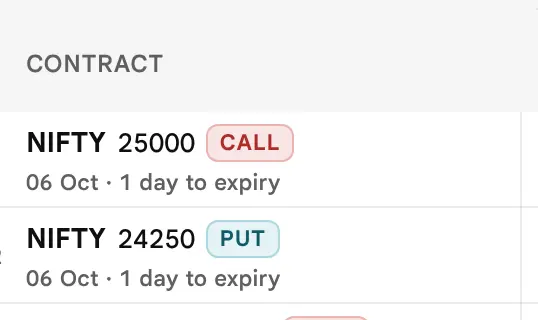
The table is in the option chain's own language: heads in sentence case (Contract, Change, Price, Spot today, IV, Delta, Volume lots, Traded ₹, Open Interest change, Build-up), the unit on a small second line, one bright figure per cell and at most one small reading under it. Each row is one contract: a rank number, then the symbol, the strike and a Call or Put chip, with the expiry date and the days to expiry beneath (for example 27 Oct · 8 days to expiry, or Expiry day). The contract column stays pinned when the table scrolls sideways. On a phone or a tablet the name keeps to one line (see Reading It on a Phone).
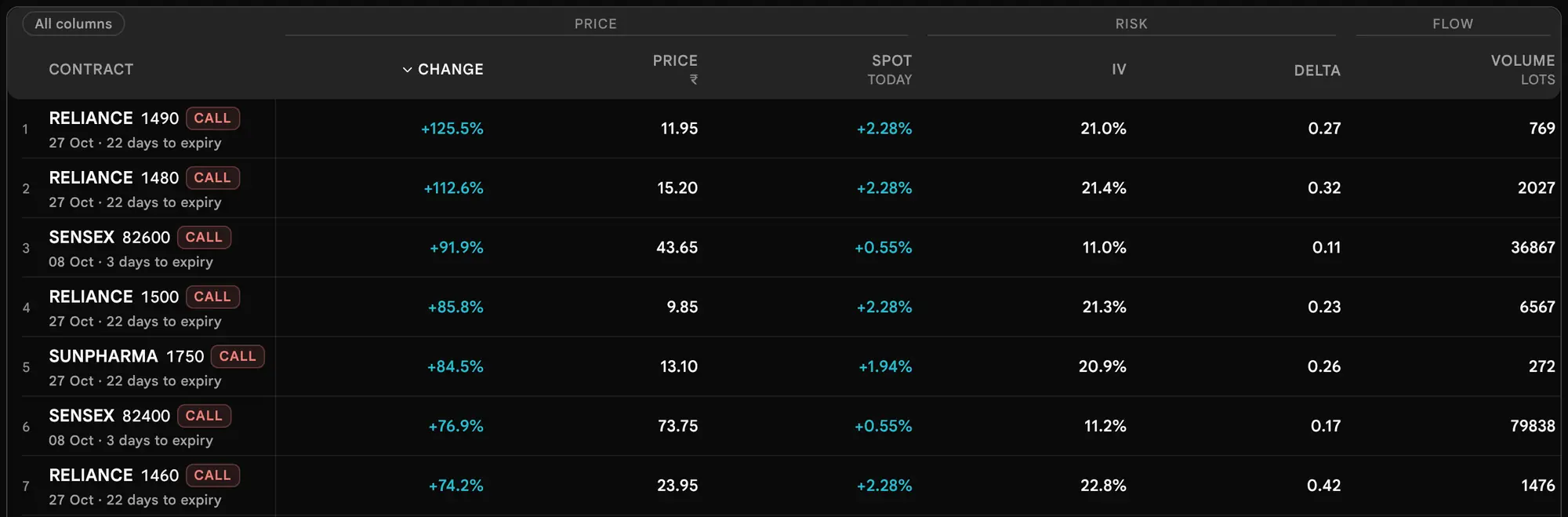

The columns are drawn in four bands, labelled Price, Risk, Flow and Positioning, so a reader knows what kind of figure each one is:
| Band | Columns in it | What kind of reading |
|---|---|---|
| Price | Change, Price, Spot today | What the premium did, what it is, and what the underlying did |
| Risk | IV, Delta, Chance worthless | How the option is priced and how it behaves |
| Positioning | Open Interest, Open Interest change, Open Interest change %, Build-up | Where positions sit and how they changed |
| Flow | Volume, Volume vs yesterday (or vs pace), Volume ÷ Open Interest, Traded, Spread | How much traded, and how wide the quote is |
The first column after the name is the figure the scan ranks by, so it is the head in bright ink. The other columns follow in a fixed order for each scan, and scans in one family share a set, so moving between Top gainers and Top losers, or between the four build-ups, never moves a column.


Which columns each scan shows, in order
| Scan | Columns, left to right |
|---|---|
| Top gainers, Top losers | Change, Price, Spot today, IV, Delta, Volume, Traded, Open Interest change, Build-up |
| Open Interest gainers and losers; the four build-ups | Open Interest change, Open Interest, Build-up, Change, Price, Spot today, Volume, Traded, Chance worthless |
| Open Interest % gainers and losers | Open Interest change %, Open Interest, Build-up, Change, Price, Spot today, Volume, Traded, Chance worthless |
| Most active | Traded, Volume, Spread, Price, Change, Spot today, Open Interest change, Build-up |
| Volume surge | Volume vs yesterday (or vs pace), Volume, Traded, Price, Change, Spot today, Open Interest change, Build-up |
| Volume above Open Interest | Volume ÷ Open Interest, Volume, Traded, Open Interest, Open Interest change, Build-up, Price, Change, Spot today |
Delta is drawn only when the market file carries it for the rows on show; a column of dashes would say nothing.
Every column, one by one
Looking for one column's formula? The column quick reference lists every column with its meaning, formula and where it is shown. Every change on the list is a difference between two readings of the same contract, so a change always equals now − from. The window (Step 8) decides what "from" is: the previous session's close for Day, or the stored minute that many minutes earlier for 5m to 1h.
| Column | What it shows | How it is worked out |
|---|---|---|
| Price ₹ | The last traded premium, per unit | As read in the market file. Only contracts with volume are listed, yet the last trade can be some time old, so read the Spread and Volume columns with it. |
| Change | How far the premium moved in the window, in percent | (Price − from) ÷ from. On Day, "from" is the previous close, and only when the contract traded yesterday: a contract that did not trade yesterday has an exchange base price, not a traded price, so no change is printed. In a window, "from" is the price at the earlier minute, and only if it traded no earlier than one window-length before that minute. |
| Spot today | The underlying's own change today | (Spot − previous close) ÷ previous close. It is the same for every contract of one underlying, because it describes the underlying, not the option. |
| IV | Implied volatility, in percent a year | As in the option chain. In a shorter window, a small second figure shows how many points it moved. |
| Delta | How much the premium moves for a one-point move in the underlying | As the option chain shows it. A Put's delta is negative; the filter reads delta without its sign. |
| Chance worthless | The model's chance the option ends out of the money at expiry | See Step 14. A model reading, not a forecast. |
| Open Interest lots | Open positions now, in lots | Open Interest in contracts ÷ lot size. |
| Open Interest change | Lots added or closed in the window, with the percent beneath | Open Interest now − Open Interest at the start of the window. The percent divides that by the starting Open Interest. A contract opened from zero shows "new" instead of a percent, because there is nothing to divide by. |
| Open Interest change % | The same change, percent first, lots beside it | The percent scans lead with it so the speed of change is the first thing you read. |
| Volume lots | Lots traded in the window | Contracts traded ÷ lot size. On Day it is today's total. |
| Volume vs yesterday (Day) or vs pace (a window) | How unusual the volume is | Day: today's lots ÷ yesterday's lots. A window: the window's lots ÷ (today's lots × minutes in the window ÷ minutes of the session so far, counted from 09:15 and no later than 15:40). A value of ×1.00 means the usual pace; ×3.00 means three times it. |
| Volume ÷ Open Interest | Volume against the position it started with | Window lots ÷ Open Interest lots at the start of the window. Above 1 means more traded than was open. |
| Traded ₹ | Money traded, shown compact (L for lakh, Cr for crore) | Average traded price × contracts traded. In a window it is the day's value now minus the day's value at the earlier minute. |
| Spread | How wide the quote is, as a share of its middle | (Ask − bid) ÷ ((ask + bid) ÷ 2). A dash when there is no two-sided quote. |
| Build-up | The pattern the premium and Open Interest make together | The option chain's rule for this window. See Step 6. |

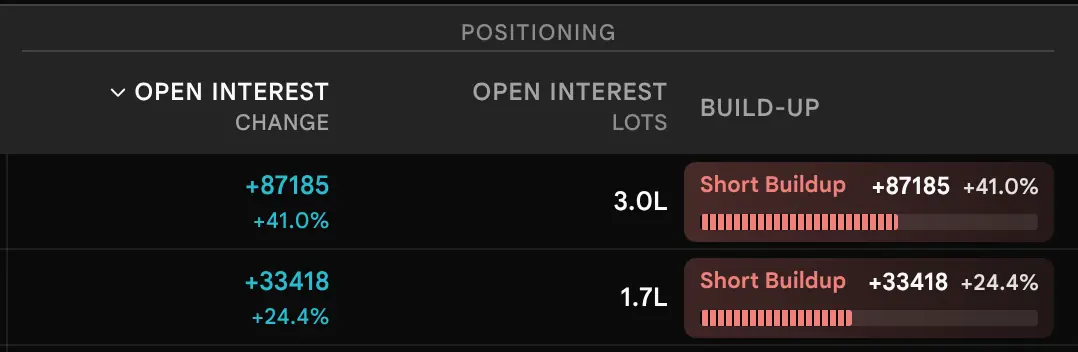
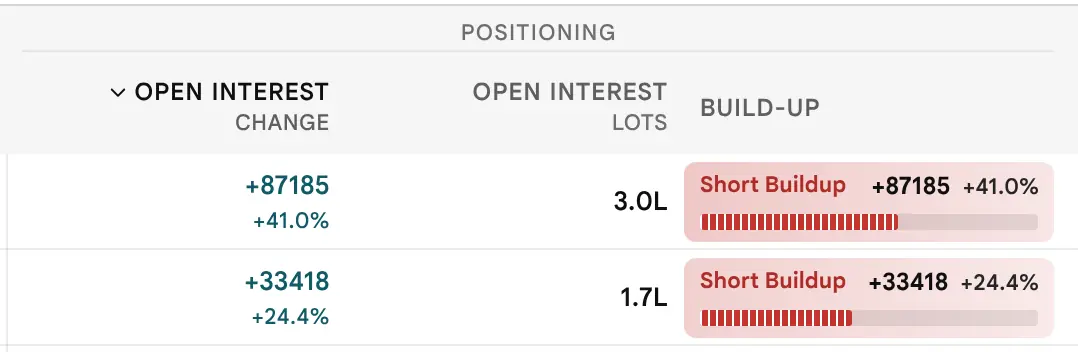

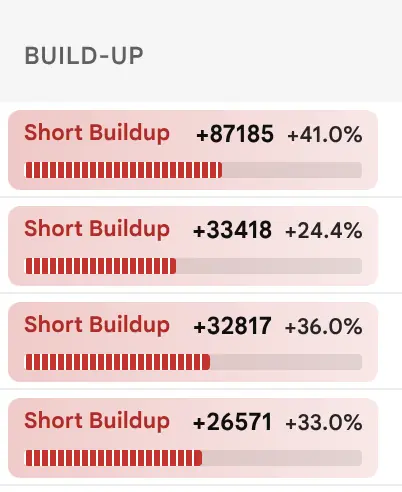
The four build-ups, and the thirteen scans in use
Open Interest has a buyer and a writer on every contract, so Open Interest alone never says who was pushing. The four build-ups read premium and Open Interest together, which is the tie-breaker the option chain uses too.
Positions are being added while the price of the contract rises. Conventionally read as fresh long positions.
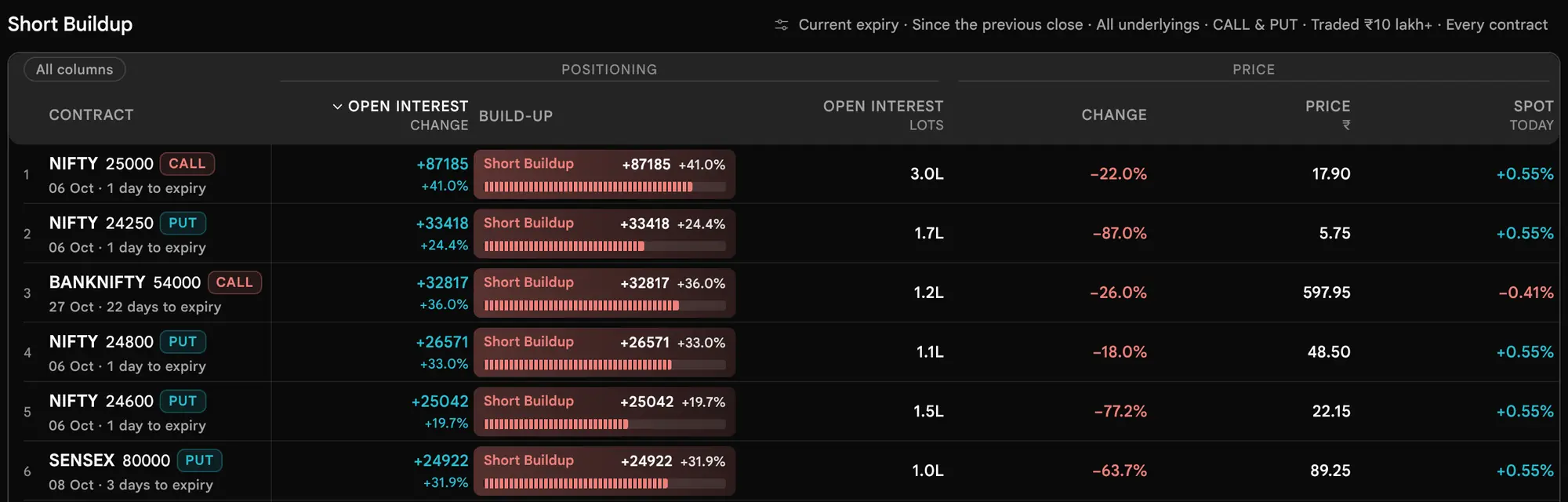
Positions are being added while the price of the contract falls. Often read as writing, though the scan cannot record who traded.
Positions are being closed while the price rises. Conventionally read as existing shorts buying back, not fresh buying.
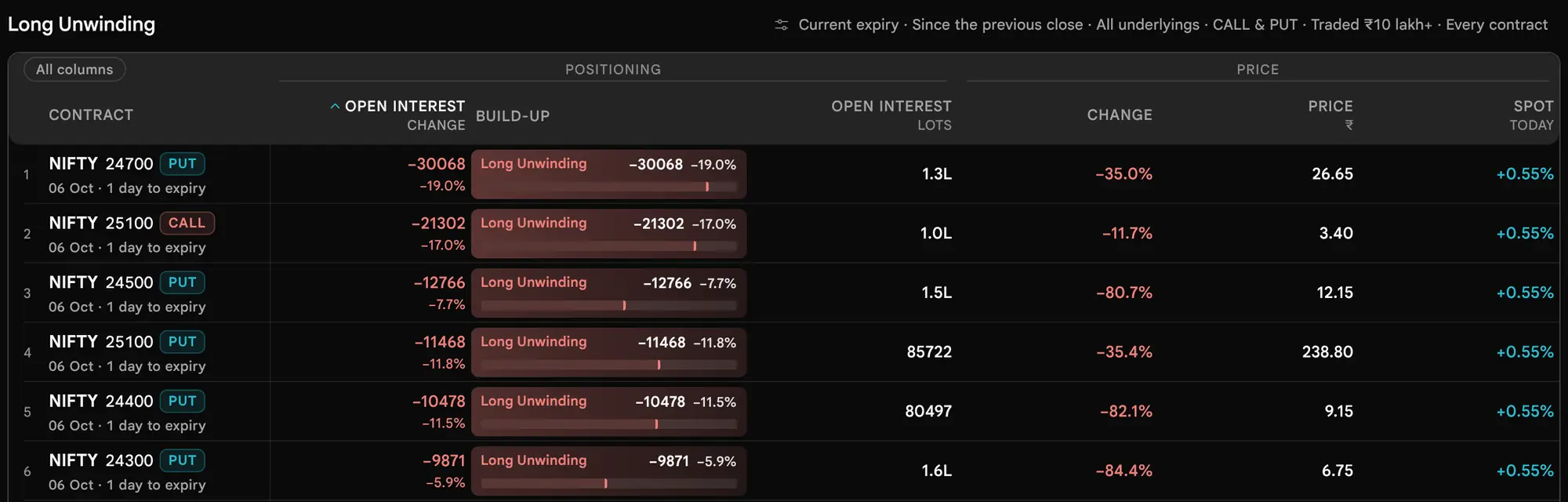
Positions are being closed while the price falls. Conventionally read as existing longs exiting.
A move smaller than the option chain's noise floor is labelled no clear pattern (a dash in the table, and the words "No clear pattern" in the contract dialog), so a flat contract never fills the four lists. Both halves must clear the floor for the window in use:
| Window | Premium must move at least | Open Interest must move at least |
|---|---|---|
| 5m, 15m | 0.5% | 1% |
| 30m, 1h, Day | 0.5% | 2% |
The 30-minute window uses the one-hour floor, because the option chain has no 30-minute floor of its own. A contract whose Open Interest started at zero and then rose is classed at once by the sign of its premium change.
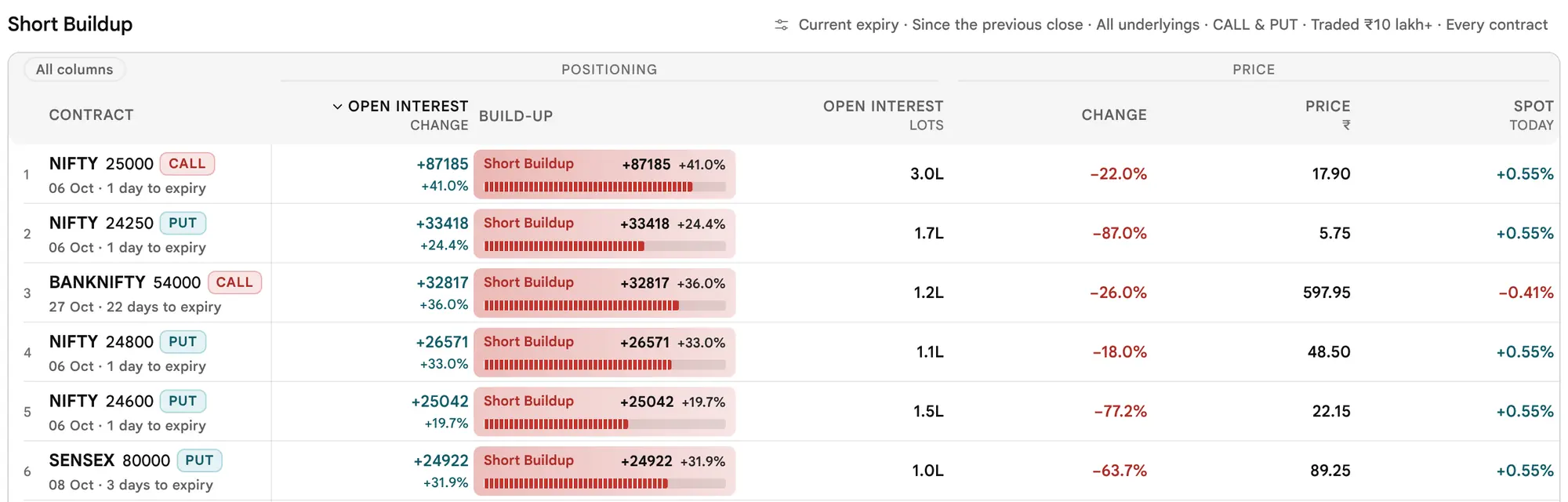
The four build-up scans in the live tool




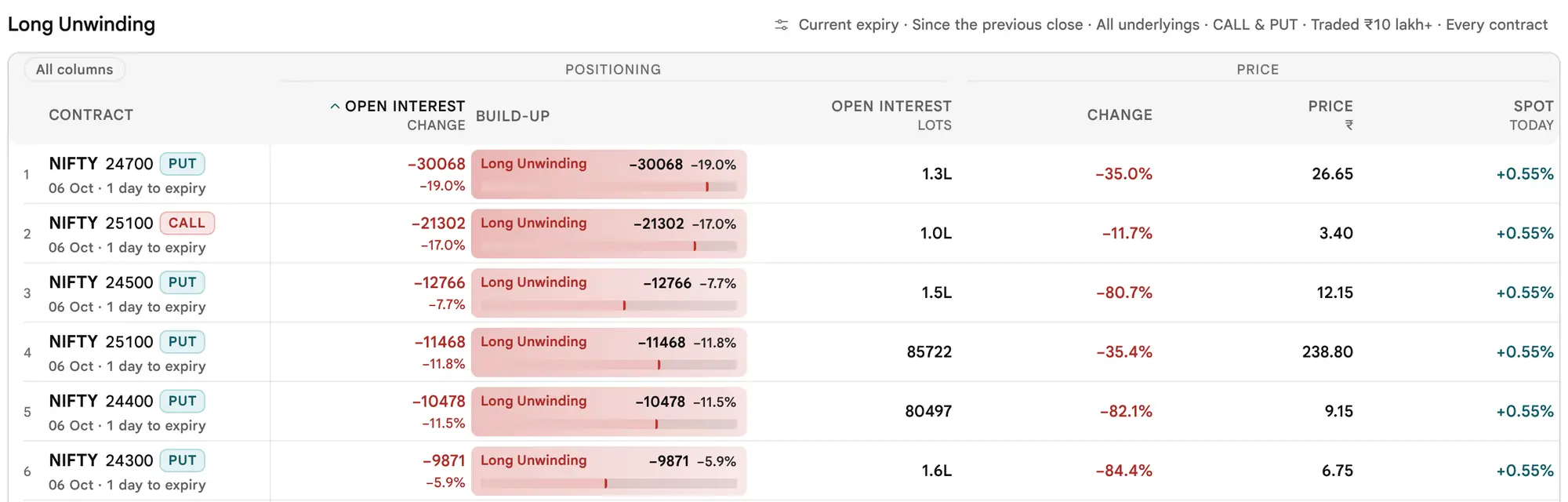
The other nine scans


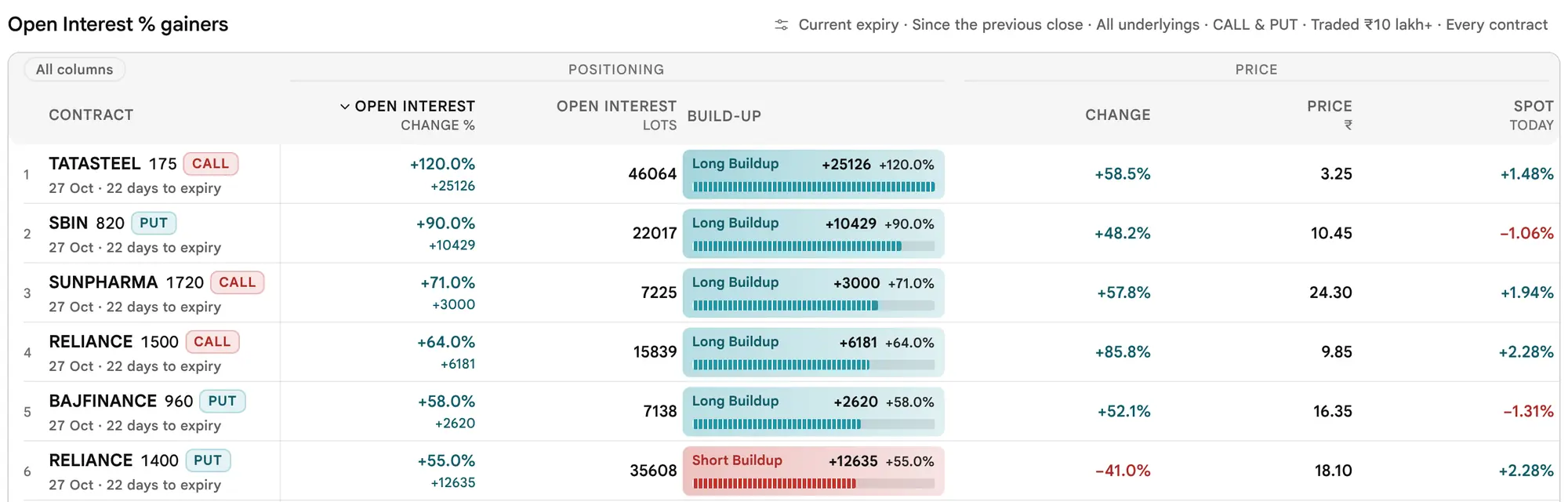


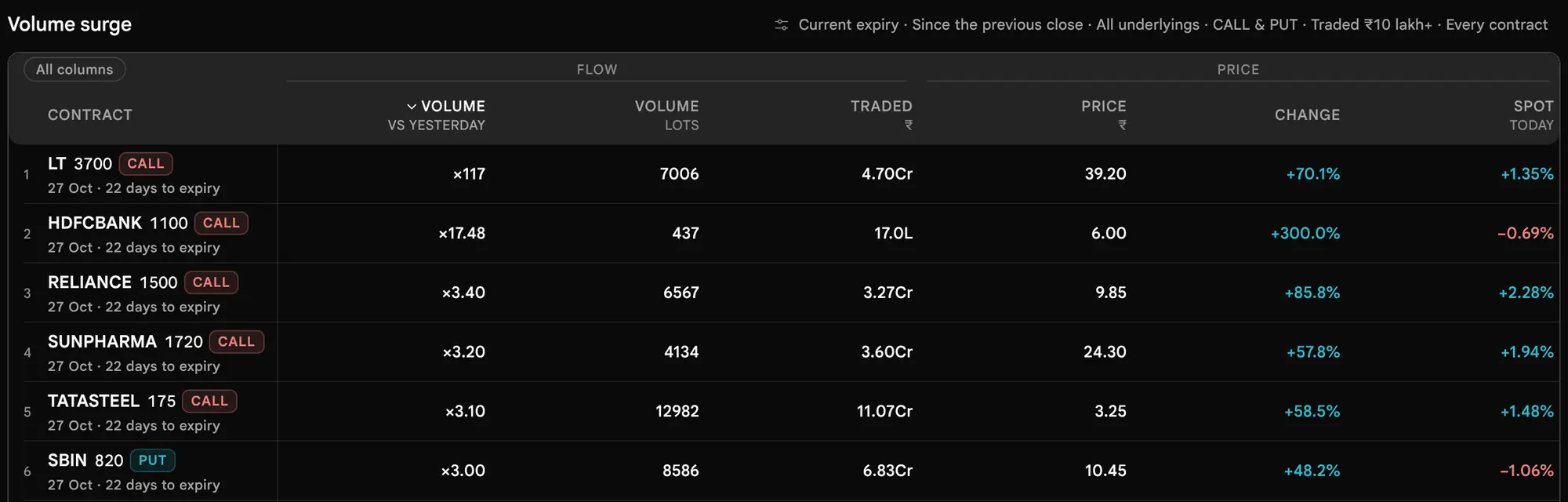
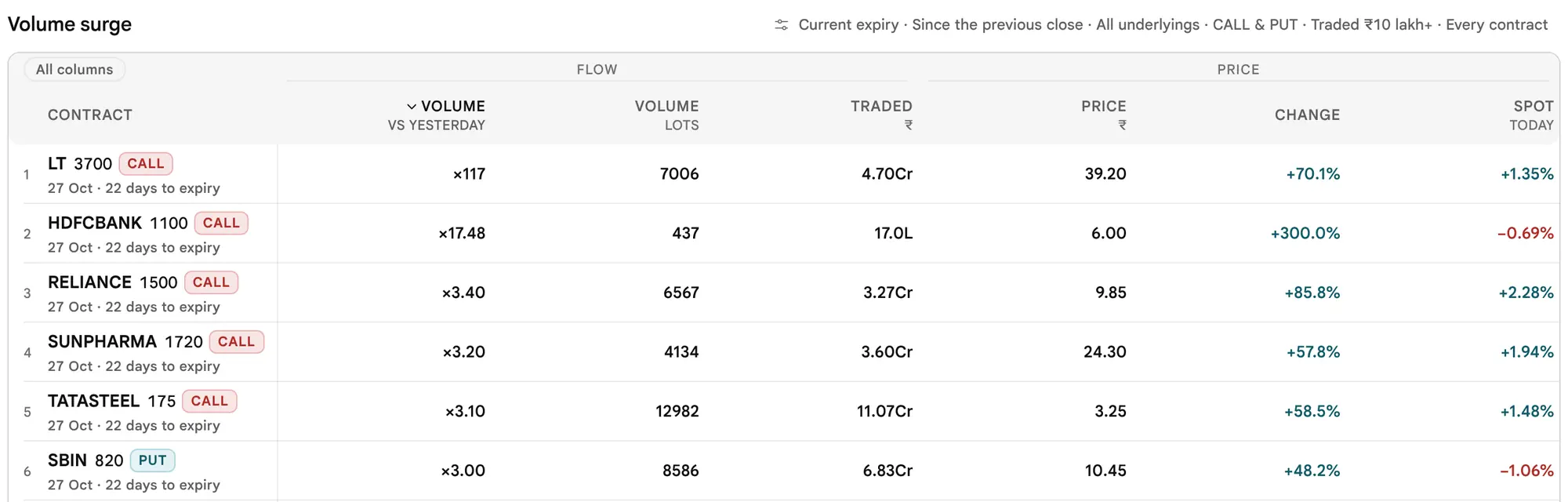


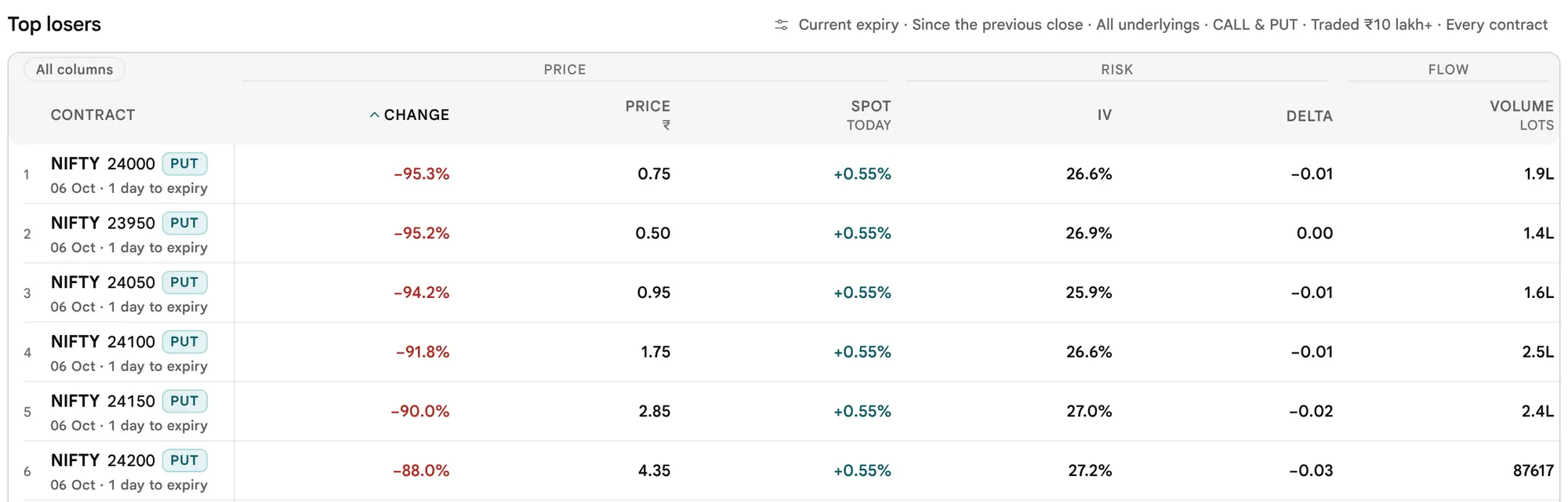
Sort by any column that has a caret
Each scan opens sorted by its own figure. Press the head of any column that has a caret to sort by it. The first press sorts largest first; a second press on the same head reverses it. A row with no figure in that column goes last, whichever way you sort. Changing the scan clears your sort.
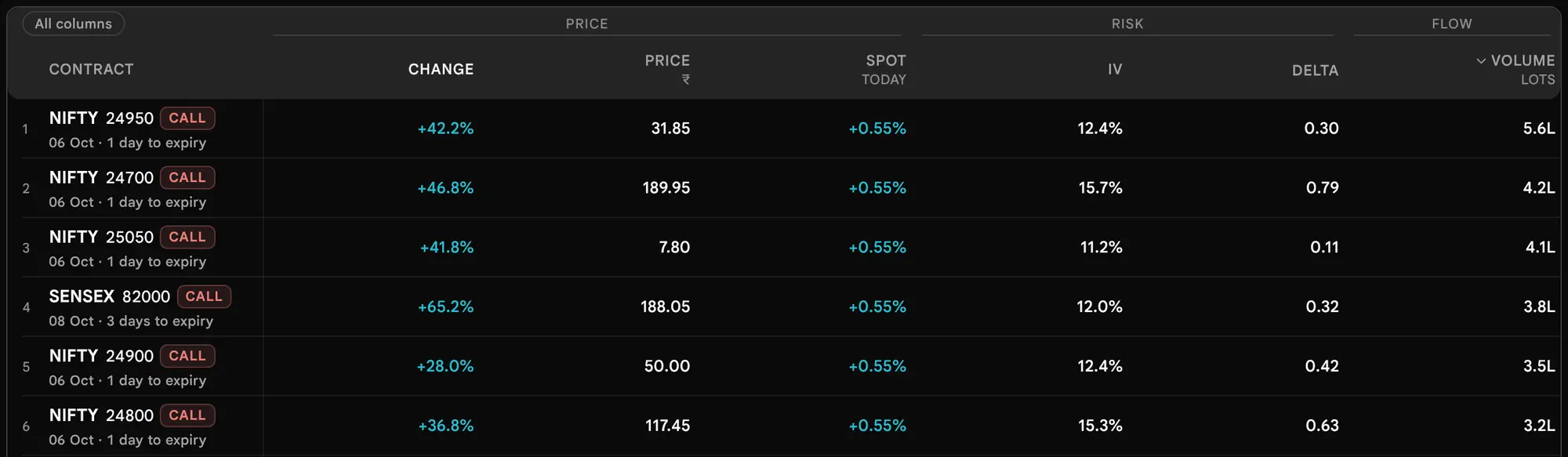

Sortable columns are Change, Open Interest, Open Interest change, Open Interest change %, Volume, Volume vs yesterday or pace, Volume ÷ Open Interest, Traded, IV, Chance worthless, Spread and Spot today. Price, Delta and Build-up have no caret. Ties are broken by money traded, then by the contract's name, so the order never jumps between readings.
Choose a window and an expiry
The window decides which two readings every change compares. Both live in the first card of Customise (Step 9), and the settings line in the header shows them.
| Window | Change is measured against |
|---|---|
| Day | The previous session's close |
| 5m, 15m, 30m, 1h | The stored minute that many minutes earlier, the same two minutes for every contract. The header names them, for example 14:05 → 14:20 IST. |


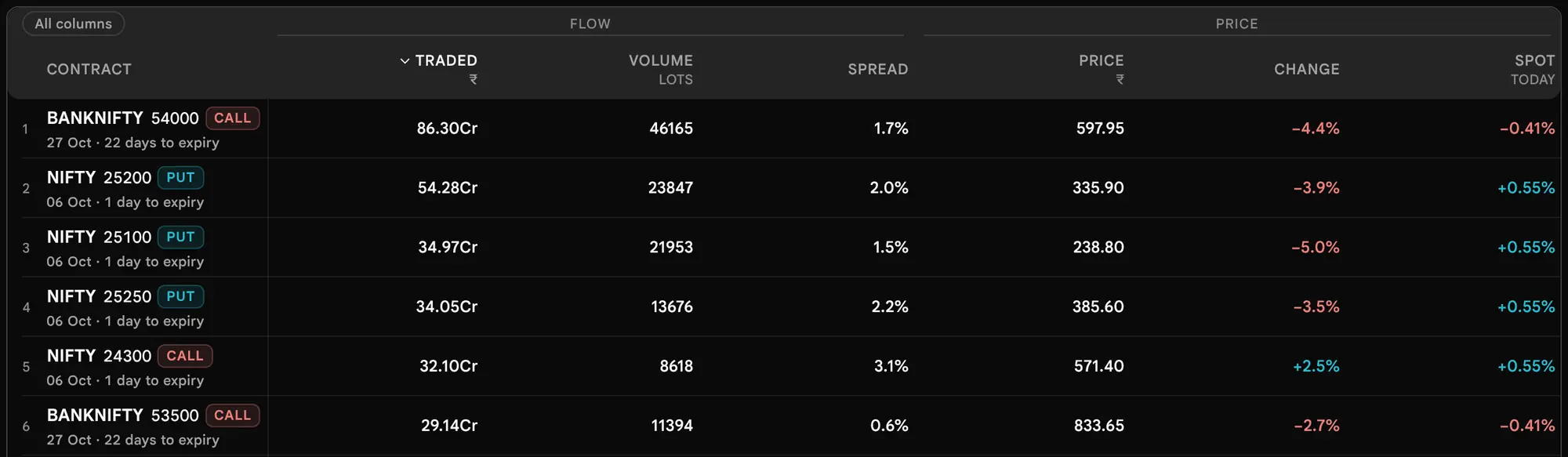

A shorter window is offered only when a stored reading exists close to the exact lookback. The accepted gap is 90 seconds for 5m, 150 seconds for 15m, 180 seconds for 30m and 300 seconds for 1h. Otherwise the capsule is greyed and says Day only right now, or the page says the window is not ready. A longer gap is never printed under a shorter name. When the market file is missing and the page has read the chains directly, only Day is available. The stored minutes are kept for about the last 75 minutes, so the 1h window exists only while a minute about an hour earlier is still stored.
Expiry is Current, Next, Far or All. Current, Next and Far are each underlying's own first, second and third tracked expiries, so they are not the same dates for an index and a stock. All lists every tracked expiry, and every row prints its date and days to expiry.
On expiry day, an option stops trading at 15:30 IST. From then on that day's series is settled. It stays in the closing file, but it is no longer anyone's current expiry: Current moves on to the next expiry, Next to the one after, and so on. The same rule holds in Contracts, Underlyings and Custom. So after 15:30 IST on a NIFTY expiry day, Current lists the following NIFTY expiry, not the one that has just settled.
Customise: every setting, in order
Press Customise in the page bar. The panel reads top to bottom as four questions: what to scan, which underlyings, which rows, how liquid. Expert limits are folded under More settings. Every change applies at once, so the only buttons are Reset and Close. The panel opens with focus on Close, never on Reset, so a stray Enter cannot wipe the screen.
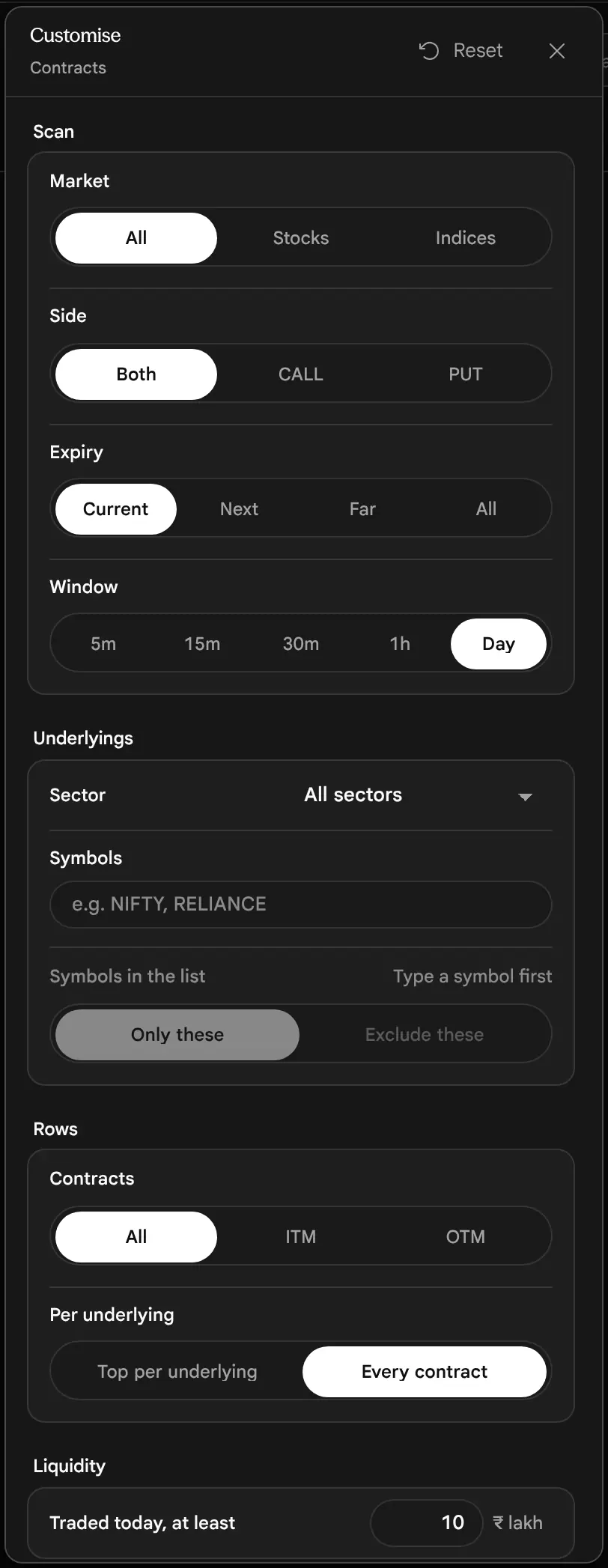
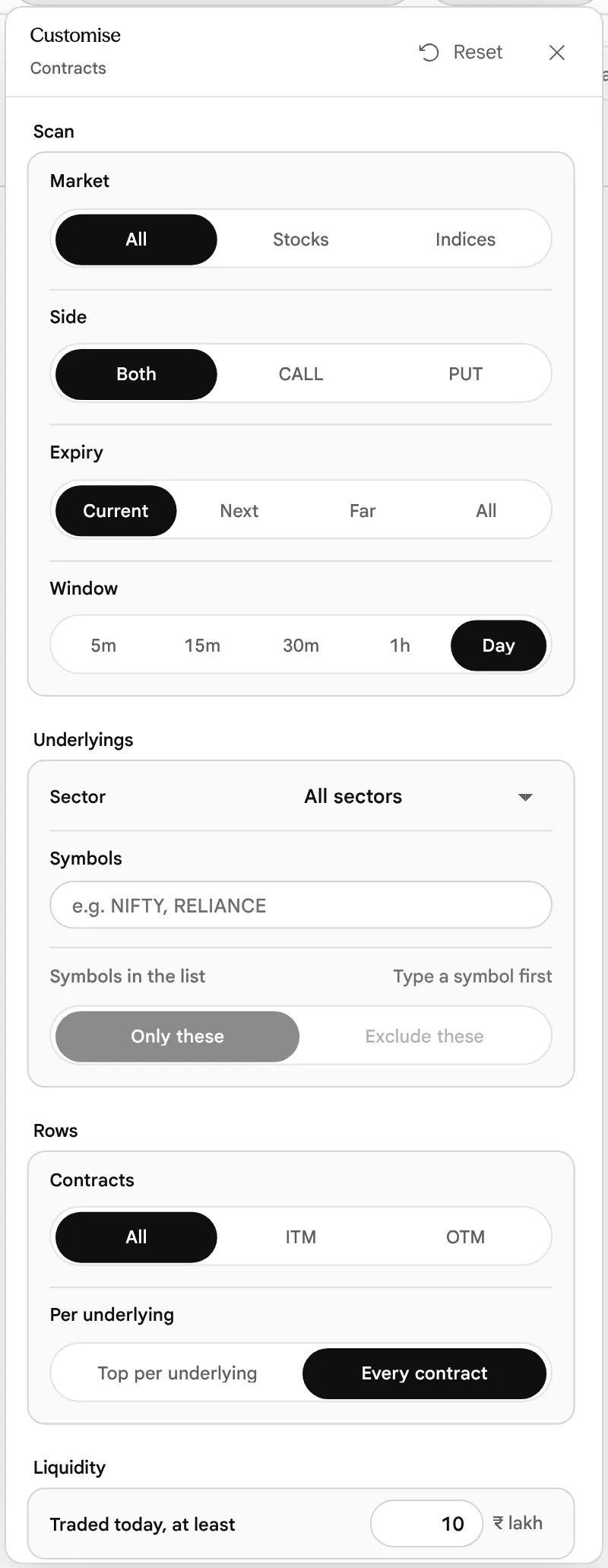
The basic controls
| Section | Control | Choices | Default |
|---|---|---|---|
| Scan | Market | All, Stocks, Indices | All |
| Side | Both, Call, Put | Both | |
| Expiry | Current, Next, Far, All | Current | |
| Window | 5m, 15m, 30m, 1h, Day | Day | |
| Underlyings | Sector | A list of sectors. Stocks only; an index has no sector, so a sector leaves indices out. | All sectors |
| Symbol list | Symbols separated by commas, semicolons or spaces, with Only these or Exclude these. Shared by every scanner view. | Empty (off) | |
| Rows | Contracts | All, ITM, OTM | All |
| Per underlying | Top per underlying (its best contract only), or Every contract | Every contract | |
| Liquidity | Traded today, at least (₹ lakh) | Average traded price × contracts traded today | 10 (₹10 lakh) |
For this view, ITM means a Call whose strike is below spot or a Put whose strike is above it. Everything else counts as OTM: a Call at or above spot, a Put at or below it. There is no ATM choice here, so each strike is split by its side: at the strike nearest spot, one side is ITM and the other is OTM (both are OTM only when the strike equals spot). That is the Contracts view's own rule, and it is why the Custom view's OTM capsule, which leaves out the ATM strike on both sides, can list slightly different rows.
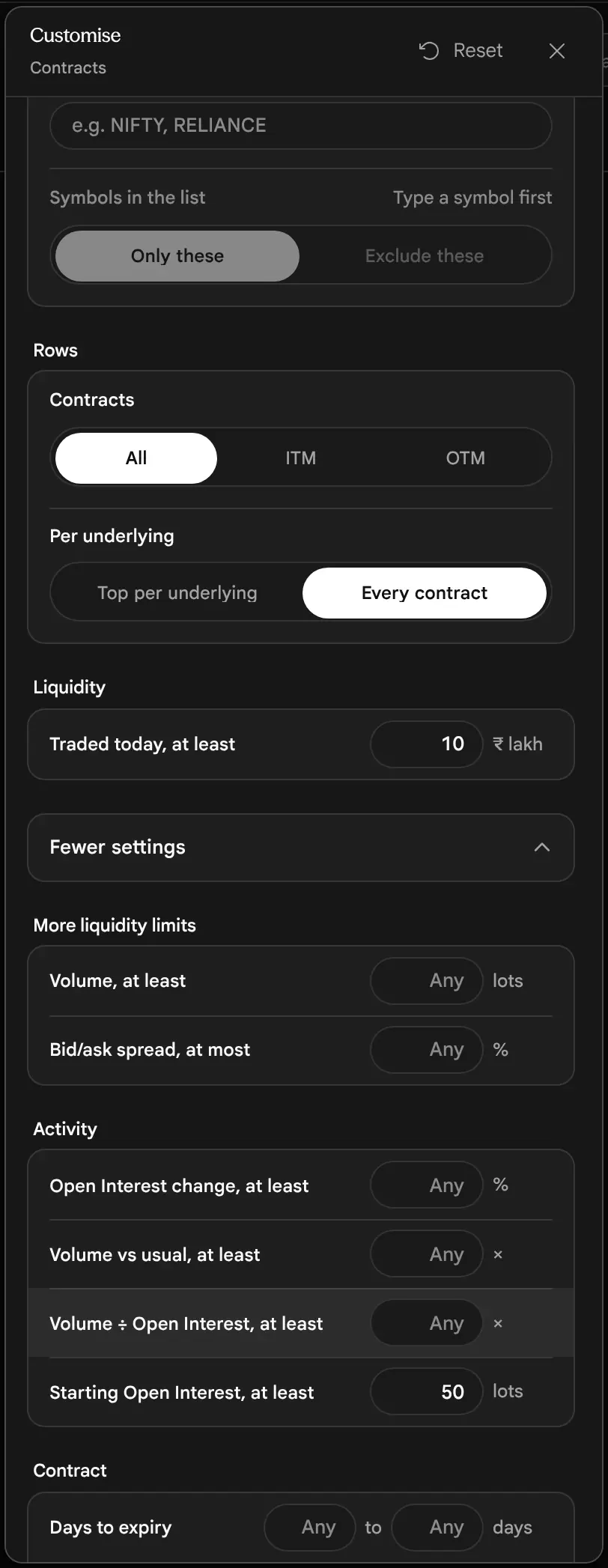

More settings
| Group | Setting | What it keeps | Default |
|---|---|---|---|
| More liquidity limits | Volume, at least (lots) | Contracts whose volume in the window reached this | Any |
| Bid/ask spread, at most (%) | Contracts whose spread is at or under this. A contract with no two-sided quote fails a set limit. | Any | |
| Activity | Open Interest change, at least (%) | Open Interest up or down by at least this share of where it started. A position opened from zero counts as added. | Any |
| Volume vs usual, at least (×) | Against yesterday on Day, against today's pace in a window | Any | |
| Volume ÷ Open Interest, at least (×) | 1 means volume above Open Interest | Any | |
| Starting Open Interest, at least (lots) | The floor for Volume ÷ Open Interest and for the % Open Interest scans | 50 lots | |
| Contract | Days to expiry (from to) | Calendar days left, counted the way the app counts them | Any |
| Distance from spot (from to, %) | Strike distance from spot as a share of spot, without sign | Any | |
| Delta (from to) | Either sign. Type 30 and it reads 0.30. A set limit leaves out contracts without a delta. | Any | |
| Worthless at expiry (from to, %) | The model's chance, Step 14. A set limit leaves out contracts without a reading. | Any | |
| Implied volatility (from to, %) | A set limit leaves out contracts without an IV | Any | |
| Premium per lot, at most (₹) | Premium × lot size, so a small account can see what one lot costs | Any | |
| Gainers and losers (only for Top gainers and Top losers) | Starting premium, at least (₹) | The price the change starts from must be a real, tradeable price | ₹2 |
| Traded yesterday, at least (lots) | Day window only | 10 lots |
The last card of the panel, ATM Open Interest in context, is marked Experimental. It ranks the Open Interest at the at-the-money strike and one strike either side against the same underlying's last 12 settled expiries at the same distance from expiry, as of the last close, and can keep only underlyings whose reading is unusual. It describes positioning and is not a forecast. It is off until you switch it on.
Use the settings in force: chips, Reset and links
Nothing you set is ever hidden. The header lists every setting in force. A setting that differs from the default is a capsule with a cross, where it falls in the line; each run of defaults between them is one quiet sentence that opens Customise. Press a capsule's cross to undo that one setting. Reset returns every setting to its default, clears your symbol list and keeps the scan you are on.


On the page itself, the address bar carries the scan and every setting that differs from the default; a page left at its defaults has a plain address. Bookmark the page or send the link and it opens the same view with the same settings. The names are readable, for example:
/options-scanner?scan=short-build&market=stocks&type=PE&strikes=otm&min_oi_change=25&expiry=next
The side is written as a two-letter code: CE is the link's code for Call and PE is its code for Put. In the tables, the tag reads Call or Put. Inside the Terminal widget the settings stay in memory for that widget and the address bar is left alone. A value that cannot be read is ignored, never guessed. A minimum above its maximum is dropped as a pair, because it could match nothing. Your symbol list stays yours and is not part of a link.
On a laptop, the table keeps its first columns
Each scan puts its most important figures first. At 1440 pixels wide or less a table keeps its first ten columns, and at 1280 pixels or less its first six, so the card never needs a sideways scroll to be read. (A Contracts table has at most nine columns, so in practice it folds at 1280 pixels and below.) A switch at the top left of the table, All columns, brings the rest back; the card then scrolls sideways with the contract name pinned. It becomes Fewer columns once pressed.


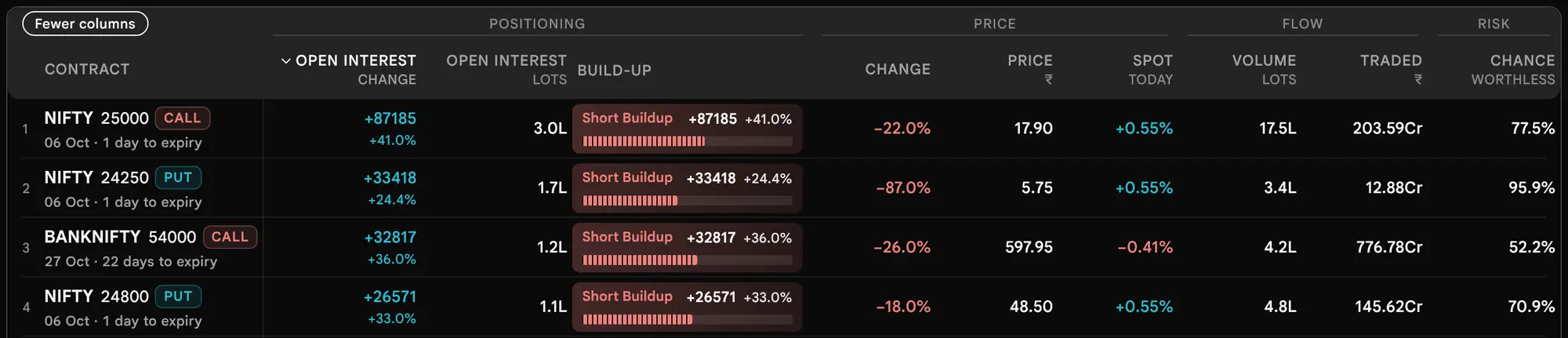

The Underlyings and Custom tables fold at the same two widths, from the same rule. In Underlyings the six that stay at 1280 pixels are Price, Change %, ATM IV, Expected move, Open Interest change and Traded.
Search one symbol, or keep a list of symbols
The Search symbol box beside the scan picker filters the list by name. A whole symbol means that underlying alone: typing NIFTY lists NIFTY and not BANKNIFTY. Part of a name finds every symbol that contains it.
If the scan has nothing for that symbol, the list says so in place: No contracts match “TCS”, with the line Nothing on this list for that symbol. Clear the search, or try another scan. and a Clear search button that empties the box without leaving the page. Underlyings does the same (No underlyings match “TCS”). Without a search, the empty list offers Customise instead.
For a standing list, use the symbol list in Customise, under Underlyings. Type symbols separated by commas, semicolons or spaces, then choose Only these to keep just them, or Exclude these to remove them. With no symbols typed, the list is off whichever choice is made. The list is kept in your browser, shared by every scanner view, and each view shows it as a chip while it is in force.


Open a contract
Press a contract's name, or anywhere on its row, to open the option chain's own strike studio for that contract, without leaving the scanner. Only symbols the site lists can be opened. Press Escape or the cross to close it.
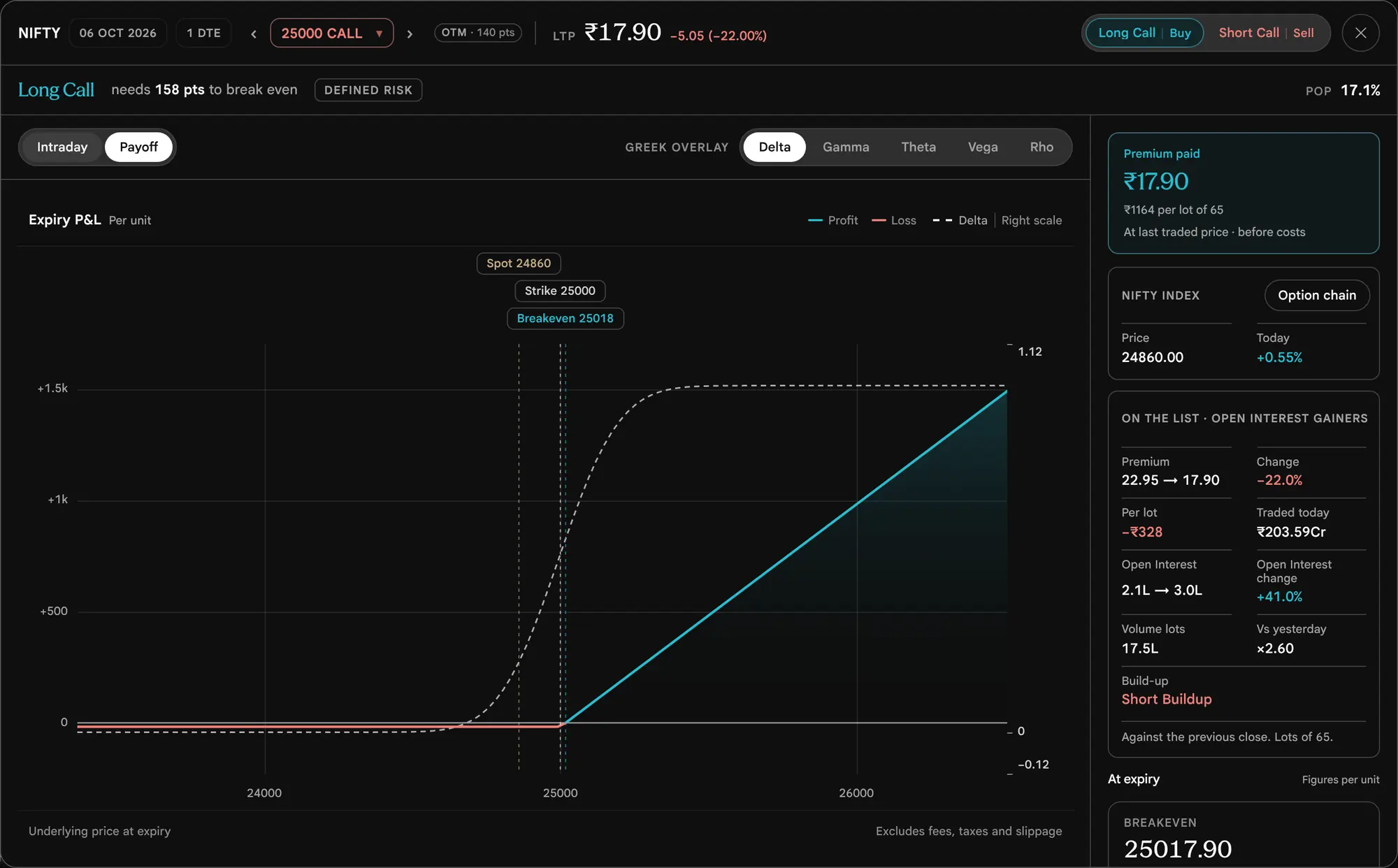
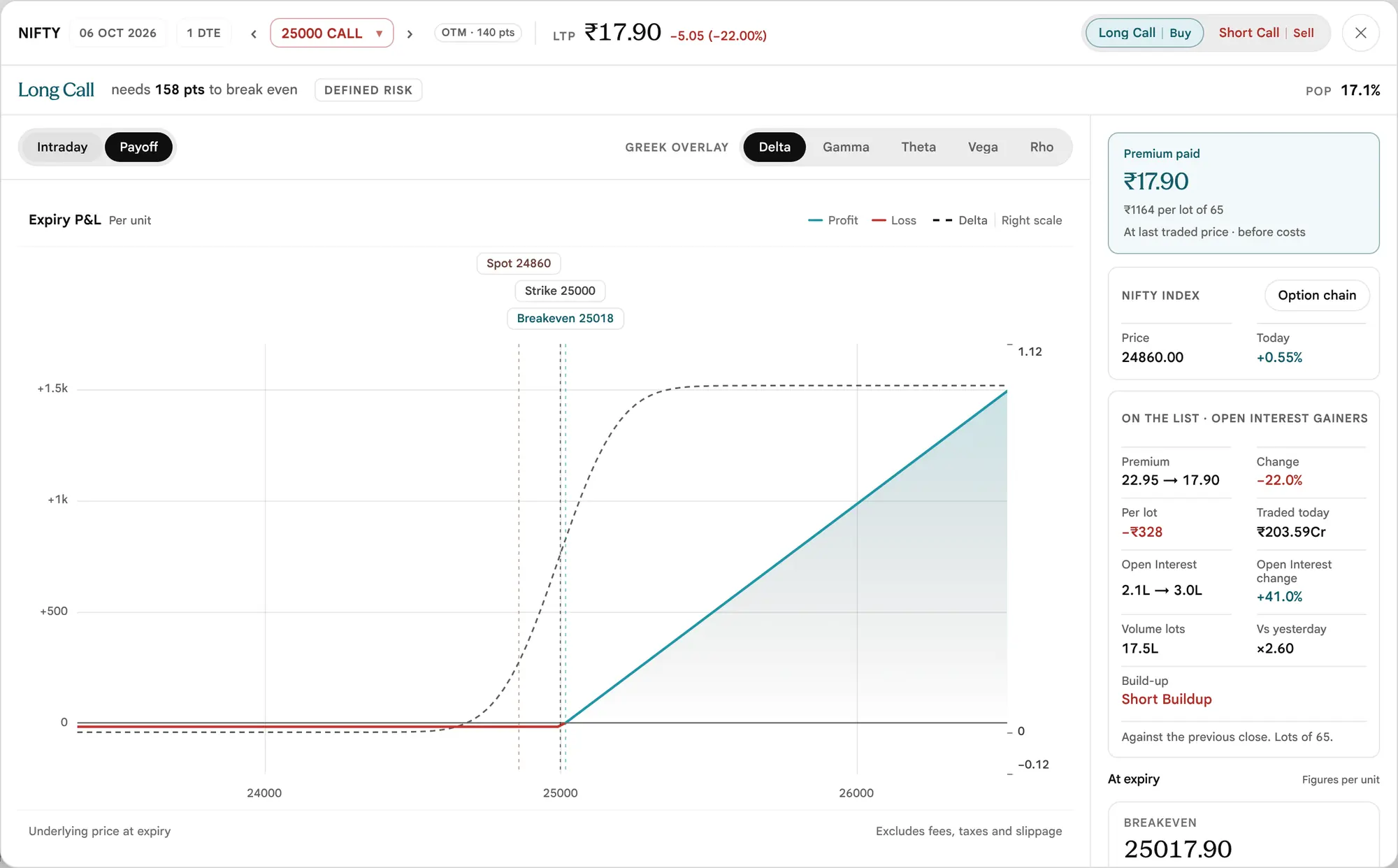
The studio carries the chart, the payoff, the Greeks and every figure of that contract, and it can step to neighbouring strikes with the arrows beside the strike name. The scanner adds two short cards at the top of the rail:
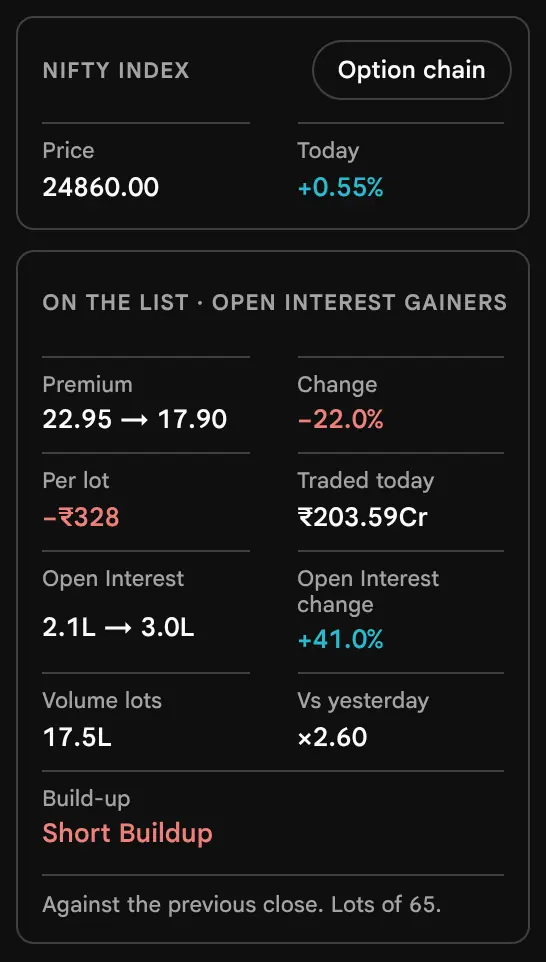

- The underlying card gives the price, today's change, the sector for a stock, and a link to the full option chain.
- On the list gives the premium from and to, the change in percent and per lot in rupees, what traded, the Open Interest from and to, the volume against yesterday (or against today's pace), and the build-up. Its note says how it was measured and the lot size, for example "Against the previous close. Lots of 65."
- If you step to another strike inside the studio, the On the list card goes away, because that contract is not the one the scan listed.
Chance worthless: read it as a model, not a forecast
What the Column Says
Chance worthless is the model's chance that an option ends out of the money at expiry: a Call at or below its strike, a Put at or above it. It is the share of probability the model places on the buyer losing the whole premium.
It is a reading from the market's own prices, not a forecast of what will happen. The model is only as good as the prices it reads, and prices move every minute.
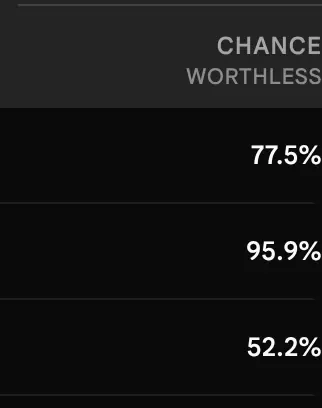

The reading is built in three steps. The expiry's price is centred on the price its Calls and Puts imply together, known as the put–call parity forward. The spread around that centre follows the expiry's implied volatility smile when the smile reads sensibly, and otherwise a single bell curve at the contract's own implied volatility. The chance is then the share of that distribution at or beyond the strike.
The column appears in the Open Interest and build-up scans, is sortable, and can be filtered as a from–to range under Customise, in the Contract group. A settled expiry has no reading and shows a dash; a set filter leaves such contracts out. Selling an option that shows 90% is not a 90% win: the writer keeps a small premium in most cases and carries the tail risk in the rest, which the percentage says nothing about.
The Underlyings view
How much movement do its options price, how does that compare with what it actually did, and where do positions sit?
Underlyings, Step by Step
Here one row is a stock or an index. The first scan, All, reads that underlying's options: how much movement they price, how that compares with what the underlying actually did, and where positions sit. The other eight scans read its near-month future.
Open Underlyings and read the page
Press Underlyings in the page bar. The scan picker has four families: All, Price, Open Interest and Build-up. The page opens on All, current expiry, every market, with underlyings whose options traded under ₹1 crore at that expiry left out. The status line says how many underlyings are listed, and while the daily candles are still being read it says, for example, realised volatility 12 of 19 read. The heading reads Underlyings on the All scan and the scan's name on the futures scans. Under each name sits the expiry date and the days to expiry, for example 12 days to expiry or Expiry day.
While the option books load the page says Loading option books…, and it does not wait for ever. A market-file request that stalls for more than 20 seconds counts as missing, and the page then reads each underlying's option chain on its own (a banner says so and offers Read again, and names the underlyings that could not be read). If not one chain answers, the page says No option books could be read and that this is not a filter result. If there is no list of underlyings to read from at all, it says No underlyings to read and links to the option chain, which still opens for any symbol.


Read the columns
For one column's formula at a glance, see the column quick reference. The All scan has fifteen columns in five bands. Volatility figures are in percentage points a year. Realised volatility uses 30 trading days.
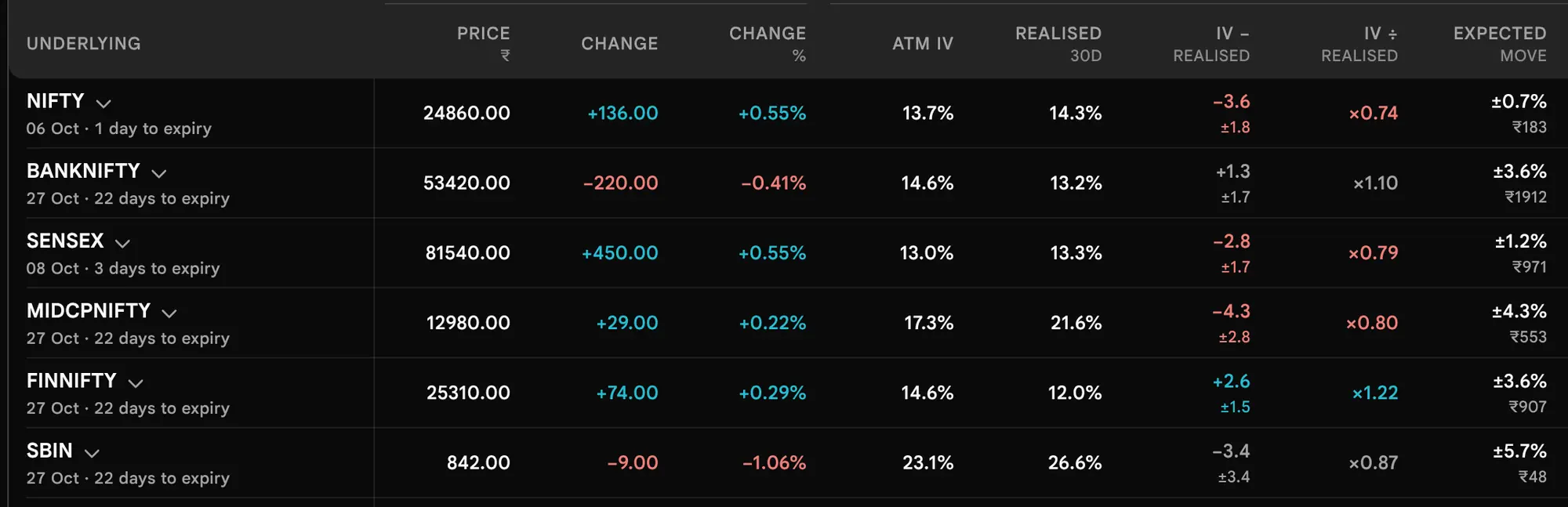
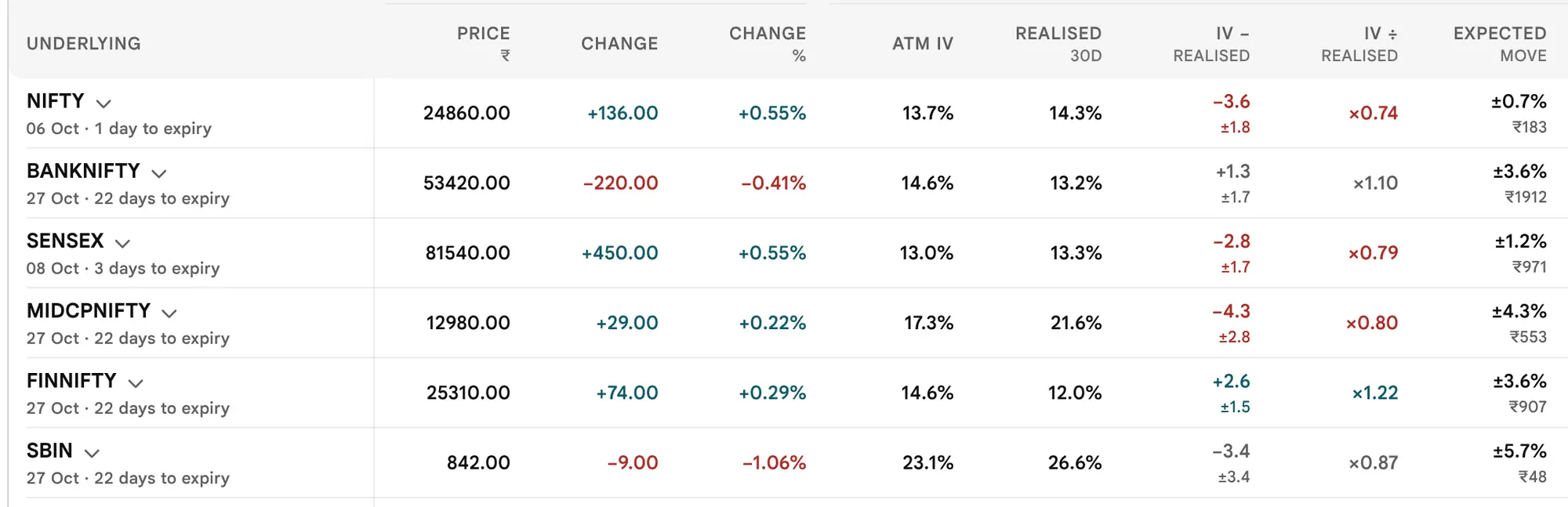

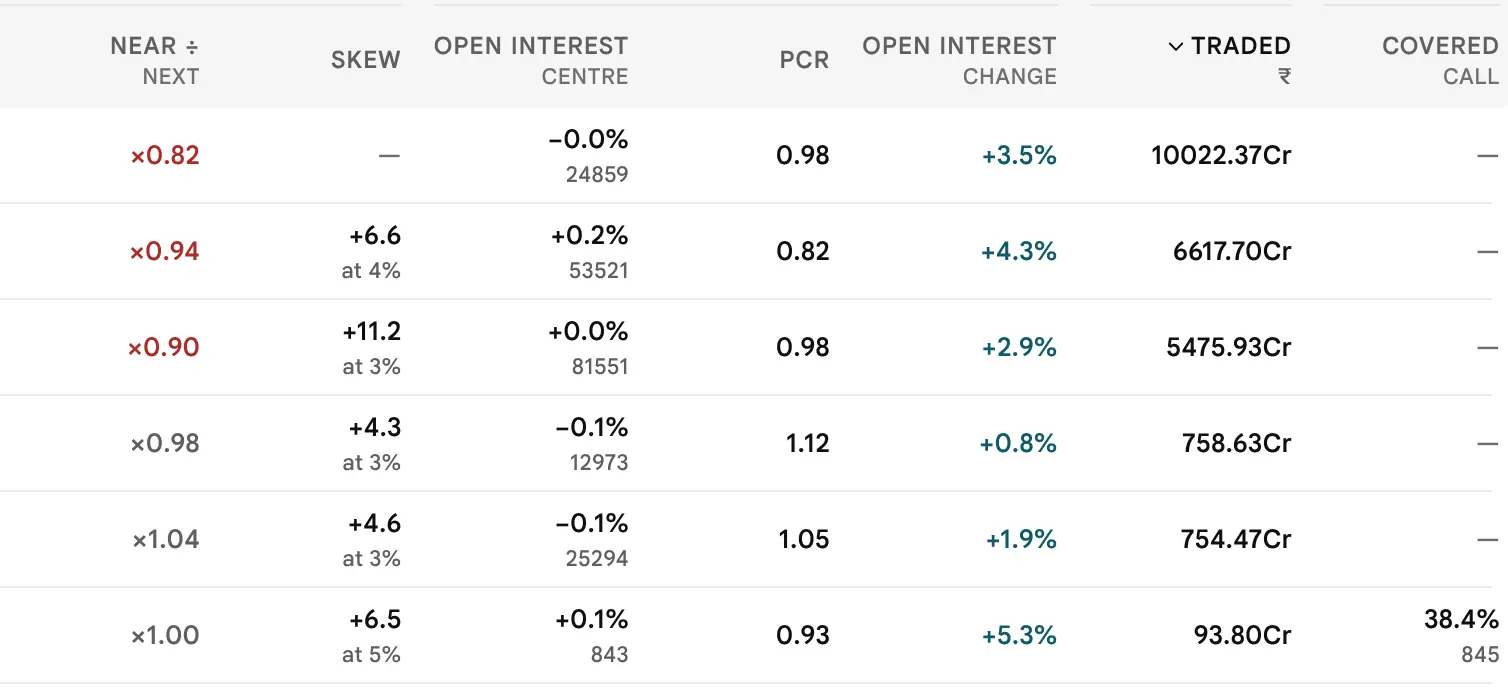
| Band | Column | What it measures | How it is worked out |
|---|---|---|---|
| Price | Price ₹, Change, Change % | The underlying's last price and its move since the previous close | As the option chain's spot |
| Volatility | ATM IV | The movement the options are priced for, as a yearly figure | From the Call and Put prices at the two strikes either side of the forward at that expiry |
| Realised 30d | How much the underlying actually moved over its last 30 trading days | Each day's open, high, low and close and the gap from the day before (the Yang–Zhang method), × √252 to make it yearly | |
| IV − realised, IV ÷ realised | Implied against realised, on one scale | A quoted IV spreads movement over all 365 days, as if 5 in 7 traded. So both are put on a per-trading-day scale first. A gap smaller than the realised reading's own sampling error is shown as roughly equal. | |
| Expected move | One standard deviation (1 SD) to expiry, in percent and rupees | Price × ATM IV × √(years left). This is a model range of one standard deviation (1 SD): under the model there is about a 2-in-3 chance of finishing inside it. It is worked out from the ATM IV, not from the ATM straddle's price. | |
| Near ÷ next | The term structure | The current expiry's IV per trading day divided by the next expiry's, per trading day | |
| Skew | Fear on the downside against the upside | IV priced for Puts a set distance below the forward minus IV for Calls the same distance above, in points. A small note says the distance, for example "at 4%". A dash means the options that traded do not reach far enough either side. | |
| Positioning | Open Interest centre | Where open Calls and Puts are centred, and how far that is from spot | Each strike × its Open Interest, added up, ÷ all Open Interest; Calls and Puts together |
| PCR | The put-to-call ratio of Open Interest | Put Open Interest ÷ Call Open Interest at that expiry | |
| Open Interest change | Open Interest added or closed today, in percent | Against the previous close | |
| Flow | Traded ₹ | Option premium traded today at that expiry | Average traded price × contracts, summed over its contracts |
| Income | Covered call | Yearly yield of owning one lot and selling the at-the-money Call | (Premium kept if the price is unchanged) ÷ (price − premium) × 365 ÷ days left. An index shows a dash, because it cannot be held as shares. |
Which "expected move" is this?
This screen's Expected move is spot × ATM IV × √T, the 1 SD model range above. Elsewhere on the site, the owner's rule for "expected move" is 0.85 × the ATM straddle (the ATM Call and ATM Put premiums added together). The two are worked out differently and give different numbers, so do not compare one with the other. Whether this screen keeps its definition or its name is pending the owner's decision (expected move definition pending).
Open a row to see every figure worked out
Press anywhere on an underlying's row, or the small arrow beside its name (the keyboard reaches the same toggle through that arrow). A panel opens beneath it with one card for each figure, saying in plain words what it reads. Press More detail under the cards for how each was worked out with that row's own numbers, and a caution where the reading needs one. The panel also offers three buttons: that underlying's contracts (which opens the Contracts view with the symbol searched), its option chain, and its implied volatility page. Pressing the underlying's name does something else: it opens a chart of its near-month future in a dialog, with 1m, 5m, 15m, 1h and 1D intervals, studies, and trend-line and level drawings. On the 1D interval a bar is a day, so the readout and the latest-bar card date it by the day alone, for example 19 Oct, with no 09:15 time; the shorter intervals print the time in IST.


This is the quickest way to learn the page. Read a card, then check the working against the table; after a few underlyings the columns need no explaining.
Use the futures scans
The eight scans after All read each underlying's near-month future over the chosen window: Top gainers and Top losers by futures price, Open Interest gainers and losers, and the four build-ups, each from futures price and futures Open Interest together. The window (5m, 15m, 30m, 1h or Day) applies to these scans only, not to All. Futures Open Interest adds every listed month (up to three), so positions rolled from one month to the next cancel out.
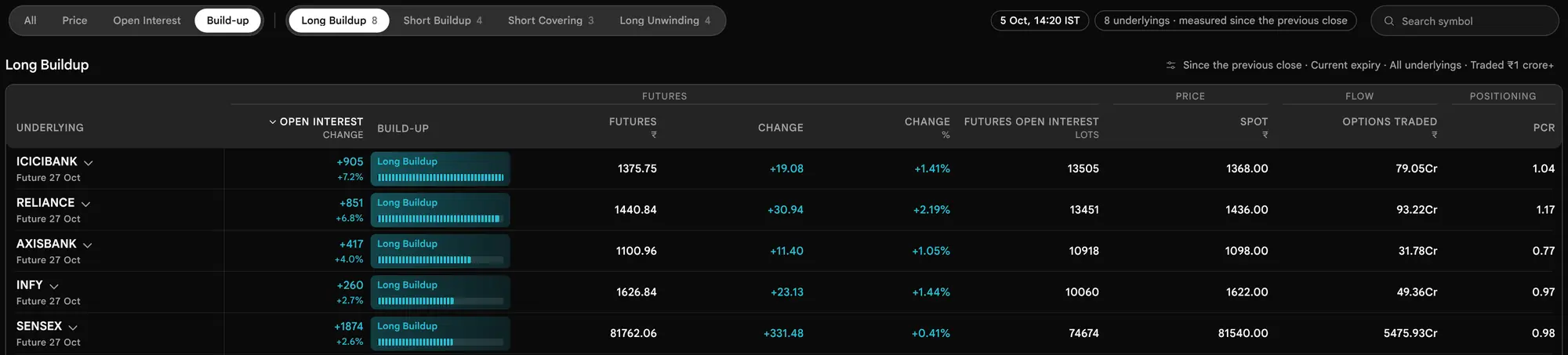

| Scan | What it lists |
|---|---|
| Top gainers, Top losers | Underlyings whose future rose, or fell, in the window, ranked by percent |
| Open Interest gainers, losers | Underlyings whose futures Open Interest rose, or fell |
| Long build-up | Futures price up and Open Interest up |
| Short build-up | Futures price down and Open Interest up |
| Short covering | Futures price up and Open Interest down |
| Long unwinding | Futures price down and Open Interest down |
Futures are read underlying by underlying, so a futures scan takes a moment the first time and the status line counts them: Reading futures 14 of 19. An underlying with no futures reading for the window is counted and left out. The futures build-up follows only the signs of the price change and the Open Interest change: unlike the contract build-ups, it has no noise floor, so any non-zero change counts. The 5m to 1h futures windows read one-minute candles, with the same tolerances as the contracts.
Customise the Underlyings view
The panel is smaller than Contracts' because the view has fewer choices.

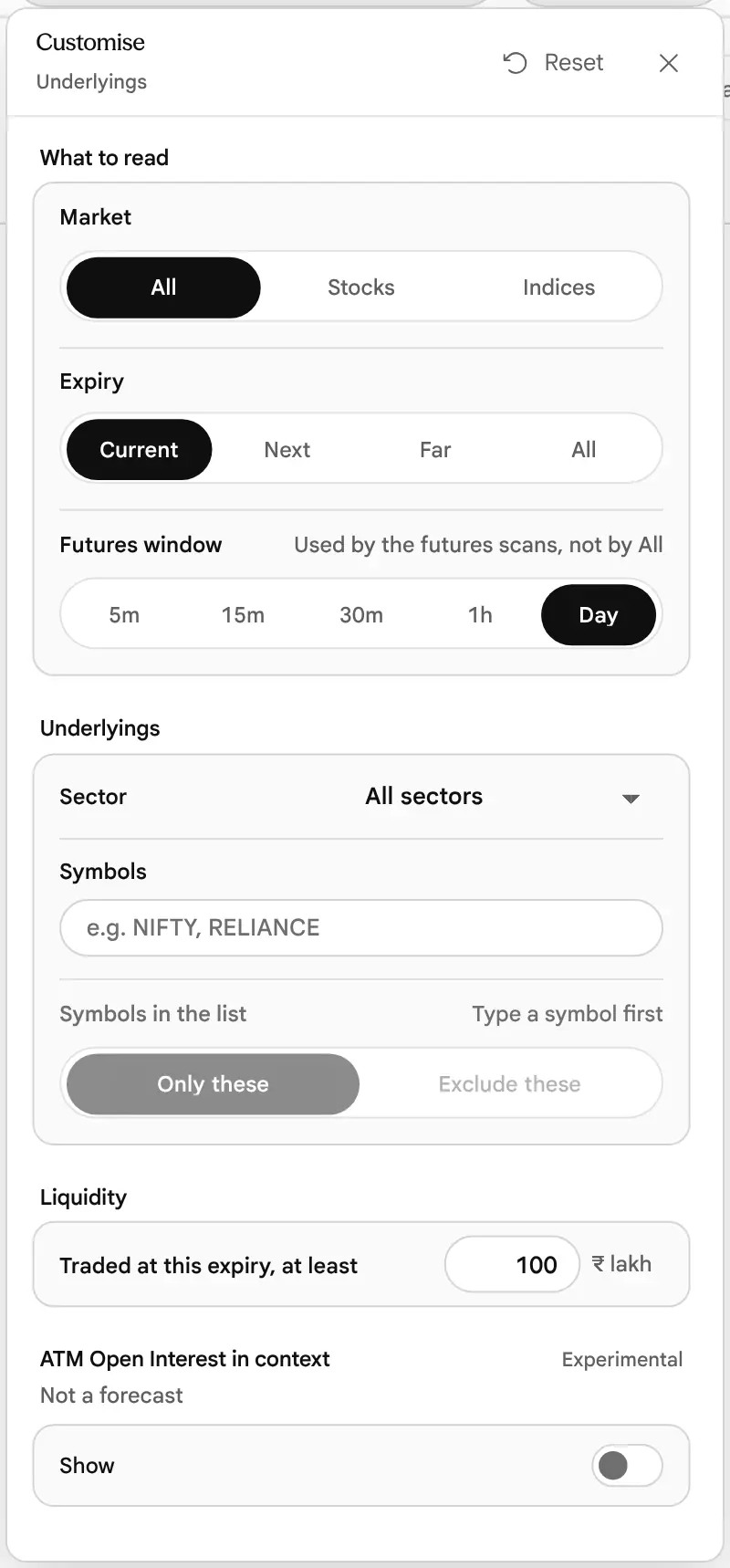
| Control | Choices | Default |
|---|---|---|
| Market | All, Stocks, Indices | All |
| Expiry | Current, Next, Far, All. All gives a row for each of an underlying's expiries, and is not offered in Custom when rows are underlyings. | Current |
| Futures window | 5m, 15m, 30m, 1h, Day | Day |
| Sector, symbol list | As in Contracts. The symbol list is the same one. | All sectors, empty |
| Traded at this expiry, at least (₹ lakh) | Thin option books are left out and the page says how many, with a Show them button. 0 keeps every underlying. The futures scans ignore this floor. | 100 (₹1 crore) |
| ATM Open Interest in context | Experimental, off until switched on | Off |
The link of this view carries view=underlyings and only what differs from these defaults: scan, expiry, window, market, min_value_lakh, sector and q.
The Custom view
Which ones meet the conditions I have set, all of them or any of them?
Custom, Step by Step
Custom works like a screener built one condition at a time. A prebuilt scan fills in the conditions for you; you can read each one, change it, add another or start from nothing. Every row is a contract or an underlying, as you choose.
Open Custom and choose what each row is
Press Custom in the page bar. At the top, Screen for offers Contracts (individual Calls and Puts across the market) and Underlyings (stocks and indices, judged on their options activity). At the right end of that line sit Undo and Redo.
The page opens on its first prebuilt scan, Every contract with money behind it: every option with ₹10 lakh or more traded today (or on the last screen you used, see Step 9). Below that sit the shelf, the filter bar and the results.
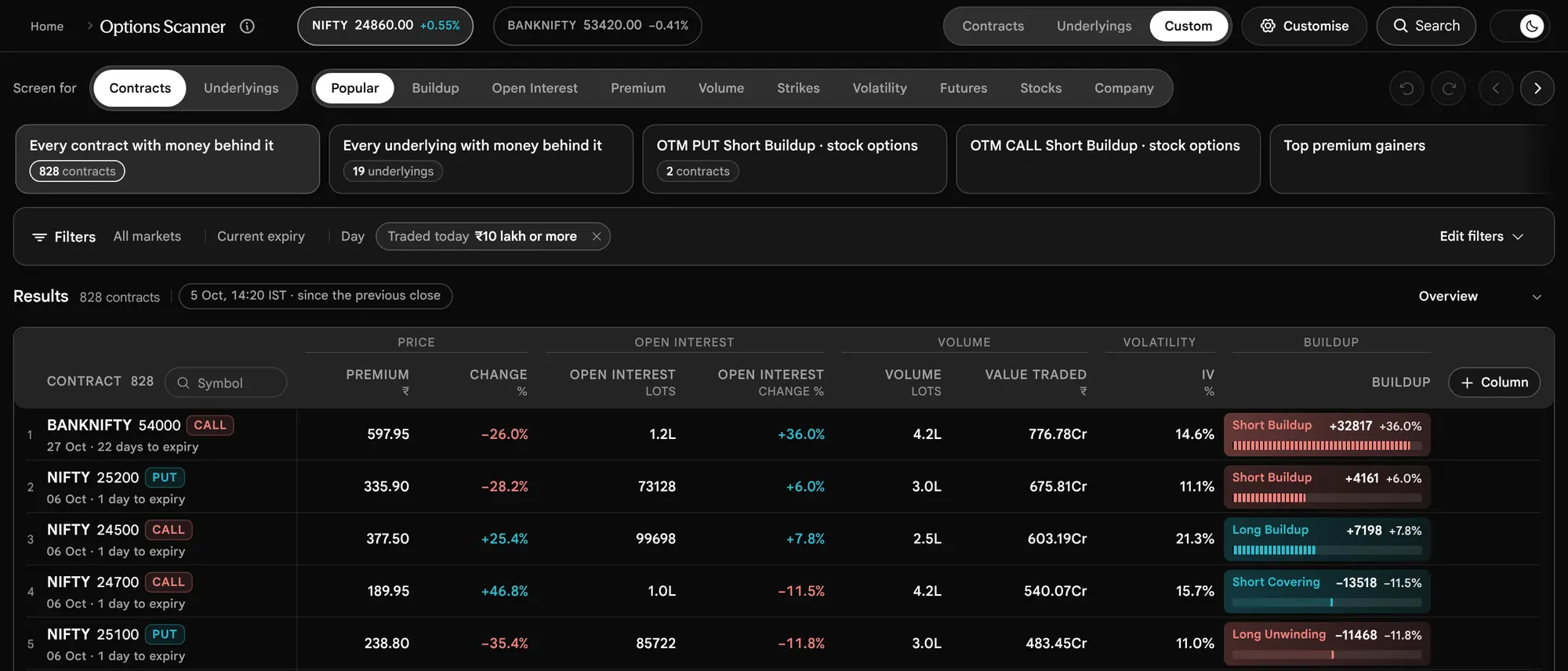
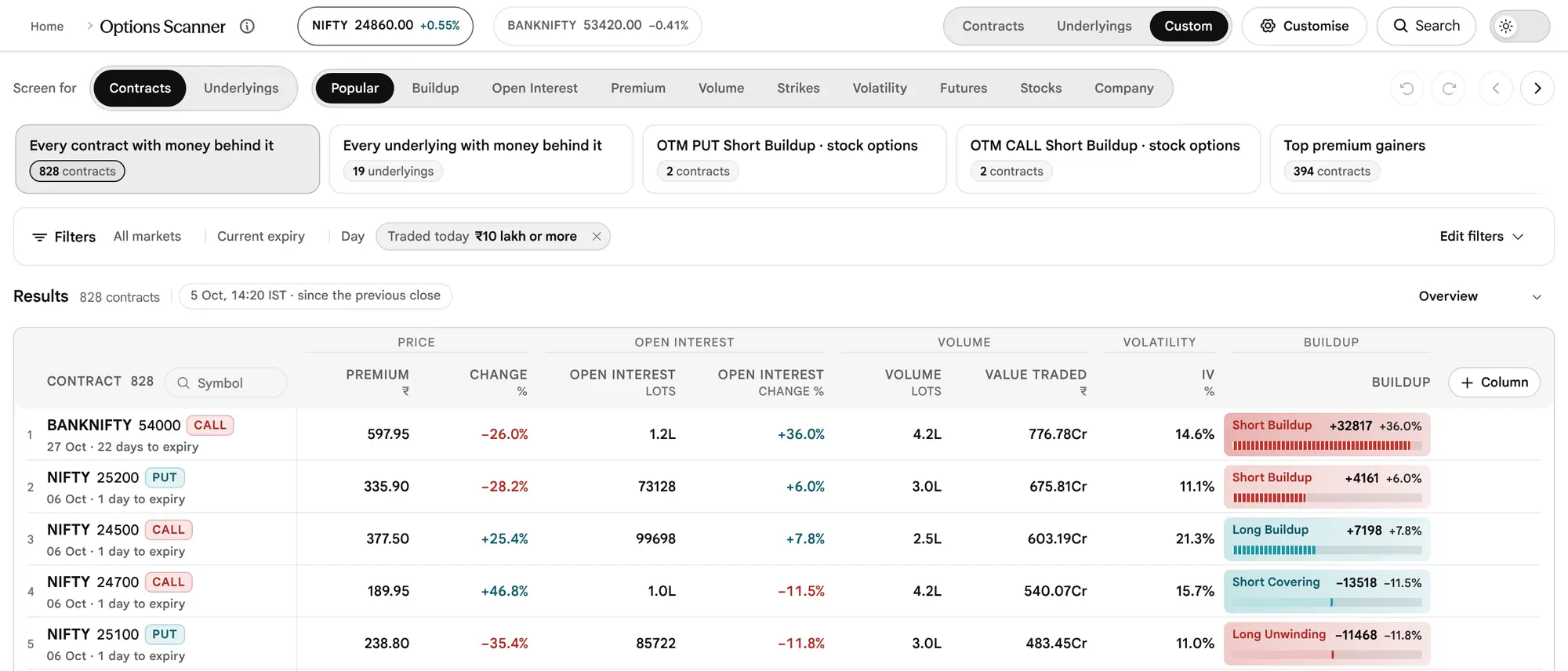


The switch keeps every filter that still reads on the new row type. Switching from the starting scan of one row type loads the starting scan of the other whole, with its own floor.
Start from a prebuilt scan
The Prebuilt scans shelf holds 77 ready-made scans in ten tabs. One click loads a whole scan: its market scope, its conditions, its Results view and its order. The conditions are real filters you can read and change, so a scan is also a lesson in how to build one.


| Tab | What it holds |
|---|---|
| Popular | Ten picks across the other tabs, in a fixed order |
| Build-up | The four build-ups, the OTM stock versions, and combinations with Chance worthless and strike Open Interest |
| Open Interest | Open Interest added or closed, in lots and percent, PCR, and the strike that is adding the most |
| Premium | Premium gainers and losers, and premium yield of OTM stock options |
| Volume | Most money traded, volume above yesterday's or above Open Interest, and combinations |
| Strikes | Conditions on the strikes counted from the money: ATM Call and Put patterns, Open Interest walls, max pain distance |
| Volatility | IV percentile, ATM IV above or below realised, near against next expiry, skew, expected move, time decay |
| Futures | The near-month future's build-up together with an option strike's |
| Stocks | Daily-candle conditions (price against a recent high or low, a moving average) together with an option build-up |
| Company | Three scans on company figures (results dates, dividend), from a source the product itself calls temporary. While those figures are not available, the cards say Company figures unavailable instead of a count. |
In the prebuilt scans, a stock, futures or company condition is paired with an options condition. A card shows only its name and a count. Under the count a card may instead say what it is waiting on: Reads futures, Reads candles, Reads IV history, Reads company figures, Reads 15 minutes ago (an earlier stored minute) or Market hours (no such minute is stored yet). Those cards are counted once you open them. The short reason for a scan appears when you rest the pointer on it or focus it.



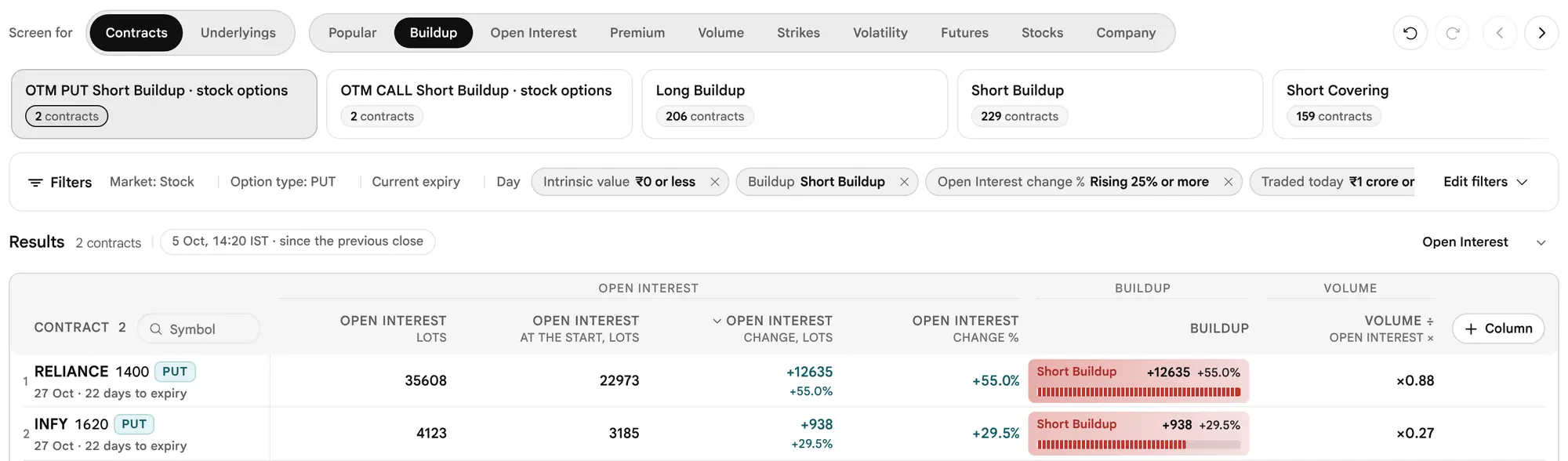
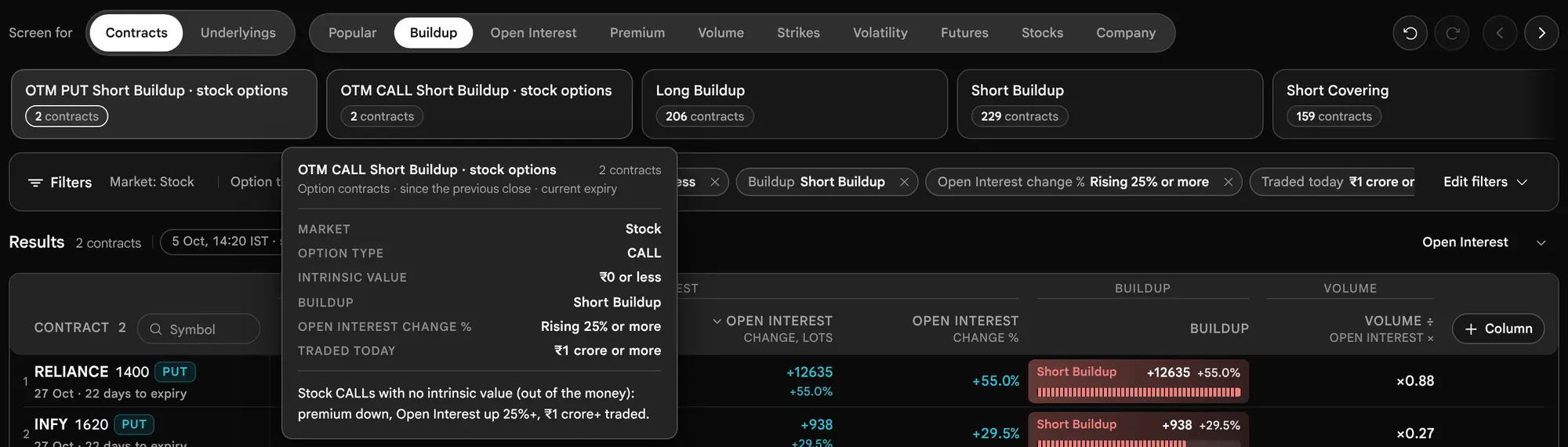
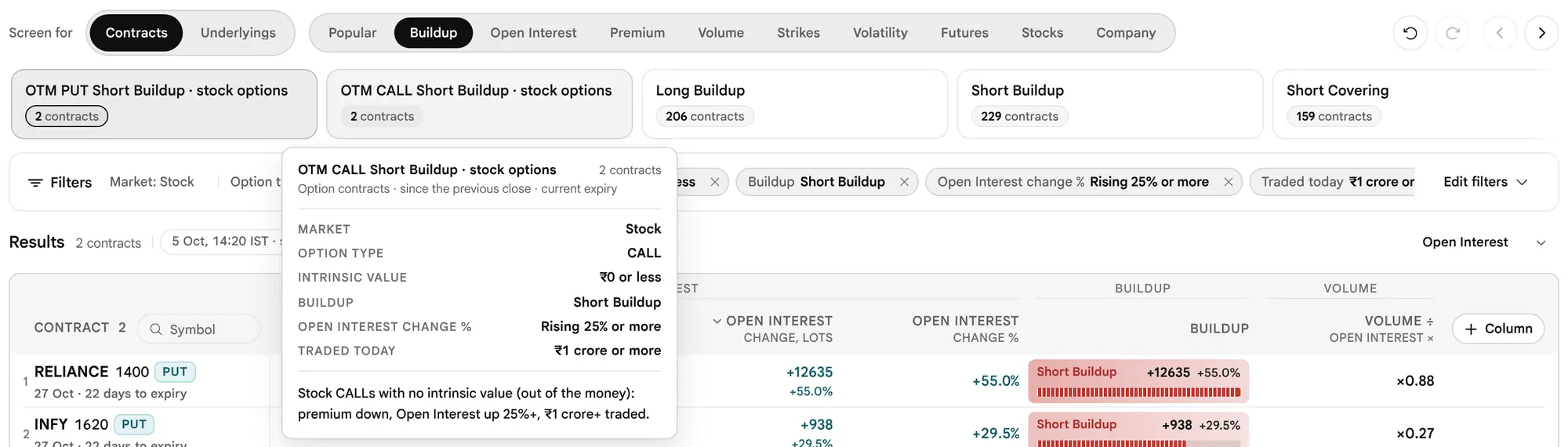
A card says Edited once you change its conditions, and pressing it loads the scan again. A count of "None today" is a valid answer, not an error.
Set the market scope
The filter bar is folded to one line while a screen has conditions: small chips for the scope, a chip for each condition, and Edit filters on the right. Press Edit filters to open it (it reads Done once open). The first row is the Market scope.






| Capsule | Choices | Note |
|---|---|---|
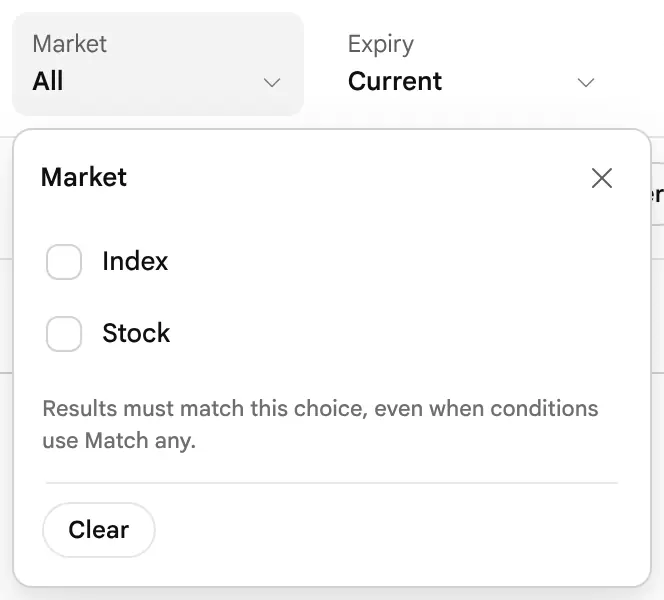
| Market | Stock, Index | Ticks; leaving both off applies nothing |
| Expiry | Current, Next, Far, All three | With All three, strike and future conditions read the nearest expiry. Not offered when each row is an underlying. From 15:30 IST on expiry day the settled expiry is no longer Current, as in Contracts. |
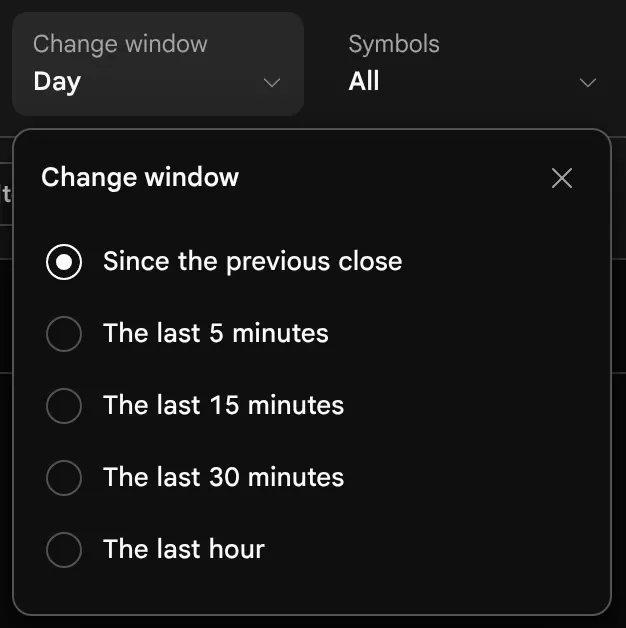
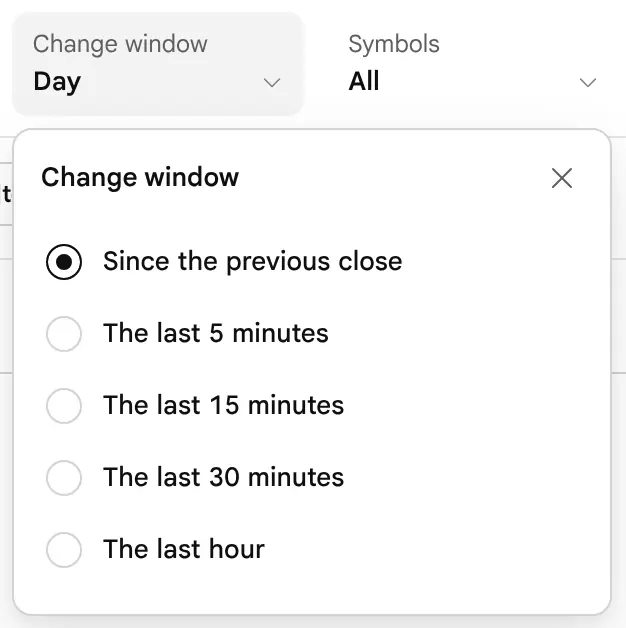
| Change window | Since the previous close; the last 5, 15 or 30 minutes; the last hour | Price, Open Interest and volume changes use this one comparison window |
| Symbols | The same symbol list as Customise | Only these or Exclude these |
| Sector | The catalogue's sectors | Stocks only; indices have no sector |
| Option type | Call, Put | Contract rows |
| Moneyness | ITM, ATM, OTM | Contract rows. Here ATM is its own choice, and OTM leaves it out. |
The scope is the fence around the screen. It always applies as AND, even when the conditions inside it use Match any. The sentence under the row says it: Within this scope, match the conditions below.



Add conditions, one capsule each
Every condition is a capsule. A capsule with no value is a figure on offer; a capsule with a value is a condition in force, drawn in ink with its value in bold and a cross to remove it. Press a capsule to open its choices as ticks.


- Ticks in one capsule are alternatives. Ticking "₹10 lakh to ₹1 crore" and "₹1 crore to ₹10 crore" means either of the two.
- A custom range can be typed in the capsule when the figure allows it, for example Open Interest change from 25 to 100 percent.
- A cross on a value empties the capsule but keeps its place; Remove inside the editor takes the capsule away; Clear conditions empties them all at once.
- A contract figure, when each row is an underlying, is shown dimmed with the reason "Only when each row is an option contract".
To add a condition, press Add filter. It opens a search over every figure the scan can read, grouped as a trader thinks of them.


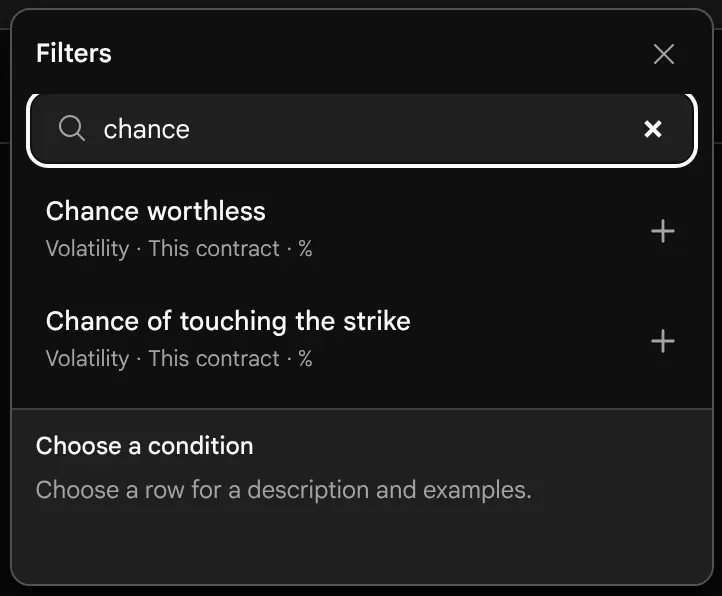

In all, the catalogue holds 123 figures. A figure that reads an underlying (underlying, futures, technicals and company figures) works for both row types; a contract figure works for contract rows only and is dimmed, with the reason, when each row is an underlying.
IV rank and IV percentile
Two figures in the Underlying group place today's implied volatility against its own year. Both read a 30-day IV, a blend of the expiries either side of 30 days, so the rise into every expiry does not move them. IV rank is where today's 30-day IV sits between the year's lowest close (0) and highest close (100). IV percentile is the share of the year's closes that were below today's. A reading above every close in the year shows rank 100, and below every close, 0. The year is the file described in Where the Numbers Come From: its last 252 sessions. With fewer than 60 closes there is no percentile, and with fewer than 252 no rank; the row then says Cannot tell with the reason. Neither figure says which way volatility will go.
The Technicals group reads daily candles at the last close, and the Company group (listed as Company, temporary source) reads company figures from a temporary source the product names in the app. This guide teaches option positioning and price action, so it does not teach those two groups.
When the Company Figures Are Not Available
The company figures (market cap, results dates, dividend yield and the rest) come from a daily file. While that file is missing, this is what you see:
- In Add filter and Add a column, the Company group is listed but greyed, with the line Company figures are not available right now, and its figures cannot be added.
- On the shelf, the three Company cards say Company figures unavailable where other cards show a count.
- If you open a Company scan, or have a company condition in the screen, the table is replaced by Company figures are not available right now, with the explanation that no stock can be checked and nothing is listed rather than every stock marked Cannot tell, and a Try again button. The same sentence appears as a note above the table.
- Company columns show a dash, never a zero.
Every other filter, scan and column works as before. When the file is there, the note names the source, calls it temporary and gives the date it was written.
Count strikes from the money, and read the future
Three kinds of capsule go beyond a single figure. They are the heart of Custom, because they let a screen ask about an underlying's own strikes the way a trader reads a chain.
A strike capsule
Under Add filter → At the money, a strike capsule reads a group of strikes counted from the at-the-money strike. It is named like ATM Call or 3 nearest OTM Puts, and its editor has three parts: Call or Put, which strikes, and, when the pick is more than one strike, how many of them.




| Which strikes | Meaning |
|---|---|
| ATM | The listed strike nearest spot, the lower one on a tie. This is not the forward-anchored ATM used for the IV figures. |
| Nearest OTM; 2, 3 or 5 nearest OTM | The first, first two, three or five strikes out of the money |
| Nearest ITM; 2 or 3 nearest ITM | The first, first two or first three strikes in the money |
| ATM and 1 or 2 either side | The ATM strike and that many on each side |
Strikes are counted in the strikes the exchange actually lists, so a step of one strike may be 50, 100 or 200 points for NIFTY. OTM and ITM picks never include the ATM strike, and a side that is not listed is not a contract and is left out. A strike condition is answered once for each underlying, and every contract of that underlying shares the answer. A percent premium change inside it keeps the same guards as the Contracts view and answers "cannot tell" with the reason when they are not met.
When a pick holds several strikes, choose Any of them, All of them or At least n of them (offered from 2 up to one fewer than the strikes in the pick). The strike capsule offers Build-up, Open Interest change % and price change % at once; + Another figure for the same contract adds any other contract figure by search. Every ticked group must hold on the same contract. The Add filter menu lists five picks (ATM, Nearest OTM, 3 nearest OTM, Nearest ITM and ATM and 2 either side); the Which strikes choice inside the editor offers all ten in the table above.
The future capsule
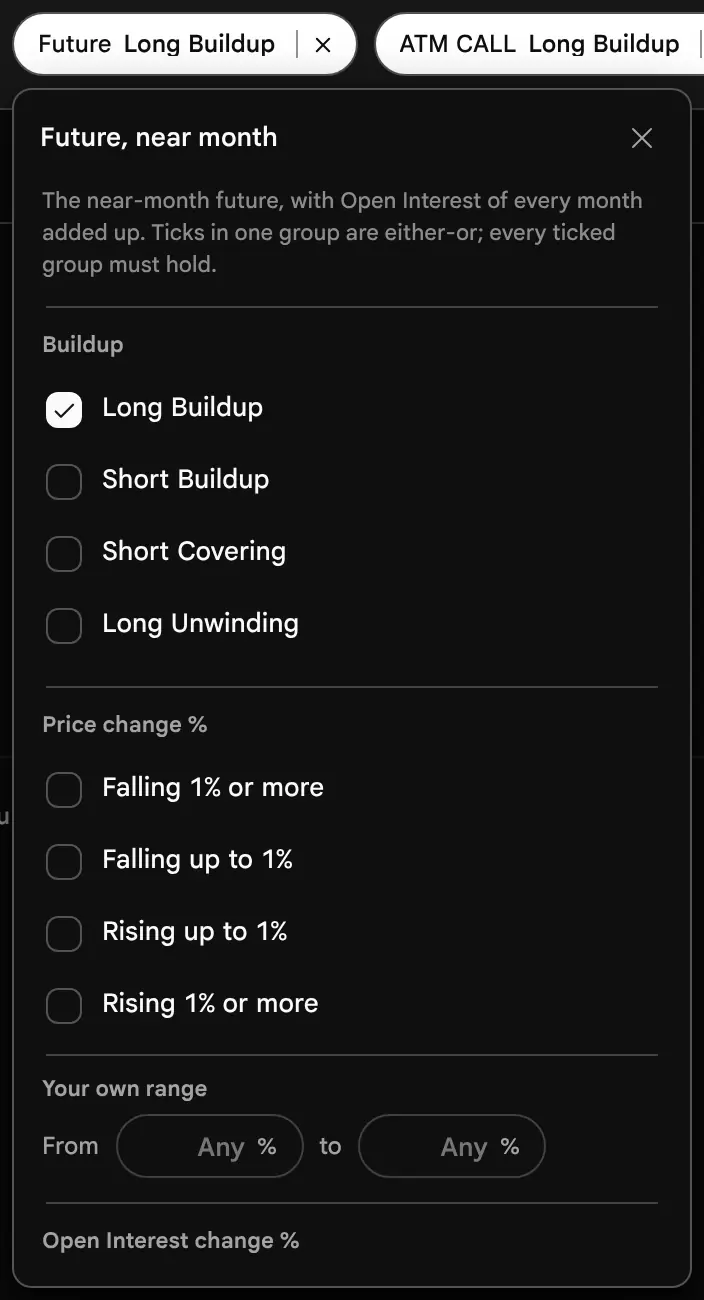
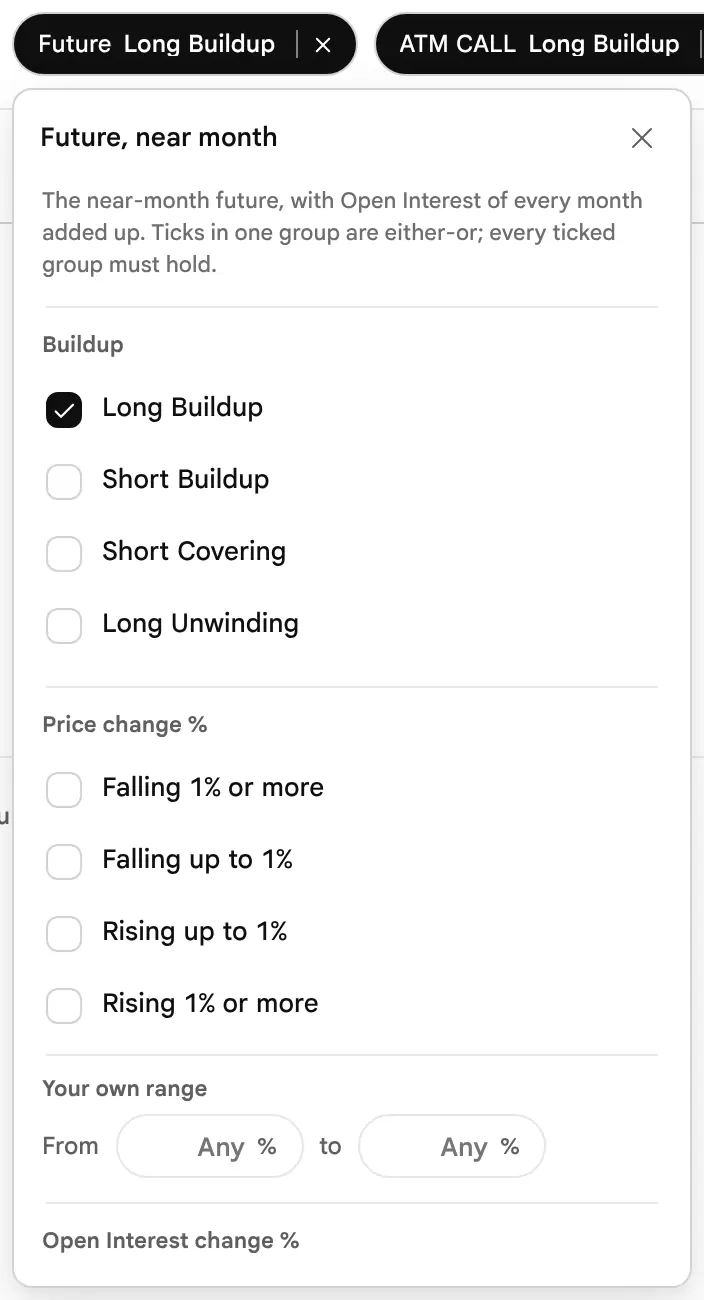
A group capsule
A group holds several conditions inside one capsule and joins them by its own All or Any. It is how a screen says "this or that" inside an otherwise strict screen. In its editor you choose All or Any of its members and can remove a member; groups come with the prebuilt scans that need them.


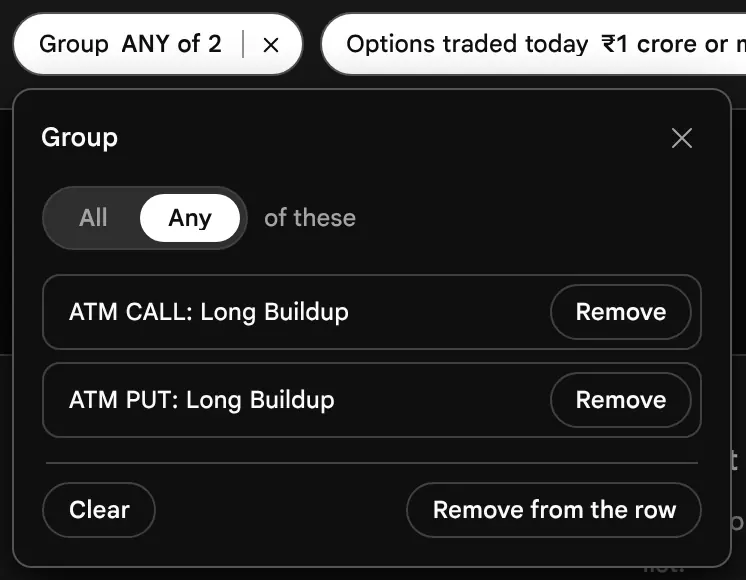

Join conditions with All or Any
The Match capsule at the right end of the Conditions row chooses how separate capsules are joined. All conditions keeps a row only when it meets every condition. Any condition keeps a row when it meets at least one. Market scope always applies, whichever you choose, and a missing figure never counts as a match.

| Contract (illustrative) | Build-up | Open Interest change | All of the two | Any of the two |
|---|---|---|---|---|
| A | Long build-up | +30% | Listed | Listed |
| B | Long build-up | +10% | Not listed | Listed |
| C | Short build-up | +40% | Not listed | Listed |
The conditions are Long build-up, and Open Interest change of at least 25%. All keeps only contract A, since it meets both. Any keeps all three, since each meets at least one. All narrows a list and Any widens it.
Three Levels of AND and OR
Inside one capsule, ticks are either-or. Between capsules, the Match capsule decides: All or Any. Around everything, the market scope is always AND. Inside a strike capsule, every ticked group must hold on the same contract, and across the strikes of a pick, Any, All or At least n decides.
Yes, no, or cannot tell
Each test answers Yes, No or Cannot tell. A figure that is missing, such as a contract with no earlier reading in the window, is never read as zero, and the row is never listed on a guess. The page counts how many could not be answered and says why in a note above the table, for example Cannot tell for 12: Not traded yesterday (12). Other reasons read "No reading from 15 minutes earlier", "No IV", "Starting premium under ₹2", "Futures not read yet" and the like, and the Results line shows "12 unavailable".
Working through every contract of the market takes a moment, so the page does it in small steps. Meanwhile the Results line reads Scanning with a count such as Scanning 8 of 19 underlyings, the last list stays on screen, and the page stays usable. If the market file never arrives and there is no list of underlyings to read from, Custom says No underlyings to read instead of waiting.
Choose the Results view, and add your own columns
The Results line says how many rows meet the screen, when the market was read, and the window measured. At its right, the Results view selector chooses which columns the table shows.


| Results view | For rows that are | Shows |
|---|---|---|
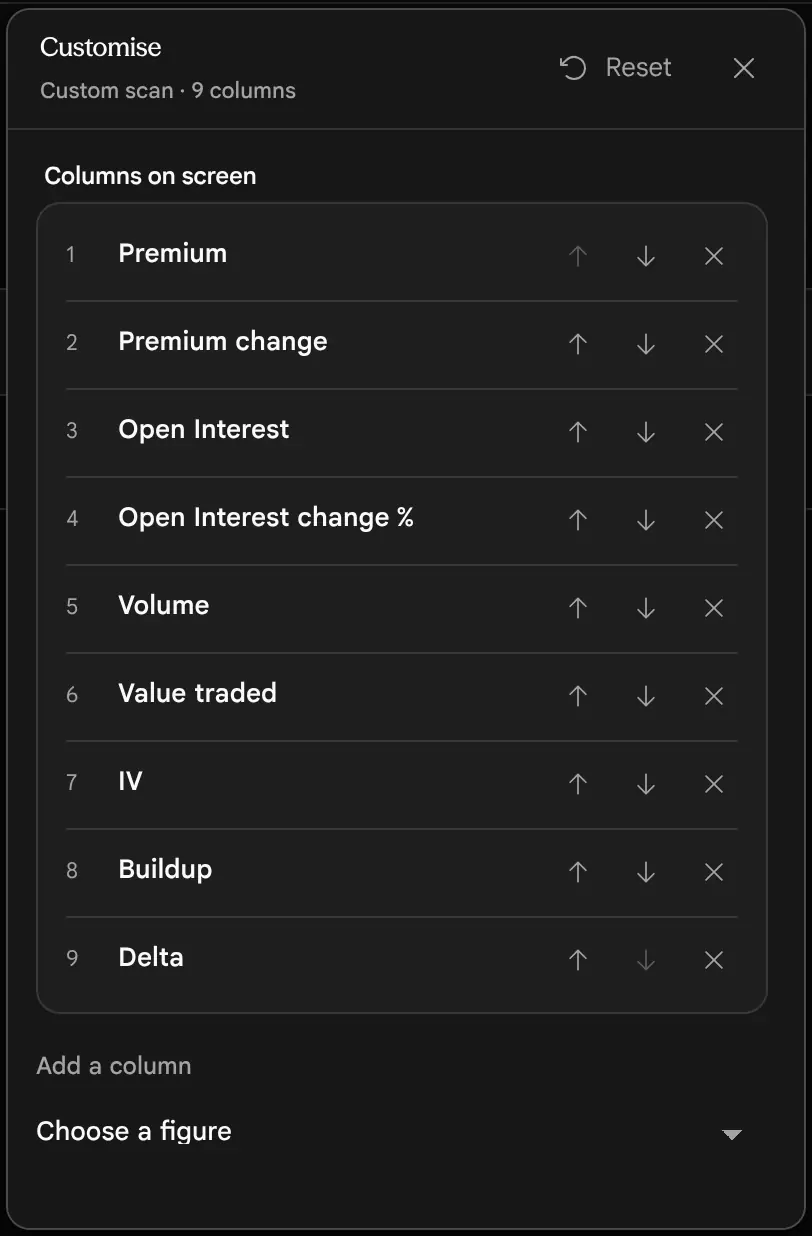
| Overview | Contracts | Premium, change, Open Interest, change, volume, value traded, IV, Build-up (the starting view) |
| Open Interest, Volume, Volatility, Greeks, Value, Levels | Contracts | The figures of that kind for the contract. Levels shows where its strike ranks by Open Interest on its side, with its share, strike PCR and max pain distance. |
| Underlying, Implied volatility, Futures, Technicals, Company | Both | The underlying's figures of that kind (the starting view for underlyings is Underlying) |
| Filters | Both | One column for each condition in force: what it read on the row |
| Custom | Both | Your own list of columns |
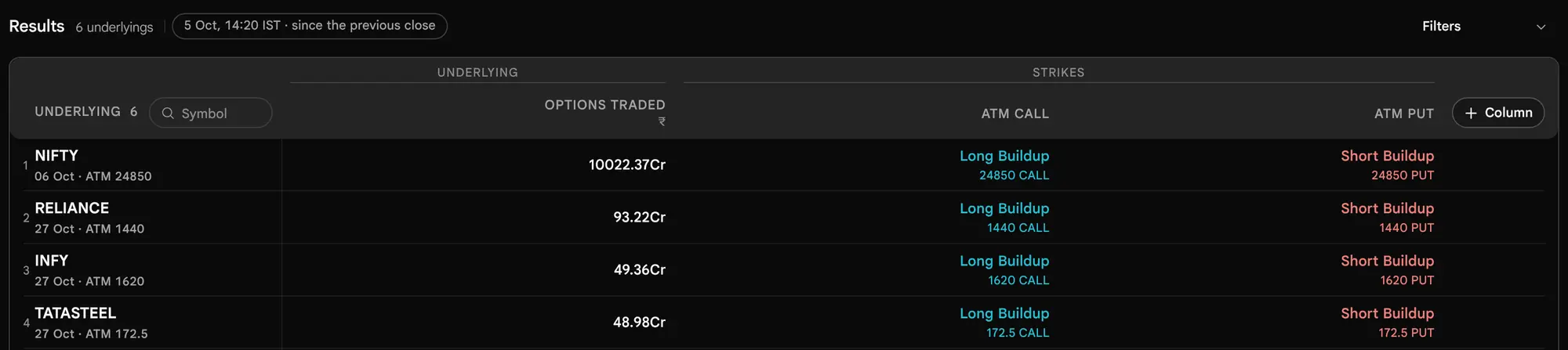
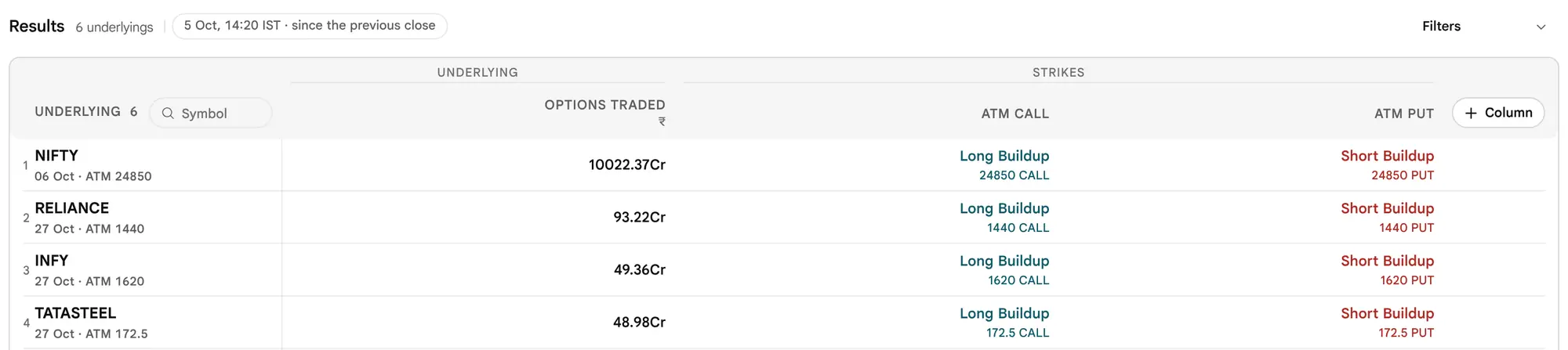
The table shows 50 rows at a time, with a Show 50 more button. The first head, Contract or Underlying, carries the number of rows and a small Symbol search box. Press + Column at the end of the table's head to add a figure. The Results view switches to Custom and shows your columns, starting from the columns that were on show so nothing disappears. Press a head to sort by it; the first press sorts largest first for a figure and A to Z for a word.


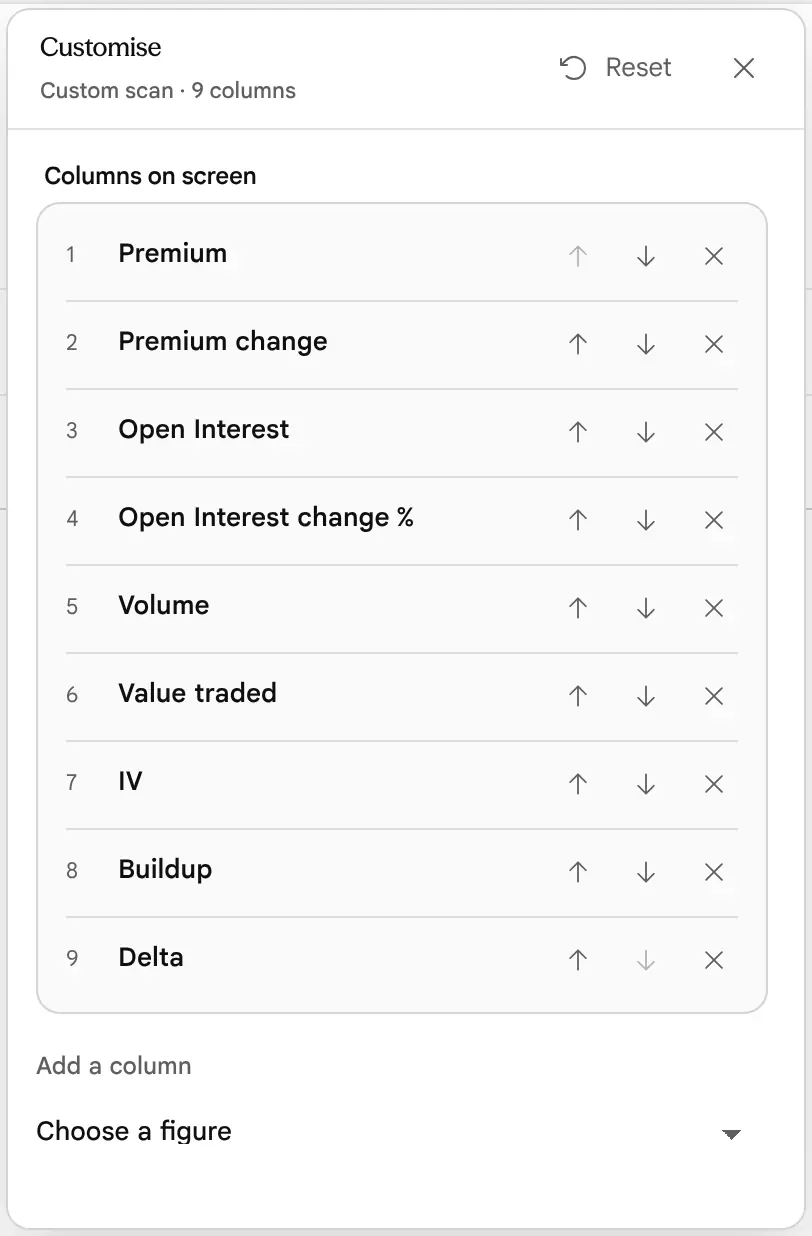
The Customise button in the page bar manages those columns. It lists them in order, each with move up, move down and remove, an Add a column choice under the list, and Reset returns to the starting view of the row type. Filters stay on the page, above the table.
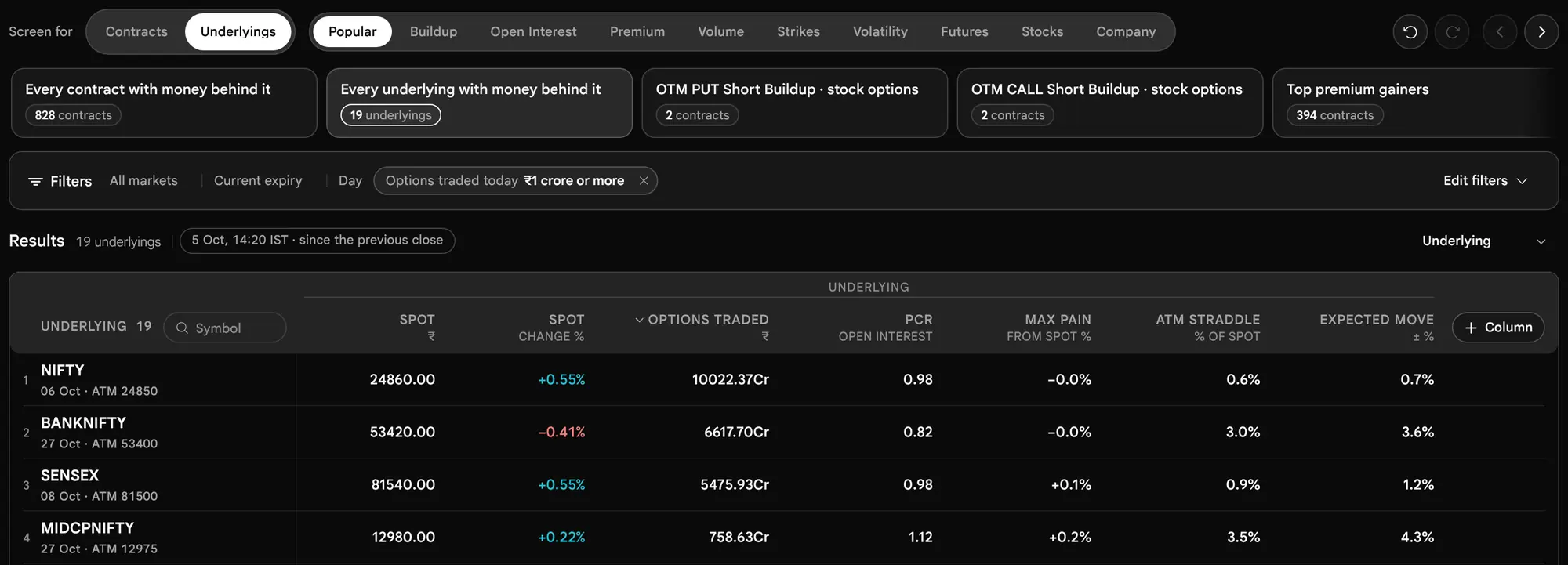
Screen for underlyings, and see why a row is listed
Switch Screen for to Underlyings and each row becomes a stock or an index, judged on its own options, future and figures. A strike capsule then asks about the underlying's strikes, so "ATM Call in long build-up" lists the underlyings whose ATM Call is in that pattern.

Press an underlying's name to open the reason it is listed. For each condition you will see Yes, No or Cannot tell, what the figure read, and for a strike capsule the contracts it examined, with their Open Interest, change, price, volume, build-up and answer.


The note at the foot says it plainly: Open Interest counts open positions, not who traded them. Names such as writing or covering are conventions, not records.
Undo, Redo, and what the page remembers
Every change to the screen can be undone: a condition added, a tick changed, a scan loaded, the Match choice. Undo and Redo sit at the top right, and the keyboard works too (Ctrl or Cmd + Z, and add Shift to redo), except inside a text field or an open panel. The history holds the last 60 changes. Choosing a scan from the shelf starts a new history.


- The page reopens on the last screen you used, in your browser, unless a link names a screen.
- The address bar carries the whole screen. A link names its view (
view=custom), the lit scan when there is one (scan=) and the screen itself (screen=). A link that cannot be read falls back to the last screen used, with a note, and is never guessed at. Ascan=link names a prebuilt scan by its short id and opens it. - Nothing is exported. The scanner has no export and no separate "save screen" button in the three views today. Keeping a screen means keeping its link. The product has no list of named, saved screens.
The Traps That Make a Scanner List Mislead
The question Why did this list mislead me, and how do I stop it?
Trap 1: A percentage on a tiny base
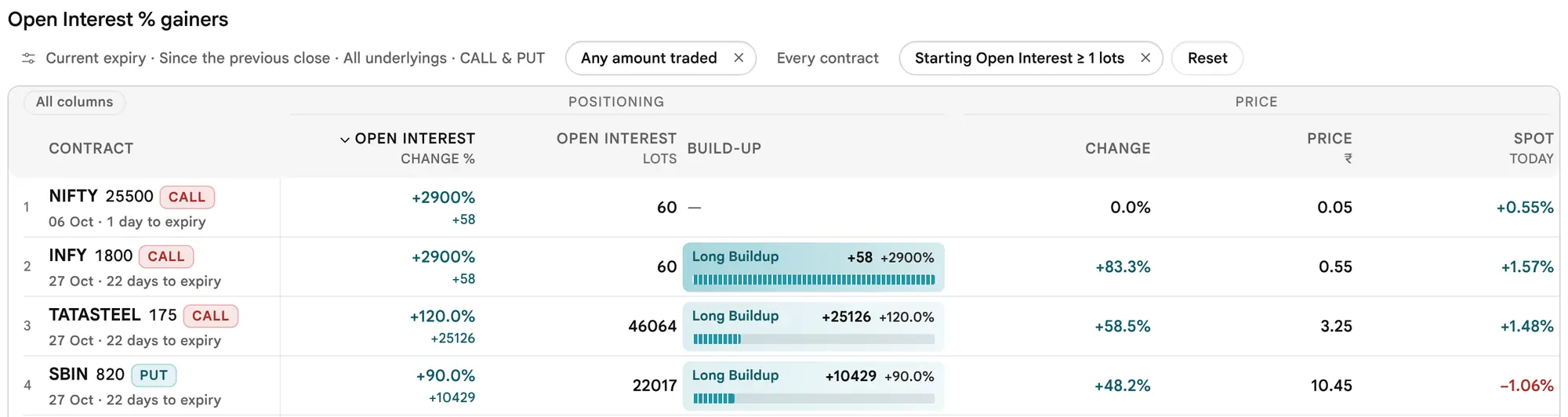
A percentage removes the size of the base from a comparison, which is useful and also the problem. A far strike holding 2 lots that grows to 60 prints a bigger percentage than any busy strike will all day, and almost nobody built a view around 58 lots.
Thin Strike (illustrative)
2 lots to 60 lots, +58 lots
Busy Strike (illustrative)
4000 lots to 5000 lots, +1000 lots
Sorted by percent alone, the thin strike wins by a factor of more than a hundred, while the busy strike added seventeen times as many lots. So several scans carry a guard, and these are the defaults today:
| Guard | Default | Where it applies |
|---|---|---|
| Traded today, at least | ₹10 lakh | Every scan |
| Starting Open Interest, at least | 50 lots | Open Interest % gainers and losers, Volume above Open Interest, and any Volume ÷ Open Interest filter |
| Starting premium, at least | ₹2 | Top gainers and Top losers |
| Traded yesterday, at least | 10 lots | Top gainers and Top losers, Day window only |


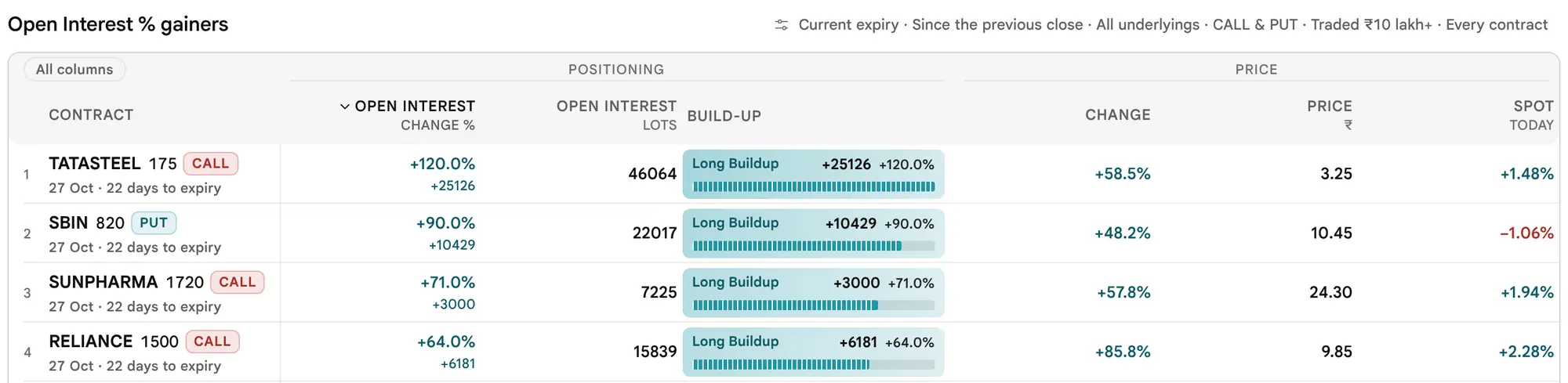
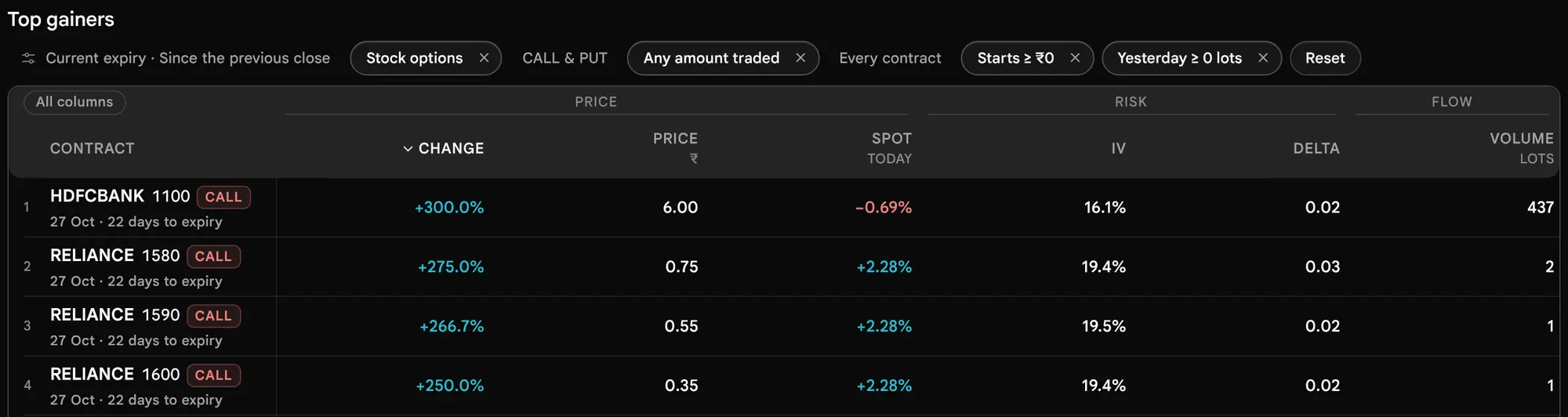
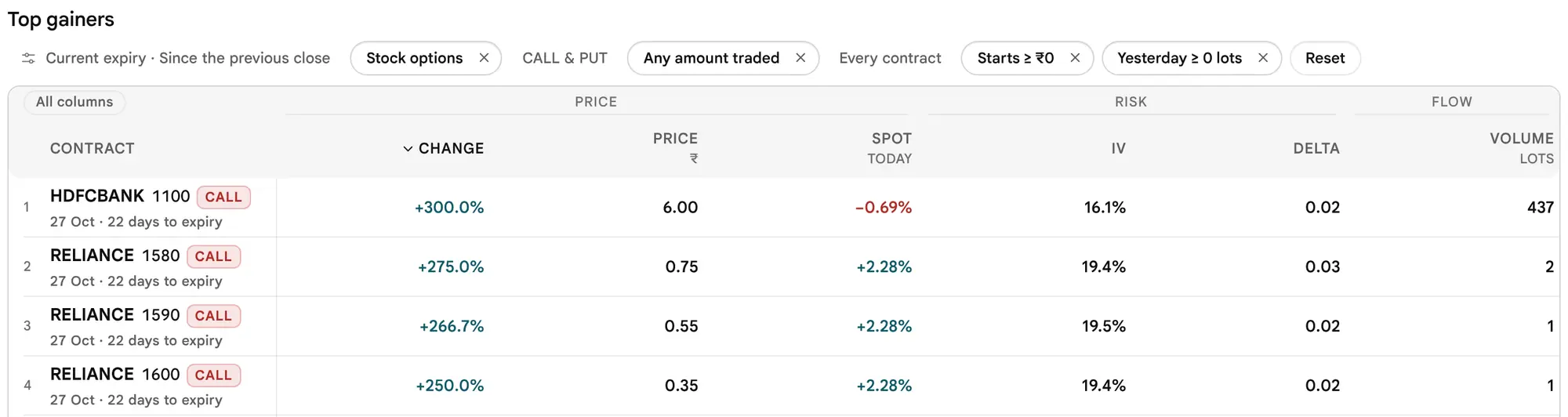


Read the table with one more fact in mind: the guards are defaults you can change, and they do not reach every scan. Open Interest gainers and losers (in lots), the four build-ups, Most active and Volume surge are protected only by the ₹10 lakh money floor. A contract opened from zero Open Interest also skips the build-up noise floors, and shows "new" instead of a percentage.
Trap 2: Illiquid strikes
A contract can top a list and still be a contract nobody can trade at a fair price. Three things show it: the Spread column (a spread of 8% of the middle price is what crossing the quote can cost), the Volume column (a premium that moved on 2 lots has not been tested), and a Last price that is old. Use Bid/ask spread, at most and Volume, at least under More settings to keep them off. The money floor counts the whole day's traded value even in a short window, so a contract with an old last price and one big trade can pass it. The lowest floor you can set, ₹0, shows every contract that traded, including far strikes that trade a lot or two.
Trap 3: A model chance is not a forecast
Chance worthless, Expected move and the "two-in-three" range are readings of option prices. They move every minute and are only as good as the prices and the smile they read. A Put showing 90% can still be exercised against its writer; the figure says how the market prices that outcome, not how it will end.
Trap 4: Build-up names are conventions
Open Interest has a buyer and a writer on every contract. "Short build-up" is often read as writing and "Short covering" as buying back, but the scanner records neither who traded nor why. Treat each name as a description of two numbers moving together, and look for a second reading (the same pattern on the neighbouring strikes, or on the future) before leaning on it.
Trap 5: An old, partial or incomparable reading
- An old reading. If the status line says "older than 3 minutes" during the session, the market file has not refreshed. Wait for the next minute before drawing a conclusion.
- A window that is not ready. A short window needs a stored minute close to the exact lookback. The page says so, and does not print a longer gap under a shorter name.
- Different expiries. One row may be a one-day option and the next a 22-day one. Their premiums, Chance worthless and Open Interest do not compare. Read the days to expiry under every name.
- A missing figure. A limit on IV, delta or Chance worthless leaves out contracts without that figure, and in Custom a row that cannot be answered is never listed on a guess. The page counts them.
Trap 6: Expiry-day behaviour
On the day an option expires, its time value is almost gone and a small move in the underlying changes its premium by a large percent. Far strikes sit at or near the smallest tick, so percentages become meaningless and gainers and losers fill with contracts nobody could trade. Spreads can be wide and fills poor. A Chance worthless of 95% is the market's price for the outcome, not safety, and a seller who keeps a small premium most days carries the tail on the rest. The scanner describes this; it does not warn you, and it does not compute charges or margin. See Risk notes.
One more expiry-day change comes at 15:30 IST, when trading in the expiring series stops. From then on that series is settled and leaves Current in all three views, so Current shows the next expiry. A list read at 15:20 and one read at 15:45 can therefore cover different expiries. Read the date under each name.
Risk Notes: What the Scanner Does Not Count
The question What can go wrong between a good-looking row and an actual trade?
- Spread. A row shows the last price, not what you will pay. A spread of 8% means crossing the quote can cost about that much of the premium. On a thin contract the book can move as you place the order.
- The cost of one lot. The premium times the lot size (for NIFTY, 65 at the date of this guide) is what one lot costs, and a percent gain on a small premium says little about it. Customise shows Premium per lot.
- Expiry day. Time value is almost gone and premiums change by large percents on small moves. A seller's profit is small and limited; the loss is not. See Trap 6.
- Charges, taxes and margin are not computed here. The scanner shows no brokerage, exchange charges or taxes, and no margin needed to write an option. Check them in your broker's own tools. The Strategy Builder's strategy finder includes fees and slippage in its own figures.
- Old readings and thin books. The floor counts the day's traded value, so a contract with one big trade and an old last price can pass. Read Spread and Volume with Price.
- None of this is advice. The scanner lists and describes. A row at the top of a list matched a question; it is not a conclusion.
Two routines, in order
What do I do at 09:20, at 11:00, and on a position held across days?
A Practical Routine: Expiry Day and Positional
The question What do I do at 09:20, at 11:00, and on a position held across days?
A scanner is most useful as a fixed order of questions. Here are two, one for the day an index expires and one for a position held across days. Both only decide where to look next; each ends with the option chain, where the contract is read cell by cell, and none of it is advice.
Routine 0: The first 30 minutes (09:15 to 09:45)
At the open, only 5m is usable before about 09:30, and 15m and 30m wait for their earlier reading (see the time-of-day guide). So:
- 09:15 to 09:20. Use Day. Contracts, Most active, search the index symbol. If Traded is empty, little has traded under the ₹10 lakh floor yet: wait a minute, or lower the floor in Customise and read the Spread column with care. The checklist Why a contract or list is missing or empty covers the rest.
- 09:20 to 09:30. Switch the window to 5m for Open Interest gainers. Read the status line: it must say measured … → … IST. If the capsule is greyed, stay on Day.
- From about 09:30. 15m is available; from about 09:45, 30m. Then follow Routine 1.
Routine 1: Expiry day, one index (illustrative)
The aim is to see where money is trading and where positions are changing in the current expiry, before reading the chain.
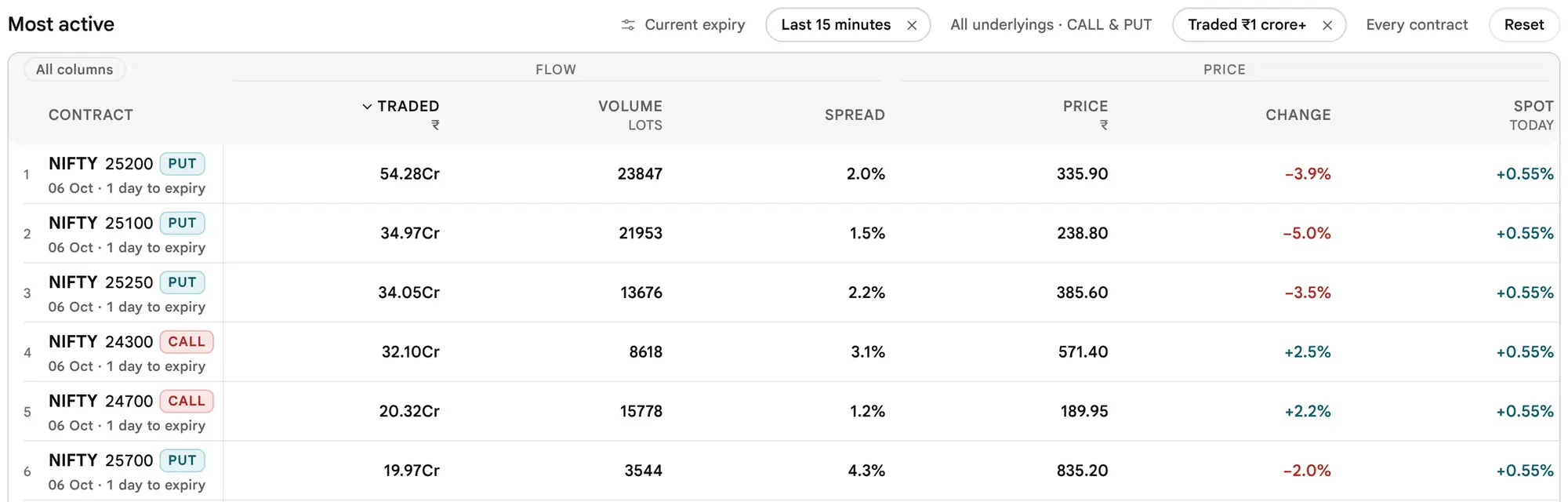
- Where is money trading now? Contracts, Most active, window 15m, search the index symbol. Read Traded, then Spread: a wide spread on a busy contract is a cost to count.

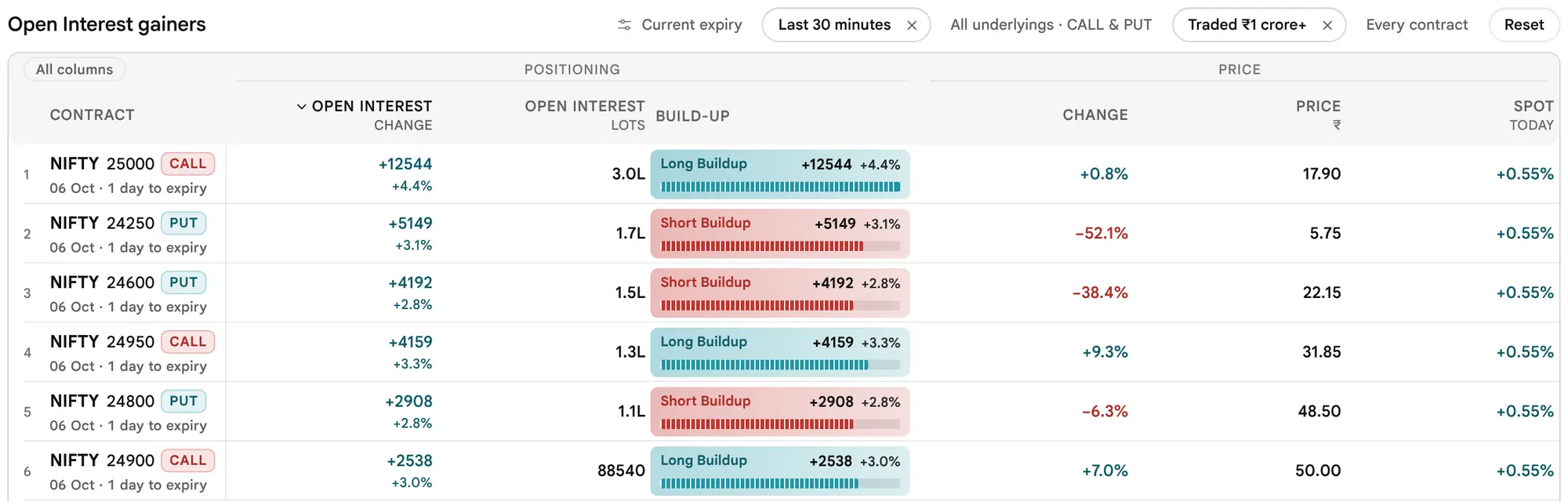
- Where are positions being added or closed? Open Interest gainers over 30m for the same symbol. Read the lots before the percentage, then the build-up name.

- Is the pattern repeated nearby? Change to Short build-up or Long build-up and look at the neighbouring strikes. One strike is a data point; a cluster is a pattern.
- Open the contract. Press the name. The dialog gives the breakeven and the payoff; the On the list card repeats the numbers behind the row.
- Confirm in the chain. Open the option chain and read the strike's quote, spread and depth before anything else.
On expiry day premiums of far strikes sit at or near the smallest tick and percentages become meaningless; the guards exist to screen those out. After 15:30 IST the expiry that settled leaves Current, so the same steps then read the next expiry. The scanner does not claim that a pattern seen at 14:20 persists to the close. This routine is shown at 14:20 for the picture; run it at the time you trade, with the windows that are ready by then.
Routine 2: Positional, stock options at the next expiry (illustrative)
The aim is to find where positions have been added over the day in stock options that are far enough from expiry to hold, and then to read whether the options are expensive or cheap against what the stock has done.
- Where were positions added? Contracts, Long build-up (or Short build-up), Customise: Market Stocks, Expiry Next, window Day, money floor ₹1 crore (100 in the ₹ lakh box).
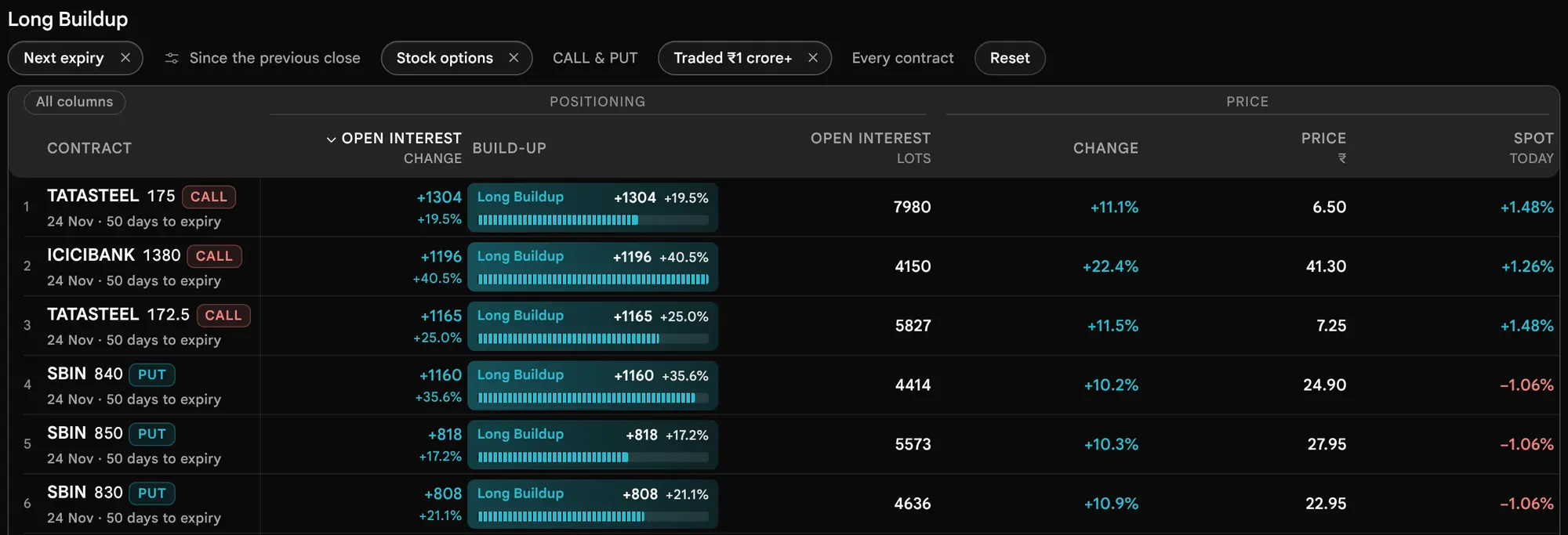
- What do the options say about the stock? Switch to Underlyings, search the symbol, and open its row. Read ATM IV against Realised 30d, the Expected move to expiry, and Near ÷ next.
- Does a second view agree? In Custom, load a prebuilt scan from the Stocks or Strikes tab, or build one: the ATM Call in long build-up, Match All conditions, expiry Next. Two views that agree describe the same positions from two sides; neither one predicts.
- Confirm in the chain, and read what one lot costs (Premium per lot, in Customise), which the percentage on the list does not show.
A routine like this does not predict. It shortens the time from "something changed" to "this is what changed, and here is its size". Before acting on any of it, read Risk notes: spread, the cost of one lot, charges and margin are not computed here.
Look it up when you need it
Why is a list empty, what does a column mean, what is a word, and what did we not verify?
Why a Contract or List Is Missing or Empty
The question I expected a contract or a list, and it is not there. Why?
Work down this list in order. Each item is something the page itself says or does. A count of 0 beside a scan is a valid answer: no contract fits that question now.
| Check | What you see | What to do |
|---|---|---|
| 1. The floor | Footer: "N more matched but traded under ₹10 lakh today." | Lower the floor in Customise. Underlyings uses a separate floor, ₹1 crore. |
| 2. A guard | Gainers and losers need a starting premium of ₹2 and 10 lots traded yesterday (Day). % scans and Volume above Open Interest need 50 lots to start with. | Lower the guard under More settings, knowing why it exists (Trap 1). |
| 3. The window has no earlier reading | "This window is not ready yet", "No reading from N minutes earlier is available yet", or the window greyed with "Day only right now". | Choose Day or a shorter window. See the time-of-day guide. |
| 4. The expiry | Current, Next and Far are each underlying's own. A contract of another date is not listed. From 15:30 IST on expiry day, the expiry that settled is no longer Current. | Set Expiry to All and read the days to expiry under the name. |
| 5. The market scope | Market (All, Stocks, Indices), Side (Both, Call, Put), ITM or OTM, Sector. A sector leaves out indices. Contracts has no ATM choice: ITM is a Call below spot or a Put above it, and OTM is everything else, so the strike nearest spot is ITM on one side and OTM on the other. | Press the cross on the chip, or Reset. |
| 6. Your search | "No contracts match “TCS”" (or "No underlyings match “TCS”"): the scan has nothing for the symbol searched. | Press Clear search, or try another scan. |
| 7. Your symbol list | Chip "Only RELIANCE, TCS" or "Excluding 4 symbols". The list is yours and is shared by every view. | Clear the symbol field in Customise. |
| 8. A limit needs a figure the contract lacks | A limit on IV, delta, Chance worthless, Spread or days to expiry leaves out contracts without that figure. In Custom the notes say "Cannot tell for N" with the reason. | Clear the limit, or read the reason. |
| 9. No trade today | Only contracts with volume today are listed. | Look in the option chain for the quote. |
| 10. An old reading | Status line "older than 3 minutes". | Wait a minute; the page reads the file every 60 seconds while the tab is visible. |
| 11. Market closed | Status line "market closed". The page shows the last session. | Read it as the last close. |
| 12. The market file is missing | After 20 seconds without the file, a banner. Contracts: "5m to 1h movement is not available right now, so the day's change is shown." Underlyings: "The market file is not available right now, so each underlying's option chain was read on its own." Both add "N underlyings could not be read". | Press Read again. Only Day is offered. |
| 13. Nothing could be read | Underlyings: "No option books could be read" (none of the chains answered; this is not a filter result), or "No underlyings to read" (there is no list to read from, and the page links to the option chain). | Press Read again later. The option chain still opens for any symbol. |
| 14. Futures not read | Underlyings futures scans: "Reading futures 14 of 19", or "N had no futures reading for this window". | Wait, or use Day. |
| 15. A link that cannot be read | Custom: "The screen in this link could not be read, so the last screen used is shown." | Rebuild the screen; a value that cannot be read is ignored, never guessed. |
| 16. Company figures are missing | Custom: "Company figures are not available right now" in place of the table for a Company scan or a company condition, the Company group greyed in Add filter, and "Company figures unavailable" on the Company cards. No rows are listed on a company condition. | Press Try again later, or use a scan or filter that does not need them; the rest of Custom is unaffected. |
If none of these explains it, the contract may simply not be in the list of underlyings the scanner reads (not yet confirmed), or it may not have traded.
Which Tool When
The question Do I use the scanner, the option chain, the strategy builder or an Open Interest tool?
| Your question | Use | Why |
|---|---|---|
| Where should I look across every underlying? | Options Scanner | One list of every traded option, ranked by the figure you asked about. |
| What does this one contract look like, strike by strike? | Option Chain | The full chain for one underlying and expiry: quotes, depth, Open Interest, Greeks. |
| What does this combination of options pay? | Strategy Builder | Payoff, breakevens and scenarios, with the strategy finder that the scanner used to hold. |
| Where did Open Interest change fastest? | Open Interest Spurts | Spurts in Open Interest across strikes. |
| Where are positions concentrated? | Open Interest Heatmap, Max Pain, PCR | Different views of the same positions. |
| Are options dear or cheap against the stock's own movement? | Scanner, Underlyings view; Implied Volatility | ATM IV against Realised 30d, in one row per underlying. |
A good order is the scanner to find, the option chain to read, and the Strategy Builder only if you are building a position.
Column Quick Reference
The question What does this column mean, how is it worked out, and where do I see it?
Each row has its own address, so a link such as #col-worthless lands on it. The steps explain the columns in context: Contracts, Step 5 and Underlyings, Step 2.
Contracts view
| Column | Meaning | Formula | Where shown |
|---|---|---|---|
| Price ₹ | Last traded premium, per unit | As read in the market file | Every Contracts scan |
| Change | Premium change in the window, percent | (Price − from) ÷ from | Every scan; it leads Top gainers and Top losers |
| Open Interest lots | Open positions now | Contracts ÷ lot size | Open Interest and build-up scans, Volume above Open Interest |
| Open Interest change | Lots added or closed in the window, with percent | Open Interest now − at the start | Leads the Open Interest and build-up scans; also in Most active, Volume surge and Volume above Open Interest |
| Open Interest change % | The same change as a share of the start | Change ÷ starting Open Interest, a dash if the start is zero | Open Interest % gainers and losers |
| Volume lots | Lots traded in the window | Contracts traded ÷ lot size | Every scan |
| Volume vs yesterday / vs pace | How unusual the volume is | Day: today ÷ yesterday. Window: window lots ÷ (today's lots × window minutes ÷ session minutes so far) | Volume surge |
| Volume ÷ Open Interest | Volume against the starting position | Window lots ÷ starting Open Interest lots | Volume above Open Interest |
| Traded ₹ | Money traded | Average traded price × contracts (Day: whole day; window: now minus then) | Every scan; it leads Most active |
| IV | Implied volatility, percent a year | As in the option chain | Top gainers and losers |
| Delta | Premium move for a one-point move in the underlying | As the option chain shows it. Drawn only if a row carries it. | Top gainers and losers |
| Chance worthless | Model chance of ending out of the money | Share of the expiry's smile at or beyond the strike | Open Interest and build-up scans |
| Spread | Quote width against its middle | (Ask − bid) ÷ ((ask + bid) ÷ 2), a dash if no two-sided quote | Most active |
| Build-up | Premium and Open Interest together | The option chain's rule for the window; floors apply | Every scan; it is the lead cell of the four build-up scans |
| Spot today | Underlying's change today | (Spot − previous close) ÷ previous close | Every Contracts scan |
Underlyings view, All scan
| Column | Meaning | Formula |
|---|---|---|
| Price ₹, Change, Change % | Underlying's last price and move since the previous close | As the option chain's spot |
| ATM IV | Movement the options are priced for, yearly | From Call and Put prices at the strikes either side of the forward |
| Realised 30d | Movement actually made over 30 trading days | Yang–Zhang method × √252 |
| IV − realised, IV ÷ realised | Implied against realised on one scale | IV restated per trading day, then differenced or divided; a gap inside the sampling error reads roughly equal |
| Expected move | 1 SD to expiry | Price × ATM IV × √(years left) |
| Near ÷ next | Term structure | First expiry's per-day IV ÷ second expiry's |
| Skew | Put IV minus Call IV at the same distance | IV below the forward minus IV above it, in points |
| Open Interest centre | Where open Calls and Puts are centred | Open Interest-weighted strike against spot |
| PCR | Put-to-call ratio of Open Interest | Put Open Interest ÷ Call Open Interest at that expiry |
| Open Interest change | Open Interest added or closed today, percent | Against the previous close |
| Traded ₹ | Option premium traded at that expiry | Average traded price × contracts, summed |
| Covered call | Yearly yield of selling the ATM Call against shares (stocks only) | (Premium kept) ÷ (price − premium) × 365 ÷ days left |
Links, Limits and Where the Strategy Baskets Went
The question How do I share or keep a setting, and where did the strategy baskets go?
Every view carries its whole setting in the address bar, so a view can be bookmarked or sent. Contracts and Underlyings write only what differs from the defaults; Custom writes the screen itself. A link that cannot be read falls back to the defaults, or in Custom to the last screen used, and is never guessed at. The symbol list is yours alone and is not part of a link. A Custom link carrying more than 40 conditions, or a screen longer than 16000 characters, is rejected on reading and the last screen used is shown instead. Inside the terminal widget, the settings stay in memory for that widget and the address bar is left alone.
| Setting | Link parameter | Values |
|---|---|---|
| View | view | underlyings or custom; none means Contracts |
| Scan | scan | gainers, losers, oi-gainers, oi-losers, oi-gainers-pct, oi-losers-pct, long-build, short-build, short-cover, long-unwind, active, volume-surge, unusual |
| Expiry, window | expiry, window | current, next, far, all; 5m, 15m, 30m, 1h, day |
| Market, side, strikes | market, type, strikes | all, stocks, indices; both, CE, PE (CE is Call and PE is Put, the codes the link uses); all, itm, otm |
| Money floor, spread | min_value_lakh, max_spread | Numbers, ₹ lakh and percent |
| Search | q | A symbol or part of one |
The scanner places no orders, and nothing leaves it except a link carrying the settings. Ready-made strategy baskets are not a scanner view any more: they are checked in the strategy finder of the Strategy Builder, and an older scanner link that names strategies opens there with the same settings (an old address such as /options-scanner?view=strategies is passed on to /strategy-builder with the same parameters).
Open the live Options Scanner · Option Chain Guide · Open Interest Spurts Guide · Implied Volatility Guide · Strategy Builder Guide
Glossary
The question What does this word mean in the scanner?
- ATM, ITM, OTM
- At the money: the strike nearest the underlying's price. In the money: a Call with its strike below spot or a Put with its strike above it. Out of the money: the rest. The Contracts view has only ITM and OTM, so the at-the-money strike falls on one side or the other; Custom has ATM as its own choice.
- Build-up
- Premium and Open Interest moving together. Long build-up: both up. Short build-up: premium down, Open Interest up. Short covering: premium up, Open Interest down. Long unwinding: both down. A move under the noise floor is "no clear pattern".
- Chance worthless
- The model's chance that an option ends out of the money at expiry, read from the expiry's smile around the forward. Not a forecast.
- Covered call
- Owning shares and selling a Call against them. The scanner's column is the yearly yield of doing it at the ATM strike if the price is unchanged at expiry.
- Delta
- How much the premium moves for a one-point move in the underlying.
- Days to expiry (DTE)
- Calendar days to expiry, printed under each name as, for example, 12 days to expiry, or Expiry day on the day itself. Customise calls the limit Days to expiry; the settings capsule abbreviates it to DTE.
- Expiry
- The date an option ends. Current, Next and Far are each underlying's own first, second and third tracked expiries that still trade. From 15:30 IST on expiry day, the settled expiry is no longer Current.
- Expected move
- On this screen: price × ATM IV × √(years left), a 1 SD model range to expiry with about a 2-in-3 chance of finishing inside it. It says how far, not which way. Elsewhere on the site the expected move is 0.85 × the ATM straddle; the two differ (expected move definition pending).
- Floor
- The smallest amount a contract needs to be listed, such as ₹10 lakh traded today. The page says how many contracts a floor left out.
- Forward
- The price of the underlying for a given expiry implied by its Calls and Puts together (the put–call parity forward).
- Future (near-month)
- The nearest futures contract of the underlying. The futures scans add the Open Interest of every listed month (up to three).
- Implied volatility (IV)
- The yearly movement the option's price implies. ATM IV is read at the money.
- IV rank, IV percentile
- Where today's 30-day IV sits in its own year. Rank: between the year's low (0) and high (100). Percentile: the share of the year's closes below today's.
- Lot
- The smallest quantity that trades. Open Interest and volume are shown in lots.
- Match (All, Any)
- How conditions are joined in Custom. All conditions needs every condition; Any condition needs one. Market scope always applies.
- Near ÷ next
- The current expiry's IV divided by the next expiry's, per trading day: the term structure.
- Open Interest
- The number of option contracts still open. Every open contract has a buyer and a writer.
- PCR
- Put Open Interest divided by Call Open Interest.
- The price of an option, in rupees per unit. Per lot it is the premium times the lot size.
- Realised volatility
- How much the underlying actually moved over its last 30 trading days, as a yearly figure, by the Yang–Zhang method.
- Skew
- IV priced for Puts a set distance below the forward minus IV for Calls the same distance above.
- Spread
- (Ask − bid) ÷ the middle of the two, as a percent. A wide spread is a cost of getting in and out.
- Starting Open Interest
- The Open Interest a window began with. The % scans and Volume ÷ Open Interest need at least 50 lots of it by default.
- Traded ₹
- Average traded price × contracts traded: the money that changed hands.
- Window
- The two readings every change compares: the previous close (Day), or a stored minute 5, 15, 30 or 60 minutes earlier.
Questions People Ask
The question Is my question already answered?
These are the scanner's detailed answers. Four short ones (what the three views are, Chance worthless, the starting Open Interest floor, and whether it places orders) are in the Questions block at the foot of the page, and are not repeated here.
Is the scanner live?
It is a minute-by-minute reading. The market file is written once a minute, and the page reads it again every 60 seconds while the market is open. The status line gives the reading time; if it says "older than 3 minutes", the file has not refreshed. For the detail of one contract, use the option chain.
Why does the list show fewer contracts than I expect?
Every scan applies a liquidity floor (₹10 lakh traded today by default) and some carry further guards. The page says how many more matched but fell under the floor, and a lower floor in Customise shows them. A shorter window also needs an earlier reading for each contract, and a contract without one shows no change. The full list of causes is in Why a contract or list is missing or empty.
Why can I only choose Day for the window?
A short window needs a stored minute close to the exact lookback. When the market file is missing, or no stored minute fits (for example in the first minutes of the session), the page greys the shorter windows and says Day only right now. It does not print a longer gap under a shorter name. See the time-of-day guide.
What is the difference between Open Interest gainers and Open Interest % gainers?
Gainers rank by lots added; % gainers rank by the share of the starting position. The % scans need a real starting position (50 lots by default) because a percentage on a tiny base misleads.
Does a Short build-up mean someone sold the option?
It means the premium fell while Open Interest rose. Traders often read that as writing, but the scan cannot record who traded or why, so it is a convention and not a record.
What does All against Any change?
In Custom, All keeps a row only when it meets every condition; Any keeps it when it meets at least one. All narrows a list and Any widens it. The market scope always applies, and a missing figure never counts as a match.
Can I save a screen?
The page reopens on the last Custom screen you used, and every view carries its setting in the link, so a link is the way to keep one. The product has no list of named, saved screens.
Where did the strategy scans go?
Ready-made strategy baskets are checked in the strategy finder inside the Strategy Builder. An older scanner link that names strategies opens there with the same settings.
Why does Custom say company figures are not available?
Market cap, results dates and the other company figures come from a daily file from a temporary source. While that file is missing, Custom says Company figures are not available right now in place of the table for a Company scan or company filter, greys the Company group in Add filter and puts Company figures unavailable on the Company cards. Nothing else in Custom depends on it. See Part C, Step 4.
Can I use it on a phone?
Yes. Each contract takes one line, with a short expiry line under it. See Reading It on a Phone.
Why did Current change to a later expiry in the afternoon?
On expiry day the expiring series stops trading at 15:30 IST. From then on it is settled, so it is no longer anyone's current expiry, and Current moves on to the next one in Contracts, Underlyings and Custom. The settled series still sits in the closing file.
Why does the status line say "1292 of 9395 contracts"?
The first figure is the list on screen, the same as the scan chip (Top gainers 1292). The second is every contract read at that expiry. When the list holds them all, the line gives one figure.
Is the Open Interest in the scanner delayed?
How late the scanner's market file is at its source is not yet confirmed. Read every Open Interest change as of the reading time in the status line.
What We Have Not Verified
The question Which statements in this guide are not yet confirmed?
Not yet confirmed
Everything else in this guide was checked against the product's source on 19 October 2026. These items could not be, and every marked phrase in the text (such as not yet confirmed) links here.
- How late the market data is at its source. The scanner's minute file is a saved snapshot, and how old it is at the source is unknown. Read changes as of the status-line time.
- The list of underlyings at runtime. The catalogue holds 217 (208 stocks and 9 indices). Whether the scanner reads exactly that list is unknown.
- The first minutes of a live session. The time-of-day guide follows the product's rules. We did not watch a live open to confirm at which minute each window becomes ready, or the first stored minute.
- Lot sizes today. The lots quoted come from the product's catalogue as of 19 October 2026. The exchange revises them.
- Delta sign for Puts. The Delta column prints what the data file carries; a Put's delta is usually negative.
- Touch behaviour on a real phone or tablet. The phone notes (one-line names, row heights, the folded settings) follow the product's style rules, not a device test.
- The expected move on this screen. The scanner's Expected move is spot × ATM IV × √T, a 1 SD model range. The owner's site-wide rule for "expected move" elsewhere is 0.85 × the ATM straddle. Whether this screen keeps its definition or its name is pending the owner's decision.
- The two daily files. The year of 30-day IV (16 September 2025 to 19 October 2026, 270 sessions, with the Budget Sunday of 1 February 2026) and the ATM Open Interest context file (to the 19 October 2026 close, 307 sessions) were read from the files' own headers and dates. We did not rebuild them or check their values against NSE.
- Pictures taken before the page changed. On 19 October 2026 the scanner moved to sentence case (Call and Put chips, column and band heads, build-up names such as Long build-up and Short covering, Any / All / At least), the status chip began to read “1292 of 9395 contracts”, phone rows took one-line names, the settled expiry began to leave Current at 15:30 IST, and several prebuilt scans were renamed. These pictures were taken before that and still show the earlier page: Contracts on a phone, Step 1 · The page on opening, Build-up, Step 3 · The header, Step 4 · Top gainers, compact width, An Open Interest scan, every column, Close-up · the contract cell, Close-up · the Positioning band, Close-up · the Build-up cell, Long build-up, Short build-up, Short covering, Long unwinding, Open Interest gainers, Open Interest % gainers, Most active, Volume surge, Volume above Open Interest, Top losers, Step 7 · Sorted by Volume, Step 8 · The 15 minute window, Most active, last 15 minutes, Step 9 · Customise for Contracts, Step 10 · Chips, The list under those chips, Folded, All columns pressed, Step 13 · The contract dialog, Close-up · the two rail cards, Close-up · Chance worthless, Step 1 · The All scan, Left half · Price and Volatility, Right half · Skew to Covered call, Step 3 · NIFTY, opened, Step 4 · Long build-up on futures, Step 1 · The Custom view, Screen for, Step 2 · The shelf, A category, A scan loaded, Resting on a card, Opened, Market scope, Walk the groups, Step 5 · Two strike capsules, The strike editor, The future editor, A scan with a group, The group editor, The Filters view, A column added, Customise in Custom, Step 8 · Rows are underlyings, Why it is listed, Step 9 · After an edit, Guards off, Default guards, Starting premium guard off, Default guards, Expiry day · step 1, Expiry day · step 2, Positional · step 1. The text describes the page as it is now; trust the text where the two differ.
Sources
The question Where does each part of this guide come from?
Paths are in the product's source, under src/features/options-scanner/ unless shown otherwise. Values as of 19 October 2026; each number's own source is in options-scanner-parts/limits.mjs.
| Section | Source files |
|---|---|
| Start: What it is, Four words, Fresh data, Time of day | contractScanData.ts, useContractMarket.ts, contractScanModel.ts (tolerances, isLiveExpiry), marketSession.ts, ContractScanner.tsx and contractFormat.ts (status line, shownCount), ivTerm.ts, src/lib/ivHistory.ts, atmOiContext.ts, public/iv-term-history.json, public/atm-oi-context.json, docs/OPTIONS_SCANNER.md |
| Reading It on a Phone | tableBands.tsx, scanner-redesign.css (folding, one-line names, row heights, 44 px targets), ScannerChrome.tsx (DaysLeft), OptionsScannerPage.tsx, ScannerPageBar.tsx |
| Part A: Contracts | ContractScanner.tsx, contractScanModel.ts, ContractTable.tsx, ScannerCustomizePanel.tsx, contractScreens.ts, ScannerContractDialog.tsx, contractChance.ts, scannerWords.ts (build-up words), src/services/analytics.ts (classify, BUILD_UP_NOISE_FLOOR) |
| Part B: Underlyings | UnderlyingScanner.tsx, underlyingModel.ts, underlyingExplain.ts, underlyingScans.ts, futuresModel.ts, useFuturesReadings.ts, FuturesChartDialog.tsx (1D bar dates), src/lib/atmIv.ts (expected move) |
| Part C: Custom | CustomScanner.tsx, ScanShelf.tsx, customScreener.ts, customScan.ts, CustomScreenPills.tsx, CustomPillEditors.tsx, prebuilt scans |
| Traps, Risk notes, Routines | contractScanModel.ts (guards, floors), src/services/analytics.ts (classify), contractFormat.ts; the routines are the guide's own descriptions |
| Why a contract or list is missing | ContractScanner.tsx (empty states, banner), contractScanModel.ts, symbolList.tsx, customScreener.ts (missing reasons) |
| Which tool when | OptionsScannerPage.tsx (strategy redirect), src/features/strategy-builder, the sibling guides listed in Links |
| Column quick reference | ContractTable.tsx (columns), UnderlyingScanner.tsx (COLUMNS), underlyingExplain.ts |
| Limits and values | options-scanner-parts/limits.mjs, with the source path for each value |
| Everything | Source-verified fact sheet of 4 October 2026, re-read against the source on 19 October 2026 (commits 59b9d50e and 43eb5afa, the data files of 741f75fd); docs/audits/GUIDE-ACCURACY-AUDIT-2026-10.md for the data-freshness wording |
Test Your Knowledge
Check the mechanics before you take them to a live chain.
1. It is 09:20 and you choose the 30m window. What should you expect?
2. A contract you expected is not on the list. Which of these is NOT a reason the page gives?
3. An Open Interest % scan lists a contract at +2900%, from 2 lots to 60 lots. What is the reasonable read?
4. A Call shows 85% under Chance worthless. What does that mean?
5. In Custom, two conditions are joined by All. A contract meets only the first. What happens?
6. A contract’s premium rose and its Open Interest fell over the window. Which build-up does the scanner name it?
7. The page says "Day only right now" beside the window. Why?
8. It is 15:45 on a NIFTY expiry day. Which NIFTY expiry does Current show?
9. The status line reads "1292 of 9395 contracts · 196 underlyings". What is 1292?
10. Where do ready-made strategy baskets live now?
About the Sahi Options Scanner
Scan the options of every F&O underlying in three views. Contracts lists single options the way a stock screener lists stocks: premium gainers and losers, open interest added or closed in lots and percent, the four build-ups, the most money traded, volume surges and volume above open interest, over the day or the last five minutes to an hour.
Underlyings reads each stock or index from its own options and futures: implied against realised volatility, the expected move, skew, term structure, where open interest sits and the futures build-up. Custom builds your own scan from conditions joined by All or Any. Every setting is carried in the page link. Ready-made strategies are checked in the Strategy Builder's strategy finder.
At a glance
- Data
- Sahi market data for NSE and BSE options
- Updates
- The scanner’s market file is re-read about once a minute in market hours; a Live scan fetches chains on demand
- Coverage
- 217 NSE and BSE index and stock F&O underlyings
- Access
- Free — no login, no download
- Orders
- Analysis only. Sahi does not accept orders
See it on today's numbers
Everything above is method. These articles apply it to a live book — options scanner among the rest — and are rebuilt as the snapshot data refreshes. Where a symbol's option book is too thin to support a reading, the article says so rather than asserting a level.
Frequently asked questions
What is the difference between Contracts, Underlyings and Custom?
Contracts lists individual options and answers where the action is: what moved, where positions opened or closed and where money traded. Underlyings reads each stock or index through its options and futures. Custom lists contracts or underlyings that meet conditions you set, joined by All or Any. None of the three predicts price; each describes what the market did.
What does chance worthless mean in the scanner?
Chance worthless is the model's chance that an option ends out of the money at expiry: a Call at or below its strike, a Put at or above it. It is read from the expiry's implied volatility smile, centred on the price its Calls and Puts imply for expiry, using the market's own prices. It is a model reading, not a forecast of what will happen.
Why do percentage scans need a starting open interest floor?
A percentage on a tiny base misleads: 2 lots growing to 60 is up 2,900%, yet it is only 58 lots. The Starting Open Interest floor, 50 lots by default, keeps the open interest percentage scans and Volume above Open Interest to contracts that began with a real position. Read the lots first, then the percentage, which says how fast the change arrived.
Does the scanner place orders?
No. The scanner lists and describes options and places no orders, and its lists stay on the page. Opening a row shows that contract's chain studio for inspection. Quote time, liquidity, charges and margin need to be checked separately before any execution decision made elsewhere, and nothing here is a recommendation.
Read next
Explore more Sahi tools
Every tool runs on the same market data and keeps whichever instrument you have selected, so you can move between them without re-picking the symbol.
Option Chain
Scan and build
Every Sahi guide
Each guide pairs with a live tool. The options FAQ collects every question from all of them in one place.