

Live now
Index readings from the same feed the Sahi terminal runs on. Open the live Market Flow to see this guide applied to today’s numbers.
- NIFTY — —
- BANKNIFTY — —
- SENSEX — —
What Market Flow Shows
Market Flow puts every F&O underlying on one page and sorts each one by what its near-month future did. Each future that moves past a floor takes a side, Bullish or Bearish. A smaller move is flat. Each side is ranked by the size of the move.
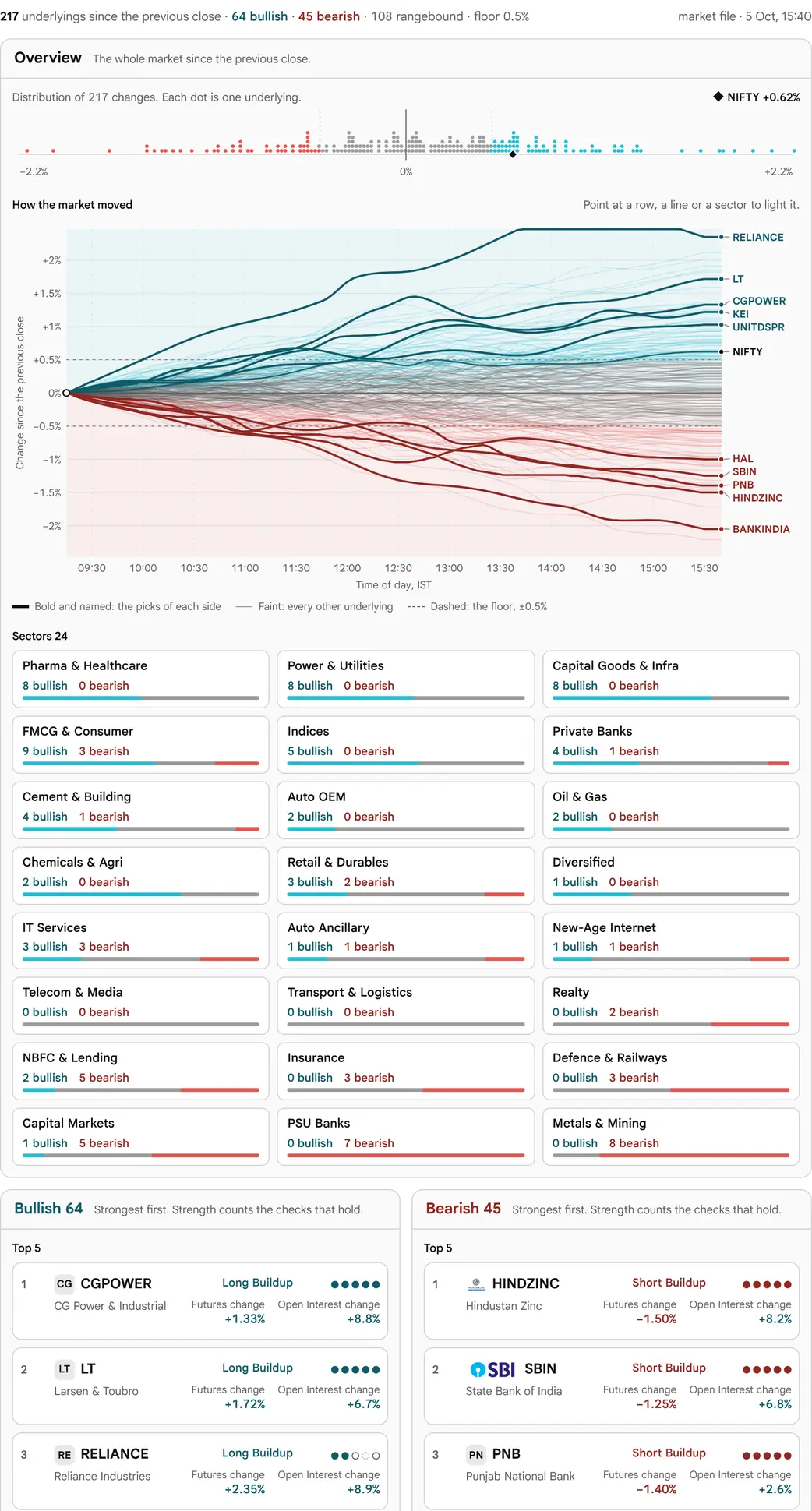
On a wide desktop (1280 pixels and wider) the page is one diagram, read left to right. A strip of every move sits on top. Below it, a fan chart draws every future from nought at the start of the window. Each line ends in a gate column and then runs, as a thin curve, to its own tile. The strongest readings on each side go on to a tall tile and a big card. Narrower screens show a simpler board with the same figures (see Layouts).
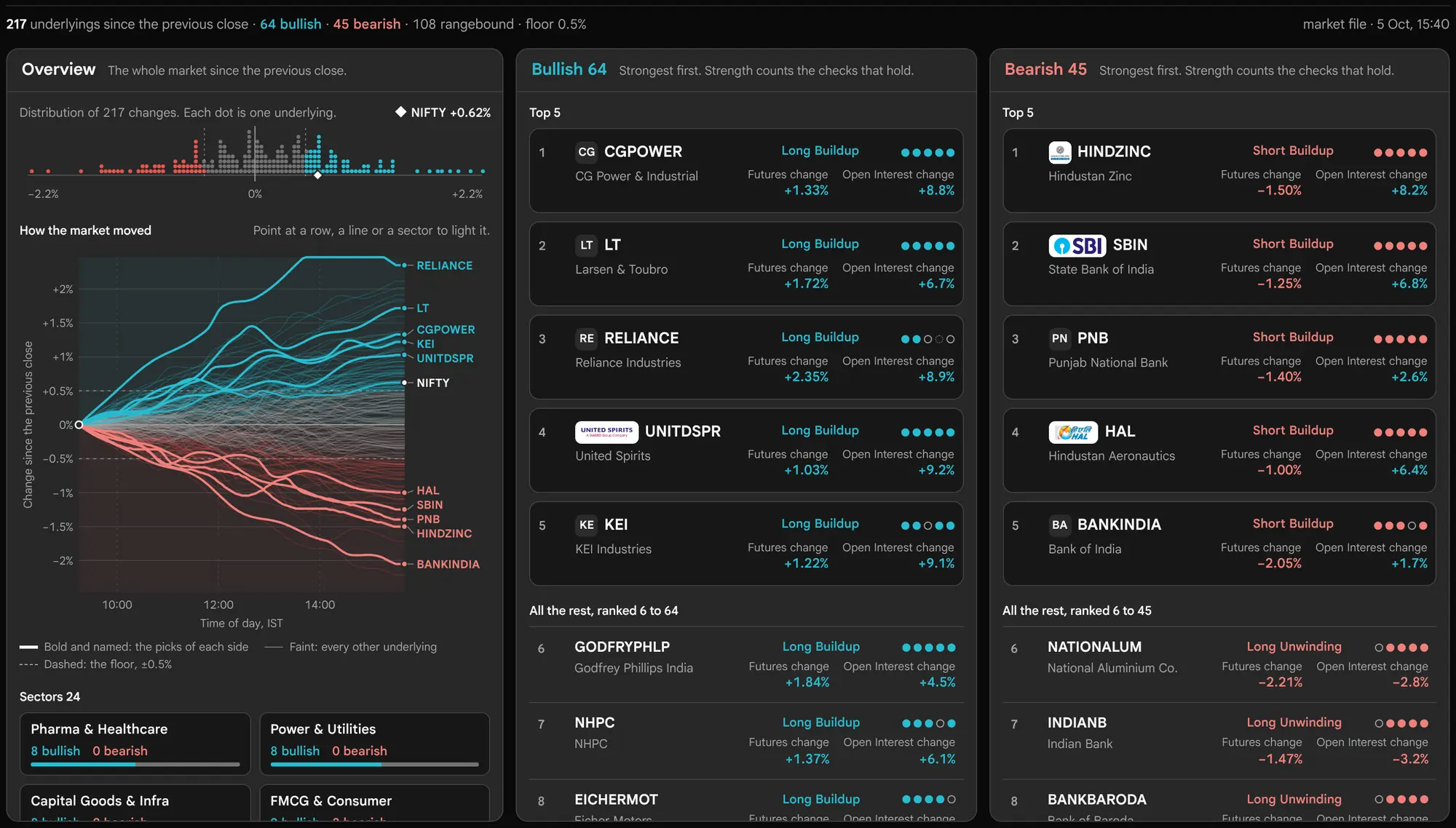
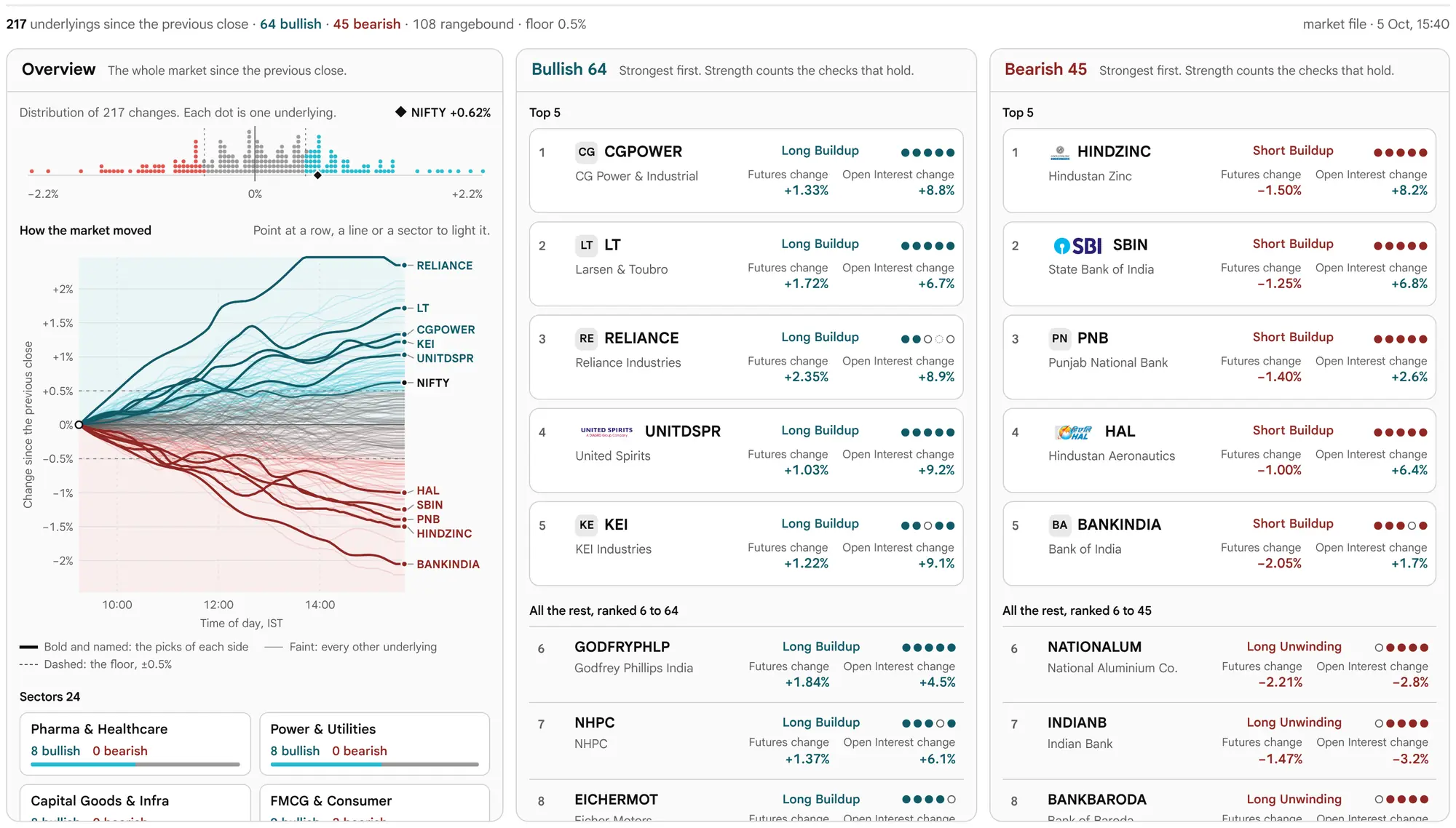
Everything on it comes from two reads that the Options Scanner already makes. The market file carries every option of every underlying and is read again every minute. It gives spot, the previous close and the option Open Interest that the levels and the profiles come from. Each underlying's future is read separately, four at a time, and read again every two minutes. It gives the direction and the build-up. The board draws from the market file at once and fills in as each future lands: NIFTY first, because it is the chart's reference line, and then the biggest spot movers. Arrivals are gathered and the board is redrawn at most once every 750 milliseconds, so it does not flicker.
Why the future and not the spot
A build-up is price against Open Interest, and a stock's spot has no Open Interest. Its future does. A position opened or closed on the future changes the Open Interest, so price up with Open Interest up means positions were opened on the way up: a Long build-up. The spot's change stands in only on the Day window, and only until the future is loaded.
The First Five Minutes
- Read the status line. It gives how many are up, flat and down, out of how many. While it says Updating, some underlyings still stand on their spot's change and the counts will move.
- Pick the window in the page bar: Day, 1h or 15m. Day compares with the previous close. The other two compare with the future's own candle that long ago.
- Read the strip and the fan. The strip shows how wide the market moved. The fan shows how each line got there. The sector pills show which groups led and which lagged.
- Follow a line to its tile. Point at a line, a tile or a card. The whole path lights from the chart to the tile, and a popup shows the candles and the levels.
- Click to keep it. A click pins the popup with its links. Escape or a click elsewhere closes it.
The Status Line
One line says what the board is made of and how old it is. On a wide desktop it sits at the top of the strip; on other screens it sits above the board.


The counts and the time
Once every future is in, the line reads, for example, “20 up · 47 flat · 149 down of 216 · As of 19 Oct, 15:40 · futures to 15:30”. Here 20 + 47 + 149 = 216, so every underlying was measured. As of is the time of the market file. Futures to is the last minute any future reached. Readings and lines stop at 15:30, so after the close the two times differ.
If a future could not be loaded even after a second try, the line adds “N could not load”. Such an underlying stays on its spot's change on the Day window, and its tile reads Could not load future. That is not the same as No future listed, which means the service lists no future for it at all.
While the futures load
Until the last future lands, the time is replaced by a thin progress bar and “Updating · futures N of 216”. The counts are marked as updating, because each future not yet loaded is counted on its spot's change. The big cards are held back until 90% of the futures are settled (loaded, not listed, or failed). Until then their place shows “Loading futures…”, so the strongest readings are not chosen from spot changes and then swapped.
An earlier session
When the market file is from an earlier session than the latest trading session, the line adds “an earlier session”. A reading from the latest session is never marked, even after the close or before the next open.


Before anything is read
Until the first reading lands, the board shows quiet placeholder blocks, and the line says “Loading the market file…”. When there is no file for the session, each chain is read one by one and the line says “Loading each chain: N of N”. If nothing can be read, it says “Could not load data.” with a Try again button. The page never shows a blank box.
The Wide Desktop: One Diagram
At 1280 pixels and wider, the board is one drawing. Read it from left to right: strip, fan chart, gate, curves, tiles, big cards. Every part is placed by arithmetic from the board's size, so the curves meet their tiles exactly and nothing shifts while the futures arrive.
The distribution strip
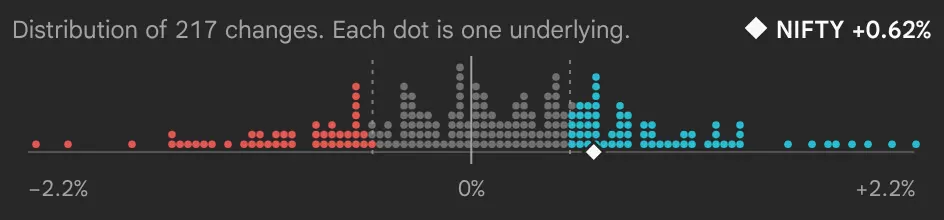
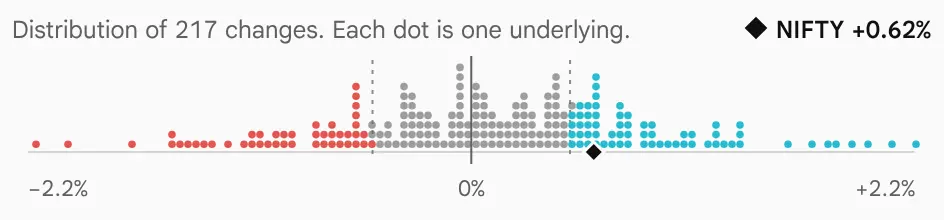
The strip across the top shows every measured move as one dot on a single line, stacked where they crowd. Green dots are up, red are down and grey are flat. A diamond marks NIFTY. The ends of the line reach to the 98th percentile of the moves, never less than 1%, so one wild print is held at the edge. On the right the strip names the count on each side, Bullish N and Bearish N, and the Leading and Lagging sector with its median move.
The fan chart
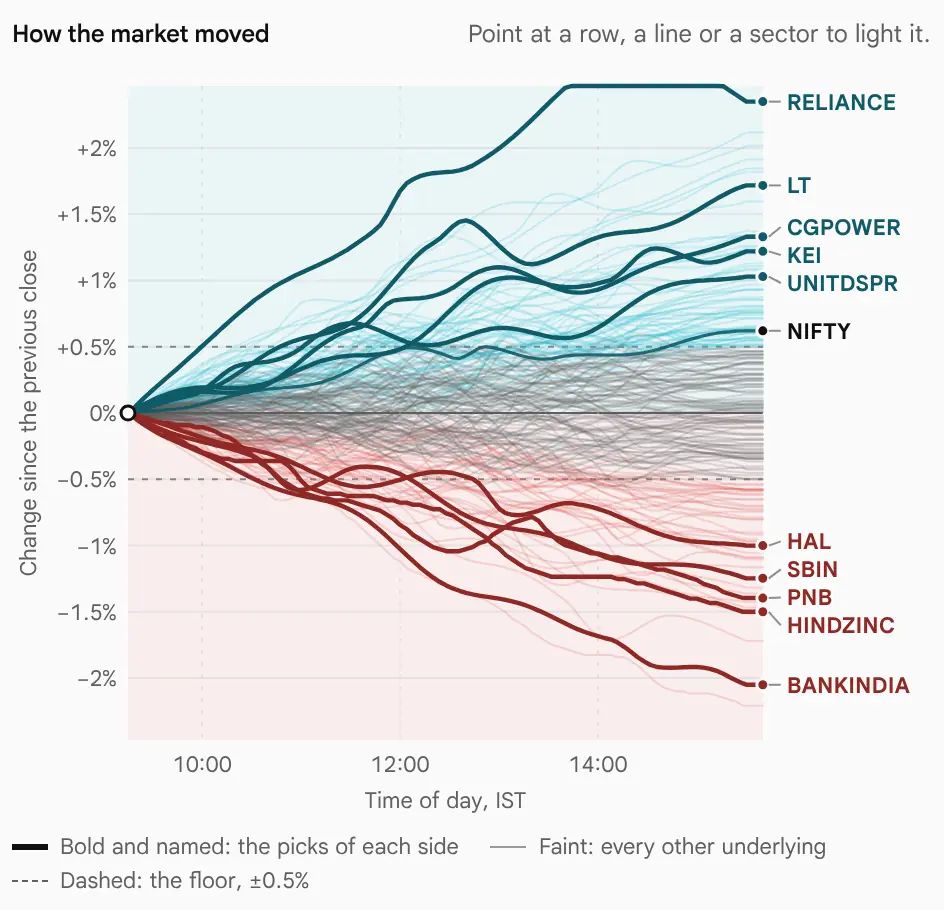
Time runs across and the change runs up the side. Every future that has been loaded is one line. Each line starts at 0% at the start of the window: 09:15 for the Day window, or the candle that the 1 hour or 15 minutes reading starts from. A line ends at its own last candle, never later than 15:30; a line is never stretched to the right edge. On the Day window the chart spans 09:15 to 15:30. On 1 hour and 15 minutes it spans the last 60 minutes or 15 minutes up to the latest future.
A green bar runs up the left edge above zero and a red bar runs down below it: the spine. The shaded band about zero is the floor. The up and down scale is compressed: it is near straight below 0.35% and logarithmic above. So the crowd of small moves near zero spreads out, and the few large moves still fit.
The largest moves on each side are drawn bold; how many is set by Named each side in Customise (Auto draws 5 on this layout). NIFTY's future is drawn bold in the text colour as the reference line, labelled “NIFTY fut” with its change. Every other future is a faint line in its side's colour.
Drawn lines are smoothed; figures are not
The lines are cleaned only for drawing. A minute that sits more than 1.5 percentage points from the median of the seven minutes around it is a bad print, or a spike that came back within three minutes, and takes that median instead. A move that holds passes, because the median follows it. The line is then averaged over a centred 13-minute span and eased out of nought over the first 10 minutes. Every figure the page reports (the strip, the tiles, the cards, the popup and the crosshair) uses the raw change, not the drawn one.
Move the pointer over the chart and a crosshair shows the time. It snaps to the nearest line within 10 pixels and names it with its symbol and its raw change in percent. That line and its path light up; a click pins it.

The sector pills
Sector pills sit inside the left side of the chart. Each pill gives the sector's name and its median move: the middle change of its measured underlyings. Sectors with a median at or above zero stack from the top, leader first. Sectors below zero stack from the bottom, with the laggard lowest. A small bar under the name shows how many of its names are up, flat and down. Each sector also draws a faint line across the chart at its median.
Hover or focus a pill to light that sector's lines and tiles. Click to keep them lit; click again to let go. Indices form their own group, labelled Indices.
The gate
At the right end of the fan, every line bends into a narrow column: the gate. The gate's height is shared out by count, so it reads as the market's breadth. The up names stand at the top in rank order, largest first, inside a green bracket. The flat names fill a grey funnel in the middle, which narrows from the floor band into the gate. The down names stand at the bottom inside a red bracket, with the largest fall lowest. A small dot marks each name that goes on to a tile.
From the gate, a thin curve carries each line to its own tile. The zero rule runs on past the gate and bends, as an S-curve, into the divider between the Bullish half (above) and the Bearish half (below).
Tiles, Tall Tiles and Big Cards
The right side of the board is in two halves. The Bullish half is on top and the Bearish half is below, either side of the divider that the zero rule bends into. Each half holds three kinds of box: small tiles, tall tiles and big cards. Flat underlyings have no tile; they are in the counts, the strip, the fan and the gate.
Small tiles
Every underlying on the side has a small tile, in rank order. On the wide desktop the names shown as big cards are left out of the small tiles. The Bullish tiles fill from the top; the Bearish tiles fill from the bottom, so the largest falls sit lowest. A tile carries:
- The symbol and the change over the window, in percent.
- A build-up mark: a filled dot where positions were opened with the move (Long build-up up, Short build-up down), a ring where positions were closed (Short covering up, Long unwinding down), and nothing where there is no clear pattern.
- A five-bar option profile: Put and Call Open Interest at the five strikes nearest spot, one bar per strike.
When a side has few names, the tiles grow, up to 84 pixels tall. A taller tile adds the build-up in words and then a small line of the window's prices. A tile still standing on its spot's change is muted and placed after every futures reading; where there is room it reads Spot only. When the tiles do not all fit, the last place becomes a +N more tile. Clicking it opens the full list of the side, ranked by move, with each name's rank, change, mark and build-up; the × closes it.
If nothing on a side moved past the floor, the half says so, for example “None up more than 0.5%”.
Tall tiles and big cards
The strongest readings on each side get a tall tile and a big card beside it. There are three per half when the board is at least 980 pixels tall, and two when it is shorter. They are chosen by strength, not by rank: the strongest underlyings whose positions were opened with the move (Long build-up on the Bullish side, Short build-up on the Bearish side). If there are not enough of those, the side's largest futures moves fill the places. See Rank, Strength and the Five Checks.
The tall tile shows the symbol, the change, five conviction dots and the build-up in words. Under them is the option Open Interest by strike, up to eight strikes either side of spot: Puts to the left of the centre line, Calls to the right, with a tag at the spot price.
The big card shows:
- The symbol and its sector, a Bullish or Bearish badge, and the conviction ring. The ring reads checks held of checks measured, for example “4/5”, and its arc fills by that share.
- The move in percent, and the future's price with its change in points.
- A range bar from Support to Resistance, with spot marked on it and the zone shaded. It is drawn only when both levels exist, and only on a card tall enough.
- Candles built from the future's 1-minute closes: 5-minute candles when the window holds more than 120 minutes, 2-minute candles above 30 minutes, and 1-minute candles below that. Each candle opens at the first close in its span, closes at the last, and its high and low are the highest and lowest close. A dashed rule marks the base (the previous close for the Day window, the window's first candle otherwise). The zone is shaded, and S1 and R1 are drawn when they sit near the price. No other line is drawn.
- Support, Zone and Resistance at the foot.
A curve joins each tile and card to its own row in the gate, so every box can be traced back to its line.
Hover, Pin and the Popup
Point at a line, a tile, a tall tile or a big card. One path lights from end to end: the line in the fan, its run through the gate, the curve and the tile. Everything else fades. After a short pause a popup opens over the tiles of the other half (a Bullish name's popup covers the Bearish tiles), so the chart and the lit line stay in view. Moving from one tile to the next swaps the popup at once.
Click to pin it. A pinned popup stays open with its links and a close button. Escape, a second click or a click on an empty part of the board lets it go. Changing the window or the floor also lets it go, because the sides are dealt again. With the keyboard, Tab reaches the first tile and the arrow keys move between tiles; focusing a tile opens its popup, and Enter pins it.
The popup holds:
- The header: the symbol, the name with its sector (or Index), a small line, the price, the change in percent and in points.
- Candles for the window, built from the 1-minute closes by the same rule as the big card. The base is a dashed rule tagged Prev (the previous close) on the Day window or From on the shorter windows. The zone is a shaded box. S1, S2, R1 and R2 are drawn as tagged rules when they sit near the session's range. Where there is no line, it says why: “Loading future…”, “Could not load future”, “No future listed for this underlying” or “Too few minutes yet for a line”.
- Rank, as “#N of N up” or “#N of N down”; a flat name reads “Flat, inside ±0.5%” at the Day floor.
- Build-up in words, and Conviction as five dots with “n of m”.
- Open Interest: the change on the future over the window, with the total held across every listed month.
- Support as S1 and S2, Resistance as R1 and R2, and the Zone with its price range and clock span.
- A last line with the Put Call Ratio (PCR) of the expiry the levels come from, and the date of that expiry: “PCR … · levels from the … expiry”. Before it is pinned the line begins “Click to keep it open”. When pinned, it adds links to the underlying's Option chain and Open Interest pages.
How a Side Is Read
Each underlying's change is its near-month future's price change over the window. Open Interest is summed over every listed futures month, so a position rolled from this month to the next cancels out instead of reading as closed. Readings stop at 15:30: later candles belong to the closing session and are left out, so the chart and the figures end together.
A change of at least the floor takes a side: Bullish when up, Bearish when down. A smaller move is flat. The floor depends on the window.
| Window | Measured from | Default floor |
|---|---|---|
| Day | The previous close | 0.5% |
| 1 hour | The future's own candle about an hour earlier (within 5 minutes) | 0.3% |
| 15 minutes | The future's own candle about 15 minutes earlier (within 150 seconds) | 0.15% |
Customise can set the floor to 0.25%, 0.5%, 1% and 2% instead, for every window. For example, with the Day floor of 0.5%, a future up 0.4% is flat and a future down 0.6% is Bearish.
A window that cannot be measured leaves the underlying without a side rather than guessing: no candle close enough to the lookback, no previous close for the Day window, or a future not loaded yet. On the Day window alone, the spot's change stands in until the future arrives, and also when the future is not listed or could not be loaded. Such a tile reads Spot only.
A side is a state
Bullish names which way the future moved past the floor over the window chosen. It describes what happened. It is not a forecast of what follows, and the page never prints buy or sell.
The Four Build-ups
The build-up is the sign of the price change against the sign of the Open Interest change on the future, over the same window. The page writes the four in sentence case, as the Options Scanner does.
| Price | Open Interest | Reads as | Mark |
|---|---|---|---|
| Up | Up | Long build-up: positions opened on the way up | Filled dot |
| Up | Down | Short covering: positions closed on the way up | Ring |
| Down | Up | Short build-up: positions opened on the way down | Filled dot |
| Down | Down | Long unwinding: positions closed on the way down | Ring |
A future whose price or Open Interest did not change reads No clear pattern and carries no mark. The side comes from the price alone, so a Bullish name is either a Long build-up or Short covering, and both are ranked together on one list. While the future is not loaded the build-up reads Loading future…; when it failed, Could not load future; when none is listed, No future listed.
Rank, Strength and the Five Checks
Rank: by the size of the move
Each side is ranked by the size of its move, largest first. Futures readings come first; underlyings that stand on their spot's change follow them. Equal moves are ordered by symbol. This is the order of the tiles, of the line ends in the gate, and of the number in the popup.
Strength: which names become big cards
Strength is a separate score within the side. It chooses the big cards; it does not change the rank. It adds three parts:
- The move, 45%. How far the move is against the others on the same side, as a standing among them (ties share it; a side of one scores full).
- The Open Interest that moved with it, 35%. Also a standing. Positions opened (Long build-up, Short build-up) count their Open Interest change in full; positions closed (Short covering, Long unwinding) count half; no clear pattern counts nothing.
- The checks, 20%. The share of measured checks that hold. A check that could not be measured is left out of both sides of that share.
The parts are standings, not raw figures, so a 2% day on a quiet tape and on a wild one stand differently. The dots and the ring show only the checks, never the score.
The five checks
Conviction is five checks. Which five depends on the window. The first, the fourth and the fifth are the same on every window.
| Which check | Day | 1 hour | 15 minutes |
|---|---|---|---|
| Positions opened with the move | Long build-up on the Bullish side, Short build-up on the Bearish side | ||
| A wider read agrees | Spot moved the same way since the previous close | The day agrees | The day agrees |
| A shorter read agrees | The last hour agrees | The last 15 minutes agree | The last hour agrees |
| Option writers lean the same way | Since the previous close, more Put Open Interest added than Call on the Bullish side; the reverse on the Bearish side | ||
| Its sector leans the same way | The sector's lean matches the side; a sector of fewer than three underlyings cannot say | ||
Each check holds, does not hold, or is not measured. A check is not measured when the figure it needs is missing (the future not loaded, no previous close, no previous Open Interest in the file), and it is never counted as a fail. A read that is exactly flat does not hold. Five dots show the checks: filled where a check holds, hollow where it does not, faint where it is not measured.
The sector check uses the sector's lean, which is a count of sides, not its median move. A sector leans Bullish when its up names outnumber its down names and are at least half of those measured; Bearish by the mirror; flat when more than half are flat; and mixed otherwise. A mixed sector does not hold for either side. The median move, shown on the pills, only orders the sectors from leader to laggard.
The Zone and the Levels
The zone is the 15-minute stretch of the session's futures candles in which the most Open Interest was added while the price moved the side's way. It is shown as the price range of that stretch (lowest to highest close) and the clock it covers. A stretch counts only if Open Interest rose across it and the price change across it has the side's sign. The largest addition wins, and the first of equals. With fewer than 15 candles the whole session is the stretch. When no stretch qualifies, the Zone reads None in the popup and a dash on the big card. A flat underlying has no zone.
The zone says where positions were opened fastest. It is a stretch of the session, not a level that held, and the page does not measure whether price comes back to it.
Support and Resistance are the heaviest Open Interest on each side of spot. S1 is the Put strike with the most Open Interest at or below spot, and S2 the next. R1 is the Call strike with the most at or above spot, and R2 the next. A tie goes to the strike nearer spot. They come from the nearest expiry that is still live. On an expiry day, once that day's expiry has settled at the close, the levels move to the next expiry. They are the heaviest positions, nothing more; the names are borrowed because that is where the eye looks for them.
Layouts
The page picks one of four layouts from the window's width.
| Layout | Width | What you get |
|---|---|---|
| Wide desktop | 1280 pixels and wider | One continuous diagram, as tall as the window: strip, fan chart, gate, curves, tiles, tall tiles and big cards |
| Compact board | 1100 pixels up to 1280 pixels | A sector rail, the chart, and the Bullish half over the Bearish half, as tall as the window |
| Tablet | Above 768 pixels and below 1100 pixels | The chart with the sector list, then the Bullish half, then the Bearish half; the page scrolls |
| Phone | 768 pixels and narrower | One panel at a time under a switch: Chart, Bullish and Bearish |
The compact board
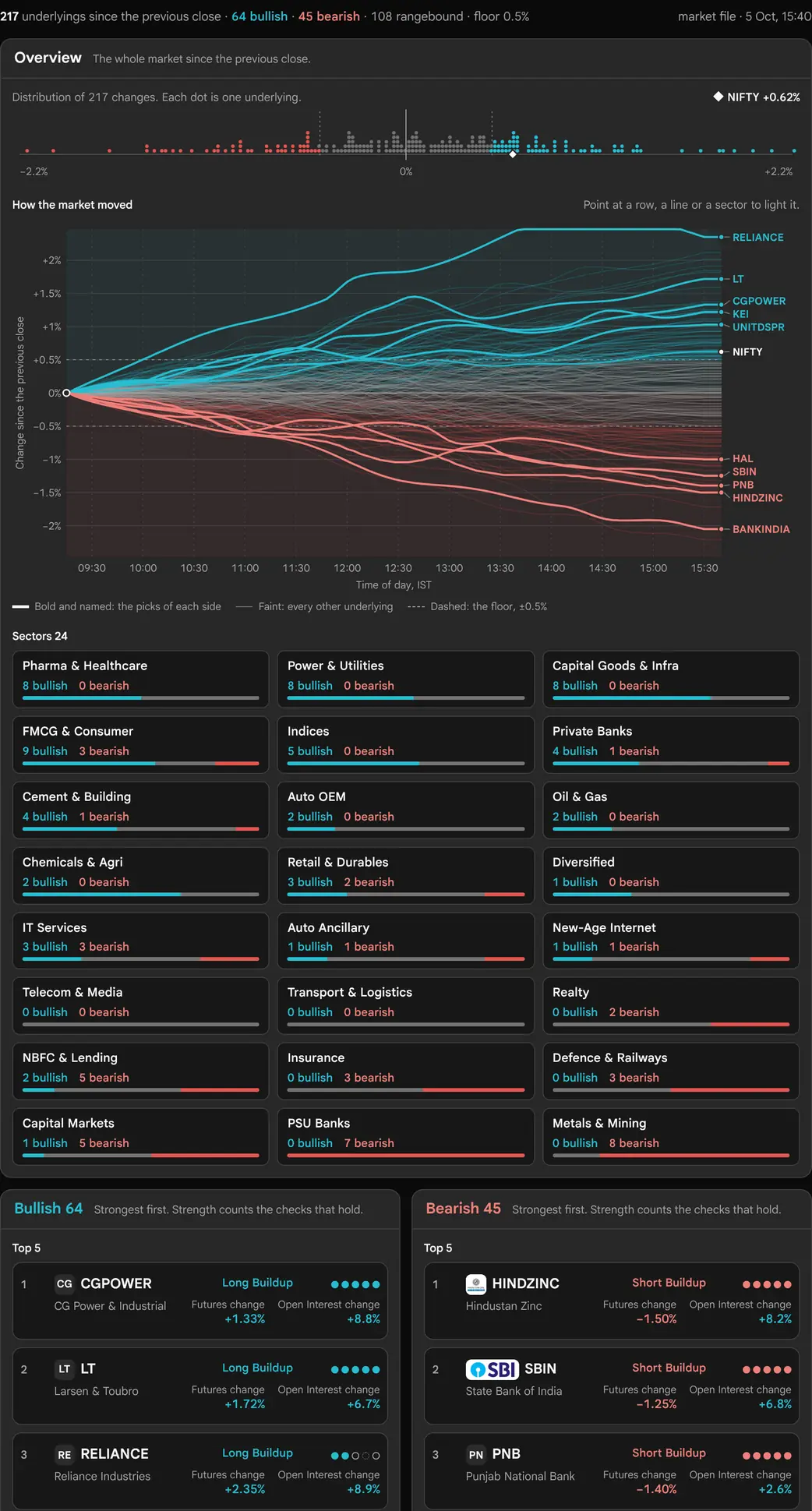
The chart has a title that follows the window: Through the day, The last hour or The last 15 minutes, with the status line beside it. Here the chart is drawn on an even scale, and the largest moves are named at their line ends: up names above the zero rule and down names below. On the left is a rail. At its top, Spread of moves is a small bar chart of every move in twenty steps, reaching 5% for the day, 1.5% for an hour and 0.6% for 15 minutes; the ends gather everything past that. A bar under it splits the board into up, flat and down. Below that, the Sectors list gives each sector's median move, rising sectors above the zero rule and falling ones below it.
On the right, each half is headed with its side, its count and “Ranked by move”, with a key to the two marks. Its tiles show the symbol, the rank, the change, the mark and a small line of the window's prices (or “spot”). Then come two big cards, each with the symbol, five dots with “n of m”, the change, the price with its change in points, the build-up in words, a line of the window with the zone and the base, and Support, Zone and Resistance. A popup opens over the other half on hover, as on the wide desktop. There are no tall tiles, no gate and no curves on this layout.
Reading It on a Phone
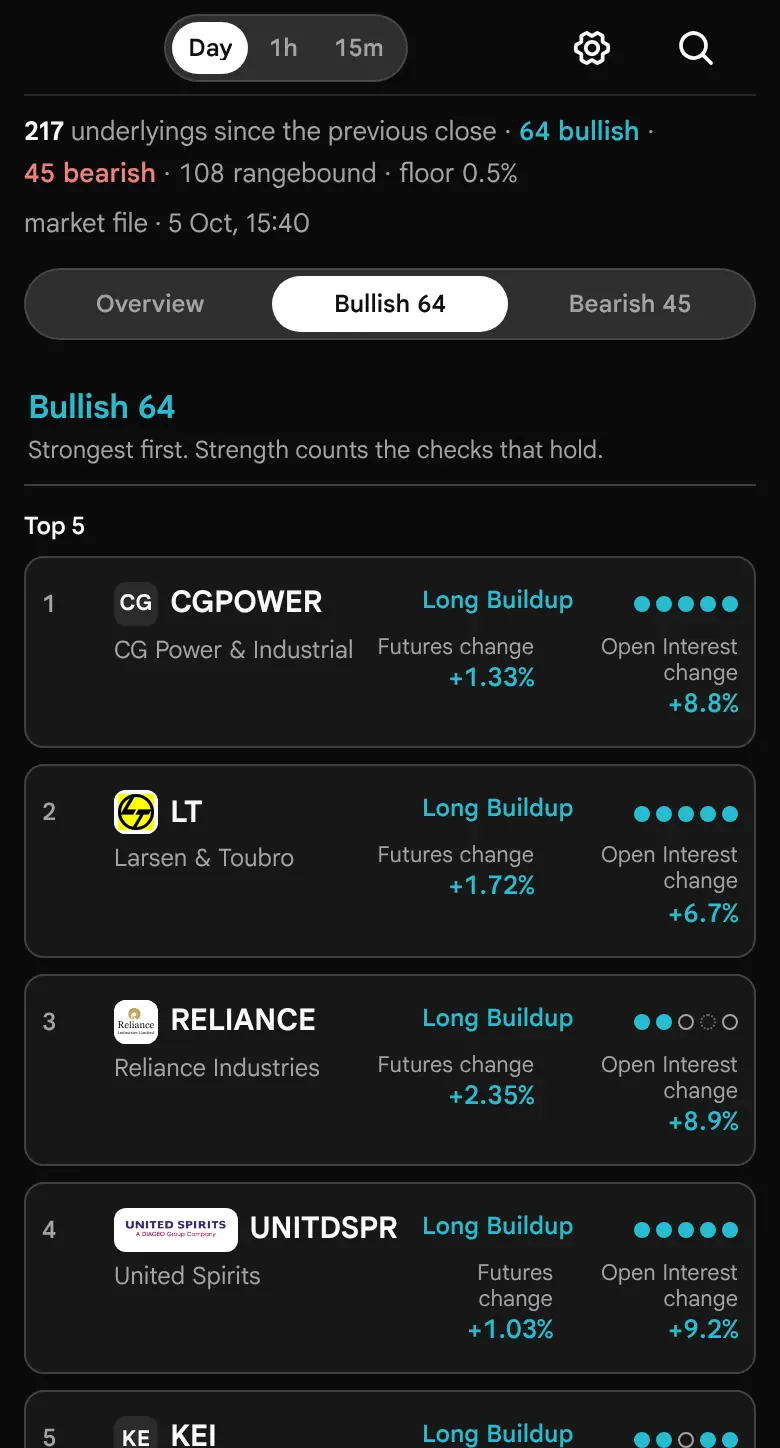
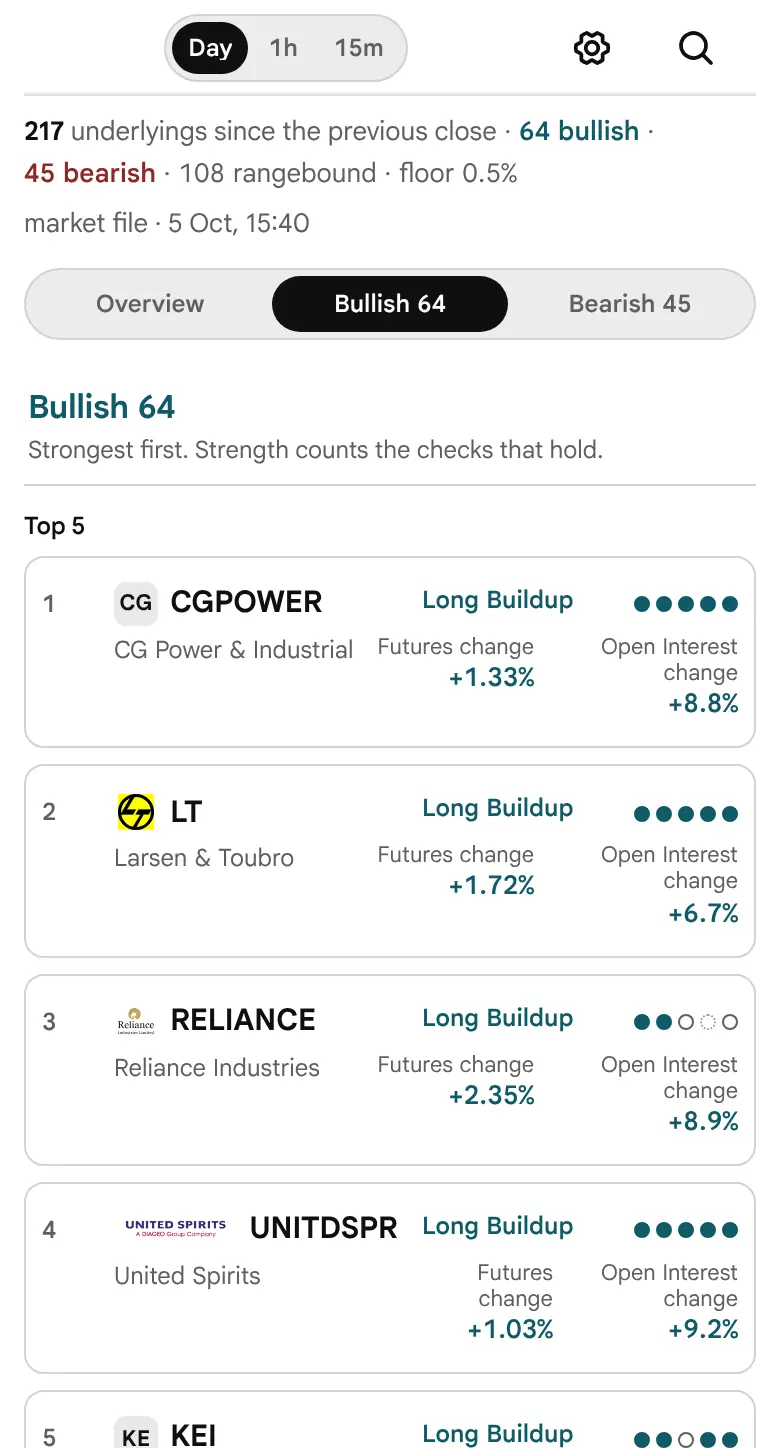
On a phone (768 pixels wide or less) the status line comes first. Under it a switch reads Chart, Bullish N and Bearish N, with each side's count. One panel shows at a time.
- Chart: the chart with its title, then the sector list. The chart is drawn as on the compact board, with fewer named lines on a narrow screen when Named each side is Auto (8 when the chart is at least 900 pixels wide, 5 when it is at least 520 pixels, and 3 below that).
- Bullish and Bearish: the side's tiles in a dense grid, ranked by move, then its two big cards.
There is no hover on a touch screen. A tap on a tile, a card or a line opens the detail as a bottom sheet: the same header, candles and facts as the popup, with the links to Option chain and Open Interest. The × or a tap on an empty part of the board closes it. A tablet works the same way, with every part stacked on one scrolling page.
Reading this guide on a phone
The diagram, the gate and the tall tiles described above appear only at 1280 pixels and wider. On a phone, read The Status Line, Tiles, Tall Tiles and Big Cards (small tiles and big cards) and Hover, Pin and the Popup (the sheet holds the same facts). The rules in How a Side Is Read and after are the same on every screen.
Customise
The window switch (Day, 1h, 15m) sits in the page bar. The Customise button beside it opens the panel. Every change applies at once. Reset restores the defaults; the close button or a click outside shuts the panel. The choices are remembered in this browser only.


| Group | Setting | Choices | Default |
|---|---|---|---|
| Market | Underlyings | All, Stocks, Indices | All |
| Floor | At least | Default, 0.25%, 0.5%, 1% and 2% | Default: 0.5% Day, 0.3% 1 hour, 0.15% 15 minutes |
| Chart | Named each side | Auto, 3, 5 and 8 | Auto |
| Chart | Lines | Show all lines, Middle 80% | Show all lines |
- Market limits the board to stocks or indices before anything is counted, so the counts, the sectors, the ranks and the big cards all follow it.
- Floor sets the smallest move that counts as up or down, for every window. Default uses each window's own floor.
- Named each side sets how many of the largest moves each side are drawn bold (and, on the compact board, tablet and phone, named at their ends). Auto is 5 on the wide desktop, and on the other layouts 8 when the chart is at least 900 pixels wide, 5 when it is at least 520 pixels, and 3 below that. NIFTY is always drawn when indices are included.
- Lines: Middle 80% replaces the faint lines with a band from the 10th to the 90th percentile of every line, minute by minute, with its median. The bold lines stay. In the product's code this setting is read by the compact board, tablet and phone chart; the wide desktop diagram always draws every line (not yet confirmed as intended).
Named each side and Lines change only the chart. A change of window or floor deals the sides again and closes a pinned popup.
In Practice
Two routines
- The open. With the Day window, let the futures finish loading, until Updating gives way to the time. Read the strip and the sector pills first: a side that most sectors share is a different market from one carried by a single sector. Then read the top tiles of each side, and point at the big cards to see which checks hold.
- Through the session. Switch to 1h. An underlying on one side for the day and on the other over the last hour fails its wider check, and the popup shows the window's own candles.
Traps
- A large percentage on a small Open Interest base. The popup prints the Open Interest total beside the change; read both.
- Expiry week. Open Interest is summed across months, but a stock whose next month is not yet listed has only one month to sum, and its rolled positions read as closed.
- A side on the spot. Until a future is loaded, a Day-window tile stands on the spot's change, reads Spot only, and sits after the futures readings. Its first check reads “the future is not loaded yet”.
- Counts while updating. Until the status line drops Updating, the counts include spot changes and will move. The big cards wait for 90% of the futures.
- Smooth lines. The fan is smoothed for drawing. A sharp spike that came back within minutes is not drawn, but the figures still carry the raw change.
- An old board. “an earlier session” in the status line is the only mark of a reading from an earlier session; the board itself looks the same.
- The zone is a stretch of the session, not a level that held.
What It Cannot Say
Open Interest has a buyer and a writer on every contract. A Long build-up says positions were opened as the price rose. It does not say who opened them, on which side of the trade, or why. The sector median is the middle move of the sector's F&O names, not the sector's own index. The levels and the profiles are the heaviest Open Interest at the moment of the last market file, which is rewritten once a minute in market hours; after the close they are the session's final book.
The page places no orders, carries no alerts and prints no prices it did not read. It describes what the futures and options did; it does not say what to do next. Figures in this guide are illustrative, never a quote. Values in this guide are as of 19 October 2026, read from the source files in src/features/market-flow and src/features/options-scanner.
What We Have Not Verified
Not yet confirmed
Everything else in this guide was checked against the product's source on 19 October 2026. These items could not be, and every marked phrase in the text links here.
- The Lines setting on the wide desktop. In the code, Middle 80% changes the chart on the compact board, tablet and phone only. The wide desktop diagram always draws every line. Whether that is intended is not confirmed.
- The count of underlyings. The example status line reads “of 216”, the count on 19 October 2026. The total is every underlying in the catalogue that the market file lists, and it changes when the exchange adds or drops names.
- A live session. The loading order, the 90% hold on the big cards and the second try for a failed future follow the product's code. We did not watch a live open to confirm how long the futures take to load.
- Touch on a real phone or tablet. The bottom sheet and the tap behaviour follow the product's code and tests, not a device test.
- Pictures taken before the page was redesigned. On 19 October 2026 the page was redesigned: one continuous diagram on a wide desktop (strip, fan chart, sector pills, gate, curves, tiles, tall tiles and big cards); tiles ranked by move in place of the three columns and the picks; a popup in place of the row that opened in place; a one-line status; and Customise with Named each side and Lines in place of the window and picks. These pictures were taken before that and have not been retaken, so they still show the earlier page: The whole board, wide, The status while the futures load, The earlier-session mark, Before anything is read, The distribution strip, The fan chart, The tablet layout, The phone layout, Customise. Pictures for the gate, the tiles, the big card and the popup are not yet taken. The text describes the page as it is now; trust the text where the two differ.
About the Sahi Market Flow
Every F&O underlying on one board, read from its near-month future over the day, the last hour or the last fifteen minutes. Each underlying takes a side once its future moves past a floor, bullish or bearish, and each side is ranked by the size of the move. The build-up says how its positions moved: Long build-up or Short build-up where positions were opened with the move, Short covering or Long unwinding where they were closed.
On a wide screen the page is one diagram: a strip of every move, a fan chart with every future starting from nought, sector pills, and a gate from which each line runs to its own tile. The strongest on each side get big cards with candles, a conviction ring, and the heaviest Put and Call open interest either side of spot as support and resistance. Point at or tap any name for its detail.
At a glance
- Data
- Sahi market data for NSE and BSE options
- Updates
- Option chain re-fetched about every 5 seconds in market hours
- Coverage
- 217 NSE and BSE index and stock F&O underlyings
- Access
- Free — no login, no download
- Orders
- Analysis only. Sahi does not accept orders
See it on today's numbers
Everything above is method. These articles apply it to a live book — market flow among the rest — and are rebuilt as the snapshot data refreshes. Where a symbol's option book is too thin to support a reading, the article says so rather than asserting a level.
Frequently asked questions
How does Market Flow decide bullish or bearish?
From the future, not the spot: the near-month future's price change over the window, with open interest summed over every listed month so a position rolled to the next month does not read as closed. A move past the floor, half a percent on the day by default, takes a side; a smaller move is flat. The side is a state the market is in, not a forecast of where it goes next.
What is the zone on a card?
The fifteen-minute stretch of the session's futures candles in which the most open interest was added while the price moved the side's way, shown as the price range of that stretch and the clock. It says where positions were opened fastest. It does not say who opened them, and open interest cannot.
What makes one stock stronger than another?
Each side is ranked by the size of the move, futures readings first. Strength is a separate standing within the side: how far it moved against the others, how much open interest moved with it (positions opened count in full, positions closed at half), and how many of five checks hold. The strongest positions opened with the move become the big cards.
Does Market Flow place orders or give calls?
No. It sorts and describes what the futures and options did, and places no orders. Possible support and resistance are the heaviest Put and Call open interest either side of spot on the nearest live expiry, named as what they are; nothing here is a recommendation.
Read next
Explore more Sahi tools
Every tool runs on the same market data and keeps whichever instrument you have selected, so you can move between them without re-picking the symbol.
Option Chain
Scan and build
Every Sahi guide
Each guide pairs with a live tool. The options FAQ collects every question from all of them in one place.