

Live now
Index readings from the same feed the Sahi terminal runs on. Open the live Option Chain to see this guide applied to today’s numbers.
- NIFTY — —
- BANKNIFTY — —
- SENSEX — —
What the Option Chain Insight Card Is
Above the Option Chain sits a one-row card. It names a verdict, shows three chips (PCR, Walls and Move) and, when you press View insight, opens a short reading and a detail panel. Older notes call this “AI Insights”. The app has no tab or page by that name. This guide uses the name the app prints: the Insight card.
Not a Prediction Engine
The verdict is a fixed rule of thumb. The app states that it has not been trained or backtested. It compares how premium and Open Interest changed on the strikes on screen with how the index moved today, and says whether the two agree. It does not say where the price will go.
- Four possible words. Bullish indications, Bearish indications, Mixed indications, or a plain statement that no direction could be read.
- Two things vote. Positioning on the displayed strikes, and the index change against the previous close. Everything else on the card is context.
- Open Interest is a count of contracts. It does not show who opened a position or why. Hedges and rolls print the same way.
Open the Option Chain and press View insight above the table.
Reading the Card
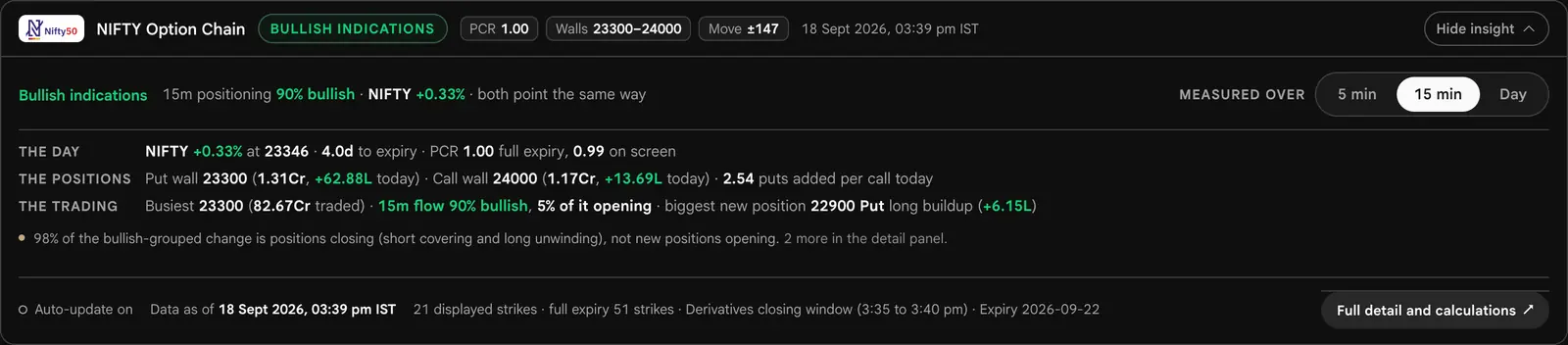

The verdict and the reason
The verdict is the coloured word. Beside it is one line giving the window, the positioning share and the index change, for example “15m positioning 90% bullish · NIFTY +0.33% · both point the same way”.
The three chips
PCR is total Put Open Interest divided by total Call Open Interest across the full expiry. Walls runs from the highest Put Open Interest at or below spot to the highest Call Open Interest at or above it, also across the full expiry. Move is 0.85 times the ATM straddle, a pricing convention and not a forecast.
The three lines
The day: index change, spot, days to expiry and the PCR on the full expiry and on screen. The positions: the walls with their Open Interest and today’s change, and the change-in-Open-Interest ratio. The trading: the busiest strike by volume, the positioning share for the chosen window, how much of it is positions opening, and the biggest new position.
The caution
At most one caution shows, with a count of the rest, which are in the detail panel. Typical ones: the positioning window is shorter than the day the index change covers; most of the lean is positions closing, not opening; a wall sits outside the strikes on screen.
On a narrow screen the card drops the word “indications” and keeps the lead word of the verdict. The reading is the same.
How the Verdict Is Decided
The detail panel lists five checks in order. Each leg is one Call or one Put on a displayed strike.
| Check | Rule |
|---|---|
| 1. Comparison window | The chosen window needs a matched earlier reading. If it has none, the card tries another window and says so. |
| 2. Legs matched | At least 60% of the displayed legs, at least 2 legs, and both Calls and Puts must be measured. Otherwise: Direction not established. |
| 3. Positioning lean | Bullish share of 60% or more leans bullish. 40% or less leans bearish. Between the two there is no lean. |
| 4. Index against previous close | More than +0.05% counts as up, below −0.05% as down, inside the band as flat. The change is judged as printed, to two places. |
| 5. Result | Lean and index agree: Bullish or Bearish indications. No lean, a flat index, no previous close, or disagreement: Mixed indications. |
What counts as bullish
Each leg with a changed premium and a changed Open Interest is weighted by the size of its Open Interest change. A Call whose premium rose is bullish; a Call whose premium fell is bearish. A Put whose premium fell is bullish; a Put whose premium rose is bearish. The bullish share is the bullish weight divided by all directional weight. A leg with no premium change or no Open Interest change is measured but casts no vote.
| Leg | Premium | Open Interest | Name | Grouped as |
|---|---|---|---|---|
| Call | Up | Up | Long Buildup | Bullish |
| Call | Up | Down | Short Covering | Bullish |
| Call | Down | Up | Short Buildup | Bearish |
| Call | Down | Down | Long Unwinding | Bearish |
| Put | Down | Up | Short Buildup | Bullish |
| Put | Down | Down | Long Unwinding | Bullish |
| Put | Up | Up | Long Buildup | Bearish |
| Put | Up | Down | Short Covering | Bearish |
The other outcomes
- Direction not established. Checks 1 or 2 failed: the window is still filling, or too few legs have a matched reading, or only one side was measured.
- Single-side view. The strike scope is not a Call-and-Put view. The app keeps the chain’s own reading when the table is expanded to Calls or Puts only, so this outcome is rare.
- No visible strikes. No strikes are on screen to read.
Why Mixed Is Common
Two independent comparisons must agree, and the index must have moved by more than 0.05%. When they do not, the card says Mixed instead of choosing. Treat Mixed as information: the two readings disagree.
Measured Over: 5 min, 15 min and Day
The switch is inside the opened card. It changes the baseline against which each leg’s premium and Open Interest are compared. The index change always covers the whole day, whichever window you pick.






| Window | Compared with | Baseline accepted |
|---|---|---|
| 5 min | The reading about five minutes back | A saved reading within 90 seconds of that mark |
| 15 min | The reading about fifteen minutes back | A saved reading within 150 seconds of that mark |
| Day | The previous session’s close and Open Interest | The previous-session figures supplied for each leg |
- Defaults. An index opens on 15 min. A stock opens on Day, because a share’s option book moves too slowly for five minutes to say much.
- Remembered. Your choice is kept in this browser, once for indices and once for stocks. If storage is blocked it lasts the session.
- Fallback. If the chosen window is not ready, the card tries others (5 min then 15 min then Day; 15 min then 5 min then Day; Day then 15 min then 5 min) and prints which one it used. A window that cannot run is greyed out, and a note beneath the switch gives the reason, for example that snapshots are still being collected.
- Names. The switch says Day; the lines say Today; the detail panel says session. They are the same window.
The Detail Panel
The button Full detail and calculations opens a panel headed “NIFTY chain detail” (the symbol you are on) with the expiry and the comparison. Its seven sections each show headline figures first. A fold, Show the N calculations, gives for every figure its formula, the working with the actual numbers, and which strikes it covers.
| Section | What it shows |
|---|---|
| How the verdict is decided | The five checks above, what is uncertain, and the arithmetic. |
| Walls and reference levels | A ladder of the call and put walls, the move range, the gamma flip, max pain and spot. Walls use the full expiry, not only the strikes on screen. |
| Put/call ratios | Four ratios with four different inputs: Open Interest on the full expiry, Open Interest on the displayed strikes, change in Open Interest today, and volume. |
| Positioning, leg by leg | The bullish and bearish groupings split into positions opening and positions closing, with a table of every directional leg. |
| Trading and new positions | The busiest strikes, the largest builds and unwinds today. |
| Premium and volatility | ATM straddle, ATM implied volatility, expected move, one-standard-deviation move, straddle decay and put-call skew. Pricing conventions and model outputs, not forecasts. |
| Data and scope | Data time, expiry, displayed strikes against the full expiry, previous close and the Open Interest baseline. |
Two scopes matter. Direction and the on-screen PCR use only the displayed strikes. Walls, full-expiry PCR, max pain and Gamma Exposure use every strike in the expiry. That is why a wall can sit outside the strikes on screen.
Worked Example and Traps
One market, three readings
On the frozen NIFTY reading (illustrative data, 18 September 2026, 03:39 pm), NIFTY is +0.33% on the day, above the 0.05% flat band, so the index votes up in every window.
| Window | Bullish share | Lean | Verdict |
|---|---|---|---|
| 5 min | 51% | None (inside 40 to 60) | Mixed indications |
| 15 min | 90% | Bullish | Bullish indications |
| Day | 69% | Bullish | Bullish indications |
The 15 min caution on the card says that most of the bullish-grouped change is positions closing (short covering and long unwinding), not new positions opening. The Day reading is mostly opening. The verdict word is the same; what sits beneath it is not. Read the caution and the opening share before the word.
Traps
- Reading Bullish as a forecast. It says positioning and the day agree at this moment. It does not say what comes next.
- Comparing windows with the day. A 5 min share is set beside an index change for the whole day. The card says so in its caution.
- Forgetting the strikes on screen. Direction reads only the displayed strikes. Widen the strike range to change what is read.
- Treating closing as opening. Falling Open Interest means contracts closed, not fresh buying or selling.
- Ignoring the stamp. The card prints its data time. Check it before reading.
On a phone
The card works at phone width: the verdict keeps its lead word, the chips stay, and the detail panel opens full width with its section links pinned at the top. The pictures in this guide scroll sideways inside their frame.
For the columns behind the build-up names, read Part C of the Option Chain guide. For the walls and max pain, read the Open Interest guide.
What We Have Not Verified
Rules were read from the app’s code. Figures were read from existing pictures of the card on one frozen reading. The items below are not confirmed.
| What | What we do not know | What you can do |
|---|---|---|
| The 5 min, 15 min and Day figures | They are those printed in the existing pictures (51/49, 90%, 69%) and in the project’s fact sheet for the card. We did not capture the card again for this guide, and the saved snapshots that the 5 min and 15 min windows read were not available here, so we could not reproduce those two figures. | Open the Option Chain, press View insight and read your own figures. |
| The detail panel | It is described from the code and the fact sheet. We have no new picture of it for this guide. | Open Full detail and calculations and use Show the calculations. |
| Which side of the mark the baseline may fall on | We state the 90 and 150 second limits but did not confirm whether the saved reading may sit before, after or either side of the mark. | Read the times the card prints for the baseline. |
| What Open Interest change means | Build-up names are conventional readings of premium and Open Interest signs. We did not cite an exchange document for them. | Treat them as labels, not records of who traded. |
| Every phone and browser | The phone description is from the code and the app’s notes, not tests on each device. | Tell us what you see on yours. |
| The old name | We found no tab or page called AI Insights in the code. Another release may differ. | Look above the Option Chain for View insight. |
Sources
| Constant | Value | Source file |
|---|---|---|
| Bullish share (whole percent) at or above which positioning leans up | 60 | src/features/option-chain/chainOutlook.ts |
| Bullish share at or below which positioning leans down | 40 | src/features/option-chain/chainOutlook.ts |
| Share of displayed legs (percent) that must have a matched reading | 60 | src/features/option-chain/chainOutlook.ts |
| Fewest matched legs a direction is read from | 2 | src/features/option-chain/chainOutlook.ts |
| Day change (percent) inside which the price counts as flat | 0.05 | src/features/option-chain/chainOutlook.ts |
| Seconds either side of the 5-minute mark within which a saved reading is accepted as the baseline | 90 | src/App.tsx |
| The same for the 15-minute mark | 150 | src/App.tsx |
| Expected move is this factor times the ATM straddle | 0.85 | src/lib/straddlePremium.ts |
| Browser storage key (per kind of underlying) that remembers Measured over | chainInsightWindow | src/features/option-chain/ChainInsightCard.tsx |
Also read: src/features/option-chain/chainOutlook.ts (verdict rule), chainInsightModel.ts (card lines and detail sections), ChainInsightCard.tsx (card, switch, panel), docs/widgets/option-chain-advanced/insight-facts.json (figures on the frozen reading). Pictures are real captures on illustrative data.
Test Your Knowledge
Check the mechanics before you take them to a live chain.
1. The bullish share is 55%. What does the card say about direction?
2. NIFTY is up 0.04% on the day and positioning is 80% bullish. What is the verdict?
3. A Put whose premium fell while its Open Interest rose is grouped as?
4. Which window does a stock open on?
About the Sahi Option Chain
The Sahi option chain shows every strike of the selected NSE or BSE underlying in a single live grid — call and put open interest, change in open interest, volume, bid and ask, last traded premium, implied volatility and the full set of Greeks.
The chain is re-fetched about every 5 seconds while the market is open. Each row also carries a build-up classification, so long build-up, short build-up, short covering and long unwinding are readable without doing the arithmetic yourself.
At a glance
- Data
- Sahi market data for NSE and BSE options
- Updates
- Option chain re-fetched about every 5 seconds in market hours
- Coverage
- 217 NSE and BSE index and stock F&O underlyings
- Access
- Free — no login, no download
- Orders
- Analysis only. Sahi does not accept orders
See it on today's numbers
Everything above is method. These articles apply it to a live book — insight card among the rest — and are rebuilt as the snapshot data refreshes. Where a symbol's option book is too thin to support a reading, the article says so rather than asserting a level.
Frequently asked questions
Is there an AI Insights tab in Sahi?
No tab or page has that name. The feature is the Insight card above the Option Chain, opened with View insight. It is a fixed rule, not a trained model.
When does the Insight card say Mixed indications?
When positioning has no lean (a bullish share between 40% and 60%), or the index is within 0.05% of its previous close, or the two comparisons point opposite ways.
What does Direction not established mean?
The chosen window has no matched earlier reading, fewer than 60% of displayed legs are matched, fewer than 2 legs are matched, or only Calls or only Puts were measured.
Which window does the card open on?
An index opens on 15 min and a stock on Day. Your choice is remembered separately for indices and stocks.
Does a Bullish verdict predict that the price will rise?
No. It says that positioning on the displayed strikes and the index change agree at this moment. Open Interest does not show who opened a position or why.
Read next
Explore more Sahi tools
Every tool runs on the same market data and keeps whichever instrument you have selected, so you can move between them without re-picking the symbol.
Option Chain
Scan and build
Every Sahi guide
Each guide pairs with a live tool. The options FAQ collects every question from all of them in one place.