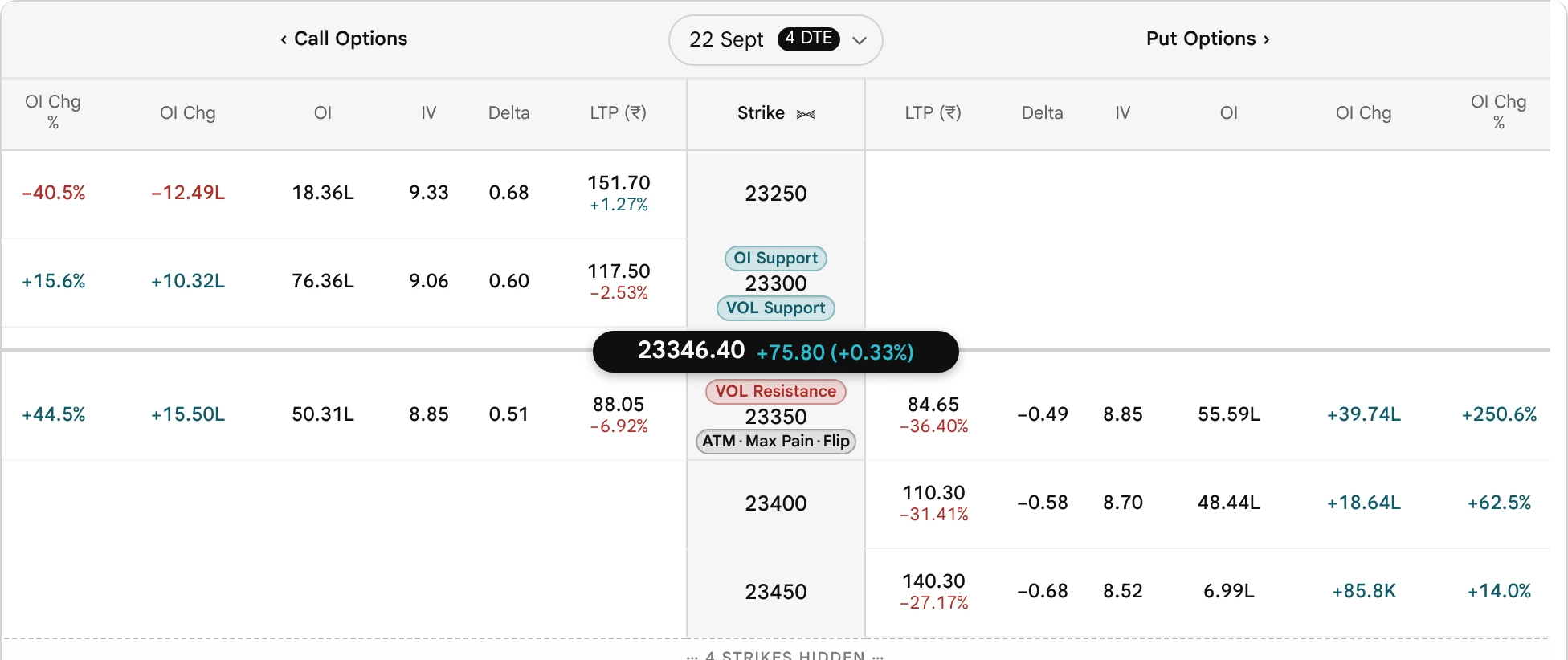
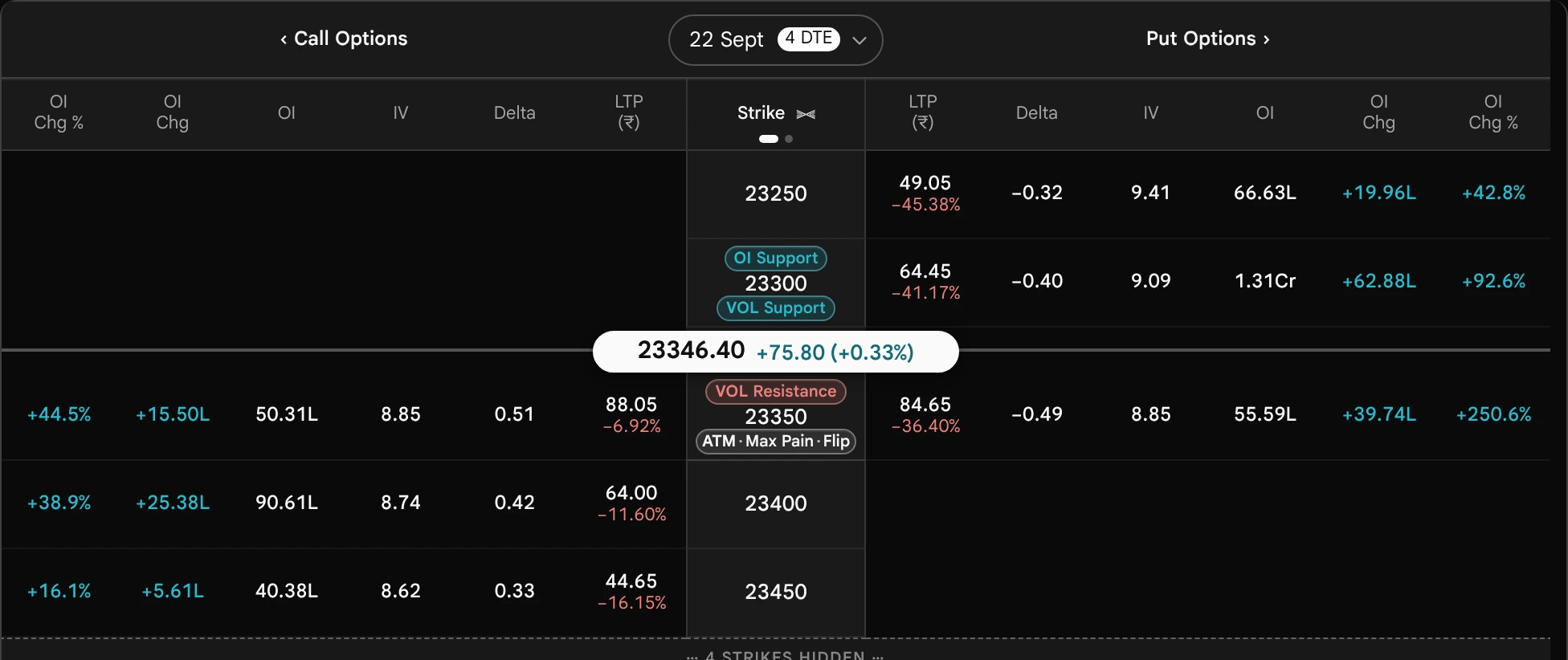
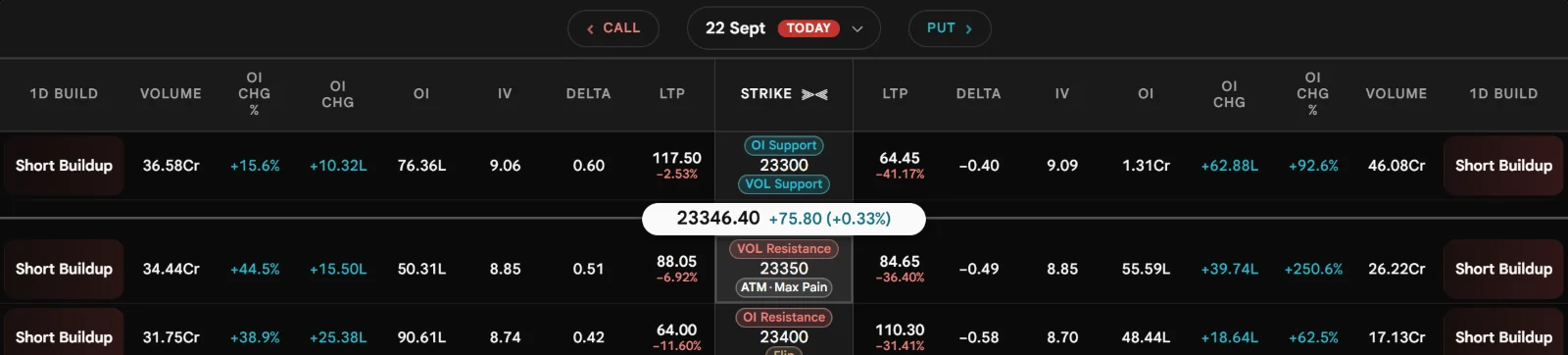
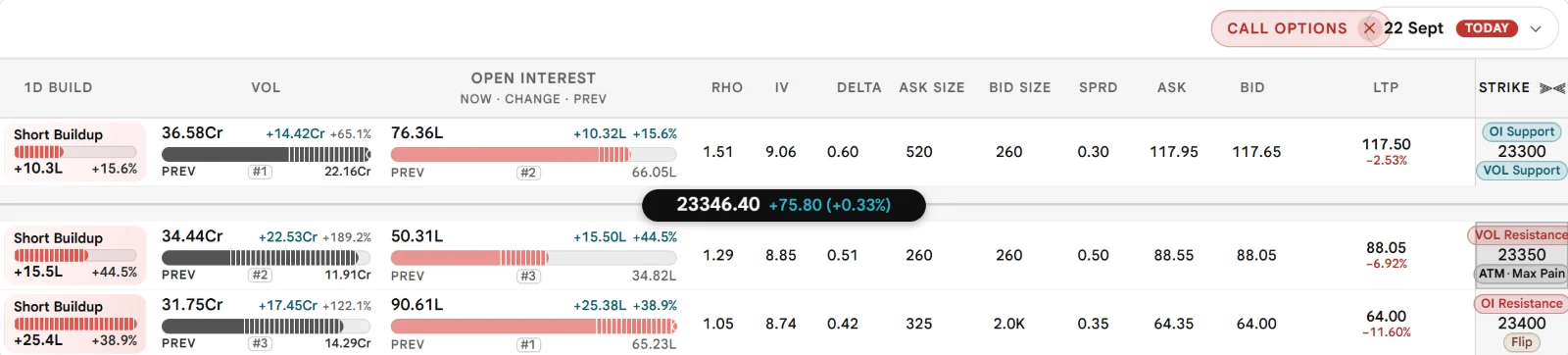
Every cell the option chain prints, in the Simple and the Advanced view, one at a time: what it shows, how Sahi works it out, what it prints when there is nothing to say, and how it is commonly misread. The two views, the expiry and Customise come first, then the ladder and spot line, price and quote, open interest and build-up, implied volatility and the Greeks, and value and distance.
44 cells5 partsSimple and AdvancedUpdated 2026-10-28
Live now
Index readings from the same feed the Sahi terminal runs on. Open the live Option Chain to see this guide applied to today’s numbers.
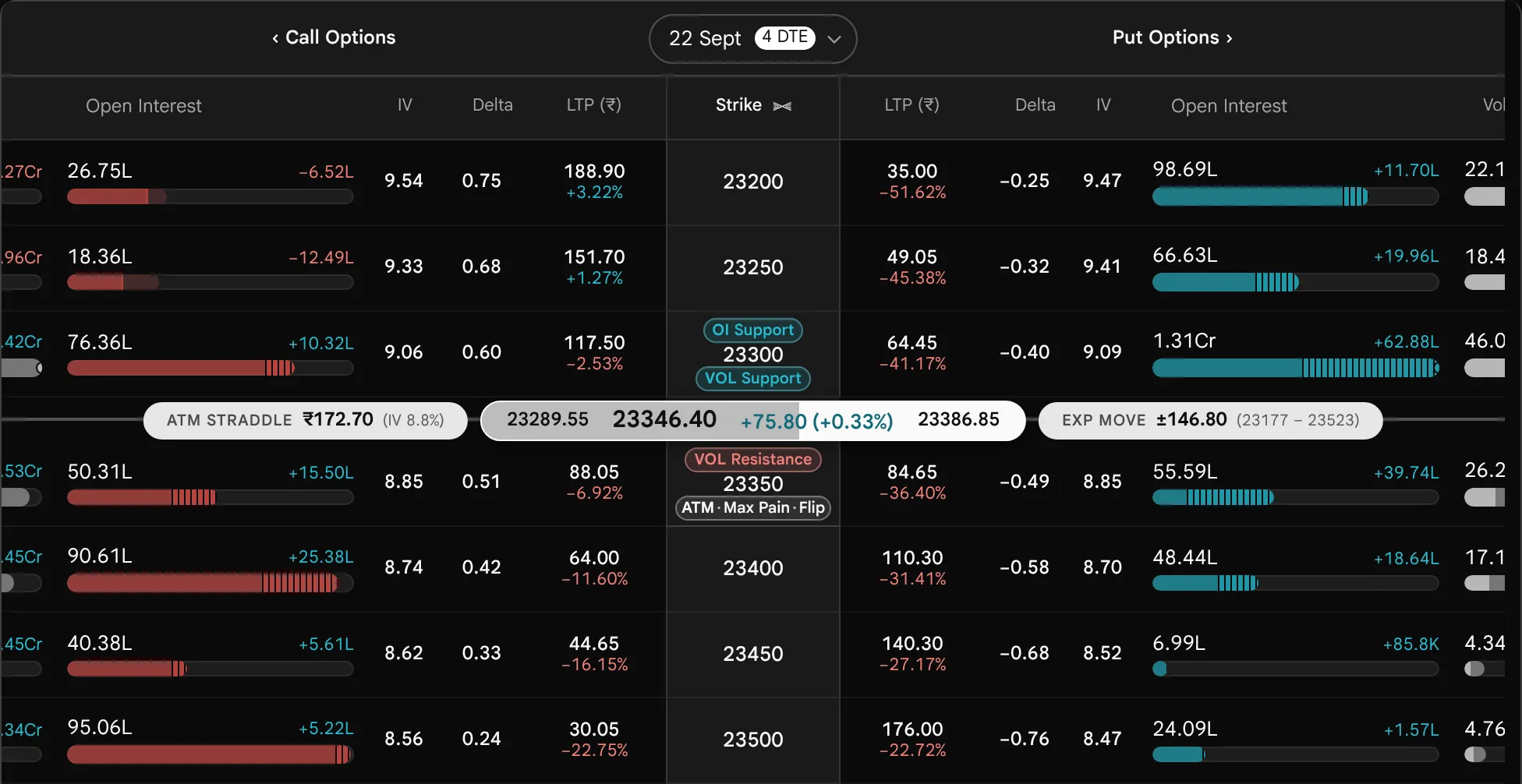
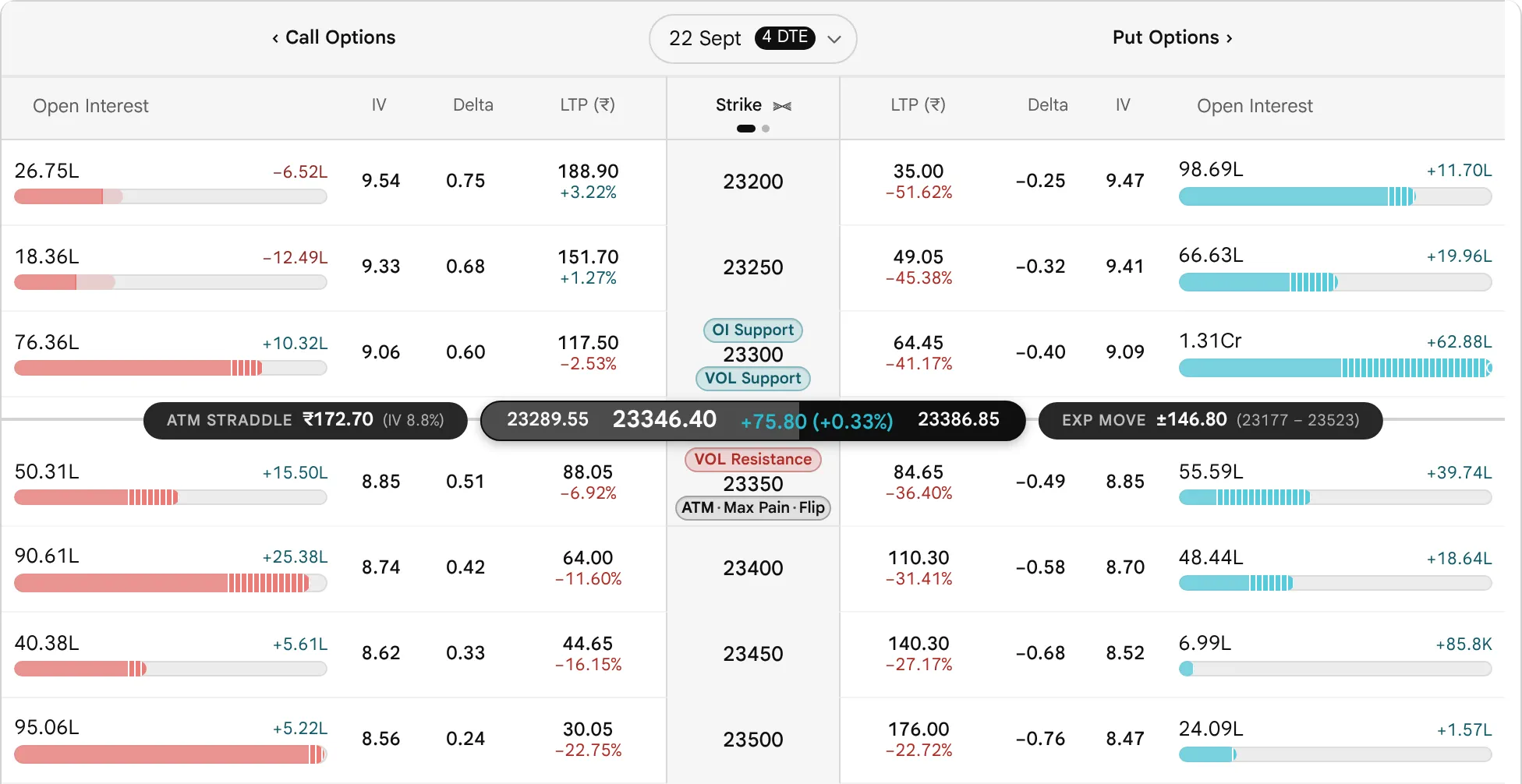
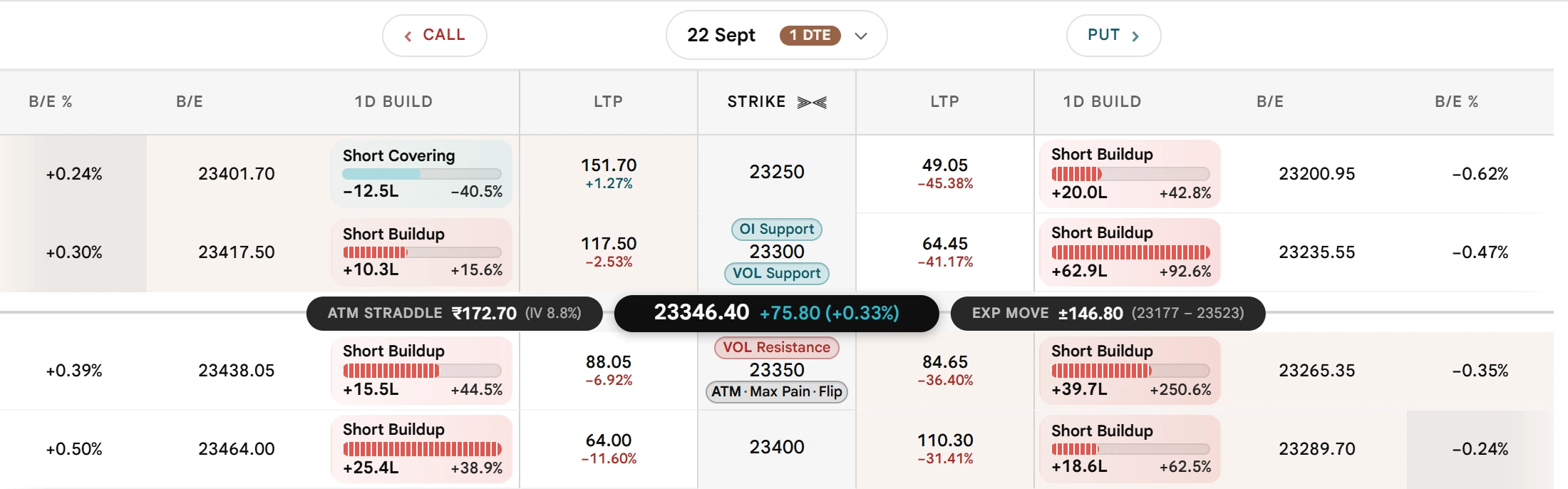
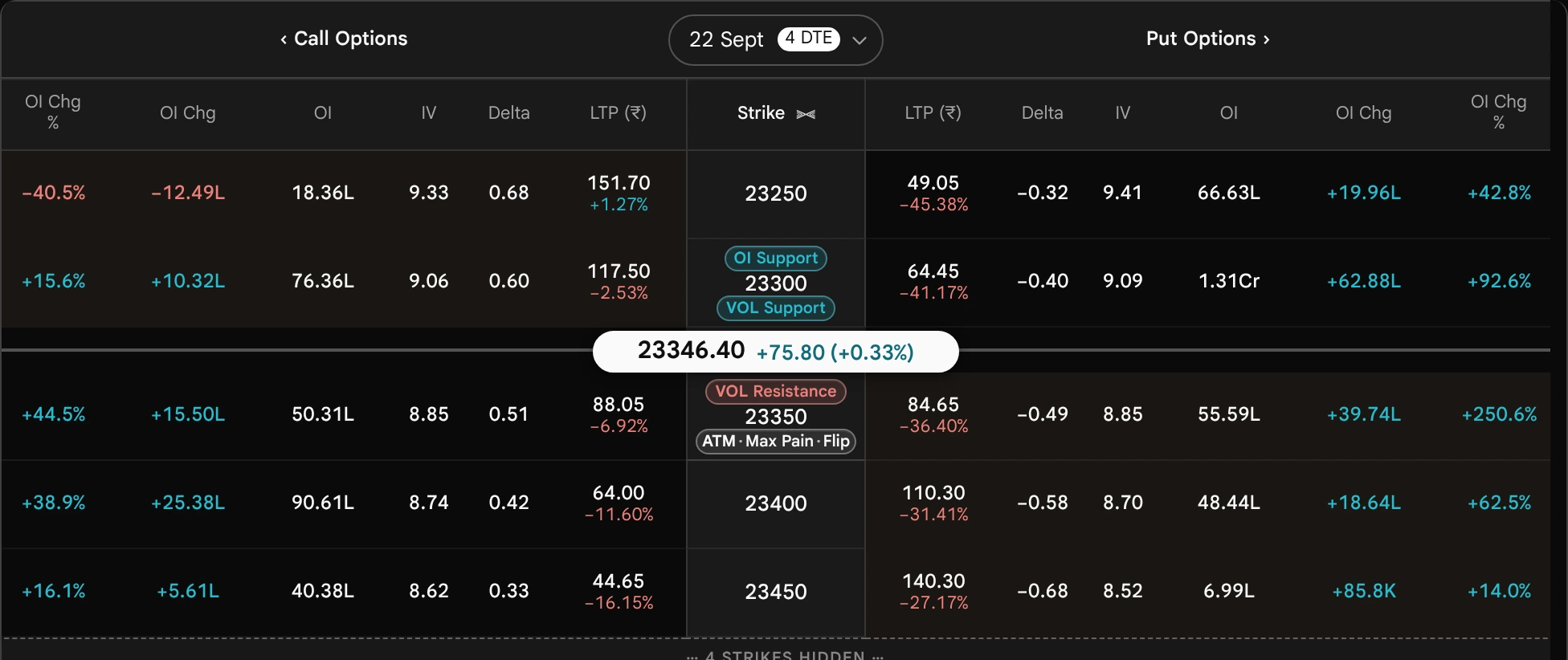
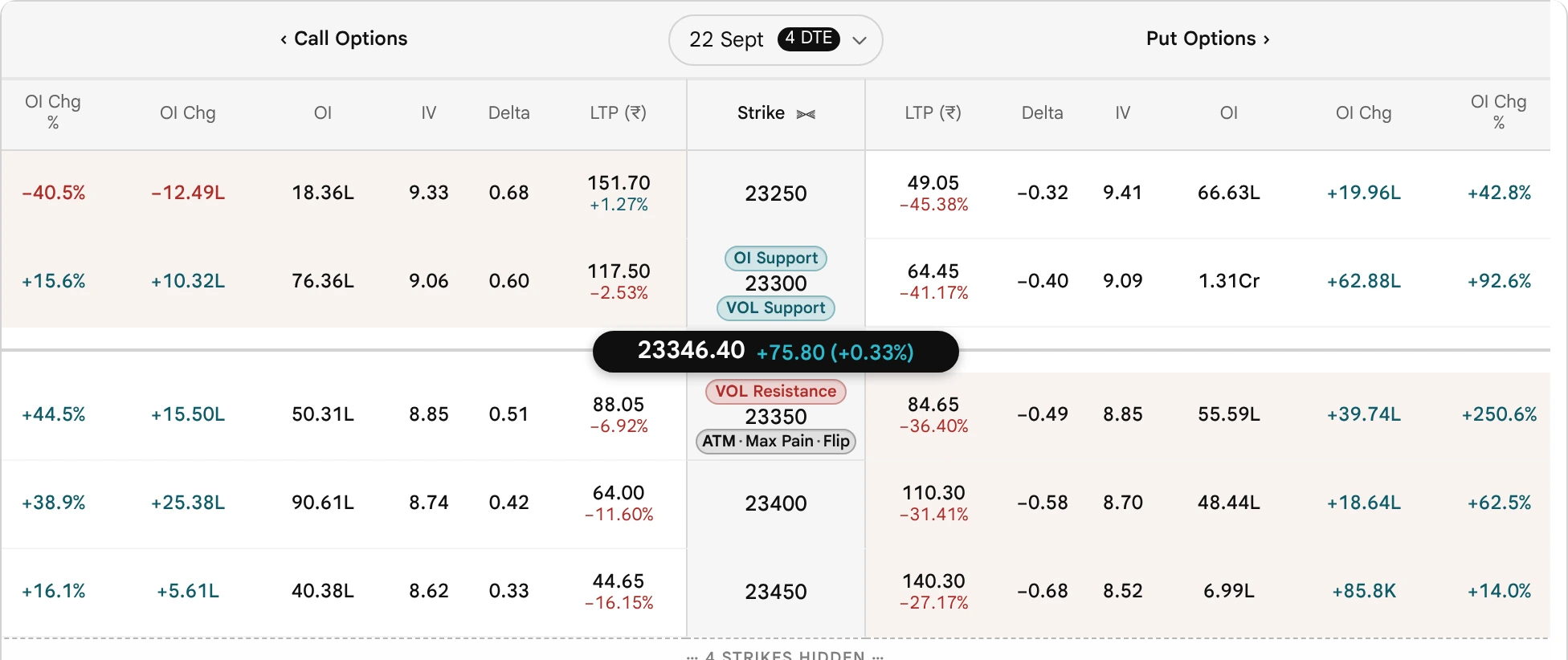
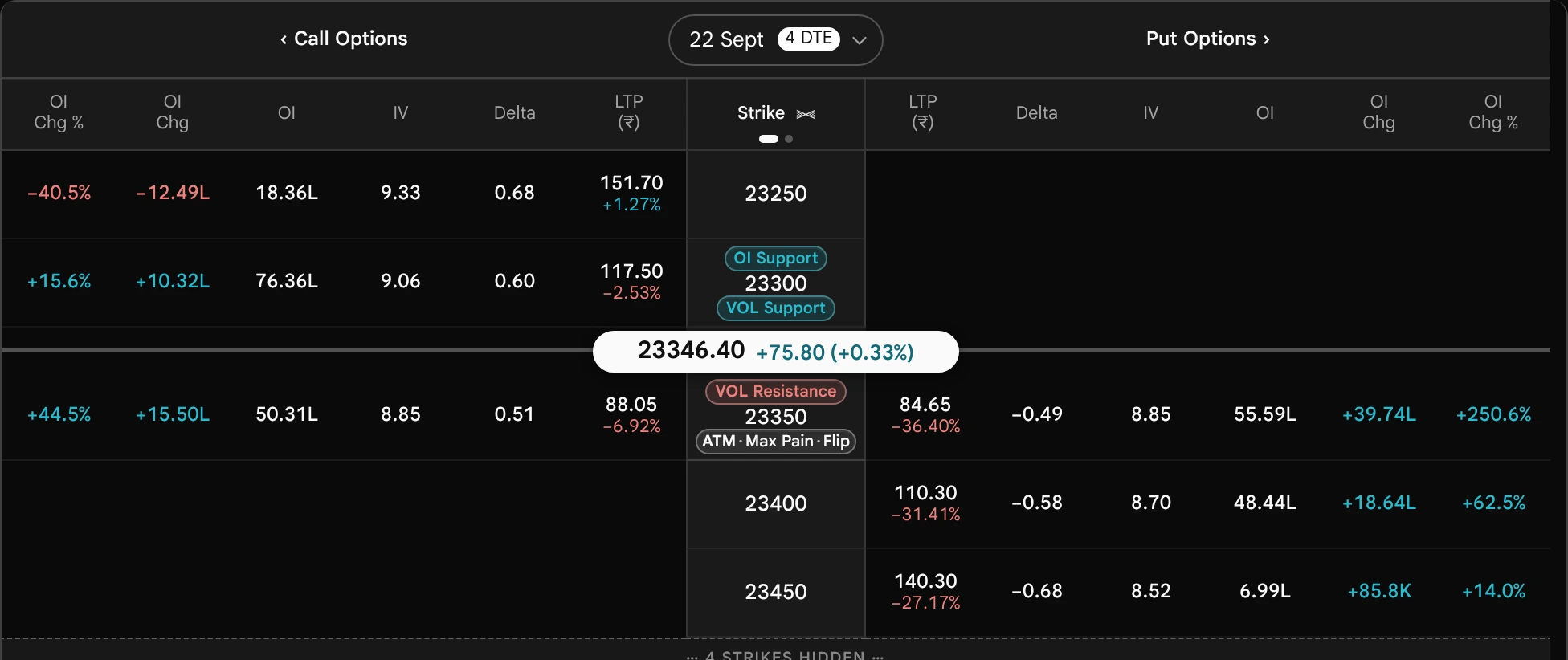
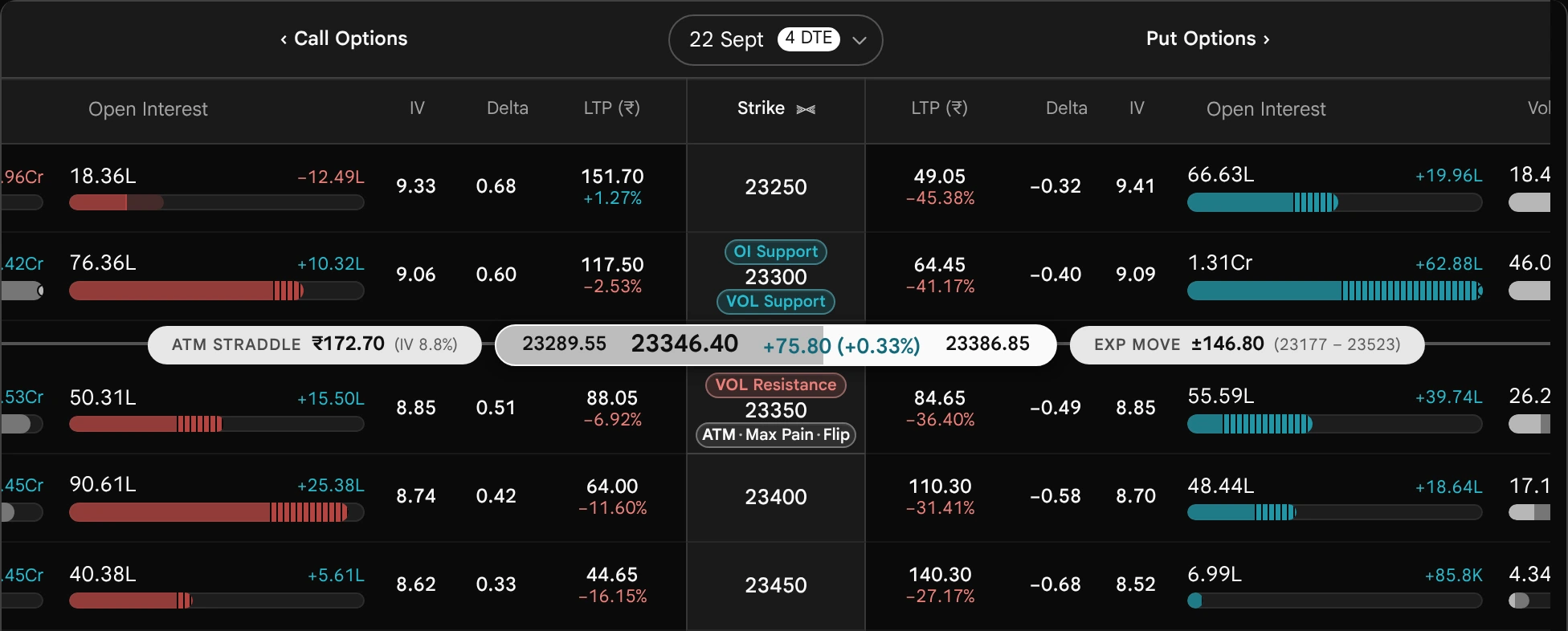
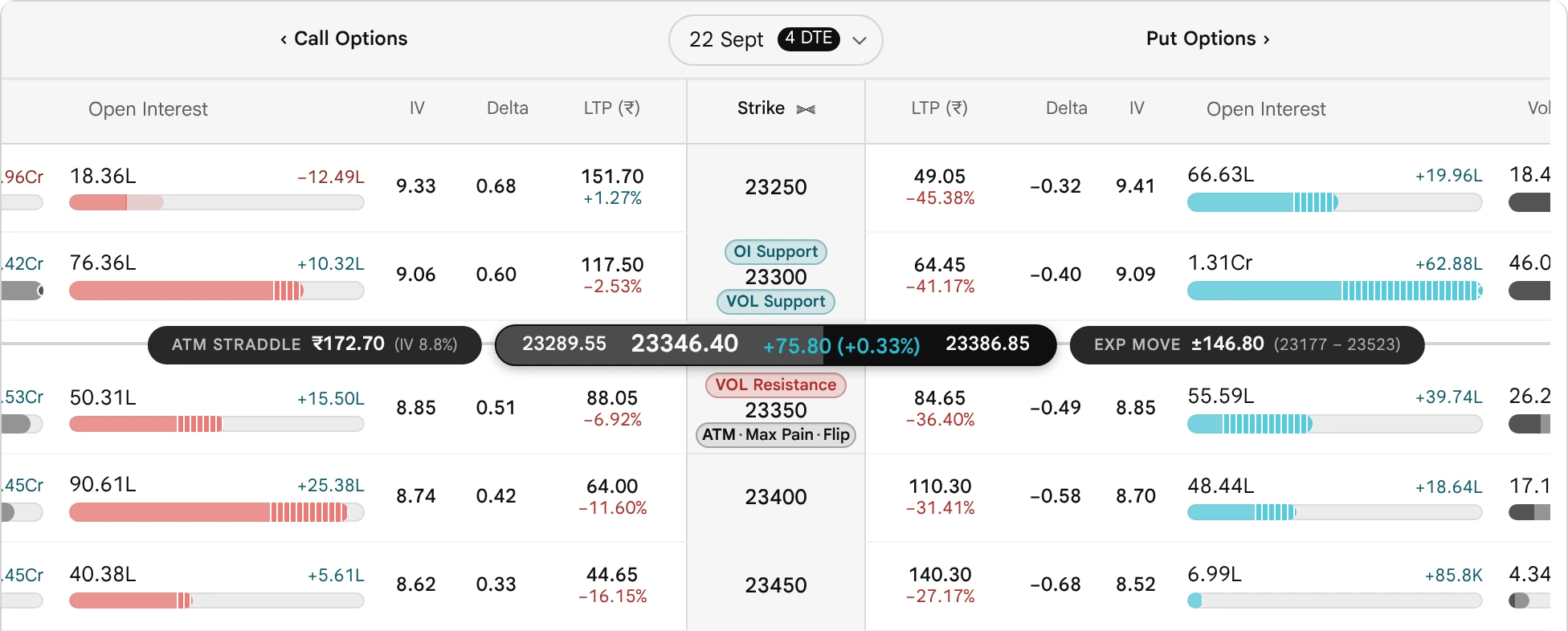
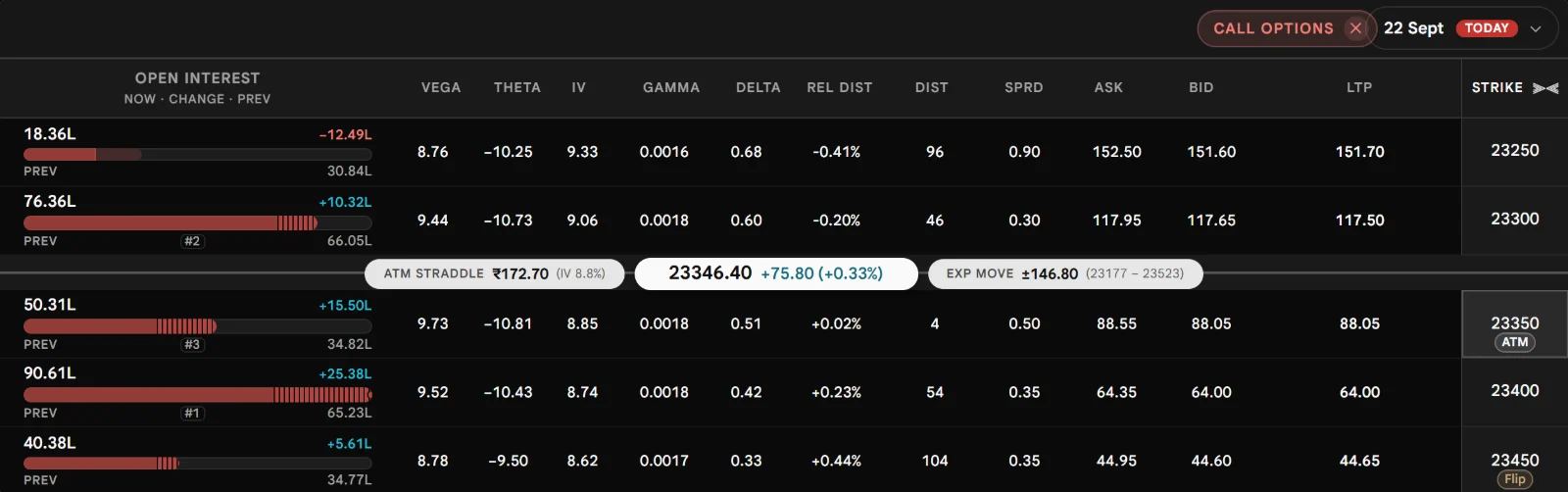
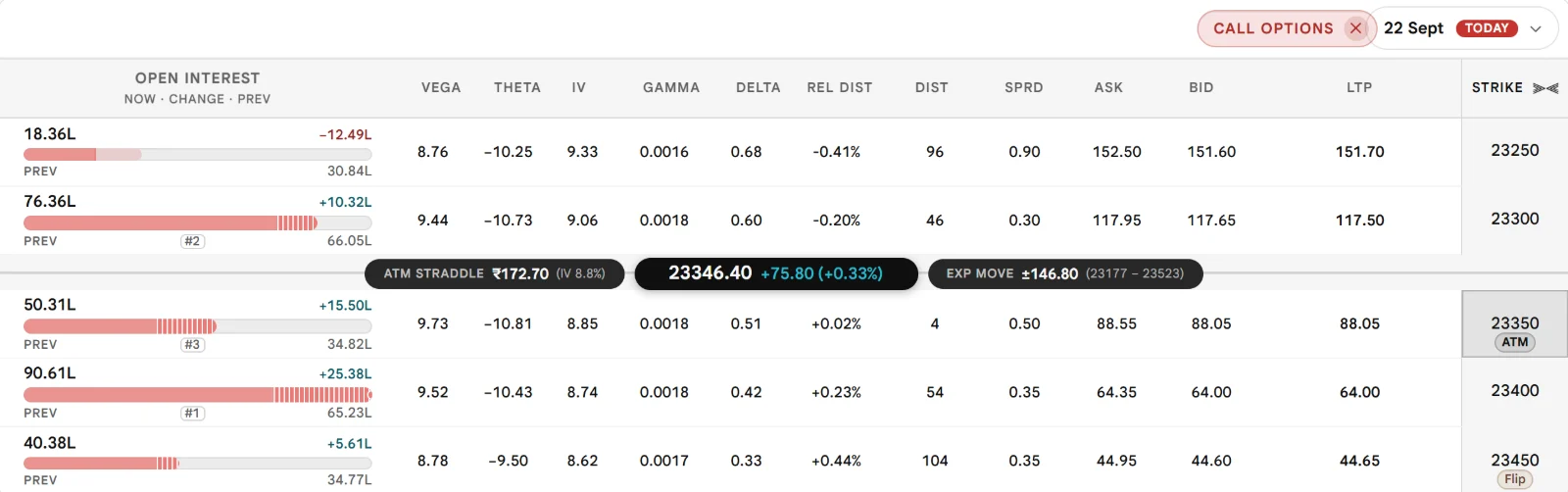
The picture below is the Advanced view of the chain around the at-the-money strike. Each lettered pin marks the corner of the table that one Part of this guide explains: hover or focus a pin to see which cells it covers, and select it to go to that Part. Almost every figure in the guide comes from one example chain, so each can be traced back to a formula; the few illustrative ones are labelled.
The Advanced viewHover or focus a pin to see what it marks; select it to go there
Calls on the left, Puts on the right, the Strike in the middle. The line across is the spot, between the 23300 and 23350 rows.Swipe sideways for the whole picture
The Insurance Counter Analogy
Picture a counter with two windows. At one you buy cover that pays if the index finishes above a level you choose. At the other, cover that pays if it finishes below one. The level you pick is the strike.
Cover close to today’s price is expensive, because very little has to happen for it to be needed. Cover far away is cheap, because a lot has to happen first. Every row of a chain is that same pair of policies written at a different level. The picture shows only cover written beyond today’s price; cover already past it costs more, because it already pays something.
Today’s price
Put windowpays below the levelCall windowpays above the level
Schematic, not data. Each bar is the cost of cover written at one level. Hover a bar to read it.
One thing holds across all five parts: a chain describes how the option market is positioned right now. It is a record of what has been done, not a statement about what happens next.
Cell Index: Every Cell and Where It Is Explained
All 44 cells a row can print. Each card shows the cell as it is drawn, what it prints and, when only one view has it, which view; it opens the explanation.
How to read a card
No tag: the cell is offered in both viewsOffered in Simple only. Simple only the Simple view lists itOffered in Advanced only. Advanced only the Advanced viewB the part of this guide that explains it
A
Strike
The centre column. Every other cell sits on its row.1 cell1 in Simple1 in Advanced
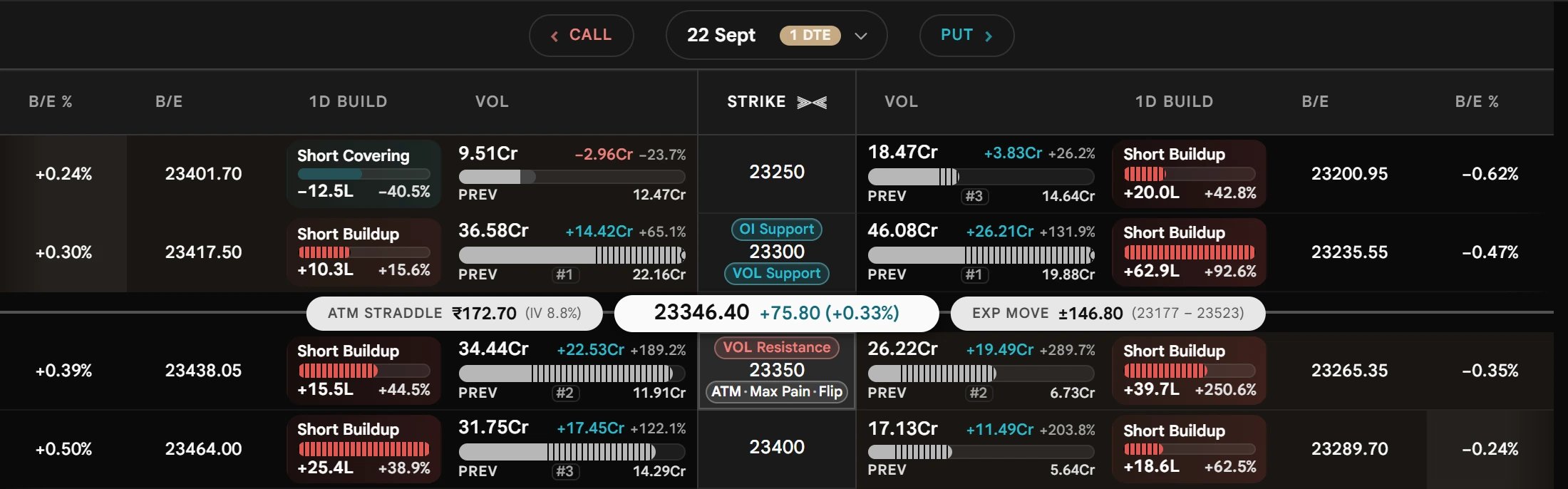
Build-upOne word for the price move and the Open Interest move together. Pick a pattern to see it in each window.
These three cells are illustrative readings.
1D Build
Long build-up
+18.6L+24.1%
15m Build
Long build-up
+3.2L+4.0%
5m Build
Long build-up
+1.1L+1.3%
Long Buildup. Price up and Open Interest up: new buyers are opening positions. 1D: Long build-up +18.6L +24.1%. 15m: Long build-up +3.2L +4.0%. 5m: Long build-up +1.1L +1.3%.
The 1D cell is the example chain’s own reading (the 23400 Call). The 15m and 5m cells are illustrative.
1D Build
Short build-up
+25.4L+38.9%
15m Build
Short build-up
+4.8L+5.1%
5m Build
Short build-up
+1.6L+1.7%
Short Buildup. Price down and Open Interest up: new sellers are opening positions. 1D: Short build-up +25.4L +38.9%. 15m: Short build-up +4.8L +5.1%. 5m: Short build-up +1.6L +1.7%.
These three cells are illustrative readings.
1D Build
Short covering
−12.5L−40.5%
15m Build
Short covering
−3.9L−7.2%
5m Build
Short covering
−1.4L−2.6%
Short Covering. Price up and Open Interest down: sellers are closing positions. 1D: Short covering −12.5L −40.5%. 15m: Short covering −3.9L −7.2%. 5m: Short covering −1.4L −2.6%.
These three cells are illustrative readings.
1D Build
Long unwinding
−9.8L−15.6%
15m Build
Long unwinding
−2.6L−4.4%
5m Build
Long unwinding
−0.9L−1.5%
Long Unwinding. Price down and Open Interest down: buyers are closing positions. 1D: Long unwinding −9.8L −15.6%. 15m: Long unwinding −2.6L −4.4%. 5m: Long unwinding −0.9L −1.5%.
A 15m or 5m cell prints a dash when its window cannot be read.
Part A of 5The chain as a wholeSee the whole table first: the two views, the expiry and clock, Customise, then the ladder and the spot line.5 topicsthe Strike cell
Strike
VOLResistance23350ATM·Max Pain
What the chain is, and what Part A covers
An option chain is one table of every option an exchange lists on an index for one expiry. Each row is a strike, a price the index can be compared with. On the left is the Call at that strike, on the right the Put, and the Strike sits between them. Every other cell on the row describes one of those two contracts.
Part A is about the table as a whole, before any single cell. The map below shows where each thing lives in the tool; point at a topic to see its place. It starts with the two views and with what the date and the clock on the table mean, then explains Customise, because most of what follows is a Customise setting: which side of the line is tinted, which cells are blanked, which extras sit on the spot line. Then it reads the ladder and the spot line themselves. The cells follow in Parts B to E.
Hover or focus a topic to see where it sits on the table.
Simple View and Advanced View
The page has two views of one chain, chosen with the Simple | Advanced (Beta) switch on the page bar. On a phone the page bar has no switch: the same choice is the first section of Customise, headed Chain view. The choice is remembered in your browser. Switching does not reset any setting, because both views read one shared column selection. Simple prints only its own catalogue, as plain figures. Advanced prints everything selected, with bars, meters and hover cards. Advanced is in beta, so new visual work lands there first; it draws the same numbers differently and adds some columns Simple lacks.
The page-bar switchHover or focus a number to see what it marks
1The switch.The filled capsule is the view you are on. A new browser opens on Simple; the choice is kept in this browser (chainViewModeV2).2Customise.Opens the panel described in Customise, below. The panel adapts to the view you are on. On a phone this switch is not in the page bar; the same choice is the first section of Customise, headed Chain view.3Beta.Advanced is still being tested, so new visual work lands there first. Nothing is taken away from Simple.
1The switch. The filled capsule is the view you are on. A new browser opens on Simple; the choice is kept in this browser (chainViewModeV2).
2Customise. Opens the panel described in Customise, below. The panel adapts to the view you are on. On a phone this switch is not in the page bar; the same choice is the first section of Customise, headed Chain view.
3Beta. Advanced is still being tested, so new visual work lands there first. Nothing is taken away from Simple.
The same strikes, drawn two ways
Pick a view to see how it prints the same strike. The strike, the premium and the build-up are the same in both; what changes is how open interest is drawn and what the spot line carries.
The same strike, in both viewsThe Call side of one strike; the cells are the tool’s own
LTP
OI
90.61L
OI Chg
+25.38L
OI Chg %
+38.9
1D Build
Short build-up
+25.4L+38.9%
Open interest is three plain columns (OI, OI Chg, OI Chg %), so each figure can be read, sorted and scanned on its own. The spot line carries the price and the day’s move only.
LTP
Open Interest
90.61L+25.38L
1D Build
Short build-up
+25.4L+38.9%
Open interest is one cell: the figure, its change and the previous day, with a bar that compares it across the visible strikes. The spot line adds the ATM straddle with its IV, the expected move, and the day low and high on a gauge.
What else differs
Beyond the cells and the spot line above, the two views differ in two things. The cells each view prints are in the chart that follows.
The differences between the two views, apart from the cells and the spot line.
Feature
Simple
Advanced (Beta)
Hover cards
Two kinds: build-up and PCR
All ten kinds, including the level pills and Max Pain
Point at a cell for what it prints; select it for its explanation. A cell offered in one view only is listed in its own lane.
Out of the box both views open on the same Core selection: LTP with its percentage change, the open interest cell, and the one-day build-up. Everything else is reached through Customise. A view offers a column only if it can draw it meaningfully, so a few columns exist in one view alone. Simple has three that Advanced does not: Prev OI, Vol Chg and Vol Chg %. Advanced already carries those figures inside its merged open interest and volume cells. Below, a dashed chip is a column the other view has and this one does not; Advanced’s one Open Interest cell stands in for Simple’s OI, OI Chg and OI Chg %.
Four ways to lay out the table
Customise › View › Table chooses the layout: Both (calls, the fixed strike, puts), Calls only, Puts only, and in Advanced Straddle. Pick a layout below to see the heading row it makes. You can also press the ‘Call’ or ‘Put’ heading above the table: it becomes a chip, and the chip’s cross returns the table to Both. The choice is saved in this browser (preferredTableView), so the table opens the way you left it; Reset in Customise returns it to Both. If you choose Straddle in Advanced and then move to Simple, the page shows Both until you return to Advanced.
Four ways to lay out the tableCustomise › View › Table; the heading row each choice makes
Calls, the fixed Strike, Puts
‹ CallPut ›
1D BuildOILTPStrikeLTPOI1D Build
The default. On a desktop the two sides scroll in opposite directions while the Strike stays where it is.
Call columns only
Call Options ×
1D BuildOILTPStrike
Press the Call heading and it becomes a chip; its cross returns to Both. The Strike is pinned at the right-hand edge, and the table is one scroller.
Put columns only
Put Options ×
StrikeLTPOI1D Build
The mirror image: the Strike is pinned at the left-hand edge, next to the Put columns.
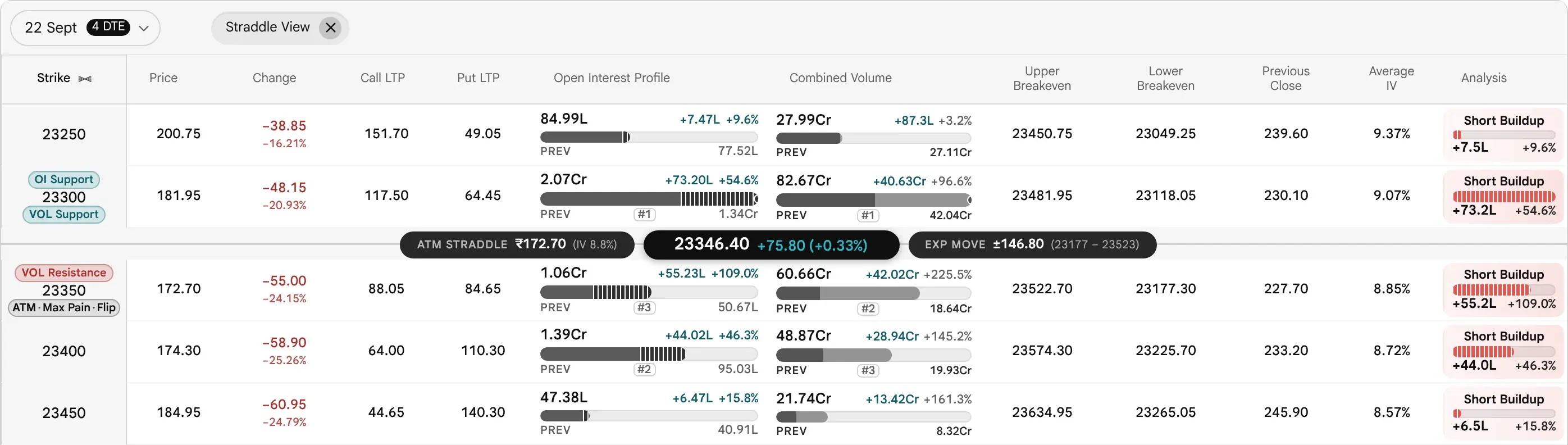
One row per strike with the Call and its Put added together: twelve fixed columns, every one sortable. Described column by column below.
A single side has more room for each column. The ATM straddle and expected move stay on the market line.
The Straddle table, column by column
Straddle is Advanced only. It adds each Call and its Put into one row per strike, so the combined figures arrive without any adding up by hand. It is a fixed set of twelve columns, not customisable, and every one of them sorts. The numbers on the picture match the numbers in the table that follows.
StraddleHover or focus a number; the table below works the ATM row
The usual build-up rule, fed the combined premium change and combined OI change.
Short Buildup: the premium fell while open interest rose
Cell by cell, the price columns, the bid and ask columns, open interest, volume and build-up, implied volatility and the Greeks, and the value and distance columns are each explained in the sections that follow this one.
Expiry, Data Time and the Phone Layout
Three things decide which numbers you are looking at before any column does: the expiry, how recent the snapshot is, and the screen. The expiry capsule sits in the centre of the header row between the Call and Put headings. It shows the date and the days to expiry (DTE), and opens a list of the expiries the data provider tracks. Every figure below it, from open interest to the Greeks, belongs to that one expiry.
The expiry capsule and its list
The capsule is a date and a pill. The pill reads N DTE, or TODAY on expiry day, and changes colour as the day nears: plain at three or more days, amber at one or two, red and reading TODAY on expiry day.
How the expiry is shownThe capsule and the list it opens, on five data dates
Data date Fri 18 Sep
22 Sept4 DTE⌄
✓22 Sept Tue4 DTE
29 Sept TueMonthly11 DTE
06 Oct Tue18 DTE
Four days out. Three or more days: a plain pill.
Data date Fri 18 Sep
22 Sept4 DTE⌄
✓22 Sept Tue4 DTE
29 Sept TueMonthly11 DTE
06 Oct Tue18 DTE
Read on the Saturday, the chain still shows Friday’s close, so the count still runs from Friday: 4 DTE, not 3. The count is the data’s own date, never the clock of your device.
Data date Mon 21 Sep
22 Sept1 DTE⌄
✓22 Sept Tue1 DTE
29 Sept TueMonthly8 DTE
06 Oct Tue15 DTE
One or two days: the pill turns amber.
Data date Tue 22 Sep
22 SeptTODAY⌄
✓22 Sept TueTODAY
29 Sept TueMonthly7 DTE
06 Oct Tue14 DTE
Expiry day: zero days. It reads TODAY, in red, not 0 DTE.
Data date Tue 22 Sep
29 Sept7 DTE⌄
✓29 Sept TueMonthly7 DTE
06 Oct Tue14 DTE
13 Oct Tue21 DTE
The series that has just expired leaves the list at its own close, 3:40 PM, and the chain moves to the next expiry. The expiry after that one is illustrative.
DTE is the number of calendar days from the date of the data shown, in India time, to the expiry, never below zero. It is the data’s own date, not the clock of the device you read it on, so a replayed day reads the same everywhere; weekends and holidays count as days. A ‘Monthly’ tag marks an expiry when the date a week later falls in the next month, that is, when no later day of the same weekday remains in the month; it is a date rule in the code, not a flag from the data.
On a phone only the Both table carries the wide capsule; the single-side and Straddle tables keep a compact one with the pill under the date, and the list opens as a sheet near the bottom of the screen.
How recent the numbers are
There is no banner on the chain body. Freshness is shown in two places. The market clock in the top bar tells you what the exchange and the data connection are doing. The Open Interest heading in Advanced tells you what the open interest figure is: its tip ends with a status line carrying the data time. The Insight card carries an IST timestamp as well.
The market clock chip, market open
1The chip. The market time in India (IST): hours and minutes, the seconds in a quieter weight, then AM or PM over IST after a hairline. While a session runs, its border fills clockwise from 12 o’clock in the state’s colour for the part already spent. It prints no word such as LIVE: the colour is the signal.
2Its description. Point at the chip, or read it with a screen reader. It names the session state and the data connection in one line. The chip is read-only: it opens no card and no menu.
112:30:15PMIST
2Market open. Data connection: Connected.
The 12:30 PM reading is illustrative: 195 of the 385 session minutes (9:15 AM to 3:40 PM) gone is 51%.
Through a trading day the clock moves through five states. The chip changes colour; its description, and the line under the Open Interest heading, say it in words. The times follow the option market: 9:15 AM to the F&O close at 3:40 PM, with the cash closing auction from 3:15 to 3:35 PM.
The five phases of a trading day: what the clock chip, its description and the Open Interest heading show in each.
Phase
The chip
Its description says
The Open Interest heading says
1Pre-open9:00 to 9:15 AM
09:05:00AMISTNo ring
Pre-open
Previous session · 18 Sept, 3:40 PM
2Continuous trading9:15 AM to 3:15 PM
12:30:15PMISTGreen ring
Market open
Live Open Interest · 12:30 PM
3Closing auction (CAS)3:15 to 3:35 PM
03:20:00PMISTAmber ring
Cash closing auction
CAS · Open Interest live · 3:20 PM
4F&O only3:35 to 3:40 PM
03:36:00PMISTAmber ring
Derivatives open
F&O live · cash close set · 3:36 PM
5ClosedAfter 3:40 PM
04:10:00PMISTNo ring
Session closed. Before 9:00 AM it reads ‘Before open’; on a weekend or holiday, ‘No trading session today’
Final Open Interest · 3:40 PM
The heading line is worked out when a new snapshot lands and does not tick on its own.
While the market is open, the state of the data connection joins the chip. Feed trouble wins over the session colour, because a red ring under a dead connection is the honest reading: the session is going on without you. After the close the chip stays plain whatever the connection says.
The four data-connection states, as the chip draws them
12:30:15PMISTConnected
Ring in the session colour
Market open. Data connection: Connected.
12:30:15PMISTConnecting
Amber ring
Data connection: Connecting.
12:30:15PMISTSaved snapshots
Accent ring
Data connection: Saved snapshots. The tool is showing saved readings while the live feed is unavailable.
12:30:15PMISTDisconnected
Red ring
Data connection: Disconnected. Prices may stop updating until the connection returns.
Other wordings of the heading line appear when the data is not from today, or has no time at all:
The chain is refreshed by polling, every 5 seconds by default, only while the option market is open and the browser tab is visible. A tab that returns after more than 15 seconds refetches at once. The data feed itself updates about once a minute in session, so every cell changes only when a fresh snapshot lands. After the close, the page keeps the last session. In the example chain used throughout this guide, open interest changes are measured against the session of 17 Sep 2026.
This page has no replay control; earlier values are reached through the ‘Prev’ and change columns.
On a phone
A desktop pointer here means a device that can hover, has a fine pointer and is at least 1024 px wide. On a desktop the call and put sides scroll in opposite directions while the Strike never moves. Everywhere else the book is still three panes, but each side becomes one lane. Columns are packed into pages exactly one lane wide, innermost first, and scrolling rests only on page boundaries. Plain figures take 64 px and a build-up cell 100 px, so two figures share a page and build-up stands alone. LTP is page one, opening beside the Strike. Dots under the Strike heading show the page, up to seven pages; beyond that a thin position bar replaces them. The ATM straddle and expected-move pills are hidden at 768 px and narrower, and call-only and put-only views are a single scroller with the Strike pinned, not paged. Both lanes move together as you swipe, a page at a time.
Swiping the chain on a phonePages of columns, one lane either side of the Strike
OILTPStrikeLTPOI
LTP opens beside the Strike, with OI beside it. Plain figures take 64 px, so two share a page.
OI Chg %OI ChgStrikeOI ChgOI Chg %
The next two columns outward, on both sides at once: the two lanes move together as you swipe.
1D BuildStrike1D Build
A build-up cell is 100 px wide, so it takes a page alone.
Customise: Columns, Presets and What Is Remembered
The Customise button sits at the top right of the page, beside the Simple | Advanced switch (on a phone the switch moves inside the panel). It opens one panel. Nothing in it changes the data; it changes only what you see. Every switch applies at once, and the only buttons are Reset and Close. The panel has seven sections, top to bottom, each its own card (a phone adds a Chain view section above them, holding the Simple | Advanced choice): Column preset, View, Strikes, Market line, Display, Columns and Add columns. The figure below draws it from the tool’s own option lists; scroll it, or pick a section to jump to it.
What Customise decides, and where it is explained
Which side of the line is tinted, and which cells are blanked (Highlight ITM contracts, Contracts)The Ladder
The price line and the extras on the spot line (Market line)Spot Line and Strip
Which columns show, in what order, and the ready-made layouts (Column preset, Columns)Five ready-made layouts
Which table you see: Both, Calls, Puts or Straddle (View)Simple and Advanced
The Customise panelScroll the panel, or pick a section from the list
CustomiseAdvanced chain · Beta
↺ Reset×
Column preset
Start with the columns that suit your style.
CoreBuyerSellerHedgerOther
View
Table
BothCallsPutsStraddle
Contracts
AllITMOTM
Strikes
10 below + ATM + 10 above.
Strikes each side of ATM−10+
Market line
The Spot price is always on the line. Choose what sits beside it.
Price line
SpotFutures
ATM straddle
Expected move
ATM implied volatility
Day low & day high
Display
Open Interest profile
Percentage changes
Open Interest & volume in lots
Highlight ITM contracts
Open Interest & volume levels
Put/call ratio (PCR)
Max pain
Show all Greeks
Keep Call & Put LTP fixed beside Strike
Columns6 selected
Drag or use the arrows to reorder.
⋮⋮LTP↑↓−
⋮⋮LTP Change %↑↓−
⋮⋮Volume↑↓−
⋮⋮IV↑↓−
⋮⋮Delta↑↓−
⋮⋮1 Day Build-up↑↓−
Add columns29 available
Price & volume7
+LTP Change
+Previous Close
+Average Price
+Today's High
+Today's Low
+Previous Volume
+Volume / Open Interest Ratio
Market depth4
+Ask
+Ask Quantity
+Bid
+Bid Quantity
Greeks4
+Gamma
+Theta
+Vega
+Rho
Open Interest signals2
+5 Min Build-up
+15 Min Build-up
Other metrics12
+Intrinsic Value
+Time Value
+Breakeven
+Breakeven %
+Bid-Ask Spread
+Theoretical Price
+Strike Distance
+Relative Distance
+Bid %
+Ask %
+Annualised Bid %
+Annualised Ask %
CustomiseSimple chain
↺ Reset×
View
Table
BothCallsPuts
Contracts
AllITMOTM
Strikes
10 below + ATM + 10 above.
Strikes each side of ATM−10+
Market line
Price line
SpotFutures
Display
Open Interest & change
Percentage changes
Open Interest & volume in lots
Highlight ITM contracts
Open Interest & volume levels
Max pain
Show all Greeks
Columns6 selected
Drag or use the arrows to reorder.
⋮⋮LTP↑↓−
⋮⋮LTP Change %↑↓−
⋮⋮Volume↑↓−
⋮⋮IV↑↓−
⋮⋮Delta↑↓−
⋮⋮1 Day Build-up↑↓−
Add columns24 available
Price & volume8
+LTP Change
+Previous Close
+Average Price
+Today's High
+Today's Low
+Previous Volume
+Volume / Open Interest Ratio
Market depth4
+Ask
+Ask Quantity
+Bid
+Bid Quantity
Greeks4
+Gamma
+Theta
+Vega
+Rho
Other metrics5
+Intrinsic Value
+Time Value
+Breakeven
+Breakeven %
+Bid-Ask Spread
Column preset. Core, Buyer, Seller, Hedger or Other in one tap. A preset replaces the whole selection. The highlighted name is found by comparing your switches with each preset, so it goes blank the moment one differs, and the line above reads ‘Custom columns. A preset replaces this selection.’
View.Table: Both, Calls, Puts and Straddle; the grey words repeat what the choice means. Contracts: All, ITM (in the money) or OTM (out of the money). The ATM strike is never removed by ITM or OTM.
Strikes. How many rows the chain draws: this many strikes either side of the ATM strike. It opens on 10 and goes from 3 up to every strike the data holds. It is kept in this browser; Reset returns it to 10. See How many strikes the page shows.
Market line.Price line: which price the line across the table follows, Spot (the index itself) or Futures. Saved in this browser. The four switches add the ATM straddle, the expected move, the ATM implied volatility and the day’s low and high to the line; all are on by default. They are explained in The Spot Line.
Display. 9 switches in Advanced, shown here as Core sets them. The first is Open Interest profile. Each one is explained in the table that follows.
Columns. The columns you have chosen, in order. The first row sits nearest the Strike on both sides. Drag a row to reorder it, or focus a row and hold Alt with the up or down arrow; the minus takes the column out and puts it back in Add columns. The headings on the table itself cannot be dragged.
Add columns. Every other column the Advanced panel offers, in groups, each with a plus. With Core on, 29 are left to add.
View.Table: Both, Calls, Puts; the grey words repeat what the choice means. Contracts: All, ITM (in the money) or OTM (out of the money). The ATM strike is never removed by ITM or OTM.
Strikes. How many rows the chain draws: this many strikes either side of the ATM strike. It opens on 10 and goes from 3 up to every strike the data holds. It is kept in this browser; Reset returns it to 10. See How many strikes the page shows.
Market line.Price line: which price the line across the table follows, Spot (the index itself) or Futures. Saved in this browser. The four extra switches are Advanced only.
Display. 7 switches in Simple, shown here as Core sets them. The first is Open Interest & change, which prints plain figures instead of a bar. Each one is explained in the table that follows.
Columns. The columns you have chosen, in order. The first row sits nearest the Strike on both sides. Drag a row to reorder it, or focus a row and hold Alt with the up or down arrow; the minus takes the column out and puts it back in Add columns. The headings on the table itself cannot be dragged.
Add columns. Every other column the Simple panel offers, in groups, each with a plus. With Core on, 24 are left to add.
Market line
Numbers 7 to 11 above. The Price line choice is in both views; the four switches are Advanced only. What each of these looks like on the line, and how it is worked out, is in The Spot Line.
Display
Nine switches in Advanced, seven in Simple. The first one differs by name: Open Interest profile draws a bar; in Simple it reads Open Interest & change and prints plain figures.
The nine Display switches, and the state Core gives them
The nine Display switches of the Advanced panel, with the state Core gives them.
Switch
Core
What it does
Only in
1Open Interest profile
On
Draws the open contracts at each strike as a bar, with the change and the previous day beside it. In Simple it reads Open Interest & change and prints OI, OI Chg and OI Chg % as plain figures.
—
2Percentage changes
On
Shows the percent beside the open interest and volume changes.
—
3Open Interest & volume in lots
Off
Counts in lots instead of single contracts. For NIFTY in this chain one lot is 65 contracts.
—
4Highlight ITM contracts
Off
Tints the cells that are already in the money. Opt-in.
—
5Open Interest & volume levels
On
Marks the strikes with the most open interest and the most volume: Support below the price, Resistance above it.
—
6Put/call ratio (PCR)
Off
Adds PCR per strike: put open interest divided by call open interest.
Advanced only
7Max pain
On
Marks the Max Pain strike on the Strike column.
—
8Show all Greeks
Off
Turns on IV, Delta, Gamma, Theta, Vega and Rho together.
—
9Keep Call & Put LTP fixed beside Strike
Off
Pins the two LTP columns beside the Strike while the other columns scroll past. Needs a desktop (a fine pointer that can hover, 1024 px or wider) and the Both table; Reset switches it off.
Advanced only
Keep Call & Put LTP fixed beside Strike, off and on
Switch off, scrolled to the far end
The Call and Put LTP columns have scrolled out of view.
Switch on, the same positionHover or focus a number to see what it marks
1Call LTP.Stays beside the Strike while the other columns scroll past.3Put LTP.Stays beside the Strike on the other side.
Call LTP, Strike and Put LTP stay together in the middle. The sides lose that much room, so a column has scrolled out of view: it is one scroll away, not lost. Both pictures use the Buyer layout.
Columns
The columns you have chosen, in order. Both views.
2Count. How many columns you have chosen.
3Remove. The minus takes the column out of the table and puts it back in Add columns.
4Order. The first row sits nearest the Strike, on both sides. So the table reads LTP beside the Strike, then the next, outward.
5Arrows. Move the row one place up or down.
6Drag handle. Drag a row to reorder it, or focus a row and hold Alt with the up or down arrow. Headings on the table itself cannot be dragged.
Add columns
Under the chosen columns the panel lists every other column, grouped, each with a plus. Core leaves 32 to add in Advanced and 27 in Simple. The Advanced panel offers 35 columns in five groups; every one is listed under Five ready-made layouts. Simple offers 30 in the same five groups. Both views.
Simple’s shorter panel
Simple shows the same sections with less in them. It has no column preset, no Straddle table, no market line switches, no PCR switch and no pinning of the prices, and its columns come only from its own catalogue plus its three Simple-only columns.
How the Simple panel differs from the Advanced panel, section by section.
Section
Simple
Advanced (Beta)
Column preset
Not shown
Core, Buyer, Seller, Hedger, Other
View › Table
Both, Calls, Puts
Both, Calls, Puts, Straddle
Market line
Price line only
Price line and four switches
Display
Seven switches. The first is Open Interest & change
Nine switches, adding Put/call ratio and Keep Call & Put LTP fixed. The first is Open Interest profile
Add columns
30 columns in five groups, including Previous Open Interest, Volume Change, Volume Change % and PCR. The group is called Open interest
35 columns in five groups, including Average Price, Bid-Ask Spread, Theoretical Price, Strike Distance, Relative Distance, Bid %, Ask %, Annualised Bid % and Annualised Ask %
Five ready-made layouts
A column preset switches a whole set of columns on or off in one tap, and you can still change any of them afterwards. Core is the default for a new browser and is what Reset applies. Each of the others is built around the figures that kind of reader scans for. These describe column preferences. They are not bullish or bearish signals.
CoreThe essentials. Nothing that needs an options-pricing background.
Switches on. LTP and its % change, the open interest profile, the one-day build-up, Max pain and the levels.
Switches on. Core plus the open interest, its change and % as figures, volume and volume against open interest, the 5-minute build-up, PCR, breakeven, IV, Theta and Vega, with ITM cells tinted.
HedgerFor someone protecting a position already held.
Switches on. LTP and the open interest profile, with IV, Delta, Gamma, Theta and Vega, bid, ask and spread, and the two distance columns. Takes away the percentages, build-up, levels and Max pain.
Price & volume 1
LTP
Market depth 2
Ask
Bid
Greeks 5
IV
Delta
Gamma
Theta
Vega
Other metrics 3
Bid-Ask Spread
Strike Distance
Relative Distance
Display switches 1
Open Interest profile
The chain it makes, with real values
‹ Call22 Sept
OPEN INTEREST90.61LVEGA9.52THETA−10.43IV8.74GAMMA0.0018DELTA0.42REL DIST+0.23%DIST54SPRD0.35ASK64.35BID64.00LTP (₹)64.00STRIKE23400
Calls shown; the Puts are the mirror image.
OtherCore plus Volume, with Percentage changes left off.
Switches on. The same switches as Core, adding the volume cell.
Only what the preset switches on is listed. Read from the tool’s own preset table.
Reordering, resetting and what is kept
Columns are reordered only inside Customise, in the Columns section above. Reset applies the Core preset and restores the default order; the last column of the table below says what it does to everything else. Your settings are kept in this browser only: there is no account behind them, so clearing the site’s data forgets them and another browser or device starts afresh.
Every setting kept in this browser, and what Reset does to it
Settings kept in this browser, and what the Reset button does to each.
Setting
Key
On reload
Reset button
Simple or Advanced
chainViewModeV2
Saved
Left as it is
Columns, and the Display and Market line switches
preferredColumns
Saved
Core preset
Column order
preferredColumnOrderV3
Saved
Default order
Table: Both, Calls, Puts, Straddle
preferredTableView
Saved
Both
Contracts: All, ITM, OTM
preferredMoneynessView
Saved
All
Price line: Spot or Futures
preferredMarketPriceReference
Saved
Spot
LTP pinned beside Strike
preferredPinLtpToStrike
Saved
Off
The Ladder, the Strike Column and the Spot Line
The chain is one row per strike: calls on the left, puts on the right, and the strike itself in a fixed column between them. Strikes run in ascending order down the page. Spot is not a row. It is a line drawn between the two strikes that bracket it, so you can see at a glance which strikes are above the market and which are below.
Reading the ladder
Each side mirrors the other: the first column you choose sits next to the strike on both sides, so LTP is always beside the strike and the one-day build-up sits at the outer edges. Hover or focus a number to see what it marks.
The ladder, with in-the-money cells tintedHover or focus a number to see what it marks
1The Strike columnFixed in the middle. The numeral never moves. Press the heading to hide its badges.21D BuildThe outer column. The wash is stronger when the move is larger and better confirmed.3LTPPremium above, the day’s % change beneath. It sits next to the Strike on both sides.4Level capsulesAt most one above the numeral and one below. Green is support, red is resistance.5The ATM rowThe nearest listed strike to spot, with its own capsule and a tinted Strike cell.6The spot lineA rule between the two strikes that bracket spot, with the live price and the day’s move.7A Call in the moneyIts strike is below spot, so the cell above the line carries the warm tint.8A Put in the moneyIts strike is above spot, so the cell below the line carries the tint. The ATM Call, just below the line, is out of the money and untinted.
1The Strike column Fixed in the middle. The numeral never moves. Press the heading to hide its badges.
21D Build The outer column. The wash is stronger when the move is larger and better confirmed.
3LTP Premium above, the day’s % change beneath. It sits next to the Strike on both sides.
4Level capsules At most one above the numeral and one below. Green is support, red is resistance.
5The ATM row The nearest listed strike to spot, with its own capsule and a tinted Strike cell.
6The spot line A rule between the two strikes that bracket spot, with the live price and the day’s move.
7A Call in the money Its strike is below spot, so the cell above the line carries the warm tint.
8A Put in the money Its strike is above spot, so the cell below the line carries the tint. The ATM Call, just below the line, is out of the money and untinted.
Spot 23346.40 sits between 23300 and 23350. The tint is the Customise option Highlight ITM contracts, off when the chain opens and switched on here so the staircase shows. Figures are printed as the tool prints them: prices to two decimals, open interest in lakh and crore.The level capsules, and why a level can sit on a strike you cannot see
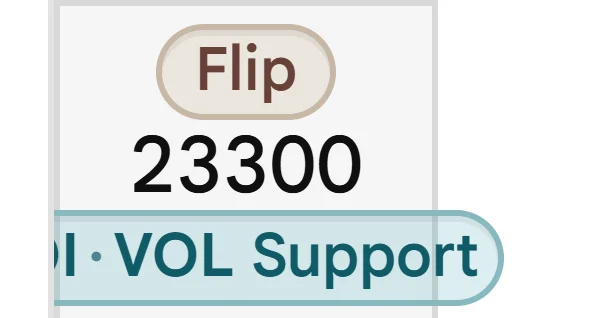
The OI and VOL capsules (open interest and volume support and resistance) are chosen from a near-spot window of the whole chain, so the strike filter does not move them: a level can sit on a strike this picture does not show. Their switch is Open Interest & volume levels in Customise. The badges and pills in the strike column (Max Pain, Flip and the levels) are explained in the sections on open interest and on max pain; Flip marks the strike nearest the gamma flip and is explained in the Gamma Exposure guide. When ATM, Max Pain and Flip fall on one strike they share a capsule, for example ATM · Max Pain · Flip. Its Max Pain part follows the Max pain switch.
The rulesFormula, rounding, empty state, where it appears and the usual misreading
Formula
One row per listed strike, in ascending order. Calls sit left of the Strike column and puts right. Spot is a line between the two strikes that bracket it, never a row.
Rounding
Prices to two decimals. Open interest in lakh (L) and crore (Cr), no digit grouping. OI change carries its sign; OI Chg % prints one decimal, the LTP change two.
Empty state
A leg that has neither traded nor holds any open interest is not built at all, and that side of the row prints a hyphen. That is why the deep out-of-the-money tails go blank instead of showing zeros.
Misreading
The ATM mark is the nearest listed strike, not the line, and its call can be out of the money. The row nearest the line is not in the money on both sides.
The ATM mark is not the spot line
Two marks are easy to confuse. Pins 5 and 6 above show both. They answer different questions, and in this chain they sit on neighbouring strikes.
The ATM mark
Sits on the listed strike nearest the cash spot; on an exact tie, the lower strike. Here |23350 − 23346.40| = 3.60, against 46.40 for 23300. It moves only when the nearest strike changes.
The spot line
Sits between the two strikes that bracket spot: 23300 is below 23346.40 and 23350 is above it. It moves with every tick.
The ATM mark is also not the vendor’s forward-anchored ATM strike. That one centres the listed window and feeds the straddle, the expected move and the ATM implied-volatility readouts. The two can differ by one strike.
In the money, at the money, out of the money
One rule shades the ladder: calls are in the money above the line (strikes below spot), puts below it (strikes above spot). The two shaded regions meet at the spot line from opposite corners.
Try a different spotEach cell shows its intrinsic value, how far in the money it is in points, and each strike shows how far it sits from spot (see Intrinsic and TV)
3 of 7 calls and 4 of 7 puts are in the money.
Seven strikes against a spot of 23346.40. Each cell shows the intrinsic value, which is also the number of points it is in the money, or zero when it is out of the money.
Call
Strike
Put
146.40In the money
23200−146.40
0.00Out
96.40In the money
23250−96.40
0.00Out
46.40In the money
23300−46.40
0.00Out
23346.40
0.00Out
23350+3.60ATM
3.60In the money
0.00Out
23400+53.60
53.60In the money
0.00Out
23450+103.60
103.60In the money
0.00Out
23500+153.60
153.60In the money
The ATM strike, 23350, is 3.60 above spot, so its call is out of the money and its put is in the money, even though it is the row nearest the line.
1 of 7 calls and 6 of 7 puts are in the money.
Seven strikes against a spot of 23212.35. Each cell shows the intrinsic value, which is also the number of points it is in the money, or zero when it is out of the money.
Call
Strike
Put
12.35In the money
23200−12.35ATM
0.00Out
23212.35
0.00Out
23250+37.65
37.65In the money
0.00Out
23300+87.65
87.65In the money
0.00Out
23350+137.65
137.65In the money
0.00Out
23400+187.65
187.65In the money
0.00Out
23450+237.65
237.65In the money
0.00Out
23500+287.65
287.65In the money
The ATM strike, 23200, is 12.35 below spot, so its call is in the money and its put is out of the money, even though it is the row nearest the line.
6 of 7 calls and 1 of 7 puts are in the money.
Seven strikes against a spot of 23487.60. Each cell shows the intrinsic value, which is also the number of points it is in the money, or zero when it is out of the money.
Call
Strike
Put
287.60In the money
23200−287.60
0.00Out
237.60In the money
23250−237.60
0.00Out
187.60In the money
23300−187.60
0.00Out
137.60In the money
23350−137.60
0.00Out
87.60In the money
23400−87.60
0.00Out
37.60In the money
23450−37.60
0.00Out
23487.60
0.00Out
23500+12.40ATM
12.40In the money
The ATM strike, 23500, is 12.40 above spot, so its call is out of the money and its put is in the money, even though it is the row nearest the line.
4 of 7 calls and 2 of 7 puts are in the money.
Seven strikes against a spot of 23400.00. Each cell shows the intrinsic value, which is also the number of points it is in the money, or zero when it is out of the money.
Call
Strike
Put
200.00In the money
23200−200.00
0.00Out
150.00In the money
23250−150.00
0.00Out
100.00In the money
23300−100.00
0.00Out
50.00In the money
23350−50.00
0.00Out
0.00Out
234000.00ATM
0.00Out
0.00Out
23450+50.00
50.00In the money
0.00Out
23500+100.00
100.00In the money
Spot is exactly on 23400: that call and that put are both out of the money, because the strike must be strictly below (call) or above (put) spot.
0 of 7 calls and 7 of 7 puts are in the money.
Seven strikes against a spot of 23150.00. Each cell shows the intrinsic value, which is also the number of points it is in the money, or zero when it is out of the money.
Call
Strike
Put
23150.00
0.00Out
23200+50.00ATM
50.00In the money
0.00Out
23250+100.00
100.00In the money
0.00Out
23300+150.00
150.00In the money
0.00Out
23350+200.00
200.00In the money
0.00Out
23400+250.00
250.00In the money
0.00Out
23450+300.00
300.00In the money
0.00Out
23500+350.00
350.00In the money
The ATM strike, 23200, is 50.00 above spot, so its call is out of the money and its put is in the money, even though it is the row nearest the line. Spot is below every strike shown, so every put is in the money and no call is.
In the tool the same rule is a tint. It is off when the chain opens; the switch is Highlight ITM contracts under Display in Customise.
The rulesFormula, rounding, empty state, where it appears and the usual misreading
Rule
A call is in the money when its strike is below spot, a put when its strike is above it. A strike exactly at spot is out of the money on both sides. At the ATM strike, here 23350 (3.60 above spot), the call is out of the money and the put is in the money.
Rounding
None: the comparison is made on the exact spot, not the printed one.
Empty state
Nothing is tinted until the first spot arrives, and empty cells, cells hidden by a filter and the Strike column are never tinted.
Where it appears
Simple and Advanced. The switch is Highlight ITM contracts under Display in Customise, and it is off until you turn it on.
Misreading
The tint is a classification, not a signal. It says where the strike lies against spot, nothing about positioning.
The Contracts filter in Customise (All, ITM, OTM) blanks cells; it never removes rows. The strike ladder and the spot line stay where they are, so you can still see where spot sits, and the ATM row keeps both of its legs whichever filter is on. Pick a filter to see it.
How many strikes the page shows
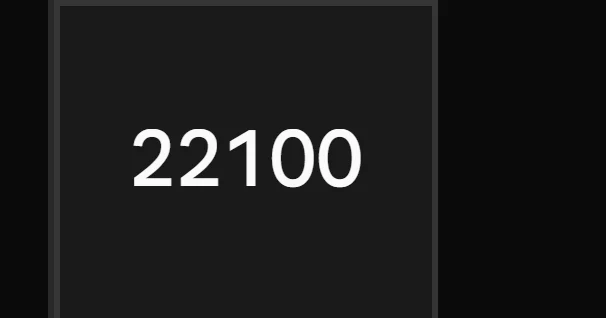
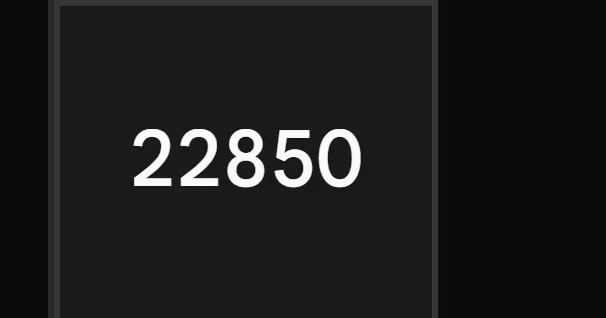
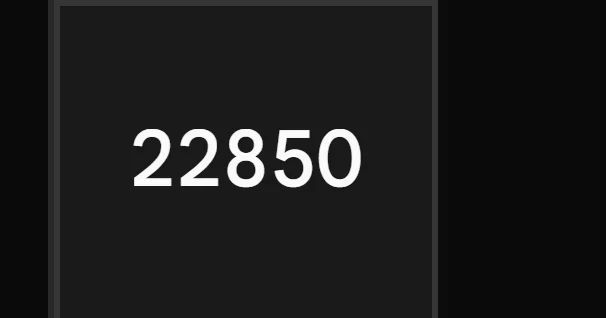
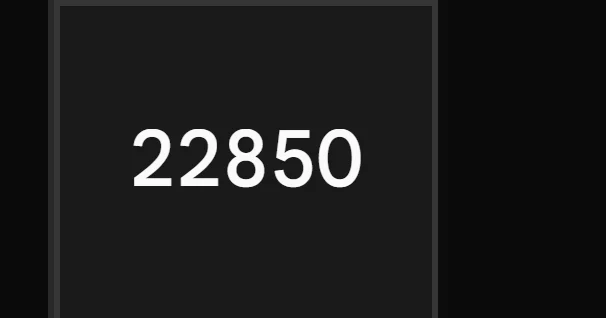
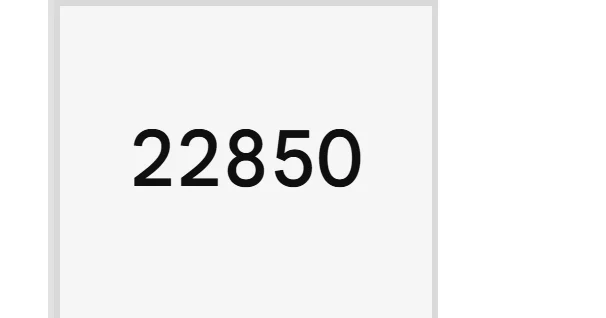
A chain holds every strike the vendor lists for the expiry, here 51. The page draws only the ones around the money, because the strikes that matter to a reader sit near the price. How many it draws is a setting: Customise › Strikes, Strikes each side of ATM. It opens on 10, so 21 rows (22850 to 23850 in the example chain). Use the minus and plus to change it, from 3 up to every strike the data holds (25 each side here); the choice is kept in this browser and Reset returns it to 10. Pick a value to see what it does.
How many strikes the page showsThe Customise › Strikes control, Strikes each side of ATM, set to five values
3 below + ATM + 3 above = 7 rows, 23200 to 23500
22100ATM 2335024600
28%of the expiry’s Call Open Interest is in these rows
30%of its Put Open Interest
24000the heaviest Call Open Interest above spot is outside the rows
5 below + ATM + 5 above = 11 rows, 23100 to 23600
22100ATM 2335024600
37%of the expiry’s Call Open Interest is in these rows
38%of its Put Open Interest
24000the heaviest Call Open Interest above spot is outside the rows
77%of the expiry’s Call Open Interest is in these rows
76%of its Put Open Interest
24000the heaviest Call Open Interest above spot is inside the rows
25 below + ATM + 25 above = 51 rows, 22100 to 24600(every strike this chain holds)
22100ATM 2335024600
100%of the expiry’s Call Open Interest is in these rows
100%of its Put Open Interest
24000the heaviest Call Open Interest above spot is inside the rows
The ATM row is always a row. The window is centred on the vendor ATM strike, so the ATM straddle, the expected move and the ATM IV do not depend on the setting.
A marked strike outside the window is still drawn. Max Pain and the Open Interest and volume levels are added as extra rows, with a divider reading “N strikes hidden” where the gap is.
The Insight card reads all 51 strikes, so its Walls chip can name a strike the ladder does not list; its PCR on screen counts only the listed rows.
Three controls on the ladder itself
Press Strike. Collapses the badges and level pills and leaves only the numerals.
Press any other heading. Sorts the rows by that column: high to low, then low to high, then back to strike order. While a sort is on, the spot line and the hidden-strike dividers are removed, and empty values sink to the bottom.
Return to ATM. Appears when the spot line is more than four rows out of view, and scrolls back to it.
The Spot Line and the Strip Above the Ladder
The line between the two bracketing strikes is the most information-dense row on the page. It always carries the live spot and the day’s move. In the Advanced view it can also carry the at-the-money straddle with its implied volatility, the expected move, and a gauge of where spot sits within the day’s low and high. The Simple view shows the spot line from the ladder above; this is the fuller one.
Anatomy of the strip
The strip is the pill-shaped row drawn on the line between the two strikes that bracket spot. Pick any of its eight parts, left to right.
The Advanced strip, with every Market line option onPick a number to see what it is, how it is made and when it shows
12345678
1ATM Straddle
Call plus put at the ATM strike.
How it is made
Call LTP + Put LTP at the vendor ATM strike, both legs traded
On this chain
88.05 + 84.65 = ₹172.70
When it shows
Advanced; on by default; hidden on phones.
2The IV note
ATM implied volatility.
How it is made
Mean of the ATM row’s Call IV and Put IV, printed to one decimal
On this chain
(8.85 + 8.85) ÷ 2 = 8.85, printed 8.8%
When it shows
Advanced; on by default. Stands alone as “ATM IV” if the straddle pill is off.
3Day Low and the fill
Lowest spot of the session; the lighter fill runs up to the price.
How it is made
Lowest of the session’s spot samples and the live tick; the fill ends at (price − low) ÷ (high − low)
On this chain
(23346.40 − 23289.55) ÷ (23386.85 − 23289.55) = 58.4% of the way up
When it shows
Advanced; on by default; needs a range where high exceeds low.
4The price
Cash spot. No caption is drawn.
How it is made
The cash index level from the chain
On this chain
23346.40
When it shows
Always on.
5The move
Points and percent against the previous close.
How it is made
Spot − previous close, and that divided by the previous close
Highest spot; the fill stops where the price sits in the range.
How it is made
Highest of the session’s spot samples and the live tick
On this chain
23386.85
When it shows
Advanced; on by default; needs a range where high exceeds low.
7Exp Move
0.85 of the straddle: a size, not a forecast.
How it is made
0.85 × the ATM straddle
On this chain
0.85 × 172.70 = 146.795, printed ±146.80
When it shows
Advanced; on by default; hidden on phones.
8The bracket
The straddle’s own breakevens.
How it is made
ATM strike − straddle, and ATM strike + straddle
On this chain
23350 − 172.70 = 23177; 23350 + 172.70 = 23523
When it shows
The straddle’s own breakevens, not the ± figure.
Each extra has its own switch under Market line in Customise (see Customise), and all four are on by default.The rulesFormula, rounding, empty state, where it appears and the usual misreading
Formula
Straddle = call LTP + put LTP at the vendor ATM strike. Expected move = 0.85 × straddle: a pricing convention, not a forecast. Neither states a direction; both measure size only.
Rounding
Price and move to two decimals. The bracket to a whole point. IV to one decimal. The Insight chip to a whole point.
Empty state
No straddle pill unless both legs have traded. No Low or High until the day’s high exceeds its low. No Exp Move unless the move is above zero.
Misreading
The pill prints no “Spot” caption: whether it shows the cash index or the implied forward is the Price line choice. The four expected-move numbers are not one range.
The Price line: Spot or Futures
A separate choice in Customise sets which price the pill carries. The wing pills and the gauge follow it. Choose one to see it.
With Spot, the default, the pill shows the cash index and its move against the previous close, as in the strip above. The ATM mark and the in-the-money tint always follow the cash spot, whichever price line you choose. With Futures only the pill changes:
1The forwardThe option-implied forward for the expiry, 23353.75. It is not a live futures quote. The line moves with the pill: it sits between 23350 and 23400 here.2The chipThe future’s own change on the day when that is known, otherwise the premium over spot: 23353.75 − 23346.40 = +7.35.
1The forward The option-implied forward for the expiry, 23353.75. It is not a live futures quote. The line moves with the pill: it sits between 23350 and 23400 here.
2The chip The future’s own change on the day when that is known, otherwise the premium over spot: 23353.75 − 23346.40 = +7.35.
The expected move is printed four ways
The expected move is printed in four places and the four are not the same range: they differ in the centre they are drawn around (the strike or spot) and in whether the 0.85 is applied. All come from one straddle, 172.70.
One straddle, four numbersAll from one straddle, 172.70
One straddle, four printed ranges. They answer slightly different questions.
Where
Formula
On this chain
Exp Move pill, the ± figure
0.85 × straddle
±146.80
Exp Move pill, the bracket
ATM strike ∓ straddle
23177 – 23523
Insight card, Move chip
0.85 × straddle, to the nearest point
±147
Insight sheet, move range
Spot ∓ (0.85 × straddle)
23200 – 23493
The two sizes carry no centre: the pill’s ±146.80 (0.85 × 172.70) and the card chip’s ±147.
The summary card above the chain
Above the table sits a summary card for the whole expiry. Its header row shows the instrument, a verdict pill, and three chips: the put-call ratio (PCR), the walls, and the move. The verdict is a plain reading of positioning over the window you choose and is worded as an indication, never a forecast; it is built from the same open interest and price columns you can see in the ladder. The chips are fixed definitions, and are the quickest way to read the expiry before reading any row. The verdict can be re-read over 5 minutes, 15 minutes or the day: an index opens on 15 min and a stock on Day.
The chips on the Insight cardThree chips read the whole expiry, not only the rows on screen
2The verdict pill. A plain reading of positioning over the window you choose, worded as an indication, never a forecast.
3PCR. Put open interest over call open interest, every strike of the expiry.
4Walls. The put wall to the call wall: the heaviest put open interest at or below spot, the heaviest call open interest at or above it.
5Move. 0.85 × the ATM straddle, to the nearest point.
PCR, walls and move on the example chain, full expiry.
Chip
Formula
On this chain
PCR
Total put OI ÷ total call OI, summed over all 51 strikes
14.29Cr ÷ 14.22Cr = 1.00
PCR, on screen
The same, over the 21 listed strikes only; printed in the card’s ‘The day’ line
8.18Cr ÷ 8.27Cr = 0.99
Walls, low end
Strike with the highest put OI at or below spot
23300 (1.31Cr)
Walls, high end
Strike with the highest call OI at or above spot
24000 (1.17Cr)
Max Pain
Strike where the total payout to option holders at expiry is smallest, a level read from the book and not a prediction; shown as a capsule in the strike column, not as a chip. Its hover card says whether spot is above or below it
23350
Two of these numbers are the same quantities other guides develop in full: see the guides on put-call ratio and on max pain for what they do and do not say.
B
Part B of 5Price and quote cellsWhat a contract last traded at, how far that has moved, and what it is quoted at right now.5 topics16 cells
LTP
Bid
64.00
Sprd
0.35
Price and Change: Last Price, Change, Previous Close
Four cells describe where the premium is and how far it has moved. They share one baseline, the previous close, and one idea: every change is measured from it. All of them use the 23400 Call of the NIFTY example chain (spot 23346.40, expiry 22 Sep 2026), so the numbers can be followed from card to card.
Simple chain: the LTP column beside the Strike
The Simple chain. LTP sits beside the Strike: the price is the figure on top, and the day’s % change is the small line beneath it. With the LTP column on, the change % is not a column of its own; the separate Chg% column appears only when LTP is turned off.
LTP
Last traded price
The premium of the contract’s most recent trade, in rupees, with the day’s % change in small type beneath it.
Simpleon by default
Advancedon by default
LTP column, Simple view, 23400 Call
LTP
123
The 23400 Call in Simple. Advanced prints the same cell.
Anatomynumbers match the callouts
1Header. The column name. Click it to sort by price. Tip in the tool: “Last Traded Price — current option premium”.
2Price. The last price to two decimals, plain ink, no digit grouping. Clicking this cell opens the strike pop-up; it is the only cell that does.
3Day change. The Chg% figure in small type: sign, magnitude, then a % sign. Red when down, green when up, grey when flat, “—” with no previous close.
On the number line23400 Call
LTP 64.00Prev 72.40
6064687276
−8.40 points−11.60% of Prev
FormulaNone for the price: the API’s last price, shown as sent
Roundingltp.toFixed(2) : two decimals, no digit grouping (1203.20)
EmptyA contract that has not traded but holds open interest prints 0.00
Worked example, the full rules and the states it can be in
Worked example23400 Call
Priceltp = 64 from the API, printed with toFixed(2)64.00
Change %(64.00 − 72.40) ÷ 72.40 × 100 = −11.6022…, rounded to 11.60, with its sign and a % sign−11.60%
Printsprice above, change % beneath64.00 −11.60%
Formula
None for the price: the API’s last price, shown as sent. The small line is the Chg% figure, worked out in the app (see Chg%).
Rounding
ltp.toFixed(2): two decimals, no digit grouping (1203.20). The small line shows the magnitude to two decimals; its sign comes from the rounded digits, so a move that rounds to 0.00 prints unsigned and grey.
Empty state
A contract that has not traded but holds open interest prints 0.00. A side with neither a trade nor open interest is not built: its whole side of the row prints a hyphen. The small line prints “—” when there is no previous close.
Where it appears
Simple and Advanced, on by default, in its own column beside the Strike. The small line shows while “LTP Change %” is on, which is the default. With “Keep Call & Put LTP fixed beside Strike” on (desktop) the column stays beside the Strike while the others scroll.
Misreading
LTP is a trade that already happened, not a price on offer. On the 22100 Call, LTP 1203.20 sits below the bid of 1205.25 and far from the ask of 1308.05: the book has moved since the last trade. Read the quote, not the last print, when the two disagree.
States
LTP
151.70+1.27%
Gain23250 Call · Prev 149.80
LTP
64.00−11.60%
Loss23400 Call · Prev 72.40
LTP
1203.200.00%
Flat22100 Call · LTP equals Prev, so 0.00% prints unsigned
LTP
0.00—
No baselineThe price still prints; the small line dashesBuilt from the tool’s rule
LTP Chg
LTP change, in points
How many rupees of premium the contract has moved since the previous close.
Simpleoff by default
Advancedoff by default
LTP Chg column, Simple view, 23400 Call
LTP Chg
−8.40
123
The 23400 Call in Simple. The figure prints in plain ink; the sign carries the direction.
Anatomynumbers match the callouts
1Header. The column name. Click it to sort. Tip in the tool: “Premium point change from previous close”.
2Sign. + for a gain, a true minus (−, U+2212) for a loss, nothing when the change rounds to 0.00.
3Points. The change in rupees of premium, two decimals: LTP minus Prev. The figure sits at the left of its column.
RoundingTwo decimals, with + for a gain and a true minus for a loss
EmptyNever a dash
Worked example, the full rules and the states it can be in
Worked example23400 Call
Subtract64.00 − 72.40−8.40
RoundtoFixed(2) gives 8.40, which is not zero, so the sign stays−8.40
Printssign and points, plain ink−8.40
Formula
change = ltp − previousClose when previousClose > 0, else 0. Worked out in the app from LTP and Prev; the API’s own change figure is not used.
Rounding
Two decimals, with + for a gain and a true minus for a loss. Sign and tone follow the rounded digits, so a change that rounds to 0.00 prints unsigned. The loss prints in plain ink, like the other price figures. A gain is built the same way, but this guide has no picture of one.
Empty state
Never a dash. With no previous close the change is stored as 0 and prints 0.00, which cannot be told from a flat day. The % line under LTP prints “—” for the same contract.
Where it appears
Simple and Advanced, off by default in both. Add it from Customise, under Price & volume (“LTP Change”). The Buyer preset switches it on.
Misreading
It is measured from the previous close, not from today’s open. A cell can be down at the open and up later, or the reverse, with the day’s path in between.
States
LTP Chg
+1.90
Gain23250 Call · 151.70 − 149.80
LTP Chg
−8.40
Loss23400 Call · 64.00 − 72.40
LTP Chg
0.00
Flat22100 Call · LTP equals Prev
LTP Chg
0.00
No baselinePrints 0.00, not a dashBuilt from the tool’s rule
Chg%
LTP change, in percent
The same move as a percentage of the previous close. By default it is the small line under the LTP price.
Simpleunder LTP by default
Advancedunder LTP by default
Chg% as the small line under LTP, Simple view, 23400 Call
LTP
123
Chg% in its default place, under the price. As its own column it prints the same figure without the % sign.
Anatomynumbers match the callouts
1Sign. + for a gain, a true minus (−) for a loss, nothing when the figure rounds to 0.00.
2Magnitude. The change as a share of Prev, to two decimals, always printed as a positive number.
3% sign. Printed in this stacked line. The separate Chg% column leaves it out; its header carries the unit.
RoundingMath.abs(changePct).toFixed(2) with the sign in front
Empty"—" only when there is no previous-close baseline and the change is 0 (an…
Worked example, the full rules and the states it can be in
Worked example23400 Call
Divide(64.00 − 72.40) ÷ 72.40 × 100−11.6022…
RoundMath.abs(…).toFixed(2) gives 11.60; the sign comes from the rounded digits−11.60
Printsunder LTP with a % sign; as its own column without−11.60% −11.60
Formula
changePct = (ltp − previousClose) / previousClose × 100 when previousClose > 0, else 0. Worked out in the app; the API’s own percent field is not read.
Rounding
Math.abs(changePct).toFixed(2) with the sign in front. Stacked under LTP a % sign follows; as its own column there is none. The stacked line takes the chain’s up and down colours. There is no capture of the standalone column, so this guide shows no picture of its ink.
Empty state
“—” only when there is no previous-close baseline and the change is 0 (an untraded or new contract). A real flat close prints an unsigned 0.00.
Where it appears
Not a column while LTP is on: it is the small line under the LTP price, on by default (“LTP Change %” in Customise). A standalone Chg% column appears only when LTP is switched off. The same in Simple and Advanced.
Misreading
A large % on a cheap option is a small rupee move. 23250 Put fell 40.75 points (45.38%), 23350 Call fell 6.55 points (6.92%). Compare points with points.
Statesas its own column, with LTP off
Chg%
+1.27
Gain23250 Call · +1.90 on 149.80
Chg%
−11.60
Loss23400 Call · −8.40 on 72.40
Chg%
0.00
Flat22100 Call · a real flat close prints unsigned 0.00
Chg%
—
No baselineThe dash means unknown, not flatBuilt from the tool’s rule
Prev
Previous close
The contract’s closing premium on the previous trading day: the yardstick for every change figure.
Simpleoff by default
Advancedoff by default
Prev column, Simple view, 23400 Call
Prev
72.40
12
The 23400 Call in Simple. Advanced prints the same cell.
Anatomynumbers match the callouts
1Header. The column name. Click it to sort. Tip in the tool: “Previous close”.
2Figure. The previous session’s closing premium, two decimals, plain ink; “—” when it is 0. It sits at the left of its column.
FormulaNone: the API’s previous close, shown as sent
RoundingTwo decimals, plain ink
Empty"—" when the value is 0: there is no usable baseline
Worked example, the full rules and the states it can be in
None: the API’s previous close, shown as sent. It is dropped to 0 when the API reports no honest day change for the contract (untraded today, or no baseline), so a change cannot read as −100%.
Rounding
Two decimals, plain ink.
Empty state
“—” when the value is 0: there is no usable baseline. An untraded contract prints no Prev even though the API holds one, which is deliberate. LTP Chg then reads 0.00 and the small % line reads “—”.
Where it appears
Simple and Advanced, off by default in both. Add it from Customise, under Price & volume.
Misreading
It is the option’s own close of the previous session, not the underlying’s and not today’s open. The premium and NIFTY move by different amounts; do not compare Prev with spot.
StatesPrev against LTP
Prev
72.40
LTP below Prev23400 Call · LTP 64.00
Prev
149.80
LTP above Prev23250 Call · LTP 151.70
Prev
1203.20
LTP equals Prev22100 Call · LTP 1203.20
Prev
—
No baselineThe dash means 0, not a missing columnBuilt from the tool’s rule
Day Range and Average Price
High, Low and Average place the last price inside the contract’s own session. They describe the option’s premium, not the index, and they are neutral figures: a price near the high is a fact about the day so far, not a signal. The chain carries no High or Low (those two cells would print “—”), so they are shown with example figures; LTP and Average come from the chain.
Day-range bar23400 Call, premium rangeLow, LTP, Average and High on one line
Low 61.50High 76.00
LTP 64.0017% upAvg 70.2961% up
Range 14.50 points
RangeHigh − Low = 76.00 − 61.50 = 14.50
LTP(64.00 − 61.50) ÷ 14.50 = 17% up the range
Average(70.29 − 61.50) ÷ 14.50 = 61% up the range
Example High and LowThe chain carries no High or Low, so those two figures are examples. LTP and Average come from the chain.
The price line: NIFTY’s own day range, not a column
The price line above the chain prints the underlying’s day range (LOW 23289.55, HIGH 23386.85). That is NIFTY. The High and Low columns below are the premium range of one contract.
High
Today’s high
The highest premium the contract has traded at today, as the app has recorded it.
Simpleoff by default
Advancedoff by default
High column, with an example figure
HIGH76.0012
The chain has no High, so the cell would print “—”. Shown with an example figure.
Anatomynumbers match the callouts
1Header. The column name. Click it to sort; contracts with no figure sink to the bottom. Tip in the tool: “Today’s highest traded premium for this contract”.
2Figure. The day high of the premium, two decimals, plain ink; “—” when no range exists. It sits at the left of its column, like Prev.
On the day range23400 Call · example High
Low 61.50High 76.00
LTP 64.0017% upAvg 70.2961% up
Range 14.50 points
FormulatodayHigh = max(day high, live LTP)
RoundingTwo decimals, plain ink
Empty"—" means unavailable: the API sent no day high and no snapshot holds a…
Worked example, the full rules and the states it can be in
Worked example23400 Call · example High
Day highthe API’s day_high; saved snapshots only if it has none76.00
Take the largermax(76.00, 64.00): the live LTP is folded in76.00
Printstwo decimals, plain ink76.00
Formula
todayHigh = max(day high, live LTP). The API’s own day_high comes first. Only when it has none (a past date, an untraded strike) does the highest positive LTP in the saved minute snapshots stand in. The live LTP is then folded in, so a fresh high shows at once. It is not an exchange record.
Rounding
Two decimals, plain ink. Never below the live LTP.
Empty state
“—” means unavailable: the API sent no day high and no snapshot holds a positive LTP. An exact 0 also prints “—”.
Where it appears
Simple and Advanced, off by default in both. Add it from Customise, under Price & volume (“Today’s High”).
Misreading
It is the highest premium of the option, not of NIFTY; the price line prints NIFTY’s own range. A put’s high is usually made when the index was weak. It records where the premium traded and says nothing about where it goes next.
States
High
76.00
A range existsDay high above the LTPExample figure
High
—
UnavailableNo day high and no snapshot with a trade; an exact 0 prints the same dash
Low
Today’s low
The lowest premium the contract has traded at today, as the app has recorded it.
Simpleoff by default
Advancedoff by default
Low column, with an example figure
LOW61.5012
The chain has no Low, so the cell would print “—”. Shown with an example figure.
Anatomynumbers match the callouts
1Header. The column name. Click it to sort; contracts with no figure sink to the bottom. Tip in the tool: “Today’s lowest traded premium for this contract”.
2Figure. The day low of the premium, two decimals, plain ink; “—” when no range exists. It sits at the left of its column, like Prev.
FormulatodayLow = min(day low, live LTP) , with the same order as the High: the…
RoundingTwo decimals, plain ink
Empty"—" means unavailable, as for the High
Worked example, the full rules and the states it can be in
Worked example23400 Call · example Low
Day lowthe API’s day_low; saved snapshots only if it has none61.50
Take the smallermin(61.50, 64.00): the live LTP is folded in61.50
Printstwo decimals, plain ink61.50
Formula
todayLow = min(day low, live LTP), with the same order as the High: the API’s day_low first, the lowest positive LTP in the saved snapshots only as a stand-in, then the live LTP folded in.
Rounding
Two decimals, plain ink. Never above the live LTP.
Empty state
“—” means unavailable, as for the High. An exact 0 also prints “—”.
Where it appears
Simple and Advanced, off by default in both. Add it from Customise, under Price & volume (“Today’s Low”).
Misreading
A low of a few rupees is not proof that the option is “cheap”. Premium decays with time as well as with price; the low only records the lowest print of the session.
States
Low
61.50
A range existsDay low below the LTPExample figure
Low
—
UnavailableNo day low and no snapshot with a trade; an exact 0 prints the same dash
Avg
Average traded price
The average price at which all of today’s trades in the contract took place, as the API reports it.
Simplenot offered
Advancedoff by default
Avg column, Advanced view, 23400 Call
Avg
70.29
12
The 23400 Call in Advanced, the only view that carries this column.
Anatomynumbers match the callouts
1Header. The column name. In Advanced it sits at the left of the column, above the figure. Tip in the tool: “Average traded price when available”.
2Figure. The average price of today’s trades, two decimals, plain ink; “—” when it is 0.
On the number line23400 Call
LTP 64.00Avg 70.29
6064687276
LTP is 6.29 below Avg
FormulaNone: the API’s average traded price, shown as sent
RoundingTwo decimals, plain ink
Empty"—" when the value is 0: nothing has traded, and always on saved-snapshot…
Worked example, the full rules and the states it can be in
Worked example23400 Call
Readaverage traded price from the API, in rupees70.29
Compare70.29 − 64.00: the LTP is below the average6.29
Printstwo decimals, plain ink70.29
Formula
None: the API’s average traded price, shown as sent. The app does not compute its own average.
Rounding
Two decimals, plain ink.
Empty state
“—” when the value is 0: nothing has traded, and always on saved-snapshot chains (offline or historical), which carry no average. In the example chain five in-the-money calls (22100, 22150, 22200, 22250 and 22450) have none.
Where it appears
Advanced only. It is not part of the Simple catalogue: Simple does not offer it and never shows it, even if it is switched on in Advanced. Off by default; add it from Customise, under Price & volume.
Misreading
The average is a history of the session, the LTP a single point. A gap between them describes where trades took place, not what the next trade will be.
States
Avg
70.29
LTP below Avg23400 Call · LTP 64.00
Avg
151.16
LTP above Avg23250 Call · LTP 151.70
Avg
—
No average22100 Call · nothing traded, so 0 prints as a dash
Not in SimpleThe column is absent, not empty
Simple viewThe Simple catalogue leaves it out
The Quote: Bid, Ask, Sizes and Spread
These five cells are the top of the order book, the only level the chain shows: a buyer who pays the ask meets the sellers’ price, a seller who hits the bid meets the buyers’. Bid and Ask are prices. Bid Size and Ask Size are the quantities waiting at those two prices. Sprd is the gap between the prices. Sizes print in contracts; switch on “Open Interest & volume in lots” in Customise and they print in lots (65 for NIFTY here).
Calls only, Advanced: the five quote cells switched on
The Call side is mirrored, so Calls read right to left: LTP, Bid, Ask, Sprd, Bid Size, Ask Size. The 23400 row at the bottom is the row every close-up below comes from. Swipe the picture sideways to reach the Strike.
The quote as a mini order book · 23400 Calllot 65
PriceQuantity waiting at that price, bars to one scale
Sellersbest offer
Ask64.35
4Ask Size325325 contracts, 5.0 lots
5Sprd
0.35
0.35 = 64.35 − 64.00crossing both sides on one lot costs 65 × 0.35 = ₹22.75
The highest price a buyer has on the book for this contract.
What you will see
Bid column · 23400 Call · Simple view
Bid
64.00
12
Anatomy
1Header “Bid”. Its tip reads “Best bid price”.
2The best bid in rupees, two decimals. Plain ink: no sign and no colour.
FormulaNone
RoundingTwo decimals, neutral ink
Empty"—" when the bid is exactly 0: nobody is bidding
Worked example, the full rules and the states it can be in
Worked example 23400 Call
Vendor bid64→Printed64.00
The price arrives in paise and is divided by 100 upstream, so the cell only fixes two decimals. Beside it the chain prints an ask of 64.35 and an LTP of 64.00: the last trade was at the bid.
States
Bid64.00Quoted23400 Call: a buyer is on the book.
Bid—No bidThe bid is exactly 0. Rule shown here; the example chain has no such contract.
Formula
None. The vendor’s best bid, shown as sent (leg.bid).
Rounding
Two decimals, neutral ink. The unit is rupees.
Empty state
“—” when the bid is exactly 0: nobody is bidding. A saved-snapshot chain (a past date) keeps the price, so Bid still prints there.
Where it appears
Customise name: Bid, under Market depth. Off by default; on in the Hedger preset.
Misreading
A market order to sell meets the bid, not the LTP. The LTP is a trade that already happened; the bid is what a buyer is offering now.
Ask
askOff by default
The lowest price a seller has on the book for this contract.
What you will see
Ask column · 23400 Call · Simple view
Ask
64.35
12
Anatomy
1Header “Ask”. Its tip reads “Best ask price”.
2The best ask in rupees, two decimals. Plain ink, like the bid.
FormulaNone
RoundingTwo decimals, neutral ink
Empty"—" when the ask is exactly 0: nobody is offering
Worked example, the full rules and the states it can be in
Formula
None. The vendor’s best ask, shown as sent (leg.ask).
Rounding
Two decimals, neutral ink. The unit is rupees.
Empty state
“—” when the ask is exactly 0: nobody is offering.
Where it appears
Customise name: Ask, under Market depth. Off by default; on in the Hedger preset.
Misreading
A wide ask is not a price anyone has traded at. On 22100 Call the ask is 1308.05 against a last trade of 1203.20; a deep in-the-money quote like this is not an estimate of value.
Bid Size
bidQtyOff by default
How many contracts are waiting to be bought at the best bid.
What you will see
Bid Size column · 23400 Call · Simple view
Bid Size
2.0K
123
Anatomy
1Header “Bid Size”. Its tip reads “Best bid quantity”; Customise calls the column Bid Quantity.
2Contracts, with no decimals below 1000 and K, L or Cr above. 2015 prints as 2.0K.
3With “Open Interest & volume in lots” on, the same size in lots of 65: one decimal below 100 lots, none above, and no K or L.
FormulaNone in contracts: the vendor’s best-bid quantity ( bid_qty )
RoundingContracts: fmtNum , so whole numbers below 1000, then K (one decimal), L…
EmptyA plain hyphen, "-", for 0, not the em dash the price cells use
Worked example, the full rules and the states it can be in
Worked example 23400 Call
Bid size2015÷ 1000In thousands2.015→Printed2.0K
With the lots setting on: 2015 ÷ 65 = 31, printed 31.0.
States
Bid Size520Under 100023400 Put: 520, shown whole.
Bid Size2.0KThousands23400 Call: 2015 prints as 2.0K.
Bid Size7.8LLakhs24500 Call: 782015 prints as 7.8L.
Bid Size12031In lotsThe same 782015 with the lots setting on: 782015 ÷ 65. No suffix.
Bid Size-No sizeA plain hyphen for 0. Rule shown here; the example chain has none.
Formula
None in contracts: the vendor’s best-bid quantity (bid_qty). With the lots setting on, lots = bidQty / lotSize.
Rounding
Contracts: fmtNum, so whole numbers below 1000, then K (one decimal), L from 1 lakh and Cr from 1 crore. Lots: one decimal below 100 lots, whole above.
Empty state
A plain hyphen, “-”, for 0, not the em dash the price cells use. A saved-snapshot chain always carries 0 here, so sizes read “-” on past dates while Bid and Ask still print.
Where it appears
Customise name: Bid Quantity, under Market depth. Off by default, in every preset.
Misreading
It is the size at the best bid only. It says nothing about the depth behind it, so it cannot tell how much could trade before the price moves.
Ask Size
askQtyOff by default
How many contracts are waiting to be sold at the best ask.
What you will see
Ask Size column · 23400 Call · Simple view
Ask Size
325
123
Anatomy
1Header “Ask Size”. Its tip reads “Best ask quantity”; Customise calls the column Ask Quantity.
2Contracts. 325 is under 1000, so it prints whole.
3In lots of 65 with the lots setting on: 325 ÷ 65 = 5.0.
FormulaNone in contracts: the vendor’s best-ask quantity ( ask_qty )
RoundingSame formatter as Bid Size: whole below 1000, then K, L and Cr; in lots…
EmptyA plain hyphen, "-", for 0
Worked example, the full rules and the states it can be in
Formula
None in contracts: the vendor’s best-ask quantity (ask_qty). With the lots setting on, lots = askQty / lotSize.
Rounding
Same formatter as Bid Size: whole below 1000, then K, L and Cr; in lots, one decimal below 100 and none above.
Empty state
A plain hyphen, “-”, for 0. A saved-snapshot chain always carries 0, so it reads “-” on past dates.
Where it appears
Customise name: Ask Quantity, under Market depth. Off by default, in every preset.
Misreading
A bigger bid size than ask size describes the resting orders at the best prices at one moment. It is not a forecast, and orders are added and cancelled between refreshes.
Sprd
spreadAdvanced only · Off by default
The gap between the best ask and the best bid: what it costs to cross the market.
What you will see
Sprd column · 23400 Call · Advanced view
Sprd
0.35
Anatomy
Sprd0.35Bid–ask spread23400 CallOf the mid price0.55%Crossing it, one lot₹22.75
1Header “Sprd”. Its tip reads “Bid-ask spread — lower means better liquidity”.
2Ask minus bid, in rupees, two decimals. Plain ink.
3Hover card, Advanced only. It opens when both a bid and an ask exist.
4The spread over the mid price, (bid + ask) / 2: 0.35 over 64.175.
5The same spread on one lot: 65 × 0.35.
Formulaspread = max(0, ask − bid) , a missing side counting as 0
RoundingTwo decimals, neutral ink
Empty"—" when ask is not above bid: no ask, a locked quote or a crossed one
Worked example, the full rules and the states it can be in
Worked example 23400 Call
Ask64.35−Bid64.00=Sprd0.35
Over a mid price of 64.175 that is 0.55%. On one lot of 65 it is 65 × 0.35 = ₹22.75.
States
Sprd0.35Tight23400 Call: 0.55% of the mid price.
Sprd0.05One tick on a tiny premium24500 Call: 0.05 is 6.06% of its mid price.
Sprd102.80Wide22100 Call: 8.18% of its mid price.
Sprd—Ask not above bidNo ask, a locked quote or a crossed one clamps to 0, which prints as a dash.
Sprd64.35No bidA missing bid counts as 0, so the cell prints the whole ask (64.35 here). The hover card skips such a contract.
Formula
spread = max(0, ask − bid), a missing side counting as 0. Hover card: spread / ((bid + ask) / 2) and spread × lotSize.
Rounding
Two decimals, neutral ink. The hover card shows the share to two decimals and the lot cost in rupees, to two decimals.
Empty state
“—” when ask is not above bid: no ask, a locked quote or a crossed one. With no bid the cell prints the whole ask.
Where it appears
Advanced only, not in the Simple catalogue. Customise name: Bid-Ask Spread. Off by default; on in the Hedger preset. The hover card needs a bid and an ask above 0.
Misreading
Rupees alone mislead. 22100 Call is 102.80 wide, 8.18% of its mid price; 24500 Call is 0.05 wide, 6.06%. Judge the gap against the premium, which is what the hover card shows.
The Quote as a Percent of Spot
Four Advanced-only cells express the bid and the ask against the index level, then scale that to a year. They help compare the premium of one strike with another on the same expiry. They are arithmetic on the quote and make no statement about return. All four are off in every preset; add them in Customise. The annualising factor is 365 divided by the days to expiry on the tool’s own clock: here 0.010921 years, 3.99 days, rounded to 4, so the factor is 91.25.
From a quote to an annualised quote · 23400 Callspot 23346.40
The factorYears to expiry0.010921× 365 =Days3.99rounds toDay count4→ 365 ÷ 4 =Factor91.25
Bid64.00as sent
÷ 23346.40 × 100
Bid %0.27%exact 0.274132
× 91.25
Ann Bid %25.0%exact 25.015
Ask64.35as sent
÷ 23346.40 × 100
Ask %0.28%exact 0.275631
× 91.25
Ann Ask %25.2%exact 25.151
Each step rounds only for printing. The next step multiplies the exact figure, not the printed one: 0.27% × 91.25 would give 24.6%, but the cell prints 25.0% because it starts from 0.274132.
Bid %
bidPctAdvanced only · Off by default
The bid as a percentage of the index level.
What you will see
Bid % column · 23400 Call · Advanced view
Bid %
0.27%
12
Anatomy
1Header “Bid %”. Its tip reads “Bid premium as percent of spot”.
2Two decimals and a literal % sign, in plain ink.
FormulabidPct = bid / spot × 100 ; 0 when spot is not above 0
RoundingTwo decimals with a literal %, neutral ink
EmptyNever a dash
Worked example, the full rules and the states it can be in
The base is the index level on the page, not the strike and not the premium.
States
Bid %0.27%Typical23400 Call: 64.00 is 0.2741% of spot.
Bid %5.16%Large premium22100 Call, deep in the money: 1205.25 is 5.16% of spot.
Bid %0.00%Small, but a real bid24500 Call: a bid of 0.80 is 0.0034% of spot, which prints as 0.00%.
Bid %0.00%No bidNever a dash: with no bid the cell prints 0.00%. Rule shown here.
Formula
bidPct = bid / spot × 100; 0 when spot is not above 0. Spot is the cash spot the page prints.
Rounding
Two decimals with a literal %, neutral ink.
Empty state
Never a dash. A missing bid prints “0.00%”, and so does a small real bid: below about ₹1.17 of premium on this spot the figure rounds to 0.00%.
Where it appears
Advanced only, not in the Simple catalogue. Customise name: Bid %. Off by default, in every preset.
Misreading
It compares the premium with the index, so it is not a return on anything. And a printed 0.00% is not proof that there is no bid: 24500 Call has a bid of 0.80.
Ask %
askPctAdvanced only · Off by default
The ask as a percentage of the index level.
What you will see
Ask % column · 23400 Call · Advanced view
Ask %
0.28%
12
Anatomy
1Header “Ask %”. Its tip reads “Ask premium as percent of spot”.
2Two decimals and a literal % sign, in plain ink.
FormulaaskPct = ask / spot × 100 ; 0 when spot is not above 0
RoundingTwo decimals with a literal %, neutral ink
EmptyNever a dash
Worked example, the full rules and the states it can be in
Formula
askPct = ask / spot × 100; 0 when spot is not above 0.
Rounding
Two decimals with a literal %, neutral ink.
Empty state
Never a dash. A missing ask prints “0.00%”.
Where it appears
Advanced only, not in the Simple catalogue. Customise name: Ask %. Off by default, in every preset.
Misreading
Equal, or one-hundredth apart, does not say whether the quote is tight. One step of 0.01% is ₹2.33 of premium on this spot, so a gap smaller than that can show as equal. Read the Sprd cell for the real gap.
Ann Bid %
annBidPctAdvanced only · Off by default
Bid % scaled from the days left to a full year.
What you will see
Ann Bid % column · 23400 Call · Advanced view
Ann Bid %
25.0%
12
Anatomy
1Header “Ann Bid %”. Its tip reads “Annualised bid premium yield”.
2One decimal and a literal % sign, in plain ink.
FormulaannBidPct = bidPct × 365 / days , days = max(1, round(timeYears × 365))
RoundingOne decimal with a literal %
EmptyNever a dash
Worked example, the full rules and the states it can be in
The factor is 365 ÷ 4: 0.010921 years × 365 = 3.99 days, rounded to 4. This is the tool’s own time to expiry, the one the Greeks and the strike pop-up also use. The chain’s own calendar field reads 2; the cell does not use it.
Ann Bid %0.3%Small, but a real bid24500 Call: 0.00% prints, 0.3% annualised.
Ann Bid %0.0%No bidNever a dash: with no bid the cell prints 0.0%. Rule shown here.
Formula
annBidPct = bidPct × 365 / days, days = max(1, round(timeYears × 365)). Here 0.010921 × 365 = 3.99, so 4 days and a factor of 91.25. Simple scaling, not compounded.
Rounding
One decimal with a literal %. It is computed from the exact Bid %, never from the printed one.
Empty state
Never a dash. No bid prints “0.0%”.
Where it appears
Advanced only, not in the Simple catalogue. Customise name: Annualised Bid %. Off by default, in every preset.
Misreading
The header calls it a yield, but it is one quote scaled by 365 / 4, not a measured return. For an in-the-money option the premium is mostly intrinsic value (22100 Call: 471.1%). Use it only to compare quotes on the same expiry.
Ann Ask %
annAskPctAdvanced only · Off by default
Ask % scaled from the days left to a full year.
What you will see
Ann Ask % column · 23400 Call · Advanced view
Ann Ask %
25.2%
12
Anatomy
1Header “Ann Ask %”. Its tip reads “Annualised ask premium yield”.
2One decimal and a literal % sign, in plain ink.
FormulaannAskPct = askPct × 365 / days , with the same day count as Ann Bid %
RoundingOne decimal with a literal %, computed from the exact Ask %
EmptyNever a dash
Worked example, the full rules and the states it can be in
Formula
annAskPct = askPct × 365 / days, with the same day count as Ann Bid %.
Rounding
One decimal with a literal %, computed from the exact Ask %.
Empty state
Never a dash. No ask prints “0.0%”.
Where it appears
Advanced only, not in the Simple catalogue. Customise name: Annualised Ask %. Off by default, in every preset.
Misreading
On a wide quote the gap between Ann Bid % and Ann Ask % is the spread multiplied by the factor. It shows how costly the quote is when scaled to a year, and it is not extra reward for anything.
All Sixteen Cells on One Strike
The table repeats each rule with the figures for NIFTY 23400, the row the close-ups of the quote cells are taken from, so that a printed number can be traced to its formula. “Shown in” says where each cell appears: Simple carries the plain price and quote cells; Advanced adds Average, Sprd and the percent family. Three empty marks differ: “—” is no figure, a plain “-” is no size, and 0.00% or 0.0% is a zero that never dashes.
Worked tableNIFTY 23400, Call and PutSpot 23346.40 · lot 65 · 4-day factor 91.25
The sixteen cells as the tool prints them for the 23400 strike. Cell names link to their cards.
High and Low carry no figure here: the chain has no per-contract day high or low.Swipe the table sideways.
C
Part C of 5Open interest, volume and build-upWhere positions sit, what changed since yesterday, and the label the tool puts on it.5 topics13 cells
1D Build
Short build-up
+25.4L+38.9%
Volume
31.75Cr+17.45Cr
OI
90.61L
Open Interest: the Profile Cell and Its Bar
Open Interest (OI) is the number of contracts at a strike that are still open. It is a stock, not a flow: a contract bought and sold ten times in a day adds ten to volume but, at most, one to Open Interest. Every open contract has a buyer and a seller, so the figure by itself says nothing about direction. The chain prints it for each strike, separately for the Call and the Put.
One setting, two shapes
The Customise switch is called Open Interest profile in Advanced and Open Interest & change in Simple. In Advanced it draws one cell per leg: the figure, the change, the previous close, and a bar. In Simple the same switch unpacks into plain columns, OI, OI Chg and, only when Percentage changes is on, OI Chg %. A separate Prev OI column exists in Simple only. Advanced already carries the previous close inside the cell, so it does not offer that column again.
What you will see
In Advanced the chain prints one cell per leg. Drawn across the strikes, those cells make a picture of where the market is positioned: Call bars to the left, Put bars to the right, one row per strike.
Open Interest at 21 strikesSpot 23346.40Hover or tap a strike
Call bars run left and Put bars run right, each against the heaviest strike on its own side. Among these strikes the Call wall is 23700 (95.93L); the Put wall is 23300 (1.31Cr). Hatched is Open Interest added since the previous close, outlined is what was unwound.
Anatomy of the cell
Every cell has three lines. The top line holds the figure and, at the far end, the change. The middle line is the bar. The bottom line is the Prev line. Below, the real cell is enlarged with the real figures of two legs: a Put whose Open Interest grew, and a Call whose Open Interest shrank.
AnatomyThe Open Interest cell, part by partDrawn to the proportions of the real cell, at about three times its size
Put 23300Open Interest grew since the previous close
123
1.31Cr+62.88L+92.6%
Prev#167.93L
10596
8
Call 23250Open Interest shrank since the previous close
18.36L−12.49L−40.5%
Prev30.84L
57
4
1FigureOpen Interest now, in lakh and crore. Put 23300 prints 1.31Cr.
2ChangeNow less the previous close, with a sign. Green is a rise and red a fall, on either side.
3PercentThe change divided by the previous close, one decimal. Printed only when Percentage changes is on.
4TrackThe column scale. Its full width is the heaviest reach among the strikes in view, on that side.
5SolidWhat stood open at both closes: the lower of now and the previous close.
6HatchedAdded since the previous close. The stripes are cut into the bar. It appears only when now is higher.
7Faded, with an edgeUnwound since the previous close. The 1px edge marks where Open Interest stands now. It appears only when now is lower, and never together with hatching.
8Wall dotMarks the #1 strike on that side, at today’s level.
9Rank chip#1 to #3 by Open Interest now, among the strikes in view. The top three also get the thicker track.
10Prev lineThe label and, at the far end, the previous close: 67.93L. The chip sits between them.
Figures are the example chain’s. The numbered pins are the guide’s, not the tool’s.
Reading one cell, step by step
Worked examplePut 23300, from the example chain
Worked examplePut 23300, from the example chainThe numbers behind the cell above
1Open Interest now13081250 contracts. A crore or more prints in crore, two decimals: 13081250 ÷ 10000000 = 1.3081.1.31Cr
5Reach and barreach = max(13081250, 6793020) = 13081250. It is also the heaviest Put reach in view, so the bar fills the track: 13081250 ÷ 13081250 = 100.00%.100.00%
7Rank and dotThe three largest Put figures among the seven strikes in view: 23300 1.31Cr, 23200 98.69L, 23250 66.63L. 23300 is #1, so it takes the chip and the dot at today’s end of the bar.#1 + dot
Rounding uses the tool’s own rule; the next sections set it out.
How the bar is scaled
Three rules, all from oiProfileScale.ts:
baseline = max(0, oi − oiChange), which is the previous close’s Open Interest. If the source sent no previous close, there is no baseline and no change segment.
reach = max(|oi|, baseline). The bar is drawn to reach, not to today’s figure, so a fall shows as a faded tail carrying past today’s end instead of a bar that quietly got shorter.
bar width = reach ÷ heaviest reach on that side × 100, where the ceiling is taken over every visible strike and over Calls and Puts separately. Within the bar, the solid part is min(oi, baseline) ÷ reach and the hatched or faded part is |change| ÷ reach.
Units and rounding
Open Interest is shown in lakh and crore, with the unit chosen after rounding, so nothing prints past its own ceiling.
How Open Interest is formatted by size
Size
Prints as
Example from the chain
Below 1000
Whole number
520 (Call 22250 held 520)
1000 to under 1 lakh
K, one decimal
84.0K (Call 22500 held 84045)
1 lakh to under 1 crore
L, two decimals
95.06L (Call 23500)
1 crore and above
Cr, two decimals
1.17Cr (Call 24000)
Exactly 0
0
—
With Open Interest & volume in lots on, Open Interest is divided by the lot size (65 for NIFTY here) and printed with one decimal below 100 lots and none from 100 lots up. The 23400 Call reads 139402 now, +39046 change and 100356 at the previous close, where it read 90.61L, +25.38L and 65.23L. Only the label changes; every bar keeps its length, because both sides of each ratio are divided by the same lot size, and the percent is unchanged.
The cell in five lines
Formula
previous = max(0, oi − oiChange). reach = max(|oi|, previous). bar width = reach ÷ heaviest reach in view on that side. Inside the bar, solid = min(oi, previous) ÷ reach and hatched or faded = |change| ÷ reach.
Rounding
Under 1000, a whole number. 1000 to under 1 lakh, K with one decimal. 1 lakh to under 1 crore, L with two decimals. 1 crore and above, Cr with two decimals. The unit is chosen after rounding, so 99.997L prints 1.00Cr, never 100.00L. In lots: one decimal below 100 lots, none from 100.
Empty state
No previous close sent: the figure alone, a dash in the change slot, no percent, Prev line or faded tail. Previous close genuinely 0: NEW in place of the percent. Unwound to 0: a dashed ghost. A leg with no Open Interest and no trades does not exist, and its side of the row prints hyphens.
Where it appears
Advanced: the Open Interest profile cell, on by default, with the bar, the rank chip and a hover card. Simple: OI, OI Chg and, with Percentage changes on, OI Chg % as plain figures, plus an optional Prev OI column; no bar, chip or hover.
Misreading
“The longest bar is where the market is bullish (or bearish).” The bar is size only. A heavy Call bar means many open Call contracts, each held by a buyer and a seller; it marks where positions are concentrated, and that is all. Direction needs the change, the premium’s own move and the Build-Up reading, which the later sections explain.
Open Interest Change and Change %
OI change is the contracts added (+) or closed (−) since the previous close. OI change % puts that change against the previous close’s figure. Both use the previous-close Open Interest the source sends with each leg, not a figure from the morning. That single baseline is why these two cells and the 1D Build-Up column agree.
oiChange = oi − previous_oi, known only when previous_oi is present and at least 0.
oiChangePct = oiChange ÷ previous_oi × 100, only when previous_oi > 0. A strike with no previous Open Interest has a real change and no percentage.
Display: the sign uses a true minus; the change uses the same lakh and crore rules as Open Interest itself; the percent has one decimal.
One cell, four columns
AnatomyOne Advanced cell, four Simple columnsThe 23400 Call: the numbers are the same, only the packaging differs
123
90.61L+25.38L+38.9%
Prev#265.23L
4
1OI90.61L
2OI Chg+25.38L
3OI Chg %+38.9%
4Prev OI65.23L
1Figure → OIoi, the contracts open now, in the same lakh and crore units.
2Change → OI Chgoi − previous_oi, with a sign. Advanced tints it by its sign; so does Simple.
3Percent → OI Chg %change ÷ previous_oi × 100, one decimal. Both views print it only when Percentage changes is on.
4Previous close → Prev OIIn Advanced it is the Prev line, at the far end. Only Simple offers it as a column of its own. The bar and the chip have no Simple column.
Figures are the 23400 Call’s. The pins are the guide’s.
Reading the numbers
Simple · plain columnsOI, OI Chg and OI Chg %Four legs from the example chain
Previous close, current, change and percent change of Open Interest for four legs of the example chain
Leg
Prev OI
OI
OI Chg
OI Chg %
Call 23000
9.06L
6.37L
−2.69L
−29.7%
Call 23500
89.84L
95.06L
+5.22L
+5.8%
Put 23350
15.86L
55.59L
+39.74L
+250.6%
Put 23600
7.50L
7.43L
−7.1K
−0.9%
Put 23350: 5559320 − 1585675 = 3973645, and 3973645 ÷ 1585675 = 250.6%. The percentage is large because the previous close was small. The percent shows size against the base and the amount shows size in contracts, so read them together: Put 23350’s rise is 39.74L contracts, Call 23000’s fall is 2.69L.
Green is a rise, red a fall. Neither is a forecast.
Edge cases
A one-lot drift (−65 on 900065) is −0.0072%, which rounds to zero, so the percent prints 0.0% unsigned and neutral while the amount keeps its sign. A new strike has a real change and no percent: Advanced says NEW; Simple prints 0.0%, because the source reports no percent when the previous close is 0. With no baseline the tool prints dashes, never a 0% it did not measure; Simple also dashes Prev OI.
The change in five lines
Formula
oiChange = oi − previous_oi, known only when previous_oi is present and at least 0. oiChangePct = oiChange ÷ previous_oi × 100, only when previous_oi > 0. Both use the previous-close Open Interest the source sends with each leg, the same baseline as the 1D Build column.
Rounding
The change uses the lakh and crore rules of Open Interest itself. The percent has one decimal. The sign is taken from the rounded digits: a move that rounds to 0.0% prints 0.0%, unsigned and neutral, never −0.0%. The Build-Up columns print the same change through the volume formatter, with one decimal in lakh: Call 23250’s 12.49L fall prints as −12.5L in its 1D Build cell.
Colour belongs to the change, not the level. The OI figure stays neutral; the amount takes green or red by its own sign, and the percent takes the same tone unless it rounds to zero.
Empty state
No previous close sent: Advanced shows a dash in the change slot and no percent; Simple shows — in OI Chg, OI Chg % and Prev OI. Previous close genuinely 0: Advanced prints the whole figure and NEW; Simple prints the figure and 0.0%.
Where it appears
Advanced: inside the Open Interest profile cell, with the percent only when Percentage changes is on. Simple: OI Chg always, OI Chg % when Percentage changes is on, and Prev OI as its own optional column. The source also sends its own change fields; the tool derives the change itself from current and previous Open Interest, and today the two agree.
Misreading
“Green OI change means bullish; red means bearish.” A rise in Open Interest means new contracts were opened, and a fall means contracts were closed. Neither says which side was more eager. Whether the move was new buying, new writing or a closing trade only becomes readable with the premium’s direction, which is what the Build-Up columns combine.
Volume, Previous Volume and Volume / Open Interest
Volume is the contracts traded at a strike so far today. Open Interest is what remains open; Volume is the turnover. Both are counted in contracts. The one wrinkle is the previous session: the source quotes it in lots, so the tool multiplies it by the lot size (65 for NIFTY) before comparing it with today’s contracts.
Volume at 21 strikesSpot 23346.40Hover or tap a strike
Each bar is read against the busiest strike on that side. The solid part is the previous session’s volume, kept; where today has traded more, the extra is hatched, and where today has traded less, the part of yesterday that has not repeated is pale, with an edge at today’s level. A hatched tail means the strike has already traded more today than it did yesterday.
In Advanced, today’s volume, the change against the previous session, a bar and the Prev line share one cell, headed VOL. In Simple, Volume is one plain figure beside Prev Vol, Vol Chg, Vol Chg % and Vol/OI.
Anatomy of the cell
The Volume cell is built like the Open Interest cell: figure and change on top, a bar, a Prev line. Two things differ. The bar is drawn in neutral ink, never in the Call or Put colour. And the previous line is a whole session of trading, not a closing count.
AnatomyThe Volume cell, part by partDrawn to the proportions of the real cell, at about three times its size
Call 23300Volume so far today is above the whole previous session
123
36.58Cr+14.42Cr+65.1%
Prev#122.16Cr
10596
8
Call 23250Volume so far today is below the whole previous session
9.51Cr−2.96Cr−23.7%
Prev12.47Cr
57
4
1FigureContracts traded today so far, in neutral ink. Call 23300 prints 36.58Cr. Always contracts, whatever the lots switch says.
2ChangeToday so far less the whole previous session. Green when above, red when below.
3PercentThe change divided by the previous session, one decimal, one size smaller and muted. Only when Percentage changes is on.
4TrackThe column scale. Its full width is the heaviest reach among the strikes in view, on that side.
5SolidThe volume both sessions reached: the lower of today and the previous session.
6StripedThe extra traded today, above the previous session. The stripes are cut into the bar, as in Open Interest.
7Faded, with an edgeThe shortfall: the previous session traded more. The edge stands at today’s level and the fade carries on to the previous session’s.
8Wall dotMarks the strike with the heaviest volume today, at today’s level.
9Rank chip#1 to #3 by today’s volume. The top three also get the thicker track.
10Prev lineThe label and, at the far end, the previous session in contracts: 22.16Cr. The chip sits between them.
Five strikes in view (23250 to 23450), so the Call ceiling is Call 23300’s 36.58Cr. The pins are the guide’s, not the tool’s.
Reading one cell, step by step
Worked example23350 Call, from the example chain
Worked example23350 Call, from the example chainThe unit trap: the source quotes the previous session in lots
1Volume today so far344365710 contracts. From 1 crore up the figure prints in crore, two decimals: 344365710 ÷ 10000000 = 34.4366.34.44Cr
2Previous session, as sentThe source quotes it in lots: 1831892. The Prev Vol column prints exactly that.1831892
3Previous session, in contracts1831892 lots × 65 = 119072980 contracts. The Prev line prints 119072980 ÷ 10000000 = 11.9073.11.91Cr
6Reach and barreach = max(344365710, 119072980) = 344365710. Against the heaviest Call reach in view, 365840215: 94.13%. Solid 34.58%, striped 65.42%.94.1%
7RankThe three heaviest Call volumes in view: 23300 36.58Cr, 23350 34.44Cr, 23400 31.75Cr. 23350 is #2, so it takes the chip, and no dot.#2
Each figure is rounded by itself: for the 23500 Call the printed ends (22.92Cr − 13.59Cr) read 9.33 while its change reads 9.34Cr. The hover card carries the exact ends.
The bar, the chip and the dot
reach = max(today, previous session in contracts).
bar width = reach ÷ heaviest reach on that side, over the strikes in view. For Calls in a five-strike window (23250 to 23450) that ceiling is 36.58Cr (Call 23300), so Call 23350’s bar is 94.1% wide. Solid is what both sessions reached; the striped part is the extra traded today, or, with an edge, the shortfall against last session.
The #1–#3 chips and the dot rank by today’s volume, not by reach.
The bar is light neutral ink on both sides. The component can take a Call or Put hue, but the chain’s own stylesheet sets the whole cell to its text ink, so a Volume bar never says Call or Put. The change is the only part that takes green or red, by its sign.
Previous volume, and the empty states
Prev Vol, its own column, prints the source figure exactly as sent, in lots, with no K, L or Cr and no lot-size change: Call 23500 prints 2090353. The Volume cell’s Prev line prints the same session in contracts, 13.59Cr, which is 2090353 × 65.
Volume / Open Interest
Vol/OI = volume ÷ oi, both in contracts, printed with two decimals. If Open Interest is 0, or Volume is 0, the value is 0 and the cell prints —. It reads as turnover per open contract: near 1, a typical contract changed hands about once today; far above 1, each open contract was traded many times over.
Volume against Open InterestFive legs, one ratioBar length is the ratio divided by the largest shown
Call 23350Vol 34.44CrOI 50.31L68.44
Call 23500Vol 22.92CrOI 95.06L24.12
Call 23300Vol 36.58CrOI 76.36L47.91
Call 24000Vol 5.94CrOI 1.17Cr5.09
Put 24000Vol 6.2LOI 9.22L0.67
Call 23500: 229241675 ÷ 9505535 = 24.12. Call 23350 turned its book over 68.44 times; Put 24000 traded 0.67 of its open contracts. The tool itself prints only the number: the 23400 Call reads 35.04.
Units and rounding
Volume uses the tool’s general number format, not the Open Interest one. The unit is chosen after rounding here too, but the lakh tier has one decimal, not two.
How Volume is formatted by size
Size
Prints as
Example from the chain
Below 1000
Whole number
520 (Call 22450’s previous session, 8 lots × 65)
1000 to under 1 lakh
K, one decimal
44.9K (Call 22500 traded 44850)
1 lakh to under 1 crore
L, one decimal
74.9L (Call 23000)
1 crore and above
Cr, two decimals
36.58Cr (Call 23300)
Exactly 0
0
0 (Call 22450 today)
Volume in five lines
Formula
Volume is the contracts traded so far today. previous in contracts = previous volume (lots) × lot size. change = volume − previous in contracts, and change % = change ÷ previous in contracts × 100, both only when the previous session is known and above 0. Vol/OI = volume ÷ oi, both in contracts, two decimals.
Rounding
Volume: whole number under 1000, K and L with one decimal, Cr with two. The percent has one decimal. Prev Vol prints the source figure as sent, in lots, with no unit letters. Volume ignores the lots switch; Open Interest does not. In a narrow Volume column (the chain caps it near 150px) the percent is the first thing the cell leaves out; the figure, the change and the Prev line always stay.
Empty state
No previous session sent: the cell drops its Prev line and its change, and Prev Vol prints a dash. A real previous volume of 0: the Prev line reads 0 and no change is computed. Volume of 0 today prints 0; the bar still draws, as all fade, if the previous session traded, and is absent if neither did. Vol/OI prints a dash when Open Interest or Volume is 0.
Where it appears
Volume is on in the Other preset (the app’s base columns) and off in Core, which is what a new browser opens on, so it is added through Customise. Advanced: one cell holds today, Prev, change and (with Percentage changes) percent, with the bar, rank chips, dot and a hover card; Prev Vol and Vol/OI stay separate columns. Simple: Volume is one plain figure; Prev Vol, Vol Chg, Vol Chg % and Vol/OI are columns of their own; no bar or hover.
Misreading
“Today’s volume is 69% above last session, so the strike is unusually busy.” The cell compares the session so far with the whole previous session, so it is not like for like until the close. A high Vol/OI is also not a direction: every trade has two sides, and at-the-money strikes naturally turn over faster than far ones.
Build-Up: Four Patterns, One Rule
Premium alone cannot say whether positions were opened or closed, and Open Interest alone cannot say which way the premium went. The Build-Up cell reads the two together over one window and names the result. The names are conventions for describing positioning, not advice.
Where the Build cell sitsHover or focus a number to see what it marks
11D Build, Call side.The outermost column on the left.21D Build, Put side.The outermost column on the right.
1D Build is the outermost column on each side of the strike: Call cells on the left, Put cells on the right. The wash is deepest at the outer edge, so a column of build-ups reads as loud and quiet before any figure is read.
The rule in one picture
The matrixPremium against Open InterestColour names the premium leg, texture names the Open Interest leg
Open Interest risescontracts written, hatched bar
Open Interest fallscontracts unwound, flat bar
Premium risesgreen wash
Long Buildup
LB
Premium rises · Open Interest rises
Call 22800 · premium +8.23%, Open Interest +16.0%
Fresh long positions are opening. On a Call, conventionally read as bullish conviction.
Short Covering
SC
Premium rises · Open Interest falls
Call 23250 · premium +1.27%, Open Interest −40.5%
Short positions are closing. On a Call, conventionally read as bullish relief rather than fresh buying.
Premium fallsred wash
Short Buildup
SB
Premium falls · Open Interest rises
Call 23400 · premium −11.60%, Open Interest +38.9%
Fresh short positions are opening. On a Call, conventionally read as bearish conviction.
Long Unwinding
LU
Premium falls · Open Interest falls
Call 23900 · premium −40.85%, Open Interest −14.7%
Long positions are closing. On a Call, conventionally read as bearish pressure rather than fresh selling.
Neither: Neutral
If either move is inside the window’s floor, the cell claims nothing: no wash, a dimmed bar. Call 23800 lost 39.00% of its premium but only 1.4% of its Open Interest, against a 2.0% floor.
Rows are the premium, columns are the Open Interest: top green, bottom red; left hatched, right flat. Premium is the option’s own price, not the underlying’s.
Anatomy of the cell
Advanced · 1D BuildFive parts, one cellCall 23700: Short Buildup, as the tool prints it
12345
1
Name. The classifier’s answer in full, in plain ink. It is decided once, before the cell draws; the cell never re-derives it. The colour lives in the wash and the bar, not the letters.
2
Wash. A tint of the premium leg’s colour over the whole cell, deepest at the outer edge and fading towards the strike. Its depth is how loud the signal is.
3
Bar. A short lane. The fill is |OI change| ÷ the largest |OI change| on that side in this window, here 80.0%. Hatched when contracts were written, flat with a bright end when they were unwound.
4
Change. Today’s Open Interest less the previous close’s, signed, in K, lakh or crore to one decimal: +20.3L is 2031315 contracts.
5
Percent. The same change as a percent of the baseline, to one decimal: +26.9%. This is the figure the floor test reads.
In Simple the cell keeps only the name on its wash (1 and 2). The change and percent (4 and 5) are the neighbouring OI Chg and OI Chg % columns, and the bar is not drawn.
Worked from the example chain: premium −42.47%, Open Interest +26.9%, bar scale 25.4L (the heaviest Call change, Call 23400).
The rule, exactly
Classification runs once, during enrichment, in classify(); the cell receives the answer. The three steps below are its whole logic.
ClassifierThree steps, two worked legs
ClassifierThree steps, two worked legsBoth on the 1D window of the example chain
1
Is the strike new?
Previous Open Interest exactly 0 and Open Interest up: the whole figure is new, so the premium alone decides. Up is Long Buildup, down is Short Buildup, unchanged is Neutral. No floor applies.
2
Do both moves clear the floor?
|OI change %| and |premium change %| must each reach the window’s floor; exactly on it passes. If either falls short, the answer is Neutral.
1DOI 2.0%premium 0.5%
15mOI 1.0%premium 0.5%
5mOI 1.0%premium 0.5%
3
Read the two signs.
Rupee change of the premium, change in contracts: four pairs, four names.
6523140 → 9061130+38.9%clears against a 2.0% floor
Reading
premium down, Open Interest up → Short Buildup
Call 23800 · 1D
Premium
5.00 → 3.05−39.00%clears against a 0.5% floor
Open Interest
8367840 → 8249085−1.4%short against a 2.0% floor
Reading
one move is inside its floor → Neutral
Premium to two decimals, Open Interest in whole contracts, as the hover card prints them.
Loud and quiet: the wash
Size is told twice. The bar is the precise reading: short, fixed in length, comparable row to row. The wash carries the same story across the whole cell, so strikes where something happened stand out before a figure is read. Both come from one share figure, so they cannot disagree.
Wash scaleSix real cells, quietest to loudest
Wash scaleSix real cells, quietest to loudestStrength of the tint, as a share of the signal colour
123456
0%9%40%
0% Neutral, no wash · 9% the faintest real signal (dashed line) · 40% the deepest
Conviction0.72 × √(p × o) + 0.28 × min(p, o), where p = |premium %| ÷ (|premium %| + 18) and o = |OI %| ÷ (|OI %| + 15). The anchors are 18 and 15 on 1D, 5 and 4 on 15m, 3 and 2.5 on 5m.
Intensity0.68 × conviction + 0.32 × bar share.
Wash9% + 31% × intensity at the outer edge, 4% + 14% × intensity at the inner edge. A Neutral cell has none.
Cells 2 and 3 show why two numbers are needed: Call 23500 has the longer bar (20.6%) but the fainter wash (18.7%); Put 23450 has a bar of 1.4% and a wash of 20.2%, because both its moves were large.
Colour, sorting and size
Colour
Premium rosePremium fellNeutral
Green for Long Buildup and Short Covering, red for Short Buildup and Long Unwinding. Colour follows the premium, not Call or Put: a Put whose premium fell is red here. The Open Interest bars use the other grammar, where red is Call and green is Put.
Size
writtenunwound
Bar length is |OI change| ÷ the largest |OI change| on that side, and each window has its own largest. The three largest on each side get a slightly thicker lane. Depth of wash is explained above.
Sorting
Long Buildup4
Short Covering3
Neutral2
Long Unwinding1
Short Buildup0
Click the column heading and it sorts by meaning, from Long Buildup to Short Buildup (bullish to bearish when read on a Call), not alphabetically. Empty cells go last.
The hover card
Rest the pointer on a Build cell for about half a second (450 ms) and a card gives the two moves behind the name, in the cell’s own windows. It opens in Simple as well as Advanced.
Hover cardTwo cards, every part
Hover cardTwo cards, every partA Short Buildup and a Neutral, labelled part by part
123456
176
1
Title. The answer, green or red by the premium’s direction. A Neutral cell is titled No Clear Pattern here; the cell itself says Neutral.
2
Strike and side. The leg the cell belongs to.
3
Basis. What the move is measured from: Since previous close on 1D; Last 5m · from 15:34 on 5m and 15m.
4
Premium row. Arrow and signed percent to two decimals, then the baseline and live price.
5
Open interest row. Arrow and signed percent to one decimal, then the baseline and live Open Interest in whole contracts. The baseline is the live figure less the change, so both ends always agree with the percent.
6
Meaning. One line on what positions are doing. On a Neutral card it reads Too small to call a pattern.
7
Needs. On a Neutral card the leg that fell short is drawn in plain ink and quotes the exact bar the classifier used. Every other row takes its own direction’s colour, so a Short Buildup has a red premium row and a green Open Interest row.
Call 23400 and Call 23800, 1D.
Facts
The rulesFormula, rounding, empty state, where it appears and the usual misreading
Formula
classify(priceChg, oiChg, oiChgPct, prevOi, window, priceChgPct). Premium and Open Interest are each judged against the window’s floor (1D: 0.5% for the premium, 2.0% for Open Interest); the direction comes from the signs of the rupee and contract changes. A strike whose previous Open Interest was exactly 0 is judged on the premium alone.
Rounding
Change in contracts: K to one decimal below one lakh, lakh to one decimal below one crore, crore to two decimals, whole contracts below a thousand. Percent: one decimal, and a move that rounds to 0.0% prints without a sign. Switch on lots and the figure is in lots.
Empty state
A dash, with the reason on the hover card. A dash means nothing could be measured; Neutral means something was measured and fell inside the floor. The reasons are in the next section.
Where it appears
Advanced: the full cell. Simple: the name on its wash only. The hover card is in both. 1D Build is on by default and in the Buyer, Seller and Other layouts; Hedger leaves it off. 5m is on only in Seller and 15m in none; add them in Customise, under Open Interest signals. The Straddle view prints one 1D cell for the Call and Put summed.
Misreading
“Short Covering means the price will keep rising.” The name describes what the last move looked like, by convention: premium up with Open Interest down is read as positions closing. The exchange publishes a contract count, not who traded, and hedges or rolls into another expiry print the same way. Read it as a description of the window, not a forecast.
5m, 15m and 1D: Three Windows, Three Baselines
The three Build-Up columns use the same classifier, the same four names and the same cell. They differ in what the present is compared with. 1D uses the settled previous close. 5m and 15m use a stored snapshot of the chain from about five or fifteen minutes earlier. Because the baseline moves, one strike can honestly read differently in each column.
Timeline · Friday 18 Sep 2026Where each window measures fromthe example chain was taken at 15:39 IST
Now · 15:39
1D Buildprevious close
≈Previous close · Thu 17 Sep
15m Buildsnapshot, ±2m 30s
±2m 30s15:24
5m Buildsnapshot, ±90s
±90s15:34
Snapshotsstored, one a minute
15:1915:2415:2915:3415:39
1D is not a snapshot: its baseline is the previous close the source publishes, one trading day back. 5m and 15m take the stored snapshot nearest the mark, and only if it lies inside the tolerance; nothing outside it is used, and the window is never silently widened.
The 15:24 and 15:34 marks are the baselines the 15m and 5m cells below measure from. Snapshots are drawn one a minute.
What each window compares with
Comparison of the 1D, 15m and 5m Build-Up windows
1D Build
15m Build
5m Build
Compared with
The settled previous close
The stored snapshot nearest 15 minutes back
The stored snapshot nearest 5 minutes back
Premium baseline
Previous-close premium
Last traded price in that snapshot
Open Interest baseline
Previous-close Open Interest, from the source
Open Interest in that snapshot
Snapshot tolerance
Not applicable
Within 2.5 minutes
Within 90 seconds
Floor: OI, premium
2.0%, 0.5%
1.0%, 0.5%
1.0%, 0.5%
Strength anchors: premium, OI
18%, 15%
5%, 4%
3%, 2.5%
Bar scale
Each window’s own largest |OI change| on that side; the windows never share a scale
Customise default
On
Off
Off
The same strike, three windows
Because the baselines differ, one leg can show three answers at once. Call 23350 at 15:39: Open Interest is up on the day, down over fifteen minutes and down again over five.
Call 23350 · 15:39Three windows, three answersEach cell classifies its own moves against its own floor
1Dsince previous close
Premium
94.60 → 88.05−6.92%
Open Interest
3481725 → 5031390+44.5%
Short Buildup
15mfrom 15:24
Premium
87.35 → 88.05+0.80%
Open Interest
6957665 → 5031390−27.7%
Short Covering
5mfrom 15:34
Premium
91.95 → 88.05−4.24%
Open Interest
5532865 → 5031390−9.1%
Long Unwinding
1D is read from the example chain. The 5m and 15m baselines are stored snapshots of the same session.
What “now” means for 5m and 15m
Every intraday window is measured back from one “now”, and which clock supplies it depends on whether the session is live.
AThe session is live
Market open, the chain refreshed in the last 2 minutes, and not on a past date.
Now is the feed’s own time while it stays within 2 minutes of this device’s clock, and the device clock when it does not. A warming window counts down.
BIt is not live
After the close, on a weekend or holiday, on a past date, or when the feed has gone stale.
Now is the last snapshot taken inside market hours (09:15 to 15:40 IST), so “5m” means the last five minutes of trading. The clock is not running, so a young history reads Not enough history instead of a countdown.
When a window is unavailable
An empty Build cell prints a dash, and the dash means nothing could be measured. That differs from Neutral, which means something was measured and fell inside the floor. Only one state prints more than a dash: a window that is merely young prints its wait. The card on hover names the cause. Whole-window states affect every strike in the column; the other two affect one strike.
Empty statesSix causes, as the tool words them
Empty statesSix causes, as the tool words themThe hover card wording, in the order the tool checks them: this strike first, then the window
No baseline
This strike
Cell prints —
1D only. The source sent no previous-close Open Interest, so there is nothing to compare with.
Cannot measure this strike
This strike
Cell prints —
The window is healthy but this strike was not quoted then, had no Open Interest then, or had not traded then.
Warming up
Whole window
Cell prints in 2m 30s
The history is younger than the window, and the clock is running. The cell counts down; it fills by itself.
Not enough history
Whole window
Cell prints —
The same shortfall on a clock that has stopped (after the close, a past date). No countdown is promised.
No snapshots stored
Whole window
Cell prints —
Nothing has been stored yet. The card says it fills from this tab once it has run the window.
Snapshot gap
Whole window
Cell prints —
History spans the window, but nothing lies within the tolerance of the mark.
The wait is first snapshot + window − tolerance − now. With history starting 09:15 and the 15m window, the column is ready at 09:15 + 15m − 2m 30s = 09:27:30, which from 09:25 is the 2m 30s the card shows.
The two timelines are drawn from the card wording.
The same three words on the Insight card
The Insight card above the chain has a Measured over control with the same three names. It is a separate reading with its own snapshot tolerance, and its stamp prints the span it measured, so do not read one against the other.
Facts
The rulesFormula, rounding, empty state, where it appears and the usual misreading
Formula
Change = now − baseline; percent = change ÷ baseline. The same classify() runs for every window; only the baseline, the floor and the strength anchors change. A snapshot is accepted only if it lies within the tolerance of the mark, and the nearest one wins. A strike whose baseline snapshot had no Open Interest or no traded price is left unclassified for that window.
Rounding
As the 1D cell: change in K, lakh or crore to one decimal, percent to one decimal. Waits and spans print as 1m 30s, 48s or 4m.
Empty state
A dash. Warming is the only state that prints more, in 2m 30s. Six causes, all named on the card.
Where it appears
Advanced and Simple both offer all three columns in Customise, under Open Interest signals (Open interest in Simple). Simple draws each as the name on its wash. 1D is on by default; 5m is on only in the Seller layout; 15m in none.
Misreading
“The 5m column disagrees with the 1D column, so one is wrong.” They answer different questions: 1D asks what the strike has done since the previous close, 5m what it did in the last few minutes against a snapshot. A dash is not a disagreement either; it only says there was nothing to compare with.
D
Part D of 5Implied volatility, Greeks and TheorWhat the premium implies, how it reacts to the index, time and volatility, and the model’s price.5 topics7 cells
IV
8.74
Delta
0.42
Theor
64.00
IV: The Premium, Restated as a Volatility
The IV cell shows the implied volatility of one contract: the annualised volatility that the option’s price implies, in volatility points. A cell reading 8.74 means 8.74% a year, but the cell carries no % sign. The column is headed IV, it is the narrowest in the table, and it prints two decimals because one decimal folds neighbouring strikes onto a single printed number.
This guide keeps the IV cell short. What a level means, why a call and a put at one strike can differ, and the one-year range are in the Implied Volatility guide. What belongs here is narrower: how the cell and its card look, where the number on this chain comes from, and what its empty state means.
Implied volatility across the strikesCall and PutHover or tap a strike
Each dot is a strike the chain prints an IV for. Deep in-the-money strikes with no trading print none and are left out. The two curves lie nearly on top of each other because a Call and a Put at one strike describe the same volatility; where they pull apart, the price is the thing to doubt.
1
What you will see
The real chain, then the real cell
Hedger layout, Calls only
IV
Outward from the strike the Greek block runs Delta, Gamma, IV, Theta, Vega. Each row is one call and carries its own IV: 9.33 at 23250, 9.06, 8.85 on the ATM row, 8.74, 8.62 at 23450. The ATM straddle pill carries the same ATM IV, IV 8.8%.
2
Anatomy of the cell and of its card
Numbers in the margin point at the parts; the list says what each part is
IV column, Simple view, Call 23400
IV
8.74
123
1
Column head. IV, with no unit in it. It is the narrowest column in the table.
2
The figure. The leg’s implied volatility in volatility points a year: 8.74 means 8.74%. Two decimals, tabular digits, no % sign.
3
The ink. Plain ink, never red or green. A higher IV is not a gain and a lower one is not a loss, so the cell carries no colour. Direction lives only in the Advanced card below.
One leg, one number: this is the Call at 23400. The Put at the same strike prints its own IV, so a strike can show two figures.
IV card on the 23100 Call, Advanced only
Implied volatility23100 CallVersus at-the-moneyATM 8.8%+1.6 ptsVersus the PutPut 10.4%0.0 pts123456
1
Title and leg. Implied volatility, on the 23100 Call. The card exists only in Advanced, and only for a leg whose IV is above zero.
2
First question. Versus at-the-money: this leg’s IV minus the at-the-money IV.
3
Its answer. A difference in volatility points, one decimal. Green with an up arrow when the leg is above ATM, red with a down arrow when below.
4
The reference. ATM 8.8%: the mean of the ATM row’s call and put IV, to one decimal. The market line prints the same number.
5
Second question. Versus the Put (on a put, the Call): this leg minus the other leg of the strike. Left out when the other leg has no IV.
6
A zero. A difference that rounds to 0.0 gets a short bar and plain ink. It is never a signed zero.
3
Worked example from the example chain
The 23100 Call card above, sum by sum
Leg IV
The cell on the 23100 Call
10.42
ATM IV
Mean of the 23350 Call and Put IV: (8.85 + 8.85) ÷ 2 = 8.85, carried at one decimal
8.8%
Versus at-the-money
10.42 − 8.8 = 1.62, shown to one decimal
+1.6 pts
The other leg
The 23100 Put IV, 10.44, printed in the card as Put 10.4%
10.4%
Versus the Put
10.42 − 10.44 = −0.02, which rounds to zero at one decimal
0.0 pts
5
Where the number comes from
Four ways a leg gets its IV, tried in this order, with the count on the example chain
ProvenanceHow one leg gets its IV102 legs: 51 strikes, a Call and a Put each
1
The feed’s own IV
If Sahi’s chain publishes an IV above zero for this leg, it is stored as it came. No rescaling, no arithmetic on the printed number.
85of 102 legs
2
Solved from this leg’s LTP
With no feed IV the tool inverts its own pricer on the last traded price: a bisection between 0.01% and 500% on Black-76, at 6.5%, on the forward. It gives nothing if the price is at or below the discounted intrinsic value, falls outside the bracket, or barely moves with volatility.
4legs
3
One solve, mirrored
Only when neither leg of a strike has a feed IV and both have traded: the out-of-the-money leg is solved and the same figure prints on both legs. If either leg has a feed IV, the two are handled separately.
0legs here
4
Nothing usable
The leg stores 0 and the cell prints a dash. A series past its own close is blanked to 0 the same way.
13legs
Call
Put
2210023350 ATM24600
One square per leg. Every leg without a feed IV sits deep in the money: the 8 dashed Calls are 22100 to 22550, and the Puts that need a solve or a dash are 24000 to 24600. A deep in-the-money premium is mostly intrinsic value, so it says little about volatility, and the solver refuses it when it is stale.
Feed IV, 85Solved from LTP, 4Dash, 13
6
Empty and borderline states
The solver refuses a price at or below the model’s floor
Cell statesThe floor test, on three real legsFloor = discounted intrinsic value, the lowest price the model allows
Put 24200
LTP
845.90
Floor
845.65
LTP − floor
+0.25
IV12.27Solved. Rounded from 12.27211669570031.
Put 24250
LTP
895.50
Floor
895.61
LTP − floor
−0.11
IV—Dash. Just under the floor.
Call 22100
LTP
1203.20
Floor
1252.86
LTP − floor
−49.66
IV—Dash. Far under the floor.
The Put at 24200 trades 0.25 above its floor, so the solver finds a volatility and the cell prints 12.27. The Put at 24250 trades 0.11 below its floor, so the tool treats the print as stale and shows a dash rather than invent a number. Floor for a Call is (F − K) × e−rT; for a Put it is (K − F) × e−rT, with F = 23353.75. The IV dash is plain ink; the Greek cells use a muted dash for the same leg.
7
Facts in one place
The rulesFormula, rounding, empty state, where it appears and the usual misreading
Formula
Not computed for 85 of 102 legs: the feed’s IV is stored as sent. Where the feed has none, Black-76 is inverted on the leg’s LTP (bisection, 0.01% to 500%, r = 6.5%, on the forward).
Rounding
Volatility points a year, two decimals, no % sign. The Advanced card rounds its differences to one decimal.
Empty state
— in plain ink when the stored IV is exactly 0. IV is not gated by the Greek flag, so a dashed IV does not always mean dashed Greeks.
Where it appears
Simple and Advanced. Column off in Core and Other; on in Buyer, Seller and Hedger; “Show all Greeks” switches it on with the other five. The card is Advanced only.
Misreading
A dash is not zero volatility. It means no reading could be made: the 22100 Call last traded at 1203.20, under its floor of 1252.86, and its five Greeks are dashed too, in muted ink. Treat it as “not measurable”, and do not compare it with a low IV.
Delta to Rho: Where Each Figure Comes From
Delta, Gamma, Theta, Vega and Rho share one resolver. For each leg, the feed’s own figure wins, field by field. The tool’s model fills only what the feed leaves out: Black-76, the Black-Scholes form that prices off the forward instead of spot. On the example chain, 85 of the 89 legs that print Greeks carry all five feed values, so the cell shows the feed’s number. The model is the fallback, and it is also the source of Theor, which the feed does not carry.
1
The engine and its four inputs
One model behind the Greek cells and Theor
Shared engineFour inputs in, five Greeks and Theor outShown for the NIFTY 23350 Call
F
Underlying23353.75 forwardNot the 23346.40 spot, which is 7.35 lower. The book prices off a forward read back from the feed’s own IVs. Put-call parity is the fallback, then spot.
r
Rate6.5% flatOne constant for every expiry. It was 10% until 18 Aug 2026.
T
Time0.010921 years3.986 calendar days to the option close on the tape’s own clock, ÷ 365.
σ
Volatility8.85% leg IVThe leg’s own IV cell, ÷ 100. Each leg, its own figure.
Black-76on the forwardU = F × e−rTd1, d2, N(·), φ(·)
Delta0.51₹ per pointfeed wins
Gamma0.0018Delta per pointfeed wins
Theta−10.81₹ per dayfeed wins
Vega9.73₹ per vol pointfeed wins
Rho1.29₹ per rate pointfeed wins
Theor87.99₹ per unitmodel only
The output figures are what the 23350 Call’s cells print. The feed supplies Delta, Gamma, Theta, Vega and Rho when it has them; the model supplies Theor always, and every Greek on a leg where the feed has none.
2
Who supplies each cell
The order of preference, with the count on the example chain
ResolverFeed first, model for the gaps102 legs; a dash is the empty state of each cell
For each of the four cases a leg can fall into, what supplies IV, Delta to Vega, Rho and Theor, with how many of the 102 frozen legs fall into it.
Case
IV
Delta to Vega
Rho
Theor
1The feed has an IV85 legs
Feed, as sent
Each finite feed figure; the model fills a missing one
Feed ÷ 100
Model, at the feed IV
2No feed IV, LTP solvable4 legs
Solved from LTP
Model, at the solved IV
Model
Model, at the solved IV
3Feed Greeks only0 legs
—
Feed; a missing one is 0
Feed ÷ 100
—
4Nothing usable13 legs
—
— muted
—
— muted
A guessed volatility is never used. Step 2 is done leg by leg unless neither leg of a strike has a feed IV and both have traded: then the out-of-the-money leg is solved and its figure is shared by both (no strike here does that). The feed quotes Rho for a full 1.00 move in rates while the other four are in display units, so the tool divides a feed Rho by 100 before anything else uses it.
TimeTwo clocks: the Greeks use the long oneCalendar days, weekend included, over a 365-day year
Fri 18Sat 19Sun 20Mon 21Tue 22
T = 3.986 days
Tape, about 16:00
Close 15:40
Label: 2
The Greeks and Theor use T: the exact fraction of a 365-day year from the chain’s own timestamp to the option close, which is 15:40 IST from 3 Aug 2026 and was 15:30 before. It is measured on the tape, not on the reader’s wall clock, so a saved chain does not keep decaying while it is on screen. The row’s “days to expiry” label is a different clock: whole calendar days from the reader’s date (this chain reads 2). On expiry day T runs down to the close, with a floor of one minute; once a series is past its own close, IV and all five Greeks are blanked.
Model against feedWhat the model gives, what the feed says, what the cell printsNIFTY 23350, Call and Put
For the NIFTY 23350 call and put, the model figure, the feed figure the tool actually reads, and what the cell prints.
Cell
Model, call
Feed, call
Prints, call
Prints, put
DeltaN(d1); put N(d1) − 1
0.5088
0.5081
0.51
−0.49
Gammaφ(d1) ÷ (Uσ√T)
0.001848
0.001846
0.0018
0.0018
Thetaper calendar day
−10.7824
−10.8097
−10.81
−10.81
VegaUφ√T ÷ 100
9.7271
9.7342
9.73
9.73
RhoK·T·e−rT·N(d2) ÷ 100
1.2871
1.2863wire 128.63 ÷ 100
1.29
−1.26
Theormodel price
87.9858
—not a feed field
87.99
84.24
The feed and the model agree closely, but the cell prints the feed’s figure wherever the feed has one. The model’s job is to fill what the feed leaves out, and Theor, which the feed does not carry at all.
4
Reference: units, rounding, empty state
Six cells and Theor, read from the column definitions in OptionChainTable
ReferenceUnits, rounding and empty stateAll rupee figures are per one unit of the index
For IV, Delta, Gamma, Theta, Vega, Rho and Theor: what the cell answers, its unit, decimals printed, what an exact zero prints, and whether Advanced adds a hover card.
Cell
Answers
Unit
Decimals
Exact zero prints
Hover card
IV
What volatility the price implies
Vol points a year; no % sign
2
— (full ink)
Yes: vs ATM, vs other leg
Delta
Premium change per 1 point of underlying
₹ per unit, per point
2
0.00
Yes: per 10 pts, per lot
Gamma
Change in Delta per 1 point
Delta per point
4
— (full ink)
Yes: Delta after ±10 pts
Theta
Premium lost to one day passing
₹ per unit, per calendar day
2
0.00
Yes: per day, per lot, share of premium
Vega
Premium change per 1 point of IV
₹ per unit, per vol point
2
0.00
Yes: per 1% of IV, per lot
Rho
Premium change per 1 point of interest rate
₹ per unit, per rate point
2
— (full ink)
None
Theor
Model price at this leg’s own IV
₹ per unit
2
—
None
Multiply a rupee figure by the lot size (65 for NIFTY here) for one lot; the Advanced cards do that for you. Sign and tone come from the rounded digits, so a value that rounds to zero never prints as −0.00. A negative figure uses the true minus sign, and no cell in this family takes a colour: a Put’s negative Delta is a sign, not a verdict.
5
Three different dashes
The glyph is the same; the cause and the ink are not
Empty statesWhat each dash meansReplicas of the cell, same type and ink as the tool
GAMMA—
Greek unavailable
Muted ink. The leg has no feed IV, no solvable LTP and no feed Greeks, or the series is settled. Delta, Theta and Vega print a real zero as 0.00, so a muted dash in those three can only mean this state.
GAMMA—
Exact zero
Plain ink. A true zero in IV, Gamma or Rho. A value that only rounds to zero does not dash: a Gamma of 0.000029 prints 0.0000.
THEOR—
Theor unavailable
Muted ink. No usable IV on the leg, or no time left. The cell never substitutes a placeholder volatility.
On the example chain. 13 of 102 legs are dashed in the IV cell and in all five Greeks at once (for example the 22100 Call). 4 more, the 24200, 24300, 24500 and 24550 Puts, have no feed IV and no feed Greeks, yet they print: the tool solved the IV from LTP and computed every Greek itself. For the 24200 Put that gives Delta −1.00, Gamma 0.0000, Theta −0.17, Vega 0.21 and Rho −2.63 at an IV of 12.27. The other 85 legs print the feed’s own five figures.
A misreading to avoid. The feed and the model are not two opinions that the cell averages. Where the feed has a figure the cell prints it, and the model’s figure for that field is set aside. Formula: Black-76, U = F × e−rT; d1 = [ln(U ÷ K) + (r + σ²÷2)T] ÷ (σ√T); d2 = d1 − σ√T; N is the five-term Abramowitz and Stegun approximation.
Delta and Gamma: The Slope and Its Turn
Delta is how much the premium moves for a 1-point move in the underlying, per unit of the index. For a call it is N(d1), so it lies between 0 and 1; for a put it is N(d1) − 1, so it lies between −1 and 0. It is also read, loosely, as a hedge ratio and as a rough chance of finishing in the money. In the example chain the 23350 Call reads 0.51 and the Put −0.49, which sum to 1 in size, as they should at one strike.
Gamma is how much Delta itself changes for that same 1 point: the turn of the slope. It is tallest at the money and small far away, so a Delta that looks steady is steady because Gamma there is near zero.
The four Greeks across the chainCall and PutHover or tap a strike
Delta slides from 1 to 0 across the strikes and crosses one half at the money. Gamma and Vega are tent-shaped around the spot, the same for a Call and a Put. Theta is the cost of holding, deepest where the premium is mostly time.
1
What you will see
The real chain, then the real cells
Hedger layout, Calls only
Gamma and Delta
Gamma sits one place outside Delta. Down the five calls Delta reads 0.68, 0.60, 0.51, 0.42, 0.33 and Gamma 0.0016, 0.0018, 0.0018, 0.0018, 0.0017. Delta falls by about 0.09 from one strike to the next: Gamma, about 0.0018 a point, times the 50-point gap between strikes. Gamma itself is almost level here because these five strikes sit at the top of its peak.
2
Anatomy of the two cells
Both are plain figures with no colour; only the number of decimals differs
Delta column, Simple view, Call 23400
Delta
0.42
123
1
Head. DELTA.
2
Figure. 0.42: the premium moves about ₹0.42 for each point the underlying moves. Two decimals.
3
Ink. Plain. A put’s Delta carries a minus sign, not a colour.
Gamma column, Simple view, Call 23400
Gamma
0.0018
123
1
Head. GAMMA.
2
Figure. 0.0018: Delta itself shifts by about 0.0018 for each point. Four decimals, the deepest in the table, because two would hide it.
3
Ink. Plain. Same for a call and a put when their IVs match.
Read together, the Call at 23400 says: Delta 0.42 (0.4153 before rounding) and Gamma 0.0018 (0.001829). One point up, and Delta becomes 0.4172: a change that two decimals would not show.
3
The Advanced cards
Delta and Gamma turned into points and rupees; Simple has neither card
Delta card on the 23350 Call, Advanced only
Delta23350 CallPremium per 10 pts of spot₹330.28 per lot+5.081234
1
Title. Delta.
2
Subject. The strike and the leg the cell belongs to.
3
Question. The card answers in one fixed unit: the premium for a 10-point move in the underlying.
4
Answer. Delta × 10: 0.5081 × 10 = 5.081, printed +5.08. The arrow and tone follow the sign: green and up for a positive figure, red and down for a negative one. The line under the question is the same figure times the lot size: 5.0812 × 65 = ₹330.28.
Gamma card on the 23350 Call, Advanced only
Gamma23350 CallDelta after +10 pts0.508 → 0.527+0.018Delta after −10 pts0.508 → 0.490−0.0181234
1
Title and leg. Gamma, on the 23350 Call.
2
First question. Where Delta ends up after the underlying rises 10 points. The line under it gives the start and the end: 0.508 to 0.527, held between −1 and +1.
3
Change in Delta. Gamma × 10 = 0.001846 × 10 = 0.0185, printed +0.018 to three decimals.
4
Second question. The same for a fall of 10 points: 0.508 to 0.490. The card does not reprice; it adds and subtracts Gamma × 10.
Slope and turnWhat Delta and Gamma say about a moveEstimated from the 23350 Call’s printed figures
Change in premium, ₹ per unit
−500+50−100−500+50+100+5.08 at +10 points+9.2 from Gamma
Move in the underlying, points
Delta alone draws the straight line: premium change = 0.5081 × move. That is what the Delta card does for 10 points. Gamma bends it: add ½ × 0.001846 × move². At 10 points the bend is 0.09 rupees and hardly shows; at 100 points it is 9.23. This is arithmetic on the two printed figures, not a repricing, and it holds only for small moves.
Delta only: the straight lineDelta and Gamma
6
States the cells can show
Real legs of the example chain
Cell statesSign, rounding and empty statesReplicas of the cell, same type and ink as the tool
DELTA0.51Call 23350. Positive, no sign printed.
DELTA−0.49Put 23350. A true minus sign, in plain ink.
DELTA−1.00Put 24200, solved from LTP: −0.9972 prints −1.00.
DELTA0.00Call 24600: 0.004998 rounds to zero, so it prints 0.00 and not a dash.
GAMMA0.0000Put 24200: 0.000029 prints 0.0000, not a dash.
GAMMA—No reading: the muted dash of the 13 unusable legs.
7
Facts in one place
The rulesFormula, rounding, empty state, where it appears and the usual misreading
Formula
Delta: N(d1) for a call, N(d1) − 1 for a put. Gamma: φ(d1) ÷ (Uσ√T), the same for call and put at one IV.
Rounding
Delta two decimals; an exact zero prints 0.00. Gamma four decimals, because index Gamma is of the order of a thousandth; an exact zero dashes, a small value prints its zeros.
Empty state
Delta: muted dash only when the Greeks are unavailable. Gamma: muted dash when unavailable, plain dash for an exact zero.
Where it appears
Simple and Advanced. Delta column on in Buyer and Hedger, Gamma in Hedger only; the cards are Advanced only.
Misreading
A put’s negative Delta is not a bearish reading: the sign says the premium moves opposite to the underlying, which is what a put is. A Gamma of 0.0018 is not negligible: it is a rate per point, and over 10 points it moves Delta by about 0.018, as the card shows.
Theta, Vega and Rho: Time, Volatility and Rates
Three cells answer three “what if” questions about one contract’s premium, one at a time. What if a day passes: Theta. What if implied volatility moves one point, say 8.85 to 9.85: Vega. What if the interest rate moves one point, from 6.5% to 7.5%: Rho. Each is a plain figure in rupees per one unit of the index, and none takes a colour.
2
Anatomy of one cell
Theta drawn from the capture; Vega and Rho follow the same pattern
Theta−10.435
1
Column headerThe short name only. There is no unit in the header or the cell.
2
SignA true minus (−) when the figure is negative, nothing when it is positive. A long option’s Theta is negative; Vega is positive; Rho follows the side.
3
Whole rupeesRupees for one unit of the index. For one lot, multiply by the lot size of 65.
4
Two decimalsAlways two, so a small real figure keeps its digits: a far-wing Vega prints 0.44, never a dash.
5
InkPlain ink. The cell carries no red or green, because a negative Theta is a sign and not a warning.
3
Worked example
NIFTY 23400 Call, the leg in the captures: IV 8.74%, LTP 64.00
Per 1.00 of volatility23337.18 × 0.3901 × 0.1045951.31
Per 1 point951.31 ÷ 1009.5131
Model
9.5131
Feed
9.5162
Cell prints
9.52
Rho
K·T·e−rT·N(d2) ÷ 100
Per 1.00 of rate23400 × 0.010921 × 0.9993 × 0.4125105.33
Per 1 point105.33 ÷ 1001.0533
Model
1.0533
Feed
1.0523wire 105.23 ÷ 100
Cell prints
1.05
The model and the feed agree to about a hundredth, and the cell prints the feed’s figure wherever the feed has one. The model fills only what the feed leaves out. The same leg on one rupee scale:
Theta₹ per day−10.43
Vega₹ per IV point9.52
Rho₹ per rate point1.05
−14014
4
How each one moves
Time, strike and side
Theta against the days left23400 Call, its own IV heldHover or tap a point
Decay is not even: −3.82 a day at 30 days, −19.42 at one day. This leg has 3.99 days left and the cell prints the feed’s −10.43.
Across strikes Theta follows the same hump as Vega (see the four-Greek chart in the previous section): −5.12 at 22900, −10.81 at 23350, −2.17 at 23800. Vega is tallest where the forward is, 9.73 at 23350, and thins to 3.22 at 22900 and 1.77 at 23800; Call and Put print almost the same Vega at one strike.
Rho, small and signedPrinted Rho: Call up from zero, Put down from zero
−303
2.33Call 1.05Put −1.50−2.52
22900forward 23353.7523800
CallPutForward
Rho is the only one of the three that changes sign with the side: Call 1.05, Put −1.50 at 23400. It is largest deep in the money (Call 2.33 at 22900, Put −2.52 at 23800) and fades out of the money. Beside Vega it is small. The red and green are the chain’s side colours; the Rho cell itself has none.
5
Advanced only: the hover card
Rest the pointer on a Theta or Vega cell; Rho has no card. The card paints its figure red or green from the sign and adds an arrow; the cell it opens from stays neutral.
How each figure on the Theta and Vega cards is made, for the 23350 Call and the 23500 Call.
Card row, and how it is made
23350 Call
23500 Call
Theta · premium per dayThe Theta figure, with its sign
−10.81
−8.21
Theta · per lotUnrounded Theta × 65
₹702.63
₹533.34
Theta · of the premiumTheta ÷ LTP
12.3% on 88.05
27.3% on 30.05
Vega · per 1% of IVThe Vega figure
+9.73
+7.65
Vega · per lotUnrounded Vega × 65
₹632.72
₹496.93
Theta falls in rupees as the strike moves away from the forward (−10.81 to −8.21), but it takes a much bigger share of the cheaper premium: 12.3% against 27.3%. The 23350 Put prints the same −10.81 on its own card, 12.8% of its 84.65.
6
Fact rows
Same labels, same order, for all three
Formula, rounding, empty state, where it appears and misreading for Theta, Vega and Rho.
Thetawhat one day takes
Vegawhat one IV point adds
Rhowhat one rate point adds
Formula
(−U·φ(d1)·σ ÷ 2√T + r × premium) ÷ 365, a calendar day. The forward is held fixed, so r × premium is the only rate term and a call and put print nearly the same Theta at one strike.
U·φ(d1)·√T ÷ 100. The ÷ 100 turns per 1.00 of volatility into per 1 point. Call and put alike.
Call K·T·e−rT·N(d2) ÷ 100; Put −K·T·e−rT·N(−d2) ÷ 100. The feed’s Rho is for a full 1.00 move, so the tool divides it by 100.
Rounding
Two decimals, true minus. An exact zero prints 0.00.
Two decimals. An exact zero prints 0.00. A far-wing 0.44 prints 0.44.
Two decimals, true minus. An exact zero prints a dash.
Empty state
Muted dash: no IV and no feed Greeks, or a settled series. Never a real zero.
Muted dash, same causes. Never a real zero.
Muted dash, same causes; a full-ink dash is an exact zero. Replayed or snapshot-backed chains set Rho to 0, so the column dashes whole.
Where it appears
Both views. On in Buyer, Seller and Hedger. Hover card in Advanced.
Both views. On in Seller and Hedger. Hover card in Advanced.
Both views. On in no layout. No hover card. “Show all Greeks” switches all three on.
Misreading
Not tomorrow’s loss: a rate at this instant.
Not a forecast that IV will move, only the effect if it does.
Its small size is set by the days left, not by how much rates matter.
From the column definitions in OptionChainTable
7
States
Drawn copies of the cell; the live tool has the same ink
Theta, negativeTheta−10.4323400 Call. A long option loses to time, so it is negative.
Vega, positiveVega9.52No sign is printed for a positive figure.
Rho, CallRho1.05Positive: a call gains as rates rise.
Rho, PutRho−1.50Negative: a put loses as rates rise. 23400 Put.
Small, realVega0.44The 24400 Call, premium 0.85. A real small figure keeps its digits.
Zero: Theta, VegaTheta0.00Prints its zeros. In the code; no leg of the example chain shows it.
Zero: RhoRho—Full-ink dash: Rho has no zero override.
UnavailableTheta—Muted dash. The 22100 Call has no IV and no feed Greeks.
A misreading to avoid
Theta is not tomorrow’s loss
A Theta of −10.43 is the rate of decay per calendar day at this instant, with 3.986 days left. The divisor is 365, so weekends and holidays count like any other day, and the rate itself changes as expiry approaches, as the first figure above shows. Read it as a rate, not as a promise of what the premium will be tomorrow. The same care applies to Vega: it is the effect of a 1-point IV move, not a forecast that IV will move.
Theor: A Model Price, Read Against LTP
Theor is the price the tool’s model gives this contract at the contract’s own displayed IV, on the same forward, rate and clock as the Greeks. It is an Advanced column only (Customise, Other metrics, Theoretical Price), off in every layout, two decimals wide, in neutral ink. The reader does the comparison with LTP; the tool does not.
InputsThe strike and the leg’s own IV come from the row. The forward, the 6.5% rate and the time are the chain’s, the same for every cell. Time is the tape’s clock, not the wall clock.
2
ModelThe same pricer that fills the Greeks, with N the five-term Abramowitz and Stegun approximation. It never substitutes a volatility: with no IV, there is no Theor.
3
CellRupees for one unit of the index, two decimals, neutral ink, header left-aligned. It is a column of its own, off in every layout; switch it on in Customise, Other metrics, Theoretical Price.
At this leg’s own IV of 8.74 the model hands the last price back exactly: Theor 64.00 against LTP 64.00. Most legs do not land that cleanly, as the next figure shows.
4
Model against market
LTP minus Theor at every strike
LTP minus Theor, strike by strikeCall and PutHover or tap a point
The gap is small everywhere because Theor is priced at the leg’s own IV. The tool prints Theor and LTP in separate cells; this chart does the subtraction for you.
Theor is built from the leg’s own IV, so it lands close to LTP by construction. The tool prints neither the chart nor the gap; this guide subtracts the two cells for you. The 23350 Call and Put, side by side:
LTP, Theor and the gap between them for the Call and the Put at four strikes of the example chain.
Leg
LTP
Theor
Gap, LTP − Theor
In IV points
Bid · Ask
23300 Call
117.50
117.50
0.00
0.000
117.65 · 117.95
23300 Put
64.45
64.07
+0.38
+0.040
64.10 · 64.35
23350 Call
88.05
87.99
+0.06
+0.007
88.05 · 88.55
23350 Put
84.65
84.24
+0.41
+0.042
84.30 · 84.60
23400 Call
64.00
64.00
0.00
0.000
64.00 · 64.35
23400 Put
110.30
109.84
+0.46
+0.049
109.60 · 110.30
23500 Call
30.05
30.03
+0.02
+0.003
30.05 · 30.15
23500 Put
176.00
175.49
+0.51
+0.067
174.60 · 175.90
The “in IV points” column divides the gap by the leg’s Vega: how many points of IV would have to move for Theor to meet LTP. It never reaches one tenth of a point on these eight legs.
What the gap can contain. Theor is priced at the IV printed in the cell, and that IV was itself read from a price, so the model returns close to LTP by construction. A gap is a difference in inputs, not a second measurement of value. Four things feed it: the IV cell’s two-decimal rounding; a last trade older than the quote the IV came from; any difference between the feed’s rate and convention and this model’s; and the approximate normal CDF. In the eight legs above, the calls sit within ₹0.06 of LTP, while on the puts Theor sits ₹0.38 to ₹0.51 below LTP. Two-decimal IV rounding moves a price by about ₹0.05 at most here (half a step of 0.005 times a Vega near 10), so rounding cannot explain a one-sided gap of that size. The forward is part of it: the two LTPs at 23350 give a parity forward of 23353.40 against the chain’s 23353.75, and a lower forward lifts a put’s model price. Repricing each strike with its own parity forward moves the gaps (the 23350 Put’s falls from 0.41 to 0.24, the 23500 Put’s grows from 0.51 to 0.66) but does not remove them, so the cause is not visible from the chain alone. Read it as the put LTP sitting above what this model gives at the feed’s IV.
5
Fact rows
Same labels, same order as the Greeks above
The rulesFormula, rounding, empty state, where it appears and the usual misreading
Formula
U = F × e−rT. d1 = [ln(U ÷ K) + (r + σ²÷2)T] ÷ (σ√T); d2 = d1 − σ√T. Call: U·N(d1) − K·e−rT·N(d2). Put: K·e−rT·N(−d2) − U·N(−d1). F the forward, r = 6.5%, T the tape-anchored time to the close, σ the leg’s IV ÷ 100.
Rounding
Rupees per unit, two decimals. No sign unless negative, and no colour.
Empty state
A muted dash when the leg’s IV is 0 or T is 0. There is no substitute volatility, so there is never a Theor on a guessed IV.
Where it appears
Advanced only (Customise, Other metrics, Theoretical Price), off in every layout. Simple does not carry it. No hover card and no badge.
Misreading
Theor above or below LTP is not a verdict that the option is rich or cheap: the model was fed the leg’s own IV.
From the column definition in OptionChainTable
6
States
Drawn copies of the cell
PricedTheor64.0023400 Call: IV above 0 and time left.
UnavailableTheor—Muted dash. The 22100 Call has no usable IV, so the tool does not price it.
Exact zeroTheor—Full-ink dash, as in any plain cell. Rare: only when the model itself returns exactly 0.
One place the strike detail differs. The Advanced strike detail panel also shows a Theor row. Where a leg has no IV of its own it borrows the nearest usable IV and marks the IV as an estimate; the chain cell refuses and dashes instead. The two can therefore disagree on a thin strike: the chain cell is the stricter reading.
A misreading to avoid
Theor below LTP does not mean the option is rich
Because Theor uses the leg’s own IV, it tests the inputs, not the price. To judge whether a premium is high or low you compare IVs: across strikes, against the other leg, against the year. That is the work of the Implied Volatility guide. A Theor that equals LTP is expected, and is not confirmation of value either.
E
Part E of 5Value, distance and the reading orderSplit the premium into value, find the breakeven and the distance, then read a chain in order.4 topics7 cells
Intrinsic
0.00
B/E
23464.00
Dist
54
Intrinsic Value and Time Value: What the Premium Is Made Of
What the premium is made ofIntrinsic value and time value, by strikeHover or tap a strike
Whatever a contract is worth beyond what exercising it would pay today is time value. It is thickest at the money, where the outcome is least settled, and thins to nothing far in or out of the money.
The short answer
Every premium has two parts. Intrinsic is what the contract would be worth if the index stopped moving now. TV (time value) is the rest: what the market pays for the chance that the index moves further before expiry. Intrinsic plus TV equals LTP.
Anatomy
Put 23400In the money, because the strike is above spot
Intrinsic53.601+TV56.702=LTP110.303
IntrinsicTime value
1Intrinsic 53.60. How far in the money the strike is: 23400 − 23346.40. It is 0.00 for every out-of-the-money strike.
2TV 56.70. The rest of the price: 110.30 − 53.60. What the market pays for the time left and the chance of a further move.
3LTP 110.30. The price of the last trade, from the LTP column. While TV is above zero, intrinsic plus TV gives it back exactly.
Worked example
Call 23400LTP 64.00 · the cells this part explains
LTP 303.00 is under intrinsic, so TV clamps to 0.00 instead of −0.60.
Where to switch them on
In CustomiseColumn header
Intrinsic Value→Intrinsic
Time Value→TV
Breakeven→B/E
Breakeven %→B/E %
The fifth row, PCR, is the per-strike put-call ratio, covered in the PCR guide. In Advanced the same four rows sit in a longer Other metrics group, and the Buyer layout switches on Time Value, Breakeven and Breakeven %.
Reference
IntrinsicColumn “Intrinsic”
Formula
Call max(0, spot − strike)Put max(0, strike − spot)The spot is the chain’s displayed spot, not the forward the Greeks use.
Rounding
Rupees, two decimals.
Empty state
None for zero. An out-of-the-money strike prints 0.00, never a dash.
Where it appears
Off by default. Customise, Other metrics, “Intrinsic Value”.
Misreading
Taking 0.00 for missing data. It is the real answer for an out-of-the-money strike.
TVColumn “TV”
Formula
max(0, LTP − intrinsic).
Rounding
Rupees, two decimals.
Empty state
None for zero. A clamped value prints 0.00.
Where it appears
Off by default. Customise, “Time Value”; the header prints “TV”. On in Advanced’s Buyer layout.
Misreading
Reading 0.00 as “about to be worth nothing at expiry”. See below.
A misreading to avoid. Reading TV of 0.00 as “no time value left, so the option is about to be worth nothing at expiry”. On this chain the 23650 put has LTP 303.00 against intrinsic 303.60. The premium is below intrinsic, so TV is clamped to 0.00 rather than shown as −0.60. The clamp hides a stale or wide-quoted deep-in-the-money price; check Bid, Ask and the last traded time before relying on it. Conversely, a large TV on a deep in-the-money strike is rarely a sign of richness; it is usually a wide quote.
Breakeven and B/E %: Where a Buyer Gets the Premium Back
B/E is the index level at expiry where a buyer neither gains nor loses. B/E % is how far that level is from spot. Both are measured against the displayed spot, not the forward, and both ignore brokerage and taxes.
Anatomy
Payoff at expiryCall 23400, bought at 64.00Profit or loss per unit of a bought option, against where NIFTY ends
1Strike 23400. The level the call is written at. At or below it the call is worth nothing at expiry.
2Premium 64.00. The LTP paid, and the most a buyer can lose.
3Breakeven 23464.00. Strike plus premium, 23400.00 + 64.00. Profit starts above it.
4Spot 23346.40. Where NIFTY is now, not where it ends.
↔+0.50%. The B/E % cell: the move from spot to the breakeven, (23464.00 − 23346.40) ÷ 23346.40.
Profit zoneLoss zoneSpot today
Where a buyer gets the premium backCall 23400 and Put 23300, profit or loss at expiryHover or tap a level
The dashed line is spot. B/E % is the gap from spot to the breakeven: +0.50% for the call, −0.47% for the put.
Worked example
Call 23400LTP 64.00 · the cells this part explains
B/E23400 + 64.0023464.00
B/E %(23464.00 − 23346.40) ÷ 23346.40 × 100+0.50%
Put 23300LTP 64.45 · the mirror image
B/E23300 − 64.4523235.55
B/E %(23235.55 − 23346.40) ÷ 23346.40 × 100−0.47%
States
Breakeven above spotCall 23400
B/E23464.00B/E %+0.50%
Positive: the index must rise.
Breakeven below spotPut 23300
B/E23235.55B/E %−0.47%
Negative, with a true minus sign: the index must fall.
No premiumA leg with LTP 0
B/E—B/E %—
Drawn from the tool’s rule: both print a dash.
Reference
B/EColumn “B/E”
Formula
Call strike + LTPPut strike − LTPAgainst the displayed spot, never the forward.
Rounding
Index points, two decimals, plain ink, no sign.
Empty state
A leg with LTP 0 prints —: strike ± 0 would be the strike under another name.
Where it appears
Off by default. Customise, “Breakeven”. On in Advanced’s Buyer and Seller layouts.
Misreading
Treating it as a level to touch today. It is the level at expiry.
B/E %Column “B/E %”
Formula
(B/E − spot) ÷ spot × 100.
Rounding
Percent, two decimals, always signed: + or a true minus (U+2212). Neutral ink, because it is a distance, not a change.
Empty state
A leg with LTP 0 prints —.
Where it appears
Off by default. Customise, “Breakeven %”. On in Advanced’s Buyer layout.
Misreading
Comparing it with Dist as if both measured the strike. B/E % includes the premium.
A misreading to avoid. Treating B/E as the level the index must touch today. It is the level at expiry. Before expiry the option still carries time value, so it can show a profit well short of B/E, and it can show a loss beyond it if volatility falls. Expiry here is 22 Sep; the figure says nothing about how soon the move must come, only how far. For that, compare B/E % with the priced move on Implied Volatility.
Distance and Relative Distance: How Far the Strike Is From Spot
Dist is how many index points the strike is from spot. Rel dist is the same gap as a percent of spot, and it carries direction. Both are Advanced-only columns, off by default, and both describe the strike, so a call and a put on the same row share them.
Anatomy
Distance rulerStrikes measured from spot, to scaleIn chain order: strikes below spot hang left, strikes above hang right
1Spot 23346.40. The zero of the ruler, drawn like the tool’s spot line pill, here between the 23300 and 23400 bars.
2Bar length is Dist.|strike − spot|. The 23000 bar is 346 points long and the cell prints 346. Never signed, so equal gaps read equal.
3The strike. The far end of a bar is the strike itself. Here 23000, which is below spot, so its bar hangs to the left.
4Side is the sign of Rel dist. 23650 sits to the right, so it prints +1.30%: (23650 − 23346.40) ÷ 23346.40.
Dist, to scaleSpot
How far each strike sits from spotDist in points and Rel dist in percent, against the breakevenHover or tap a level
The bars are the strike alone. Each breakeven line sits further out, because it also covers the premium paid.
Worked example
Strike 23400Above spot · the cells this part explains
Dist|23400 − 23346.40| = 53.654
Rel dist(23400 − 23346.40) ÷ 23346.40 × 100+0.23%
Strike 23300Below spot
Dist|23300 − 23346.40| = 46.446
Rel dist(23300 − 23346.40) ÷ 23346.40 × 100-0.20%
States
Strike above spotStrike 23400
Dist54Rel dist+0.23%
A leading + marks a strike above spot.
Strike below spotStrike 23300
Dist46Rel dist-0.20%
A plain hyphen marks a strike below spot, not the true minus B/E % uses.
Strike equals spotDistance 0
Dist—Rel dist+0.00%
Drawn from the tool’s rule.
Where to switch them on
In CustomiseColumn header
Strike Distance→Dist
Relative Distance→Rel dist
Both rows exist only in Advanced; the Simple Customise panel does not list them. The Hedger layout switches both on.
Dist and Rel dist describe the strike and so are the same for the call and the put on one row. B/E and B/E % describe each leg’s own premium.
Reference
DistColumn “Dist”
Formula
|strike − spot|, against the displayed cash spot.
Rounding
Index points, whole number. Never negative, never signed.
Empty state
Prints — only when the distance is exactly 0, because the cell treats a zero as empty.
Where it appears
SimpleAdvancedAdvanced only; off by default. Customise, “Strike Distance”. On in Advanced’s Hedger layout.
Misreading
Reading it as the distance to breakeven. It stops at the strike.
Rel distColumn “Rel dist”
Formula
(strike − spot) ÷ spot × 100.
Rounding
Percent, two decimals. A + for zero or above, a plain hyphen for below.
Empty state
Never a dash. A strike exactly at spot prints +0.00%.
Where it appears
SimpleAdvancedAdvanced only; off by default. Customise, “Relative Distance”. On in Advanced’s Hedger layout.
Misreading
Mixing its hyphen with the true minus of B/E %. Both are as the code renders them.
A misreading to avoid. Comparing Dist and B/E % as if they were the same ruler. Dist is how far the strike is from spot. B/E % is how far the breakeven is, which also includes the premium. The call 23400 is 54 points away (+0.23%), yet needs +0.50% to break even, because the 64.00 premium must be covered as well.
Inconsistency noted. Rel dist prints a plain hyphen for negatives (the output of toFixed), while B/E % prints a true minus sign. Both are as the code renders them; the two columns are not typographically identical.
The Order to Read a Chain
A chain has dozens of columns. Reading them in a fixed order keeps each one answering only its own question. The 23400 Call is read below in six steps. None of them predicts direction; they describe where positions, prices and costs sit.
1
Anatomy
Where am I on the ladder?
ExpiryCalls left, Puts rightSpot line
Spot 23346.40 against the ATM strike 23350. Everything else is read relative to spot.
Every figure, cell and chart in this guide is drawn from one example chain: a saved reading of the NIFTY option chain for the 22 Sep 2026 expiry, taken at 15:39 IST with the spot at 23346.40 and a NIFTY lot of 65. It is not live data, so the numbers below will not match the screen today; they are here so that every figure can be traced to a formula and checked by hand.
The cells and strips are the tool’s own cells, run on the example chain with the tool’s own rules. When the tool changes, they change with it.
The charts are drawn from the same chain, strike by strike.
Worked examples use the example chain’s figures and show the arithmetic. Where the chain has nothing to show (a state it never reaches), the guide says so and draws the tool’s rule instead.
The guide describes what the cells print. It is educational and not investment advice.
Test Your Knowledge
Check the mechanics before you take them to a live chain.
1. NIFTY is at 24860 and strikes are listed 50 points apart. Which row is the ATM row?
2. A far out-of-the-money call is quoted 2.10 bid against 3.05 ask. What does that mainly tell you?
3. On a call, open interest rose clearly while the premium fell. What does the 1D Build cell print?
4. Which cell tells you how many rupees the premium changes for 1 point of change in implied volatility?
5. NIFTY is at 23346.40 and the 23400 call last traded at 64.00. What do the Intrinsic and TV cells print for that call?
About the Sahi Option Chain
The Sahi option chain shows every strike of the selected NSE or BSE underlying in a single live grid — call and put open interest, change in open interest, volume, bid and ask, last traded premium, implied volatility and the full set of Greeks.
The chain is re-fetched about every 5 seconds while the market is open. Each row also carries a build-up classification, so long build-up, short build-up, short covering and long unwinding are readable without doing the arithmetic yourself.
At a glance
Data
Sahi market data for NSE and BSE options
Updates
Option chain re-fetched about every 5 seconds in market hours
Everything above is method. These articles apply it to a live book — option chain among the rest — and are rebuilt as the snapshot data refreshes. Where a symbol's option book is too thin to support a reading, the article says so rather than asserting a level.
Open interest is the total number of option contracts in a strike that are still open and not yet squared off or settled. It counts positions, not trades. Rising open interest means fresh contracts are being created and new money is entering that strike; falling open interest means existing positions are being closed out.
How do I read the option chain to find support and resistance?
Look for the strikes carrying the largest put and call open interest around the current spot. The heaviest put strike below spot is commonly treated as a support reference and the heaviest call strike above spot as resistance. Then watch change in open interest through the session — a level being defended will keep adding open interest, while a level about to break usually sheds it.
What does change in open interest tell me that open interest alone does not?
Change in open interest shows what is happening today, while standing open interest shows what was already there. A strike can hold a very large position built up over weeks yet see no fresh activity, and another can be quiet in absolute terms but adding aggressively right now. Reading both together separates old positioning from live intent.
What is the difference between open interest and volume?
Volume counts every contract traded during the session and resets to zero the next day, while open interest counts contracts still outstanding and carries forward until they are closed or expire. High volume with rising open interest points to fresh positioning; high volume with falling open interest points to existing positions being unwound.
Why do call and put implied volatility differ at the same strike?
Implied volatility is set by supply and demand for each contract separately, so the same strike can price its call and its put differently. Persistent gaps usually reflect directional demand — heavier put buying lifts put implied volatility, producing the downside skew commonly seen in index options. Watching the gap widen or narrow is itself a read on positioning.