


Sahi Research is on the SAHI app, shown below on SAHI's own phone screens, labelled. We did not find a Research section on SAHI web. For alerts when a new idea is published, see the 10 March update on Research notifications.
Trade ideas with entry, stop loss and target
1Where it is
WhereSAHI appHomeResearchStocks or Options
On the SAHI app's Home screen, open the Research tab beside F&O, Stocks, IPO and ETFs. Switch between Stocks and Options ideas at the top.
Read an idea4 steps
- Open Research on Home and pick Stocks or Options.
- Read the card: buy or sell, the duration (Intraday, Short Term or Long Term) and when it was published.
- Check the Entry range, Stop loss and Take profit.
- Press View Details for the reasoning, or Buy to open the order form.
2What it is
A list of trade ideas from a SEBI-registered research analyst, built with backtested strategies. Each card gives the direction, the stock or contract, an entry range, a stop loss, a take profit and the potential move to the target.
In SAHI's example, Patanjali Foods at 524.05: buy between 519 and 520, stop loss 490, take profit 580, a potential of +10.7%, marked Long Term.
- AResearch tab
On Home, beside F&O, Stocks, IPO and ETFs.
- BStocks or Options
Ideas for shares, or for option contracts.
- DThe idea
Buy Patanjali Foods, published at 11:39 AM, a Long Term idea.
- EPotential
+10.7%: the move from entry to the take-profit level.
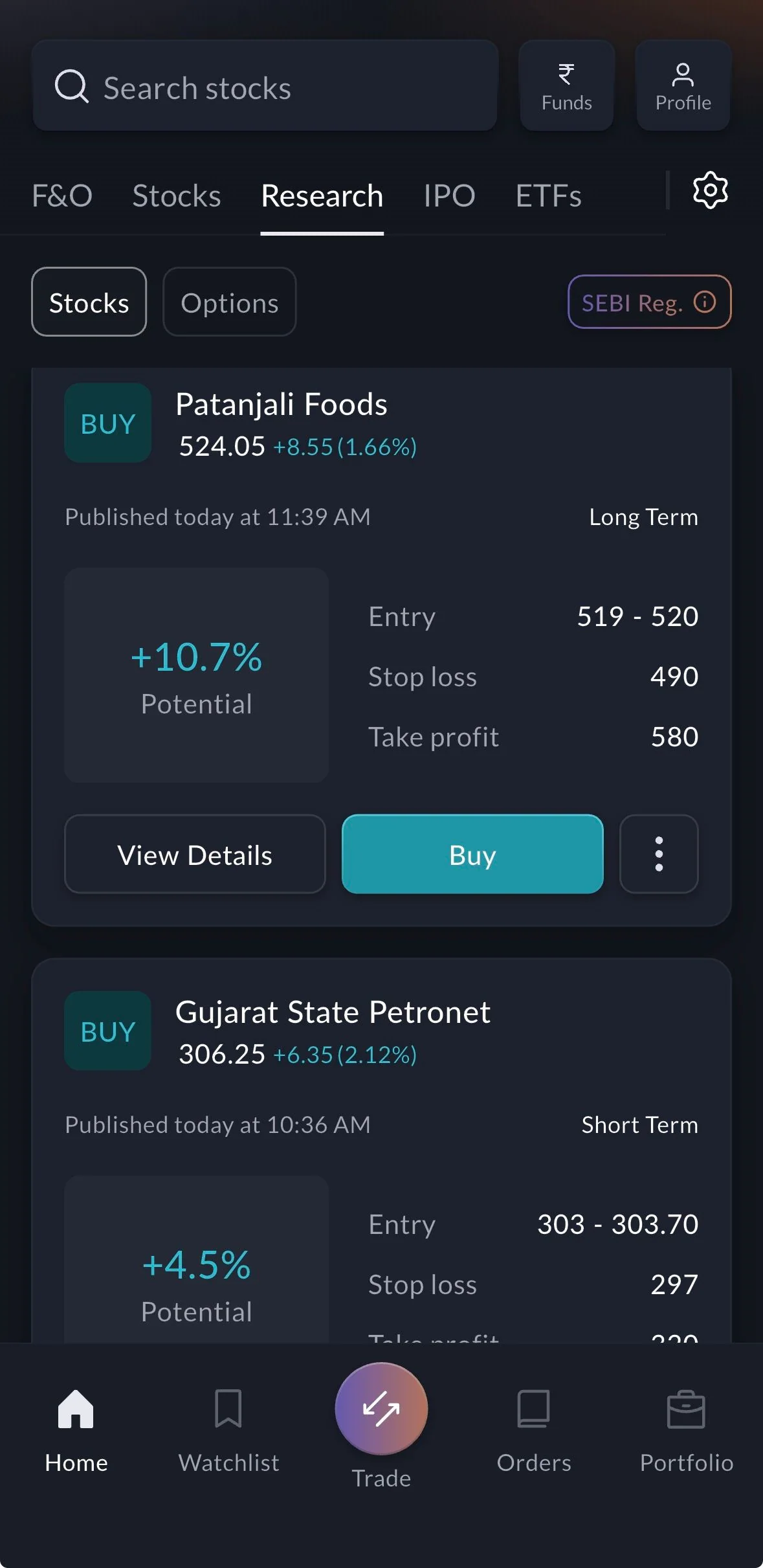
- CSEBI Reg.
From a SEBI-registered research analyst; tap for the registration details.
- FLevels
Entry 519 to 520, stop loss 490, take profit 580.
- GView Details or Buy
Read the reasoning, or open the order form with the idea's levels.
3How it helps
- A plan, not a tip. Every idea comes with where to enter, where you are wrong and where to take profit.
- Risk you can size. With the stop loss known in advance, you can decide the quantity before you buy, not after.
- The right kind of idea for you. Durations and the Stocks/Options switch keep intraday options apart from long-term stock ideas.
- Research ideas are for information. Trading involves risk, and past performance does not guarantee future results.
- Sahi Research is on the SAHI app; we found no Research section on SAHI web.
A track record you can check
1Where it is
WhereSAHI appResearchPerformance
In the Research tab, press the Performance card ("See closed recommendations") beside Market Insights.
- AResearch tab
Where both cards live.
- BMarket Insights
The daily market view, with the time it was last updated.
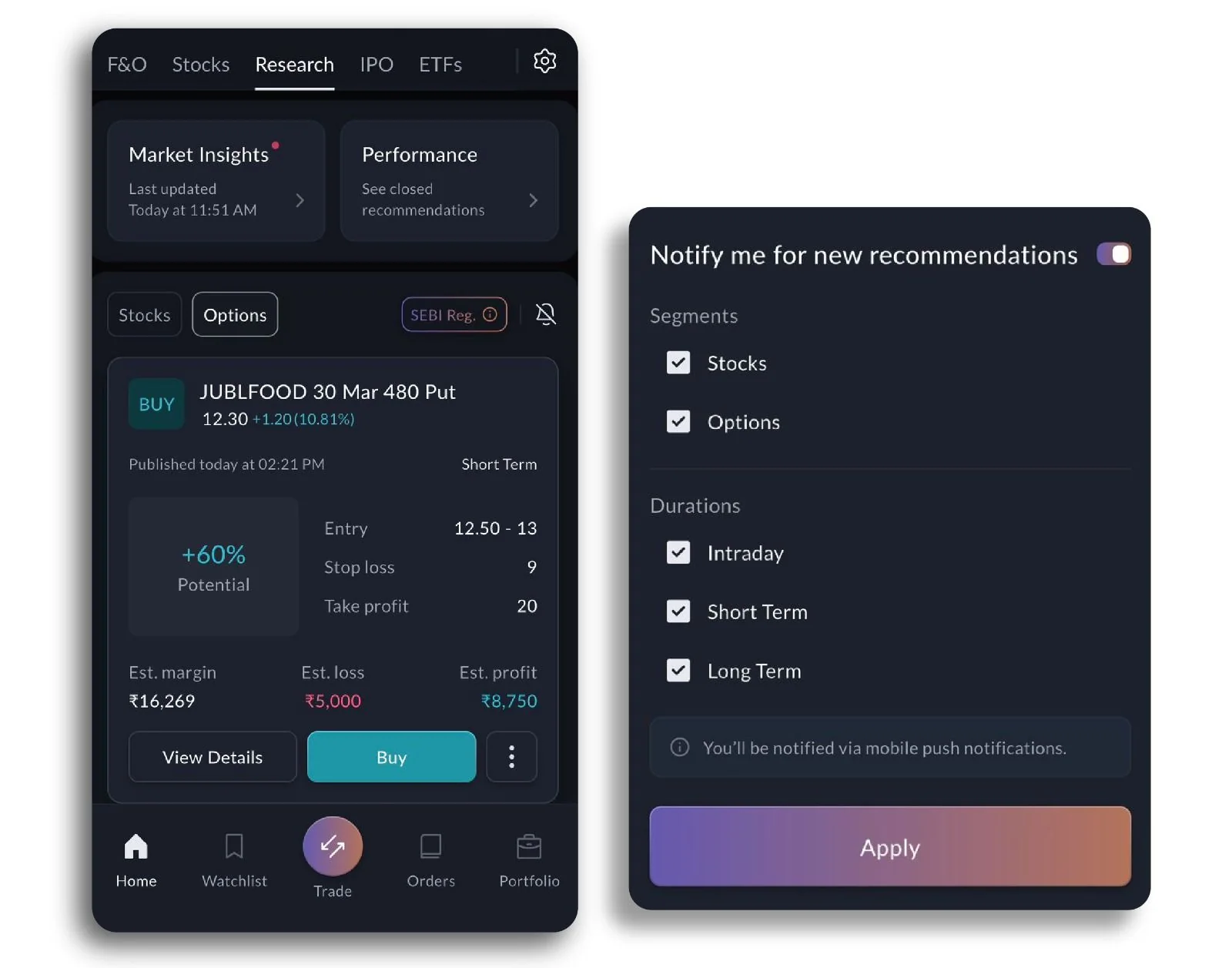
- CPerformance
Opens the record of closed recommendations.
2What it is
Research Performance shows every closed recommendation, month by month, on a calendar: each trading day carries its profit or loss, teal for a gain and red for a loss. Under the calendar are the number of trades, the winning trades and the total P&L, for Stocks and Options separately.
SAHI's screen shows options ideas in January 2026: 78 trades, 68 of them winners (87%), and a total P&L of +₹89,245, with one losing day, the 29th (−₹1.8K).
- AStocks or Options
The record for each kind of idea, kept apart.
- BDaily calendar
Each day's result from closed ideas: +₹12.1K on the 21st, for example.
- ETotal P&L
+₹89,245 for the month; the ⓘ explains how it is counted.
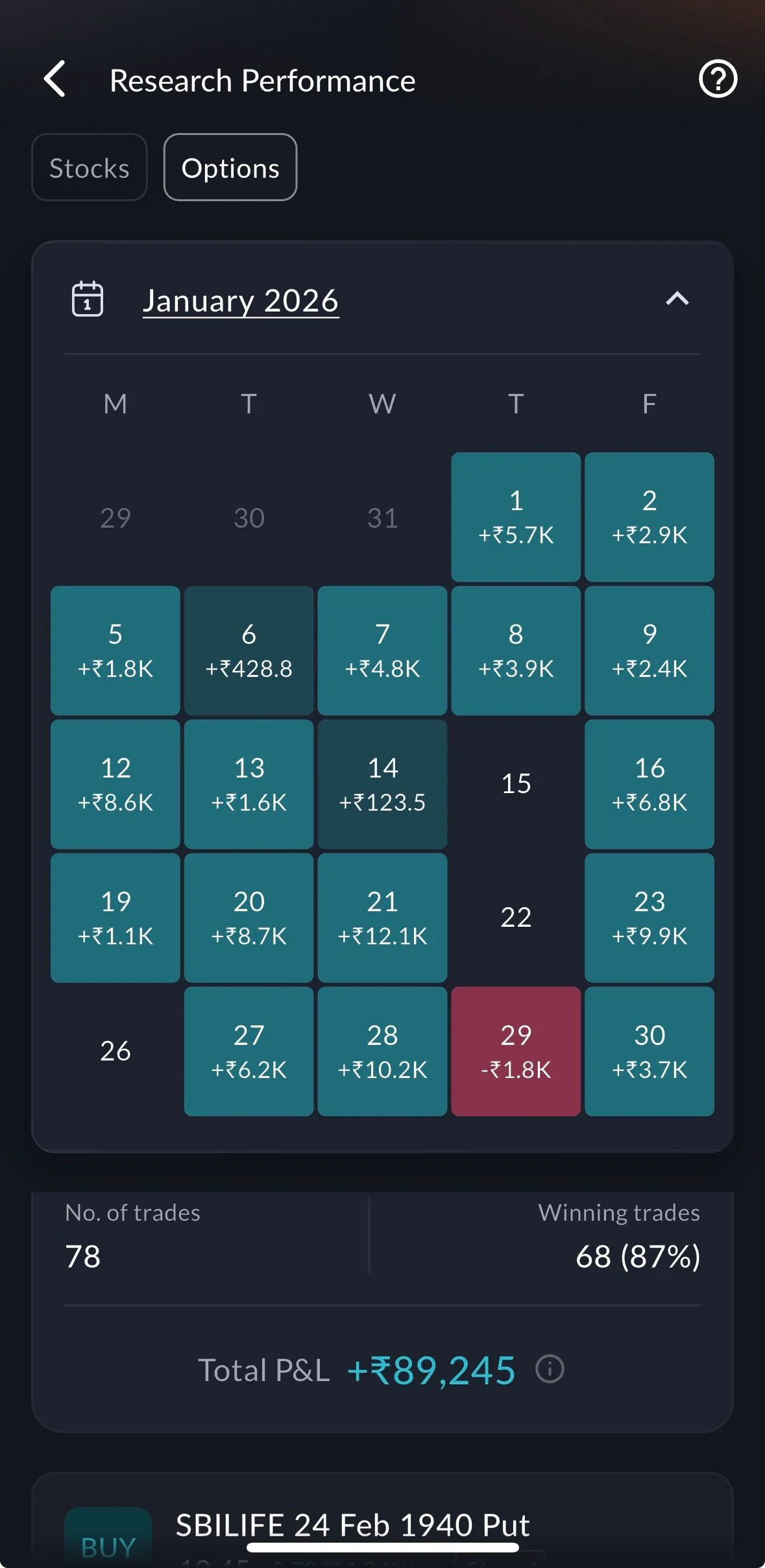
- CLosing day
Losses are shown too: −₹1.8K on the 29th, in red.
- DTrades and win rate
78 trades in the month, 68 of them winners: 87%.
3How it helps
- Judge the research before you use it. The win rate and the P&L are on record, month by month, not just the winners.
- Losing days included. A red day on the calendar is as visible as a green one.
- Stocks and options judged apart. Each has its own record, so a strong options month does not hide a weak stock month.
A high win rate says how often ideas worked, not how much each one made or lost. Read it with the total P&L and the size of the losing days.
- The numbers above are from SAHI's January 2026 screenshot; open Performance in the app for the current record.
- Past performance does not guarantee future results.
Questions
Is Sahi Research free?
Yes. SAHI's release says the recommendations are free.
Who makes the recommendations?
A SEBI-registered research analyst, using backtested strategies. The SEBI Reg. badge in the Research tab shows the registration.
Where do I see past results?
In the Research tab, press Performance. It shows a daily calendar, the number of trades, the win rate and the total P&L, for Stocks and Options separately.
Can I get an alert for a new idea?
Yes, from the bell in the Research tab. See the 10 March update.
Open Research in the SAHI appRead today's ideas with their levels, then check Performance for the record.
Open SAHI