
Documentation
How every part of Morning Bytes works.
Morning Bytes is one page, read before the market opens at 9:15 am. Every time on it is IST, Indian Standard Time.
A trader reads it in a few minutes. It says what happened in the last session, what changed overnight, and what would change the reading. An analyst writes each edition by hand.
This document holds the detail the presentation leaves out. Every part answers five questions in the same order. Why is it there? What is it? How does it help the reader? How does it work? Where are its edges?
An edition is one morning’s page. The edition studio draws it from one data file. Most pictures here come from today’s real-data draft. That draft is real and unreviewed. It has not been published. A few pictures come from an older sample edition, made up for design and testing. Each caption says which.
Written against studio 2.2.0 and the draft edition MB-20260924-DRAFT-v3.
Part D0
Start here
What the page is for, how to read this document, the promise every part answers, and the two views of one edition.
What Morning Bytes is
A market-insight page. It is not a data dump. It is not a prediction poster.
Many morning pages print figures and leave the rest to the reader. What does each figure mean? Is it current? What would change it? This page answers those three questions on the page itself.
Conclusion first
The top holds one short reading of the market, written by hand.
Evidence right below
The figures that support the reading, or cut against it, sit under it.
Conditions always visible
Beside each chart is the exact close that would change the reading.
The page asks one question and keeps asking it: What matters before 9:15 am? A figure stays only if it helps answer that. Otherwise it comes off.
Morning Bytes has its own look: warm paper, wine headings, and Sahi’s two typefaces. It is deliberately not the dark interface of the trading app.
Who it is for
A trader with a few minutes
Reads before 9:15 am to decide what to watch at the open. Needs the reading, the evidence and the conditions, in that order.
The analyst who writes it
Needs to know what the page requires, where each figure goes, and what each rule means.
A colleague who checks it
Needs to trace each figure to a source and a time, and to see what the page refuses to say.
Every unfamiliar word is explained where it first appears. All of them are also in the glossary, in part D8.
How to read this document
The presentation
Twenty slides. One idea each, with the reason it is on the page. Read it first.
This document
Answers “how exactly?” for every part. It holds the rules, the states and the edge cases. It is about four times as long as the slides.
Getting around
- The contents list on the left lists every section. On a narrow screen it becomes a menu at the top.
- The search box filters the list by what each section says. Press Enter to jump to the first match.
- A- and A+ change the text size from 80% to 150%. The page remembers your choice.
- Every module has its own address, such as #market-breadth.
- Click or tap a picture to open it full size.
Four labels
- Built The studio draws it today. Its rules were read in the studio’s code.
- Decided An editorial rule the owner has given. The studio does not enforce it. Some decided rules still have a proposed part, and the section says which.
- Proposed Designed, not decided, and not part of the studio.
- Open Not decided, or not known. The section says so plainly.
Pictures. Pictures marked “Today’s draft edition, unreviewed” are real data and are not published. Pictures marked “Sample, illustrative” use made-up numbers. The studio is the truth: where a picture and a sentence disagree, the studio wins.
The promise every part answers
Before anything is on the page, we answer one sentence. If it cannot be filled in, the part does not go on the page.
Each module below opens with its own sentence, labelled “draft wording”. The team wrote them. The owner has not yet confirmed them. The five headings that follow come from that sentence.
- Why it is there. The reader’s problem, from the “when” and the “so they can”.
- What it is. What the reader sees, in plain words.
- How it helps the reader. What changes for them, from the “helps them understand”.
- How it works. The steps from the analyst’s entry to the printed figure.
- Edge cases. What happens when data is missing, old, or on a boundary, and what is not decided.
The sentence also fixes what a part is not. The participation tile counts stocks. It does not say where the market will go.
Two views of one edition
The same data file draws two pages. The word “view” has three meanings here, so they are separated.
Reader view
The compact page that goes to readers. A switch inside the edition turns it on. Today’s draft uses it. It leaves out the working detail.
Full view
The working page for the analyst. It adds times, scopes, sources, the review line and several cards the reader view does not draw.
Reading layout
A different matter: how either page is laid out on a screen. On a window under 1,024 pixels wide it is one column, for phones. See module 25.
| Part of the page | Reader view | Full view |
|---|---|---|
| Masthead | Name, main heading, “Pre-market edition” stamp, date, weekday and last session | Adds the time strip and the full edition stamp |
| Main message | Headline, explanation, takeaways | Same |
| Overnight cues | Tiles: label, value, change | Adds scope, time observed, comparison and the analyst’s note line |
| Index charts | Drawn | Drawn |
| Condition note | Not drawn | Drawn |
| Evidence | Tiles: expiry day, participation, cash flows, VIX, sectors, FII derivatives | Four cards, options line, “Read together” |
| Chart patterns to watch | Chart plus one line | Chart, levels, distances, conditions |
| Events and risks | Only when a verified event exists | Risk radar, always |
| Footer | Disclosure and brand line | Sources, review line, disclosure |
Each module says which view draws it. Anything the studio does not draw is not described here as built.
The map of the page
The reader view, top to bottom, in the order it prints.
- The main headingWhat is this page for?
- Date, stamp and time stripHow fresh is it?
- The main messageWhat do I need to know first?
- Overnight cuesWhat moved while India was shut?
- Index charts and referencesWhere did each index finish, and what would change the reading?
- Expiry dayWhere is open interest stacked today?
- Participation, flows, sectors, derivatives, VIXWho and what was behind the move?
- Stocks to watchWhich charts deserve a look?
- EventsIs anything scheduled today?
- The footerCan I rely on it?
The parts of this document
| Part | What it holds |
|---|---|
| D0 Start here | What the page is, the promise, the two views. |
| D1 How the page thinks | Five-part claims, three kinds of time, missing stays missing, written by hand. |
| D2 The page, module by module | Every part of the page, in reading order, including the overnight-cue rule. |
| D3 How an edition is made | The data file, sources and status, the checks, sample, draft and production, the phone layout, the picture and the archive. |
| D4 Using the presentation | The keyboard shortcuts. |
| D5 Proposed | The daily line and the pre-market checklist. |
| D6 Decided, proposed, open | The ledger, and the decisions that wait for the owner. |
| D7 The inventory | All 33 features and their status. |
| D8 Glossary | Every term in plain words. |
| D9 Engineering notes | File formats, limits, commands and build rules. Collapsed. |
Part D1
How the page thinks
Four ideas shape every module. Read them once. The module entries then only say what is different.
The problem it fixes
The old page
- Takeaways, sparklines and a row of levels.
- Numbers with nothing attached.
- The reader worked out the meaning, the age and what would change it.
This page
- A fixed structure, not more numbers.
- Each claim carries its evidence and its condition.
- The page does that work first.
Sahi’s platform and site were redesigned. This page was the last piece still in the old style. The fix is the structure in the next section.
Five parts of every claim
A claim on this page has five parts. Words that skip them are not used.
The figures above come from today’s unreviewed draft. Words such as “bullish” and “strong buy” are not used. They carry no condition, so they can never be shown wrong. Neither are prediction verbs or probabilities.
This is decided. The studio does not read the wording. A writer applies it, and the sections below say where the studio checks structure only.
Three kinds of time
These are never merged into one score. The words Fact, Observation and Condition are the writer’s vocabulary. They are not printed on the page. The separation is by position and by time stamp.
Missing stays missing
Nothing is estimated. Nothing is taken from a related instrument. Nothing is carried over from another day without saying so.
- A missing figure shows a dash or the words “Data unavailable”.
- An old figure keeps its number and gets a “stale” label.
- A conclusion that rests on a missing or stale source is withheld.
Module 20 explains how each figure records its source, its time and its status.
Written by hand
An analyst writes each edition. The analyst enters every figure from a named source and writes every sentence. The studio draws and checks what was entered. It adds no figure and no sentence of its own.
An edition is frozen at publication. A later view is a new edition, never an edit. This is a working rule. The studio does not lock a loaded edition.
Part D2
The page, module by module
Every part of the page, in the order the reader view prints it. Modules drawn only in the full view say so.
Module 1 Built Reader and full view
The main heading
QuestionWhat is this page for, and is it worth my next few minutes?
Promise · draft wordingFor a trader with a few minutes before 9:15 am, when they open the page, this helps them understand that the page holds only what matters before the open, so they can decide to read it top to bottom instead of hunting for the one figure they need.
Why it is there
A morning page can turn into a wall of numbers. One permanent question under the name tells the reader, and the writer, what the page is for.
Every figure below has to help answer it, or it comes off.
What it is
The line under the words “Morning Bytes”: What matters before 9:15 am? It sits beside the SAHI mark. In the reader view the stamp “Pre-market edition”, the date, the weekday and the last completed session sit to its right.
The daily message is a different line. It is in the wine panel (module 3).
See it

How it helps the reader
The reader learns the page’s job in one line. Because it is a question, everything under it reads as an answer. A trader can scan for the answer instead of reading everything.
The writer gets one test for every field: does it answer a question a trader has before 9:15?
How it works
- The analyst writes the line once, in the edition.
- The page prints it under the title. The title itself is fixed in the page.
- The checks require the line. An edition without one is blocked instead of printing an empty line.
- It does not change from day to day.
Edge cases
- It cannot be missing. A missing heading blocks the whole edition.
- “Permanent” is a working rule. Nothing checks that the line reads exactly this way.
- The “9:15” is plain text. On a day when the session opens at another time, the analyst changes the text by hand. Nothing checks it.
Module 2 Built Full view (date line also in reader view)
The date, the stamp and the time strip
QuestionHow fresh is this page, and which numbers are from the finished session and which were seen overnight?
Promise · draft wordingFor a trader reading before the open, when they look at the top of the page, this helps them understand which session the numbers come from and when the page stopped taking news, so they can decide how much weight to give the settled figures and the overnight ones.
Why it is there
A morning page mixes two clocks: the session that finished yesterday, and the moves since. If they blur, a reader can take an overnight reading for a settled fact.
What it is
In the reader view, the masthead’s last line names the date and the completed session: “Thursday · after the 23 Sept session”.
The full view adds a strip under the title with up to three items.
- Domestic: the last completed session.
- Cut-off: the moment the edition stopped taking news. A draft calls it “Evening cut-off”.
- Reading order: Conclusion → evidence → conditions.
See it

How it helps the reader
The reader sees, before any number, that the index figures come from a finished session. In the full view they also see that everything overnight stops at a stated time.
The stamp stops a sample or unreviewed edition being mistaken for a live one.
How it works
- The date, the previous session and the cut-off are entered in the edition.
- The weekday is worked out from the date.
- The stamp depends on the edition’s mode: a sample, a real-data draft or a production edition (module 22).
- The checks require the dates to be real, the previous session to be earlier, the cut-off not to be after publication, and no observation to be stamped after the cut-off.
Edge cases
- The reader view has no strip and no cut-off. The strip is a full-view element.
- The third strip item is hidden on windows 530 pixels wide or less, in the reading layout. Wider windows show it.
- Fact, Observation and Condition are not printed. Whether to print them is not decided.
- A draft may be prepared before the session date, never after it.
Module 3 Built Reader and full view
The main message
QuestionWhat is the one thing to know before I read anything else?
Promise · draft wordingFor a trader who has one minute, when they open the page, this helps them understand the analyst's one-line reading of the market and what to check first, so they can decide what to wait for at the open.
Why it is there
Most pages open with a grid of numbers. Here the reader should know the most important thing before reading anything else.
A trader with two minutes can stop at this panel and still leave with the reading.
What it is
The wine panel. It has one headline, a short explanation, and under “Before the bell” up to three numbered takeaways. An analyst writes all of it by hand.
Today’s draft reads: “Inside every range. GIFT points to the rising line.” The three takeaways carry their numbers.
See it


How it helps the reader
The trader decides at a glance whether the day needs a closer look, and which line to read next. Everyone who reads on knows what the evidence below is for.
How it works
- The analyst writes the headline, the explanation and one to three takeaways.
- The analyst lists which evidence modules the message depends on.
- The studio checks the length of every line.
- It shows the panel only while every listed module is confirmed. If one is stale or missing, the panel says “Interpretation withheld” and the rest of the page stays.
Edge cases
- The wording is free text. The studio checks length, not meaning, and does not check that a takeaway states a condition.
- If the analyst removes a module from the dependency list and it then goes missing, a takeaway can still quote its number. Nothing links the words to the list.
- The reader view draws the panel only. The overnight note and “Read together” (module 15) belong to the full view.
- The rules for the headline are proposed, not decided (module 30).
- Whether “GIFT points to the rising line” reads too close to a forecast is an owner decision.
Module 4 Built Reader and full view
Overnight cues
QuestionDid global risk appetite rise or fall overnight, and what are crude and the rupee doing?
Promise · draft wordingFor a trader deciding how much overnight news to carry into the open, when they look at what moved while India was shut, this helps them understand what each overseas or overnight market did since its own last reference point, so they can judge whether the overnight picture is calm, mixed or one-sided without treating it as a forecast.
Why it is there
A single overnight number is easy to misread. The strip shows several markets side by side, each compared with its own previous reading. The reader can see what moved and by how much.
A separate rule (module 4.1) decides which markets earn a place.
What it is
A row of three to six tiles. Today’s draft has five: GIFT Nifty, Nikkei 225, S&P 500, Brent crude and USD/INR.
Each reader tile shows a label, an optional short note, the value and the change with an arrow. The full view adds what the value is, the time it was observed, what it is compared with, and one line from the analyst. In a draft the full view titles the strip “Evening cues · refresh before the open”.
See it


How it helps the reader
The reader sees the overnight picture as calm, mixed or one-sided. A GIFT Nifty change is an indication, not a promise of the open. A futures price sits a little above or below the index itself, and that gap has a name, the basis.
How it works
- The analyst enters each cue: value, previous value, unit, scope, what it is compared with, and its source and time.
- The page works out the percentage change from the two values.
- A cue marked “price” shows a rise in green and a fall in red. A cue marked “neutral” stays grey.
- If the contract changed between the two readings, the percentage is withheld.
Edge cases
- A missing cue shows a dash. Nothing is filled in from a related market.
- A cue with a changed contract shows no percentage.
- A value of zero or less cannot be entered today.
- The reader tile prints no time. Only a short note the analyst adds, such as “Close 18 Sep”, tells the reader a reading is older. Module 4.2 proposes printing every time.
- The full view’s closing line depends on the main message. If the message is withheld, that line says to review each observation separately.
- The US 10-year yield, Europe, the dollar index and other Asian markets are owner decisions (module 4.1).
Module 4.1 Decided Editorial rule
The overnight-cue rule
QuestionWhy is this market on the page, and why is that one not?
Promise · draft wordingFor a trader with a few minutes before 9:15 am, when they read the overnight strip, this helps them understand that every market shown has a known route to India's open and has already settled or is trading, so they can weigh each cue as a reason rather than as decoration.
Why it is there
A strip of overseas numbers can grow into a world dashboard. A stated rule keeps it short. Anyone can then ask the same two questions of any cue, shown or missing.
The rule also explains what is absent. “Left out” means tested and not passed, not forgotten.
What it is
A two-part test, given by the owner on 24 Sep 2026. A cue earns its place only if:
- (a) it has a known, explainable route to India’s opening reading, and
- (b) it is settled, or trading, before 9:15 am IST.
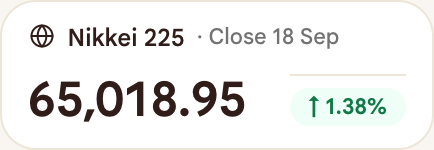
Nikkei is shown because Tokyo is one of the largest stock markets and trades from about 5:30 am IST, before India opens. China and Hong Kong are not shown. They fail test (a).
See it
How it helps the reader
The reader can see why each cue is there. The writer has a fixed test for adding or dropping one, so the strip does not drift. A rejected market can be revisited by asking which test it fails.
How it works
- Test (a). Can the route be said in one plain sentence? Example: India imports most of its oil, so Brent matters to the rupee and to oil users.
- Test (b). Is the market settled, or trading, before 9:15 am IST?
- Decide. A cue that passes both may be shown. A cue that fails either is left out.
- State its age. Passing admits a cue. It does not make the reading fresh. A cue must still say when it was read.
Edge cases
- The rule is editorial. The studio does not enforce it. It only requires three to six cues.
- A proposed third test would say: the reading is from the latest session, or states its date. This is proposed, not decided.
- US 10-year yield, Europe, the dollar index, Kospi and ASX are left with the owner. See the table.
- The publish time is an open decision. An edition finished at about 2 am IST cannot contain Tokyo’s session, because Tokyo opens about 5:30 am IST.
Settled or trading
Settled means the market has closed for the session and has a final close. The US session is settled after about 1:30 am IST.
Trading means the market is open and its price is still moving at the moment of reading. Tokyo after about 5:30 am IST, and GIFT Nifty through the evening, are trading.
A trading reading is true only as of its time. A settled reading is final for that session. Both are allowed. The reader must be able to tell them apart.
How a cue states its age
- Every cue is stored with the time it was observed and what it is compared with.
- The reader tile prints only a short note the analyst adds, for example “Close 18 Sep”.
- The full view prints the observation time and the comparison on every cue.
- Printing the time on every reader tile is proposed (module 4.2).
Verdict for each candidate
| Cue | Verdict | Test (a): route | Test (b): timing | Note |
|---|---|---|---|---|
| GIFT Nifty | Shown | Direct: a Nifty futures contract, the nearest thing to an implied open. | Trades through the evening and early morning. | It is an indication, not a forecast. |
| Nikkei 225 | Shown | One of the biggest stock markets. Foreign money and risk mood carry across Asia. | Tokyo trades about 5:30 to 11:30 am IST, before India opens. | An edition finished before 5:30 am IST can only carry the previous close. |
| S&P 500 | Shown | The last big session before India opens. It sets the global risk mood. | The US session ends about 1:30 am IST, so it is settled by morning. | The tile must say whether it shows the close or a mid-session reading. |
| Brent crude | Shown | India imports most of its oil. That reaches the rupee, prices and oil users. | Trades almost around the clock. | The contract used is named on the tile. |
| USD / INR | Shown | The rupee affects foreign flows, importers and exporters. | Quoted through the evening and overnight. | Which quote counts as the reference is not stated. |
| Hang Seng, Shanghai (China and Hong Kong) | Not shown | Owner’s decision: the link to India’s opening read is too weak. | Both trade before 9:15 am IST. | Passes test (b), fails test (a). Decided. |
| Europe (FTSE, DAX) | Owner decision | A route exists but is second-hand. It reaches India mostly through the US session. | Settled about 9 pm IST the evening before. | Adds little beyond the S&P 500. |
| Gold | Not shown | A route exists, since India imports gold. It is weak for an equity opening read. | Trades almost around the clock. | Fails test (a) on the current reading. The owner may disagree. |
| US 10-year yield | Owner decision | Global interest rates move foreign flows, the rupee and IT. | Trades almost around the clock. | Passes both tests. Only a proposal today. |
| US dollar index | Owner decision | Explainable, but it overlaps USD/INR. | Trades almost around the clock. | Likely adds nothing beyond USD/INR. |
| Other Asian markets (Kospi, ASX) | Owner decision | Same question as China: is the route strong enough? | Both open before India. | Not in the edition. |
| Bitcoin and other markets with no known route | Not shown | No route can be explained. | Trade at any hour. | Fails test (a). |
“Owner decision” means it is not settled. The rule alone does not decide those rows.
Data honesty rules
These are rules for every cue, whatever today’s values are.
- A cue older than the session must state its date.
- Missing stays missing. A gap is a dash, not a guess.
- Nothing is estimated, and nothing is copied from another instrument.
Worked example, from today’s unreviewed draft. The Nikkei tile reads “Close 18 Sep”. That is an old close. Its date is printed so nobody reads it as an overnight move. It must be refreshed before publication. The same draft’s evening readings for the other cues must be refreshed before the open.
Module 4.2 Decided
Cue times stay in the edition, not on the tile
QuestionHow old is this number?
Promise · draft wordingFor a trader reading the overnight strip, when the page has to stay short and quiet, this helps them take in each cue at a glance so they can decide what to check next. Decided: the time each cue was read stays in the edition and in the full view, and is not printed on the tile.
Decided by the owner on 24 Sept. The reader tile does not print the time. This replaces the earlier proposal to print it.
Why it is there
The page is updated by hand each morning. A printed time would be wrong the moment a cue is refreshed, and a row of five times makes the strip busy.
What it is
Each cue’s observation time is still stored in the edition. The reader tile leaves it out. The full view and the Sources and timing block print it.
How it helps the reader
The strip stays quiet. A value that is not from the latest session still says so in words on its own tile, as today’s Nikkei does: “Close 18 Sep”.
How it works
A cue may carry a short note. The tile prints the note beside the label. Only a cue that needs one has one.
Edge cases
- A missing cue prints a dash and no note.
- The stored time is never deleted, so a later view can bring it back.
Module 5 Built Reader and full view
The three index charts
QuestionWhere did each index finish, and how did it get there?
Promise · draft wordingFor a trader who follows Nifty, Bank Nifty and Sensex, when they check the last session, this helps them understand how each index moved over two sessions and where it finished against its references, so they can decide what to watch at the open.
Why it is there
A close alone does not show how the day was traded. A chart alone does not say what would change the reading. Each index gets a chart with its interpretation beside it, so the reader can check the claim.
What it is
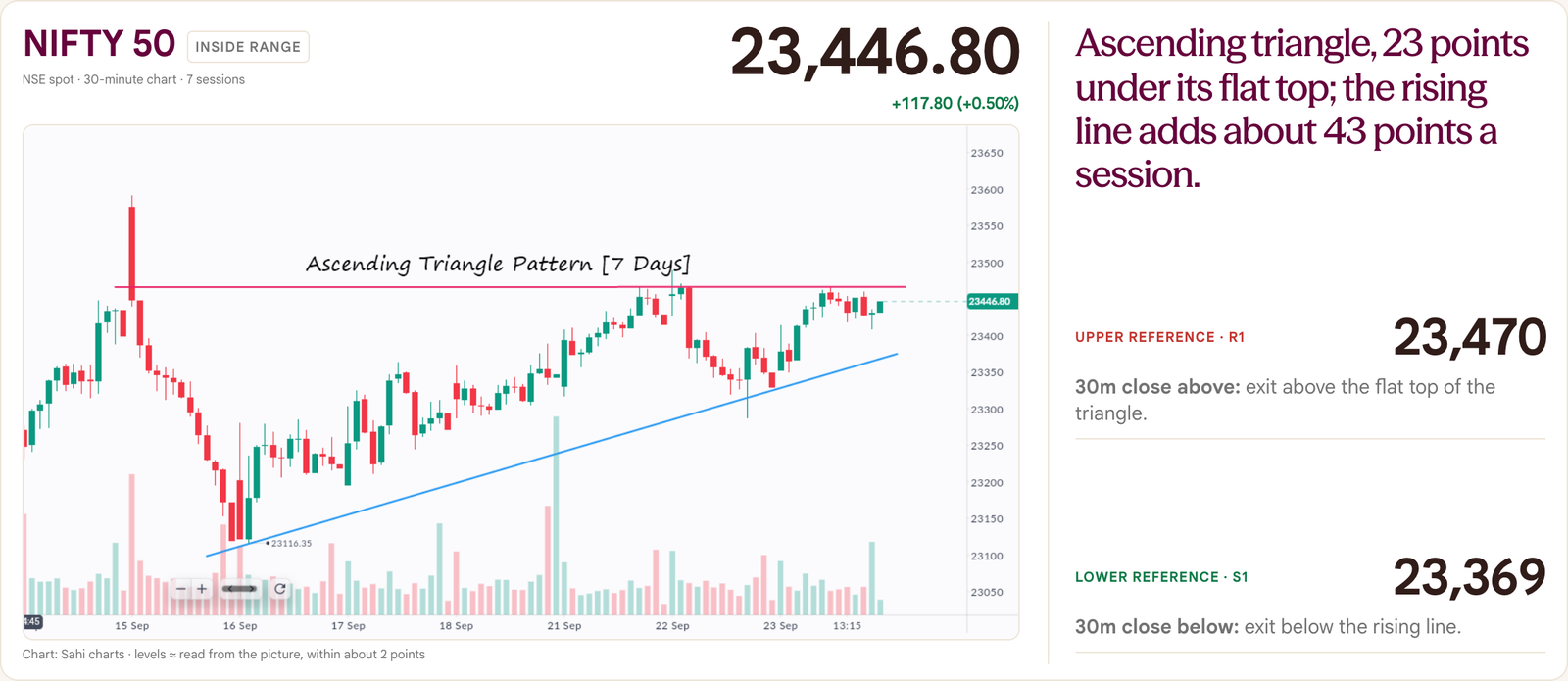
Three cards: Nifty 50, Bank Nifty and Sensex. Each has a header with the name, a range tag, the source and time, and the official close and change. Then comes a chart with two reference lines. On the right are the reading and its conditions (module 6).
The studio can draw candles from numbers. It can also show the owner’s own chart as a picture in the chart slot, as today’s draft does. Whether a picture may stand in for candles in the index cards is not decided.
See it


How it helps the reader
The trader sees the shape of the recent sessions, the final close, and both references on one picture. They can see how far the close sits from each.
How it works
- The analyst supplies the chart: candle numbers, or the owner’s picture with its source.
- The header shows the official close and the change from the previous official close, in points and in percent.
- The range tag compares the close with the two references: inside range, above the upper reference, or below the lower reference.
- A caption says what the chart is, so a small gap between the header close and the last candle is not a surprise.
Edge cases
- Exactly three indices. A missing index blocks the edition.
- In today’s draft the three charts use different timeframes: 30-minute, daily and 30-minute closes. Each card says which.
- A level read from a picture is marked with “≈” and a tolerance, for example “within about 2 points”.
- A stale index keeps its numbers and shows “Stale chart · review required”. Its wording is withheld.
- Header and chart can differ slightly. The header uses the official close. The chart uses what was supplied.
- Some text inside the picture is small. Read the figure from the card, not the picture.
Module 6 Built Reader and full view
Upper and lower references
QuestionWhere is the nearest boundary the reading depends on, and what would a close beyond it mean?
Promise · draft wordingFor a trader who wants to know where the reading would change, when they look beside a chart, this helps them understand the two levels that matter and what a completed close beyond each would mean, so they can decide what to wait for instead of guessing.
Why it is there
A previous high is a boundary. Calling it “resistance” claims sellers wait there, which nobody has shown. So the page says reference, records how each was found, and attaches a condition. A line with no condition can never be wrong, so it is not on the page.
What it is
The right-hand side of each index card. It holds a one-line view from the analyst. It holds an upper reference (R1) and a lower reference (S1) with prices, a condition for each, and how each level was found. Secondary levels (R2, S2) are optional.
How it helps the reader
The reader gets two numbers and the exact event that would change the reading: a completed close above or below, on the stated timeframe. Inside the two, no directional exit is confirmed.
How it works
- The analyst enters R1 and S1 with a price and a basis. R2 and S2 are optional.
- The analyst writes what a close above, inside or below means, in a few words.
- The page prints the price and the condition for each side.
- A conditional reading carries its own invalidation line.
Edge cases
- Worked example, from today’s draft. Nifty’s upper reference is 23,470, the flat top of a triangle. The close is 23.2 points under it. The lower reference 23,369 is the rising line. The close is 77.8 points above it.
- The studio requires the lower reference to be below the upper one. It does not check the wording of the conditions.
- Only the basis of R1 and S1 is printed. A basis for R2 and S2 is required but not shown.
- Which close counts as “inside” depends on the source: the range tag uses the chart’s last close, not the official close. Near a reference they can differ.
- The rule that levels are “references” unless there is evidence for support or resistance is decided. It is a writing rule, not something the studio enforces.
Module 7 Built Full view only
The shared condition note
QuestionWhat exactly counts as an exit from the range?
Promise · draft wordingFor a trader watching the open, when price pokes through a reference, this helps them understand that only a finished candle beyond the line counts, so they can decide not to act on a touch.
Why it is there
The commonest misreading of a level is to treat a brief touch as a break. One bar says once that only a completed close counts, and what would undo it.
What it is
A wine bar under the three index cards: “A candle close, not a price touch.” with the invalidation: a completed close back inside the range invalidates that range-exit reading.
See it

How it helps the reader
The reader learns the rule once instead of three times. The timeframe is printed beside each condition.
How it works
The text is part of the page, not the edition. If every index is a range reading it uses the sentence above. If any is conditional it tells the reader to use each index’s own rule.
Edge cases
- This is a full-view element. The current reader view does not draw it.
- The reader view therefore relies on each card’s own condition lines.
- Whether “completed close” should be defined on the page itself is not decided.
Module 8 Built Reader view
The expiry-day block
QuestionWhich contract expires today, and where is its open interest?
Promise · draft wordingFor a trader whose index option expires today, when they read the morning page, this helps them understand where calls and puts are stacked around the money and what the options price in, so they can decide which strikes deserve a look.
Why it is there
On expiry day the whole option chain matters more than usual. One tile gives the ladder and the headline figures, so the trader does not open the chain to find them.
What it is
The first evidence tile, printed only when the edition carries an expiring contract. Today’s draft shows Sensex weekly options, flagged “Expires today” (or “N days left”).
Left: a ladder of 13 strikes, six either side of the at-the-money strike. Puts are on the left and calls on the right, in lakh (1 lakh is 100,000 contracts). Right: spot, the at-the-money strike, max pain, put/call by open interest and by volume, and at-the-money implied volatility. Then the total call and put open interest. Then four lines: highest call open interest, highest put open interest, most calls added and most puts added.
When both at-the-money prices exist, it also states the range the call and put together price in, “not a forecast”.
See it

How it helps the reader
The trader sees where positions are stacked and what the market charges for today’s move, in one place. The tile says that concentration is not a guaranteed barrier and that the range is not a forecast.
How it works
- The analyst saves the whole chain of the expiring contract with spot, the at-the-money strike and the totals.
- The page picks the strikes around the money and works out the highest and most-added strikes.
- Max pain, the put/call ratios and implied volatility are read from the saved chain. A missing figure is left out.
- The range is shown only when both at-the-money prices exist.
Edge cases
- The tile does not appear on an edition with no expiring contract.
- Which contract counts when several expire on one day is not decided.
- A day-count flag reads “Expires today” at zero days left.
- Open interest is as of the previous close. Additions are since the previous close.
- If the source is marked missing, the tile says so and shows no figures.
Module 9 Built Reader tile and full-view card
Market participation
QuestionWas the move broadly shared, or carried by a few stocks?
Promise · draft wordingFor a trader who has read the index moves, when they want to know whether the market moved together, this helps them understand how many stocks in a named group rose, fell or stayed flat, so they can decide how far to trust a move in the index.
Why it is there
An index can rise because a few heavy stocks rose while most fell. A count of advances and declines shows whether the move was shared. It is the quickest check on how much weight an index move deserves.
What it is
A tile titled “Market participation”, with the group counted in its label: “50-stock basket” in today’s draft. It shows the share that advanced, a three-colour bar, and the three counts: up, flat and down.
Today: 74% advanced, 37 up and 13 down.
See it

How it helps the reader
One glance answers “did most stocks go up?”. The bar and the counts show the split. A 74% figure is never read without knowing how many fell.
How it works
- The analyst enters the group name, the counts of advancing, declining and unchanged stocks, and the total.
- The studio checks that the three counts add up to the total. If not, the edition is blocked.
- The page shows advances divided by the total as a whole percentage, and draws the bar in proportion.
Edge cases
- It counts one named group. Today it is a 50-stock basket, not the whole exchange. The full-view card says so in its note.
- Missing: the tile says “Data unavailable”. Stale: the numbers stay with a “stale” label.
- If participation is a dependency of the main message and it is missing or stale, the message is withheld.
- The card is titled “Market participation”. “Breadth” is the everyday word.
- Which group a production edition counts is not decided.
Module 10 Built Reader tile and full-view card
Institutional cash flows
QuestionWhat did reported institutional cash activity show?
Promise · draft wordingFor a trader wondering who was buying and selling, when they check the last session, this helps them understand what foreign and domestic institutions did in cash, so they can decide whether the index move had large buyers or sellers behind it.
Why it is there
Price alone does not say who stood behind it. Reported cash flows show whether foreign and domestic institutions were net buyers or sellers, and whether they pulled the same way.
What it is
A tile with two panels, FII/FPI and DII, in rupees crore net. Each shows the last session as a large figure and five sessions as small bars. Under the bars: the five-session net.
Today: FII/FPI +1,617 and DII +2,342, with five-session nets of −5,378 and +13,896.
See it

How it helps the reader
The reader sees one group buying while the other sold, or not, and by how much, on one scale. The five-session total shows whether the last day was a one-off.
How it works
- The analyst enters gross buy and gross sell for each group, and up to five sessions of net figures.
- The page works out each net as buy minus sell.
- Bars share one scale, centred on zero, so their lengths compare.
- The checks confirm the latest history entry equals that session’s buy minus sell.
Edge cases
- Only net figures are printed. Gross buy and sell are checked, not shown.
- Figures are provisional and rounded by the publisher.
- Money moved is not a forecast of direction.
- Missing: “Data unavailable”. Stale: figures stay with a “stale” label and the note tells the reader not to present them as the latest session.
- The checks do not confirm the sessions in the bars are consecutive.
Module 11 Built Reader tile and full-view card
Sector snapshot
QuestionWhere was the move concentrated?
Promise · draft wordingFor a trader who wants to know where the day's strength and weakness sat, when they check the evidence cards, this helps them understand which sectors led and which lagged, so they can decide which parts of the market to watch more closely.
Why it is there
A “mixed” market can hide a clear split between sectors. A short list of selected sectors shows the shape of the day without listing every sector.
What it is
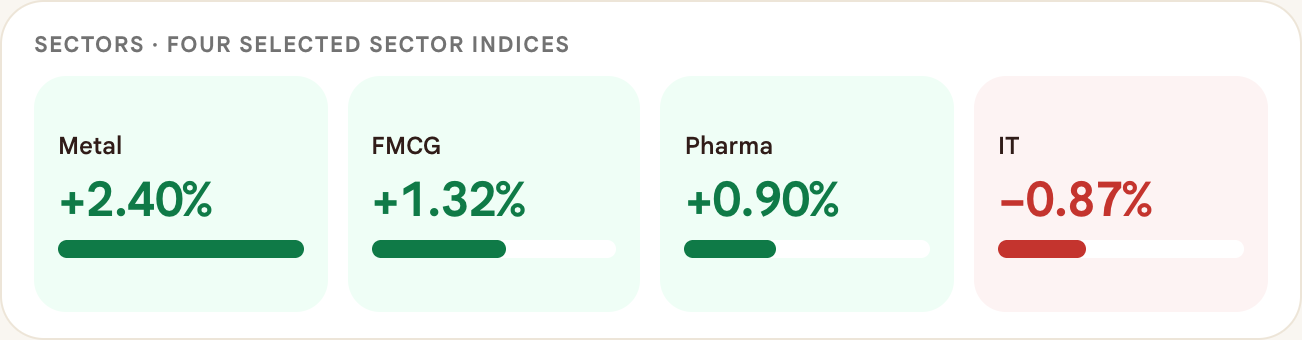
A tile of up to six sectors, each with its change and a bar on a common scale. Today: Metal +2.40%, FMCG +1.32%, Pharma +0.90%, IT −0.87%. The reader tile prints two decimals. The full-view card prints one.
See it
How it helps the reader
The reader sees leaders and laggards at once, so a small move is not made to look large. The trader knows which sector names to open first.
How it works
- The analyst chooses one to six sectors and enters each change.
- Bars run from a zero line: right for a rise, left for a fall.
- The largest move sets the scale.
- Rows keep the analyst’s order. The page does not sort.
Edge cases
- These are selected sectors, not a full ranking. Do not call it a sector ranking.
- How the sectors are chosen each day is not decided.
- Missing: “Data unavailable”. Stale: bars stay with a “stale” label.
Module 12 Built Reader tile
FII derivatives turnover
QuestionDid institutions trade index futures and options heavily, and on which side?
Promise · draft wordingFor a trader who wants to know what large participants did in index derivatives, when they finish the cash flows, this helps them understand net buying or selling in index futures and index options, in rupee crore, so they can decide how much weight to give the cash-market flow.
Why it is there
Cash flows show what institutions did in shares. Derivatives turnover shows another part of what they did. The tile says plainly that it is not a direction.
What it is
A tile named “FII derivatives · net turnover, ₹ crore”. Two rows: index futures and index options, each buy value minus sell value. Today: index futures +679.0 and index options −3,906.2. Its note reads: buy minus sell turnover; not open interest, not positioning.
See it

How it helps the reader
The trader gets the second half of the flow picture without a false positioning read.
How it works
- The analyst enters buy and sell values for index futures and index options, in rupees crore.
- The page prints the difference for each, to one decimal.
- The unit must be rupees crore, not contracts.
Edge cases
- The block is optional. Without it, no tile is printed.
- In the full view the same figures fill the futures card’s slot, but only when the futures card is missing.
- FII index-futures long and short positions are on the pre-market checklist as “Not yet” (module 31).
Module 13 Built Full view only
Futures positioning
QuestionDid positions grow or shrink alongside price?
Promise · draft wordingFor a trader who wants to know whether money was added or removed alongside price, when they check Nifty futures, this helps them understand the change in price and in open interest on the same contract, so they can read the two together instead of either one alone.
Why it is there
Open interest counts contracts that are still open. Rising open interest with rising price means something different from rising open interest with falling price. Neither can be read alone, so the card shows both.
What it is
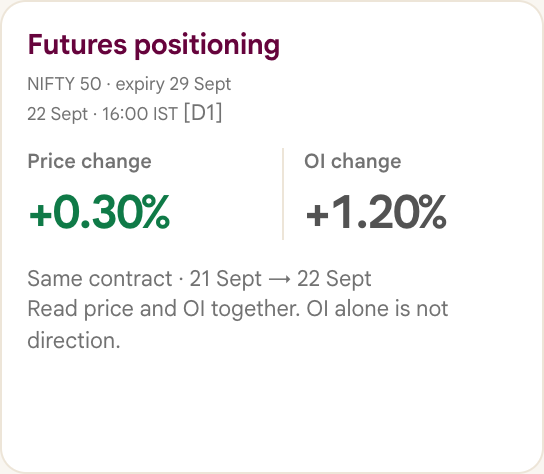
A full-view card with two changes for one futures contract: the price change and the open-interest change, in percent, with the contract, its expiry and the two dates compared.
See it
How it helps the reader
The reader can judge whether a move had new positioning behind it. The card reminds them that open interest alone is not a direction.
How it works
- The analyst enters the contract, expiry, and today’s and the previous price and open interest.
- If both readings are the same contract, the page prints each change as a percentage.
- The price change is coloured. The open-interest change is always grey.
- If the contract changed, both changes are withheld.
Edge cases
- In today’s draft this block is marked missing. It is withheld until it is verified, and the reader view has no futures tile.
- A previous open interest of zero gives “N/A”.
- The card prints only the two percentages, not the raw price or open interest.
Module 14 Built Full view only
Options context
QuestionWhere is options positioning concentrated?
Promise · draft wordingFor a trader looking for where options positions are piled up, when they read under the evidence cards, this helps them understand which strikes hold the most open Call and Put contracts, so they can decide which prices to keep an eye on, remembering it is not a guaranteed barrier.
Why it is there
Many traders watch the strikes where the most option contracts are open. One line gives that without turning the page into an option chain. It reports the highest total, not the biggest change, so the two are never confused.
What it is
A line under the evidence cards. It names the underlying and expiry, and says whether the count covers the whole expiry. It gives the strike with the highest open interest on the Call side (CE) and on the Put side (PE). It ends with the scope, the time and the reminder “Concentration is not a guaranteed price barrier.”
See it

How it helps the reader
The reader gets two strikes to watch and an honest statement of how complete the data behind them is.
How it works
- The analyst supplies the total open Call and Put contracts for each strike, and says whether the list covers the whole expiry.
- The page finds the highest Call total and the highest Put total. Ties are all listed.
- The label says “highest total OI” for a complete list, or “highest OI within supplied subset” otherwise.
Edge cases
- This is a full-view line. The current reader view does not draw it. It uses the expiry-day tile instead (module 8).
- It prints strikes only, not the open-interest totals.
- It uses CE and PE. Whether to change to Call and Put is not decided.
- Put/call ratio and max pain are not part of this line.
Module 15 Built Full view only
Read together
QuestionPutting the evidence together, what holds up the reading and what cuts against it?
Promise · draft wordingFor a trader who has scanned the four cards, when they want the balance of evidence in one line, this helps them understand what supports the reading and what challenges it, so they can decide how firmly to hold the reading.
Why it is there
Evidence rarely points one way. A line that must state both what supports the reading and what challenges it stops the page from quietly picking a side.
What it is
One line under the options line, labelled “Read together”. It has two analyst sentences: what supports the reading, then what challenges it. There is no score and no meter.
See it

How it helps the reader
The trader sees the strongest reason for the reading and the strongest reason against it, side by side, and can check each against the cards.
How it works
- The analyst writes “supports” and “challenges”.
- The page shows them one after the other, only while the main message is available.
Edge cases
- Full view only. The current reader view does not draw it.
- If a dependency is stale or missing, the line reads “Combined interpretation withheld until the referenced evidence is refreshed.”
- The studio does not check that the sentences agree with the cards.
Module 16 Built Reader and full view
Stocks to watch: the owner’s charts
QuestionWhich stocks have a chart pattern worth a look, and what would confirm or cancel it?
Promise · draft wordingFor a trader reading before the open, when a stock has formed a chart pattern, this helps them understand the pattern on the real chart with its resistance, its support and the close that would confirm or cancel it, so they can decide whether the stock is worth watching.
Why it is there
The owner already draws patterns on Sahi’s own charts. A drawn pattern is often clearer than a list of candle numbers, if it says where it is confirmed or cancelled.
What it is
Built in studio 2.2.0. A section, titled “Stocks to watch” in today’s draft, of one to six cards. Each card has the name, exchange, timeframe and span of the pattern, the last price and its date, and the owner’s chart as a picture with its source.
Under the chart the reader view prints one line: the breakout condition. Example: “A daily close above 9,070.50 confirms the exit from the range. A close back under 9,050 afterwards voids it.” The fuller reads stay in the edition data.
The full view also prints each level, how far the last price sits from resistance and support, and three conditions: Confirms, Voids it and Downside.
See it


How it helps the reader
The reader sees the pattern where it formed, and is told in numbers where it is confirmed or cancelled. The trader knows which stocks to open first and the exact close that would confirm or cancel each pattern.
How it works
- The owner sends a chart picture and names the stock.
- The analyst confirms the instrument from the candles on the picture, matched to saved bars, not from the label it arrived under.
- The analyst writes each level with how it was found, and the conditions.
- The picture is stored inside the edition file, so the edition stays self-contained.
Edge cases
- A level read from the picture is marked “≈” and states its tolerance. A level matched to saved data is exact.
- The identity check matters. The first chart received carried the wrong name.
- When the drawn line and the data highs differ by a few points, the condition is set at a level printed on the chart.
- The rule “a confirmation is a completed daily close beyond an unambiguous level” is proposed, as are the rules that every level states how it was found.
- Not decided: whether pictures may stand in for candles in the index cards. Not decided: which line defines a range top when the drawn line and the data disagree. Not decided: how many cards a day, and whether the checks may verify a picture.
- On a phone the chart can be swiped sideways to read all of it.
Module 17 Built Full view only
Stock setup cards: none, one or two
QuestionWhat deserves attention today, and why?
Promise · draft wordingFor a trader who wants a short list of names worth a look, when they finish the market view, this helps them understand up to two stocks where a clear daily-close trigger and a clear invalidation exist, so they can decide whether to watch them, without being pushed to trade.
Why it is there
A list that is always filled teaches readers to ignore it. So the page allows zero, one or two setups. Each carries the level that confirms it, the level that voids it, the volume context and the event risk.
What it is
Full-view cards beside the risk radar. Each shows the name, the last close and a status. It has a small daily chart with volume bars and the trigger line. It has one line naming the setup and one saying why. Two boxes give “Daily close above” and “Invalidate: daily close below”. A volume line and an event check finish the card.
See it

How it helps the reader
The trader sees what would confirm each name, what would void it, and whether volume backed the last move. When there is nothing, the page says so.
How it works
- The analyst enters each stock: daily candles with volume, close, trigger, invalidation, status and three short lines.
- The page divides the latest day’s volume by the average of the earlier days and prints it, for example 1.80×.
- With no setups it prints “No fresh setup selected. There is no requirement to fill the watchlist.”
Edge cases
- Today’s draft has none. It uses the chart cards of module 16 instead. When chart cards exist and there are no setups, this block is left out.
- The template expresses upside setups only.
- How stocks are chosen is not decided. No definition of “today’s criteria” exists yet.
- A stock cannot be missing, and in production it cannot be stale.
Module 18 Built Reader tile, full-view radar
India VIX and today’s events
QuestionIs options pricing calm or stretched, and what scheduled news could change today's reading?
Promise · draft wordingFor a trader planning around the open, when they check what could disturb the reading, this helps them understand how much movement the options market is pricing in and which scheduled events fall today, so they can decide when to be careful.
Why it is there
A reading can be right and still be broken by a scheduled announcement. The page shows the volatility index as context, lists the events a trader should know about, and is honest when nobody has checked the calendar.
What it is
India VIX is a published measure of how much movement the options market expects. In the reader view it is a tile: 10.37, −5.73%, with the note that it is not a direction signal or protection against an opening gap.
Events. The reader view prints an events panel only when a verified event exists. The full view always prints the risk radar: VIX, the events or a calendar status box, a “Before the open” checklist on drafts, and “Read conditions, not certainty.”
See it


How it helps the reader
The trader gets a calm-or-stretched reading and the exact times of scheduled events. In the full view an unchecked calendar reads “Calendar not verified”, never “no events”.
How it works
- The analyst enters India VIX (value, previous value, note) and the calendar: a status, a note and up to two events, each with name, scope, reason, source and time.
- The page prints the VIX value and its change in grey, because a rise is not good or bad by itself.
- Each event prints its time in IST, name, scope and reason.
- With no events it prints “Calendar reviewed” (verified) or “Calendar not verified” (unverified).
Edge cases
- In today’s draft the calendar is not verified and has no events. The reader view therefore shows no events panel and no sign that the calendar was unchecked. Whether the reader page must carry a “calendar not verified” line is an owner decision.
- A “quiet day” headline is only allowed when the calendar is verified empty.
- Where the calendar comes from, how it is verified, and what counts as a high-priority event are not decided.
- If VIX is marked missing, the full view says so. If it is left out entirely, nothing is drawn.
- Only two events fit.
Module 19 Built Reader and full view
The footer, sources and timing
QuestionWhere did all of this come from, who checked it, and can I rely on it?
Promise · draft wordingFor a trader or a reviewer who wants to know how far to trust the page, when they reach the bottom, this helps them understand where every figure came from, whether a person reviewed it, and what the page does not claim, so they can decide how much to rely on it.
Why it is there
A page that shows conclusions must show where its evidence came from and when. The footer says what the page is and is not, and who reviewed it.
What it is
Reader view: the disclosure, the SAHI web address with the tagline, and “Pre-market edition”. Today’s disclosure says the page is prepared from public market information and Sahi’s own market data, for information only, not advice, and that levels marked ≈ are read from charts and are approximate.
Full view: also “Sources & timing” (every source by id), the line “All times IST”, the review line, the edition id and version, and any correction.
See it


How it helps the reader
Every source tag in a card resolves here. The review line tells the reader whether a person approved the edition. The disclosure states what the page does not claim.
How it works
- The analyst lists the sources and writes the disclosure.
- Each card prints its source id. The full-view footer expands the ids into names.
- The review line reads “Draft · analyst review pending” until the edition is approved. Then it names the reviewer.
- A correction note, if any, adds a “Correction:” line.
Edge cases
- In today’s draft the sources are public web pages and Sahi’s own saved readings. Data rights, brand and disclosure approvals are all still unconfirmed.
- The reader view does not print the sources or the review line.
- The approved production disclosure and the real source list are not in the product yet.
- Without a source list or a disclosure, the edition is blocked.
Part D3
How an edition is made
The data behind the page: where each figure comes from, how the studio checks it, the three kinds of edition, the phone layout, the picture and the archive. Field names, limits and commands are in the engineering notes (part D9).
Module 20 Built
Source, time and status on every figure
QuestionWhere did this figure come from, and is it current?
Promise · draft wordingFor a trader or reviewer who wants to trust a figure, when they see it on the page, this helps them understand its source, the moment it was observed and whether it is current, so they can decide whether to rely on it.
Why it is there
A page that quietly shows yesterday’s number as today’s, or fills a gap with a guess, cannot be trusted. Every figure carries its source and time, and a status the reader can see.
What it is
A small record attached to every observation: which source it came from (a short id), when it was observed, what it is compared with and when, and a status: confirmed, stale or missing.
How it helps the reader
Each card shows its source id and time, so the reader can see how fresh it is. A stale or missing status is printed beside the time. The full view’s “Sources & timing” window lists every observation.
How it works
- The analyst gives each observation a source, an observed time, an optional comparison time and a status.
- The page prints the source id in brackets and the time. A status other than confirmed prints as a small tag.
- A missing module shows “Data unavailable” and no conclusion is drawn from it.
- The main message reads the statuses: it needs every module it depends on to be confirmed.
Edge cases
- Stale data is still drawn, with its label. What the page withholds is the conclusion that rests on it.
- Only the index charts and cash flows are held to the previous session’s date. Marking other old data stale is up to the analyst.
- A missing module that still has an old time prints that time beside “missing”. The time should be left out.
- How old is too old is not decided. The studio accepts what the analyst declares.
- A missing India VIX left out of an edition draws nothing at all.
Module 21 Built
The checks
QuestionCan I trust that an edition with a wrong figure will not be published?
Promise · draft wordingFor the analyst and the reviewer, when an edition is loaded or edited, this helps them understand at once whether it breaks a rule, and why, so they can fix it before anything is exported or published.
Why it is there
A morning page has to be right, and a tired reviewer’s memory is not enough. The most damaging mistakes are a sum that does not add up, a stale chart shown as current, and two different contracts compared. The checks run before the page can be drawn or exported.
What it is
About a hundred checks, run when an edition is loaded or edited. An error blocks the edition. A warning is shown and needs a person’s judgement. A last check looks for text running out of its box.
See it

How it helps the reader
A bad edition never looks finished. It shows a list of what is wrong, in plain words, and the export buttons stay off. The analyst fixes the data, not the picture.
How it works
- The studio runs the checks on load and on every edit.
- With errors, it shows “Edition blocked — data needs correction” and the first errors. It states that no previous report is being shown as the new edition.
- Without errors, the page is drawn and the layout check runs. A layout problem blocks an export.
- “Validate edition” opens a summary of warnings and review items.
Edge cases
- The checks cover: text length, arithmetic, comparison times, chart and time order, reference order, and stock levels.
- They also cover: a main message that depends on modules that are not confirmed, and the stricter production rules.
- They do not check whether a source is authentic, whether the contract or expiry is right, whether the calendar is right, data rights, brand approval, or whether the analyst’s words are wise.
- The rules for the daily line’s wording are proposed and not run by the studio (module 30).
- The checks test structure and arithmetic. They do not judge a reading.
- Real-data drafts always carry one warning: “Evening snapshot, not morning-final.”
Module 22 Built
Sample, draft or production
QuestionIs this a real edition, or an example?
Promise · draft wordingFor anyone holding a copy of the page, when they wonder whether it is real, this helps them understand from the page itself whether it is a sample or a reviewed live edition, so they can decide whether it may be shared or relied on.
Why it is there
A design example must never be mistaken for a market report, and a real edition must not go out unreviewed. The kind of edition is written into it, shown on the page and enforced by the checks.
What it is
Three kinds. A sample is invented and says so in four places. A draft is real data that is not reviewed (module 23). A production edition is real and approved by a named reviewer.
See it


How it helps the reader
The reader can tell from the page whether it is an example or a reviewed edition. A production edition cannot be drawn until a reviewer has approved it and the sources, brand and calendar are real.
How it works
- The kind is stored in the edition.
- It changes the stamp, the footer words, the studio’s status text, how strict the checks are and the tags in the archive.
- A production edition passes the same checks and then stricter ones.
Edge cases
- Production needs: an approved status with a named reviewer whose review time falls between the cut-off and publication; data rights, brand and disclosure confirmed; no made-up sources; no demo identifiers; a verified calendar.
- Only production and approved editions count as published. Everything else is a draft.
- The approved production disclosure, the real sources and who reviews are not decided.
- The studio does not lock an edition. “Frozen” is a rule the team follows.
Module 23 Built
Real-data draft
QuestionIs this real data that has not yet been reviewed?
Promise · draft wordingFor the analyst and the owner, when an edition is prepared the evening before from real observations, this helps them understand that it is real but unreviewed and still needs a morning refresh, so they can decide what to check before it is published.
Why it is there
A sample is invented. A production edition is reviewed. A draft sits between: the numbers are real, the review is not done. It needs its own honest label so it is never read as either.
What it is
An edition whose mode is “draft”. The studio bar reads “REAL-DATA DRAFT”. In the full view the stamp reads “REAL-DATA DRAFT · REFRESH BEFORE OPEN” and the footer says “Real observations · not a streaming feed”. Today’s edition is one.
How it helps the reader
Real numbers can be laid out and checked in advance without being passed off as a released report. The analyst and the owner know what still needs a morning refresh.
How it works
- The analyst sets the edition’s mode to draft.
- The checks add one standing warning and refuse made-up sources and demo identifiers.
- A draft may be prepared before the session date, never after it.
- Review status stays draft, with no reviewer, and the rights, brand and disclosure approvals stay unconfirmed until someone signs them.
Edge cases
- A draft is never published. The site build does not copy it.
- It must be refreshed before the open.
- A draft is never called published.
- Who reviews, and what a review checks, is not decided.
- A missing block stays missing. Today the futures block is withheld.
Module 24 Decided
The reader page carries no draft mark
QuestionCan an unreviewed draft be mistaken for a published edition?
Promise · draft wordingFor anyone who receives the picture, when the page is meant to be shared, this helps them read it without workflow notes, so they can decide on the figures alone. Decided: the reader page carries no draft mark, source list or review block. The full view keeps them.
Decided by the owner on 24 Sept. This replaces the earlier proposal to print “Draft, not reviewed” on the picture.
Why it is there
The reader page is the one that is shared. Workflow notes such as “calendar not verified” or a source list belong to the people who prepare it, not to the reader.
What it is
The reader view shows the stamp “Pre-market edition” and a short disclosure. Status, sources, times and the review block stay in the edition and in the full view.
How it works
A draft is kept apart by the studio bar, which says so, by the Output page, and by the site build, which never ships a draft edition. Sharing a draft is a deliberate act, as with today’s card.
Edge cases
- Production still needs an approved status, a named reviewer and confirmed rights before the studio will call an edition reviewed.
- Who reviews is not decided.
Module 25 Built
The reading layout on a phone
QuestionCan I read the whole page on my phone?
Promise · draft wordingFor a trader who opens the page on a phone, when the screen is narrow, this helps them understand each chart and its conditions in one column, so they can read the page in order without zooming a desktop sheet.
Why it is there
Most people meet a morning page on a phone. A desktop sheet shrunk to fit is unreadable. So the same page, from the same data, is laid out again for reading.
What it is
A second layout of the same page. It is used when the window is under 1,024 pixels wide. A “Page view” menu in the studio lets you choose Page view, 100% size or Reading view.
See it


How it helps the reader
On a 390-pixel phone each index card is one column, with the chart on top and the two conditions side by side under it. Tiles and cards stack. The type is larger. The page does not scroll sideways.
How it works
- When the studio opens, a window under 1,024 pixels gets the reading layout. Otherwise it gets the page view: a 1,200-pixel sheet, scaled down if the window is narrower.
- In the reading layout the reader-view tiles form one column.
- In the full view the evidence cards go two across from 531 pixels and one across at 530 pixels and below.
- Under 620 pixels the chart is drawn taller and its text larger.
- On chart-picture cards, the picture can be swiped sideways.
Edge cases
- The layout is chosen once, when the page opens. Resizing does not switch it.
- A desktop window dragged narrow stays in the page view, scaled down.
- The studio’s own controls wrap into rows on a phone and are left out of exports.
- The third item of the full view’s time strip is hidden at 530 pixels and below.
Module 26 Built
One edition, one file
QuestionWhat exactly goes into an edition, and where does each figure live?
Promise · draft wordingFor the analyst who writes the page and the colleague who checks it, when they prepare a morning edition, this helps them understand exactly what the page needs and where each figure goes, so they can write it once, by hand, knowing the page will not add anything they did not enter.
Why it is there
If a page were put together from many places, nobody could say what a figure was based on. One file per morning means one thing to write, check, keep and reproduce. The page is only ever a drawing of it.
What it is
A single data file that holds every fact and every sentence of one morning, including its own chart data and the owner’s chart pictures. The studio draws the whole page from it.
How it helps the reader
The analyst has one place to enter figures and a list of what is required. The reviewer can read the file and see exactly what the page will say.
How it works
- The analyst writes the edition and loads it into the studio.
- The studio checks it and draws the page if it passes.
- Drawing never rewrites the data. Numbers are rounded only as they are printed.
- The published file is kept, and the archive lists it.
Edge cases
- Some fields are required but never drawn.
- Nothing locks an edition in the studio. Frozen is a working rule.
- The archive lists an edition if it has a session date. It does not re-run the checks.
- How versions and corrections are numbered is not decided, and neither is the file name of a production edition.
- Field names and limits are in the engineering notes.
Module 27 Built
The picture
QuestionHow does the page leave the studio as one picture I can share?
Promise · draft wordingFor the analyst publishing the morning edition, when the edition has passed its checks, this helps them understand that the page becomes one clean picture of exactly what was reviewed, so they can share that picture and nothing else.
Why it is there
The page is often shared as an image. An image made by hand can drift from the reviewed page. Exporting from the page itself, and only after the checks pass, means the picture is the reviewed edition.
What it is
The studio’s “Download PNG” button saves the page as one picture, named after the edition id, without the studio controls. “PNG · smaller file (2×)” is in the More menu. Print prints one page sized to the sheet.
How it helps the reader
One click gives a sharp picture of the whole one-pager. An invalid or overflowing edition cannot be exported.
How it works
- The studio draws the sheet at 1,200 pixels wide with its controls hidden.
- It refuses if the checks or the layout fail.
- It saves the file at three times the size, or two times from the smaller-file item.
Edge cases
- If a browser cannot draw the picture, the message says so and points to the engineering route.
- The two routes were not compared pixel by pixel.
- Which route is the published one is not decided.
- A picture of a draft still says “Pre-market edition” (module 24).
Module 28 Built
The output archive
QuestionWhere can I find every past edition, and was it real?
Promise · draft wordingFor the team and anyone checking what was published, when they want to see an earlier morning, this helps them understand which editions exist, whether each was sample or live and whether a reviewer approved it, so they can open exactly what went out.
Why it is there
A daily publication needs a record. The archive keeps one entry per morning and shows two separate facts: is the data live, and has a reviewer approved it.
What it is
The Output page. It counts editions, published and drafts, shows the latest edition large with its headline, status, dates, reviewer and id, and lists earlier ones as cards. Each has links to open it in the studio and to download its data file.
How it helps the reader
The reader sees at once whether an edition is sample or real, draft or approved, and can open or download any of them.
How it works
- Editions are saved as data files in a folder.
- A step run by hand rebuilds the list on the Output page.
- The page sorts by session date and draws it. Nothing is fetched, so it opens straight from disk.
Edge cases
- A new edition does not appear until that step is run.
- The list does not check that an edition passes the checks.
- The public site lists the sample edition. It does not list a draft, and it does not copy the draft’s data file.
- “Open in the studio” needs the folder to be served. Opened from disk, the studio asks you to use Load JSON.
- Where the archive is shown publicly, and which editions appear, is not decided.
Module 29 Built
The studio controls
QuestionHow does an analyst work with an edition day to day?
Promise · draft wordingFor the analyst, when they prepare and review an edition, this helps them understand what the studio lets them do, so they can load, edit, check and save an edition without leaving the page.
Why it is there
The page is drawn from data, so the tools for working with the data live beside the page. They are never part of an exported picture.
What it is
The bar at the top of the studio: a status, a Page view menu, and the buttons Edit edition, Load JSON and Download PNG, then a More menu with the smaller PNG, Save HTML, Save JSON, Validate edition, Sources & timing and Print one page.
How it helps the reader
One place to open an edition, change it, see whether it passes, see where every figure came from, and get a file out.
How it works
- Load JSON opens a file, checks it and draws it, or shows the blocked page.
- Edit edition shows the data in a box. “Validate & apply” accepts the change only if it passes.
- Sources & timing lists every source and every observation with its times.
- Save HTML saves a self-contained copy. Save JSON saves the data.
Edge cases
- Download PNG, Save HTML and Print are off while the edition is invalid.
- Save JSON is not disabled for an invalid edition.
- The status reads “REAL-DATA DRAFT”, “SAMPLE · NOT LIVE”, “REVIEWED EDITION”, or the number of data errors.
- The Edit box does not lock the edition’s mode or review state. It only re-runs the checks.
Part D4
Using the presentation
The presentation is a keyboard-first deck. It works when opened from a file, with no network.
Keyboard shortcuts
| Key | What it does |
|---|---|
| Right arrow, Page Down, Space | Next slide |
| Left arrow, Page Up, Shift+Space | Previous slide |
| Home, End | First slide, last slide |
| A number, then Enter | Jump to that slide. Type “1”, “4”, Enter for slide 14. Backspace deletes a digit. A pill at the bottom shows the number. A number above the last slide goes to the last slide. Any other key, or two seconds of silence, clears it. |
| g | Opens a “Go to slide” prompt with one number field. Enter goes. Esc cancels. |
| t | Opens or closes the contents list. |
| ? | Opens or closes the shortcuts overlay. A visible “? Shortcuts” button does the same. |
| f | Full screen on or off. If the browser refuses, a one-line notice says so. |
| n | Shows or hides the speaker notes for the current slide. Notes are hidden by default. |
| o | Overview: a grid of every slide with its number and title. Arrow keys move, Enter opens a slide, and so does a click. |
| Esc | Closes the top layer: go-to prompt, shortcuts overlay, overview, contents, then notes. |
- Shortcuts are ignored while a text field has focus, and when Ctrl, Alt or Cmd is held. Browser shortcuts keep working.
- Space does not advance when a button or link has focus.
- A link to one slide can be shared. It ends in the slide’s address.
- Printing gives one slide per page. Notes print only if you ask.
Part D5
Proposed
Two designs that are not part of the studio. Nothing in this part is built or decided.
Module 30 Proposed
The daily line: rules for the headline
QuestionDoes the one-sentence message of the morning speak about the kind of day the numbers actually show, and does it stay within what can be shown?
Promise · draft wordingFor a trader reading the one-sentence message of the morning, when the market has something unusual (an event, a range exit, a gap), this helps them understand that the line is about the kind of day the numbers show and claims nothing they cannot check, so they can decide how much to trust the headline.
Proposed. The rules for the daily line are still being designed. Everything here is a proposal.
Why it is there
A hand-written headline can still make two mistakes on a page that promises never to over-claim. It can speak about a state the numbers do not show, such as “inside the range” over a chart that closed outside it. Or it can assert something it cannot support: a direction, a prediction, a number found nowhere in the edition.
What it is
Proposed, not decided. The analyst declares which of six kinds of day the headline speaks about. A rule-check would refuse a kind the figures contradict, and would check the wording against language rules. The analyst still writes every word. The studio does not run any of this today.
Today’s edition declares its kind of day as “inside range”. The studio does not check that.
How it helps the reader
The analyst is stopped from writing “quiet day” when an event is due, and from writing a number that is not in the edition. The reader gets a headline that is always about a state the data supports.
How it works
- The analyst declares a kind of day.
- The check works out which kinds the figures allow, strongest first.
- A declared kind that does not apply is an error. A stronger kind that applies is a warning.
- The check tests each line for banned words, advice, predictions, probabilities, times and numbers.
Edge cases
- Not decided: whether the check joins the studio, and whether the range should always be judged by the official close or the chart’s last close.
- A rule-check that rejects “will” even in “will not” shows how strict the number and word rules are.
Six kinds of day
| Kind, strongest first | When it applies |
|---|---|
| Event day | The calendar is verified and lists at least one event. |
| Range exit | An index’s official close is above its upper reference or below its lower one. |
| Gap beyond | The indicative Nifty open lies beyond a reference. |
| Divergence | The index moved one way and more stocks moved the other. |
| Quiet | Inside every range, no gap, no divergence, and a verified empty calendar. “Nothing is in play” is a strong claim, so an unverified calendar cannot support it. |
| Inside range | All three official closes are inside their ranges. |
The indicative open
Nifty’s official close, moved by GIFT Nifty’s own percentage change. It uses GIFT’s own move, not GIFT minus spot, because GIFT is a futures price with a gap to spot.
Sample figures: GIFT 24,825 to 24,850 is +0.100705%, so a close of 24,820 becomes about 24,845. It is an indication, never a forecast. It is absent when the GIFT reading is missing or the contract changed.
What the line may say
- No direction words, no advice, no prediction verbs, no probabilities.
- Every number must be in the edition or be arithmetic on it. For example 24,900 − 24,820 = 80.
- Every time must be 9:15 or a verified event’s time.
- Each line has a hard length limit and a softer “reads best under” length.
Module 31 Proposed
The pre-market checklist
QuestionWhat does a good trader look at before the open, and which of it should the page carry?
Promise · draft wordingFor a trader preparing for the open, when they work down what to check, this helps them understand which checks the page already answers and which it does not, so they can decide what else to look at themselves.
Proposed. Rows marked “Not yet” are proposals, not commitments.
Why it is there
A page earns its place by answering the questions a trader has before 9:15. Laying those questions out in the order a trader asks them shows what the page covers and what it leaves out.
What it is
Proposed: a list of checks, each with the question it answers and whether the page carries it. It exists as a working list, not on the page. Whether it becomes visible cards is not decided.
How it helps the reader
The team can see the gaps. A rule decides what joins the page: a row joins only if it changes the reading.
How it works
The analyst works down the list. Every figure that is carried is entered by hand with its source and its time.
Edge cases
- On the page today: overnight cues, the three index charts, cash flows, FII derivatives turnover, expiry-day open interest, India VIX, participation, sectors, chart patterns to watch, and the event calendar.
- Not yet, all proposals: the US 10-year yield, FII index-futures long and short, and index heavyweights (was the index carried by two or three stocks?).
- Every “Not yet” row is undecided.
Part D6
Decided, proposed, open
What can be relied on, what is still a proposal, and what waits for the owner. A proposal must never be read as a promise.
The ledger
| Decided | Proposed | Not decided |
|---|---|---|
|
|
|
Each item carries the same label wherever it appears in this document.
Decisions that wait for the owner
Seven questions. None is answered here.
- Publish time. After Tokyo opens (about 5:30 am IST) so Nikkei is current, or earlier with Nikkei labelled as the previous close.
- Freshness. Whether to add the freshness test to the cue rule, and whether the reader tile prints each cue’s time.
- More cues. US 10-year yield, Europe, the dollar index and other Asian markets: in or out.
- Draft and calendar marks. Whether the reader page must carry a draft mark and a “calendar not verified” line.
- Headline wording. The wording “GIFT points to the rising line”.
- Promise sentence. Whether it lives only in the speaker notes and this document, or also on the slide.
- Verification. Checking the Brent, USD/INR, Nikkei and S&P 500 values against their source pages before any release.
Part D7
The inventory
All 33 features. The presentation and this document are both written from this one list.
All 33 features and their status
| Feature | Status | Question it answers |
|---|---|---|
| The main heading | Built | What is this page for, and is it worth my next few minutes? |
| Date, stamp and time strip | Built | How fresh is this page, and which numbers are from the finished session and which were seen overnight? |
| The main message | Built | What is the one thing to know before I read anything else? |
| Overnight cues | Built | Did global risk appetite rise or fall overnight, and what are crude and the rupee doing? |
| The overnight-cue rule | Decided | Why is this market on the page, and why is that one not? |
| Cue time on each tile | Proposed | How old is this number? |
| The three index charts | Built | Where did each index finish, and how did it get there? |
| Upper and lower references | Built | Where is the nearest boundary the reading depends on, and what would a close beyond it mean? |
| The shared condition note | Built | What exactly counts as an exit from the range? |
| The expiry-day block | Built | Which contract expires today, and where is its open interest? |
| Market participation | Built | Was the move broadly shared, or carried by a few stocks? |
| Institutional cash flows | Built | What did reported institutional cash activity show? |
| Sector snapshot | Built | Where was the move concentrated? |
| FII derivatives turnover | Built | Did institutions trade index futures and options heavily, and on which side? |
| Futures positioning | Built | Did positions grow or shrink alongside price? |
| Options context | Built | Where is options positioning concentrated? |
| Read together | Built | Putting the evidence together, what holds up the reading and what cuts against it? |
| Stocks to watch: the owner’s charts | Built | Which stocks have a chart pattern worth a look, and what would confirm or cancel it? |
| Stock setup cards | Built | What deserves attention today, and why? |
| India VIX and events | Built | Is options pricing calm or stretched, and what scheduled news could change today's reading? |
| The footer | Built | Where did all of this come from, who checked it, and can I rely on it? |
| Source, time and status | Built | Where did this figure come from, and is it current? |
| The checks | Built | Can I trust that an edition with a wrong figure will not be published? |
| Sample, draft or production | Built | Is this a real edition, or an example? |
| Real-data draft | Built | Is this real data that has not yet been reviewed? |
| Draft mark on the reader page | Proposed | Can an unreviewed draft be mistaken for a published edition? |
| The reading layout on a phone | Built | Can I read the whole page on my phone? |
| One edition, one file | Built | What exactly goes into an edition, and where does each figure live? |
| The picture | Built | How does the page leave the studio as one picture I can share? |
| The archive | Built | Where can I find every past edition, and was it real? |
| The studio controls | Built | How does an analyst work with an edition day to day? |
| The daily line | Proposed | Does the one-sentence message of the morning speak about the kind of day the numbers actually show, and does it stay within what can be shown? |
| The pre-market checklist | Proposed | What does a good trader look at before the open, and which of it should the page carry? |
Part D8
Glossary
Every term in plain words.
Glossary
| Word | What it means |
|---|---|
| 9:15 am | When the Indian stock market opens. The page is written to be read before it. |
| At the money | The strike closest to the current spot price. |
| Basis | The gap between a futures price and the spot price. It is why the page never compares a futures price with the spot level directly. |
| Blocked edition | What the studio shows when an edition fails a check: the reasons, and no page. |
| Breadth | How many stocks in a named group rose, fell or stayed flat. It shows whether a move in the index was shared widely or carried by a few. The card is titled 'Market participation'. |
| Call and Put (CE and PE) | A Call gains value when the price rises; a Put gains value when the price falls. Indian exchanges label them CE and PE, and the options line on the page uses those letters. |
| Candle (OHLC) | One bar on a price chart for a fixed span of time (here 15 minutes for the indices, one day for stocks). It shows where the price opened, its high, its low and where it closed: open, high, low, close (OHLC). |
| Completed close | A candle that has finished, on the timeframe the page states (for example 15 minutes). A price touching a line, a wick, or a candle still forming is not a completed close. |
| Condition | What would change the reading, written so it can be checked. Example: 'a 15-minute close above the upper reference'. |
| Contract | One futures or options agreement. Open interest counts contracts. |
| Crore (Cr) | Ten million. Flows are shown in rupees crore (₹ Cr). |
| Cue | A reading from outside the Indian session that a trader watches before the open. |
| Daily line | The one-sentence headline of each morning. Its rules are proposed. |
| DII | Domestic institutional investors: Indian institutions such as mutual funds and insurers. |
| Draft edition | Real data that has not been reviewed. It is not published and must be refreshed before the open. |
| Event calendar (verified or unverified) | The list of scheduled announcements that could move the market. 'Verified' means someone checked it against a source. 'Unverified' does not mean there are no events. |
| Expiry | The date a futures or options contract ends. |
| Fact (completed session) | What settled in the last completed session. Example: the official close of an index. |
| FII / FPI | Foreign institutional investors, also called foreign portfolio investors: overseas funds that trade in Indian shares. |
| Full view | The working page for the analyst. It adds times, scopes, sources, the review line and several cards. |
| Futures roll (contract rollover) | Moving from the expiring futures contract to the next one. Prices and open interest of two different contracts are not comparable, so the page withholds the comparison when the contract changed. |
| GIFT Nifty | A Nifty futures contract that trades while Indian markets are closed, so traders read it as an early hint of the open. It is a futures price, so it can sit above or below the spot index; that gap is the basis. It is not a forecast of the open. |
| Highest total OI | The strike with the most open contracts in total, on the Call side and on the Put side. It is not the strike with the largest change in open interest. |
| Implied volatility (IV) | How much movement an option’s price implies. The tile shows it for the at-the-money strike. |
| India VIX | A published measure of how much movement the options market is pricing in over the near term. The page shows it as context, not as a signal of direction. |
| Indicative open (proposed) | Nifty’s official close moved by GIFT Nifty’s own percentage change. An indication, not a forecast. |
| Interpretation | What the evidence means, stated as a reading and not as a fact. |
| Interpretation withheld | What the main message says when a source it depends on is stale or missing. |
| Invalidation | What would prove a reading wrong. Example: after an exit, a completed close back inside the range. |
| IST | Indian Standard Time. Every time on the page is IST. |
| Kind of day (proposed) | Which situation the daily line speaks about, such as an event day or an inside-the-range day. |
| Lakh (L) | One hundred thousand. The expiry-day ladder shows open interest in lakh. |
| Last candle | The final bar drawn on the chart. Its close can differ slightly from the official close, so the page shows both and labels them. |
| Max pain | The strike at which option buyers as a group would lose the most. Shown on the expiry-day tile as a stored figure. |
| Net flow | What an investor group bought minus what it sold, in rupees. A negative number means it sold more than it bought. |
| Observation | Something true as of a stated moment, usually overnight and still moving. Example: GIFT Nifty +0.10% as of 08:15 IST. |
| Official close | The exchange's published closing level of an index. The header of each index card shows it. |
| Open interest (OI) | The number of contracts still open. It counts positions, not trades. Open interest rising does not say by itself whether buyers or sellers are ahead. |
| Overnight cut-off | The moment the edition stopped taking new information (08:15 IST in the sample). No observation may be stamped after it. |
| Production edition | A real edition approved by a named reviewer, with data rights, brand and disclosure confirmed. |
| Provenance | Where a figure came from and when. Every observation carries a source id, the time it was observed, the time it is compared against, and a status. |
| Put/call ratio | Put open interest divided by call open interest, or the same for volume. |
| R1, S1, R2, S2 | The labels printed beside the levels. R1 is the upper reference and S1 the lower one. R2 and S2 are optional secondary references. The letters stand for the data names; the page words are 'upper' and 'lower'. |
| Range | The space between the lower reference and the upper reference. 'Inside the range' means the close sits between them. |
| Range exit | A completed close beyond a reference: above the upper one is an upside exit, below the lower one is a downside exit. Inside the range, no directional exit is confirmed. |
| Reader view | The compact page that goes to readers. It leaves out the working detail. A switch inside the edition turns it on. |
| Reading layout | How a page is laid out on a narrow screen: one column, larger type. |
| Reference (upper, lower) | A price level the reading depends on, with a note saying how it was derived. The upper reference sits above the price and the lower reference below. The page calls them references, not support and resistance, because 'resistance' claims sellers are waiting there. |
| Sample edition | An edition made up for design and testing. Its numbers are not a market report. |
| Sector snapshot | The day's change of a small chosen set of sectors (up to six), so a reader sees where the move was concentrated. |
| Settled and trading | A settled market has closed and has a final close. A trading market is open and its price is still moving. |
| Spot index and futures | The spot index is the index level itself. A futures contract is a separate price for buying or selling that index on a later date. |
| Status: confirmed, stale, missing | Confirmed means current for the edition. Stale means it is an older observation, shown with a label. Missing means there is no value, and the page says so instead of filling the gap. |
| Strike | The price an option is set at. |
| Universe | The named group of stocks a breadth count covers, for example 'Sample 500-stock universe'. |
| Validation (checks) | The tests run on an edition before it can be drawn or exported. An error blocks it. A warning needs judgement. |
| Volume and relative volume | Volume is how many shares traded. Relative volume compares the latest day with the average of the earlier days (for example 1.80× the prior 20-session average, excluding the latest). |
| Watchlist chart | A chart picture of a stock with its pattern, levels and conditions, drawn by the owner on Sahi’s charts. |
Part D9
Engineering notes
For the people who build and run the studio. Readers of the page do not need this part.
Engineering notes
Show the engineering notes
Files
- The studio and the page renderers are in one file, studio.html, in the Morning Bytes folder. Its version constant reads 2.2.0.
- Editions are data files in editions/. The Output page lists them from a block written by scripts/morning-bytes/index-editions.mjs. Run it by hand after adding an edition.
- The headless picture route is scripts/morning-bytes/render.mjs. It takes --edition, --out and --scale.
- The colour gate is node scripts/morning-bytes/check-palette.mjs <file>. The page gate is node scripts/morning-bytes/qa-pages.mjs.
- The studio opens an edition by name with studio.html?edition=<file>.json.
The edition file
- Schema version 1.0. Required blocks: meta, brand, summary, cues (3 to 6), indices (exactly 3), breadth, flows, futures, sectors, events, sources (at least 1) and disclosure.
- Optional blocks: options, volatility, participantFlows, expiryDay (11 to 500 strikes), watchlist (1 to 6 items) and stocks (0 to 2).
- meta holds the edition id, version, mode (sample, draft or production), the two session dates, publishedAt, cutoffAt, timezone Asia/Kolkata, reviewStatus, the three approval flags, and a readerView switch.
- Loading a file in the studio is limited to 2 MB. A watchlist picture must be a PNG, JPEG or WebP under 700 KB, stored inside the file.
Content budgets
- Main heading 60 characters. Headline 90. Explanation 255. Each takeaway 110. Supports and challenges 155 each. Overnight note 190.
- Cue label 28, scope 40, unit 25, comparison label 65. Sector name 22. Watchlist title 40 and note 160.
Build rules
- The site build copies the Morning Bytes folder. It skips anything whose name starts with an underscore, every draft edition file, and the folder of today’s pictures. It also removes draft editions from the Output page it ships.
- Pictures used in this document from that folder therefore do not reach the public site unless they are moved.
Facts checked against the studio for this document
- The expiry-day ladder shows 13 strikes: six either side of the at-the-money strike.
- The full-view time strip’s third item is hidden only at 530 pixels wide or less, inside the reading layout.
- The layout is chosen once at open: under 1,024 pixels gives the reading layout.
- The reader view prints no time strip, no cut-off, no condition note, no options line and no “Read together”.
- The main download button saves at three times the size. The smaller-file item saves at two times.